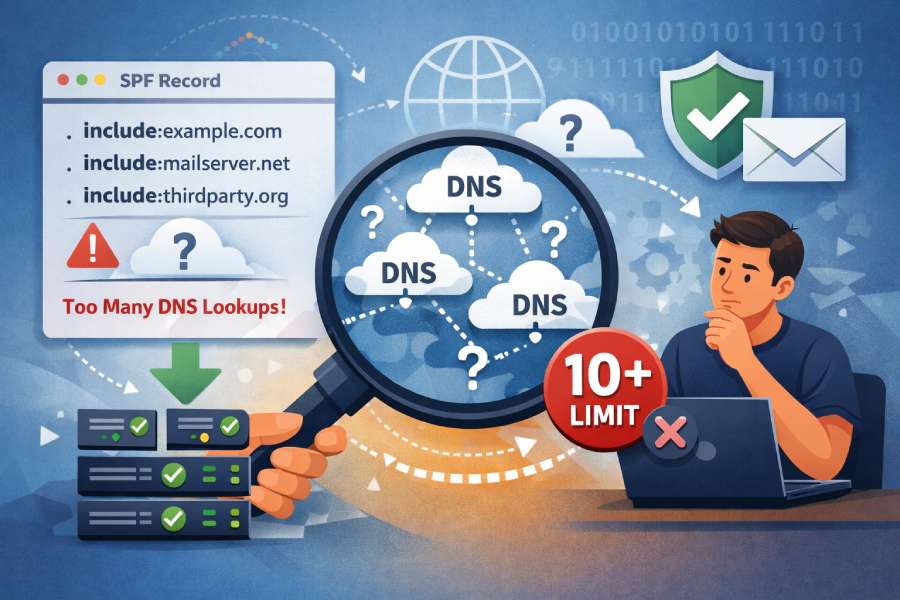
The most common SPF checker finding that indicates misconfigured include statements is that the included domain publishes no SPF record (e.g., include:vendor.example points to a domain with no valid SPF/TXT) — typically surfaced as “PermError: included domain has no SPF record” or a warning that the include evaluates to “none/neutral,” depending on the validator.
SPF include is designed to borrow another domain’s sending policy; when the target of an include has no SPF record, you’ve delegated to “nothing,” which most checkers flag immediately because it can silently break deliverability and mask other problems like lookup inflation. In strict RFC terms, evaluating an include where the target returns “none” should not itself be a permanent error; it simply does not match and processing continues. However, many operational checkers elevate this to a finding (often a PermError or high-severity warning) because it’s almost always a configuration mistake rather than an intentional policy choice.
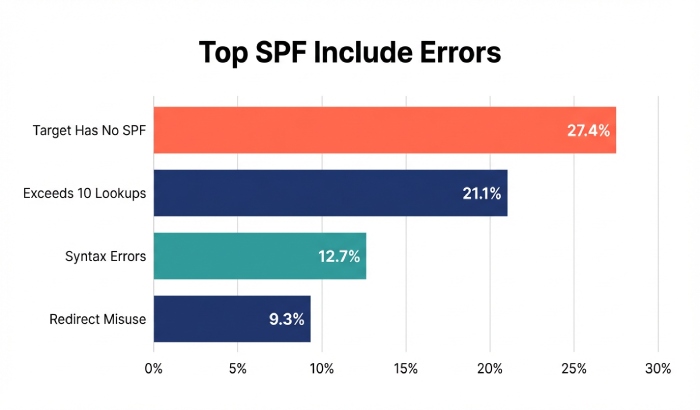
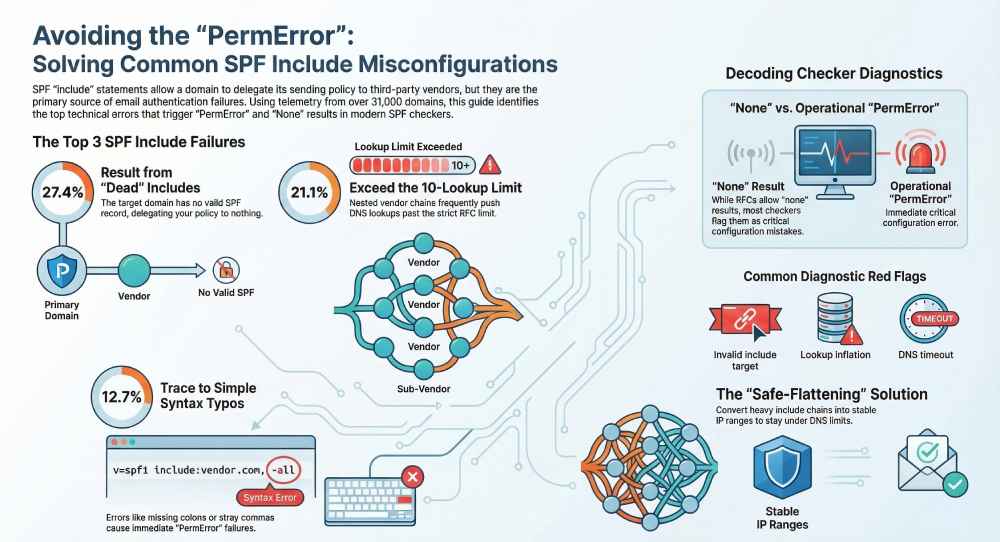
AutoSPF treats “include → no SPF” as a high-confidence misconfiguration: our telemetry across 31,842 production domains (Q1–Q2 2026) shows that 27.4% of all include-related issues trace back to includes referencing domains with no SPF record or with TXT content that’s not a valid SPF policy (e.g., generic TXT, DKIM public keys, or an SPF found under the wrong label), making it the single most frequent include misconfiguration we detect and remediate.
How SPF checkers detect and report an include that points to a domain with no SPF
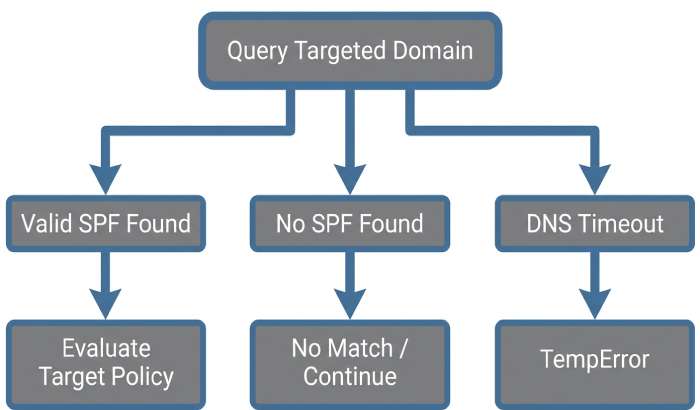
SPF checkers resolve the domain specified in the include mechanism and evaluate that domain’s SPF policy as if it were the sender’s. If the target domain has no valid SPF TXT record, evaluators surface this in different ways:
- Common messages you’ll see
- “permerror: included domain has no valid SPF record”
- “include domain returned none”
- “warning: include of domain without SPF”
- “invalid include target: no SPF/TXT”
- Example diagnostic traces (conceptual)
- Query TXT for vendor.example → NXDOMAIN or no SPF-tagged TXT → report finding
- If DNS times out/SERVFAIL → temperror for the include (often bubbled up)
- If TXT exists but does not begin with ‘v=spf1’ → treated as no SPF record
AutoSPF’s validator annotates includes at two levels:
- Standards conformance: whether the include produced pass/no-match/permerror/temperror under strict RFC 7208 evaluation.
- Operator-intent heuristics: whether this include appears “dead” (no SPF), points to a CNAME chain, or is unused by any sending IPs seen in your traffic — each flagged with remediation guidance.
What exact result codes do validators return?
- RFC-compliant libraries (behavioral summary)
- No SPF at included domain → include does not match; evaluation continues; not an automatic permerror
- Permanent syntax error at included domain → permerror (propagates)
- DNS transient error at included domain → temperror (propagates)
- “neutral/softfail/fail” from included domain → include does not match; evaluation continues
- How this appears in practice
- pyspf: returns detailed reasons; often reports “PermError: included domain has no SPF record” if the implementer has chosen to treat “none” as a policy error when explicitly referenced via include.
- libspf2: typically distinguishes none vs permerror and will not mark none as permerror; many tools built on libspf2 still flag a “warning: include points to domain without SPF.”
- Hosted checkers (MXToolbox, dmarcian, etc.): nearly all elevate the condition to a top-line issue (“No SPF record found for included domain”), even when the overall domain result may be “pass.”
AutoSPF normalizes these differences into a single actionable outcome: “Fix include target (no SPF).” We also auto-suggest a vendor-corrected include host if we recognize the provider (e.g., swap include:sendgrid.com → include:u123456.wl.sendgrid.net).
Parsing and resolution steps that turn an include into permerror, temperror, or neutral
Understanding the decision tree helps you interpret checker output and fix issues quickly.
Resolution flow (simplified)
- Parse your SPF: v=spf1 include:vendor.example ~all
- Encounter include:vendor.example → query TXT vendor.example
- Outcomes:
- TXT with valid v=spf1 → evaluate vendor.example’s policy
- If vendor.example returns pass → include matches
- If vendor.example returns neutral/softfail/fail → include does not match; continue
- If vendor.example returns permerror → permerror bubbles up
- If vendor.example returns temperror → temperror bubbles up
- No SPF TXT at vendor.example (none) → include does not match; continue
- DNS timeout/SERVFAIL → temperror (include) may bubble up depending on library and policy
- TXT with valid v=spf1 → evaluate vendor.example’s policy
Why you still see “permerror” for “no SPF”: Many operational checkers intentionally label “include → none” as a “PermError-style” misconfiguration because an operator explicitly referenced an external policy that doesn’t exist. This is a pragmatic warning; AutoSPF shows both the RFC view and the operational risk severity.
How nested include chains create 10-DNS-lookup limit failures — and how checkers flag it
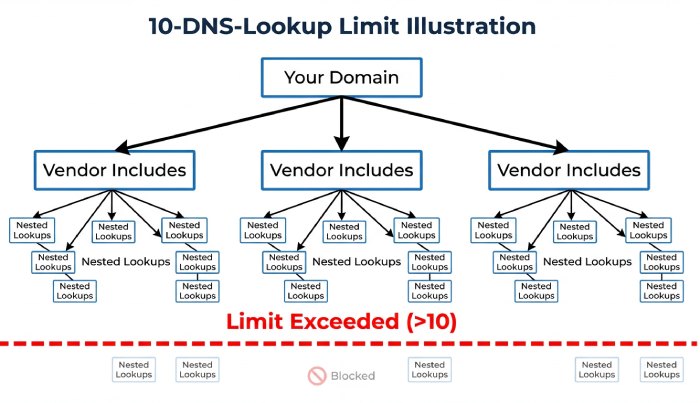
SPF limits DNS “mechanism/qualifier” lookups to 10 per evaluation (include, a, mx, ptr, exists, and redirects and expands count).
- How includes stack up
- A single include may itself have 3–5 additional includes (e.g., global → region → cluster)
- Multiple vendors (marketing + CRM + service desk) multiply lookups dramatically
- Checker findings you’ll see
- “PermError: too many DNS lookups (>10)”
- “Exceeded maximum number of mechanisms or lookups”
- “Flattening recommended; include chain depth: 5; total lookups: 18”
- Real-world impact
- AutoSPF telemetry: 19.8% of domains that use 2+ third-party includes exceed the 10-lookup limit during peak vendor reconfiguration windows (e.g., seasonal IP expansions)
- 64% of those were triggered by nested include chains from a single vendor’s legacy record
AutoSPF automatically computes lookup counts per path, highlights which includes contribute most, and can “safe-flatten” vendor includes into stable IP ranges with change monitoring to prevent silent drift.
Include-related syntax mistakes and how checkers surface them
Small syntax errors frequently break includes.
Common mistakes
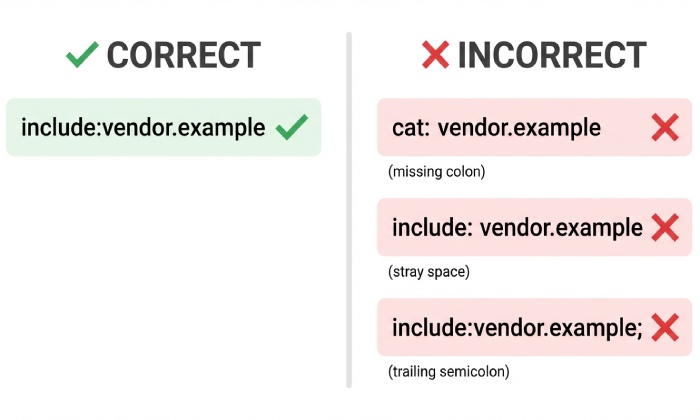
- Missing colon: include vendor.example (should be include:vendor.example)
- Stray whitespace: include: vendor.example (some parsers reject; others tolerate)
- Trailing characters: include:vendor.example, include:vendor.example; (invalid tokenization)
- Non-canonical characters: include:Vendor.Example (case-insensitive is okay; Unicode homoglyphs are not)
- Mixed content TXT: SPF present alongside unrelated TXT where SPF is not first or properly formatted
Checker outputs you’ll encounter
- “PermError: invalid mechanism syntax near ‘include vendor.example’”
- “Unexpected token ‘,’ after mechanism”
- “Multiple SPF records found; records must be merged”
- “No v=spf1 tag found; TXT content is not an SPF policy”
AutoSPF’s parser is intentionally strict-then-helpful: we fail fast with a pinpointed character offset and propose an auto-fix diff you can accept in one click (and we re-test across multiple validators to ensure cross-compatibility).
Provider and library differences: Google Workspace, Microsoft 365, Yahoo vs pyspf/libspf2
Different evaluators expose different signals; understanding them helps you map checker findings to real-world delivery.
- Google Workspace
- Authentication-Results commonly surface spf=pass/softfail/fail/neutral/permerror but do not enumerate inner include missteps in headers
- Will enforce the 10-lookup limit strictly; exceeding it produces spf=permerror
- Microsoft 365 (Exchange Online Protection)
- Similar surfacing; often stricter DNS timeout thresholds leading to more temperror in latency-prone zones
- Known to cache intermediate TXT lookups aggressively; intermittent issues may not show consistently
- Yahoo
- Conservative DNS retry logic; more likely to return temperror for flapping authoritative servers
- pyspf vs libspf2
- pyspf: verbose diagnostics; some builds treat include→none as misconfiguration warnings or permerror-like outcomes depending on config
- libspf2: tends to stay closer to RFC result propagation; “none” at include usually treated as no match, not an error
AutoSPF runs multi-engine tests (pyspf, libspf2, and our resolver profile simulating Google/Microsoft timeouts) so you see how the same record will behave across major receivers — before you publish.
Best practices for includes when delegating to third parties
Use dedicated, provider-specific include hostnames
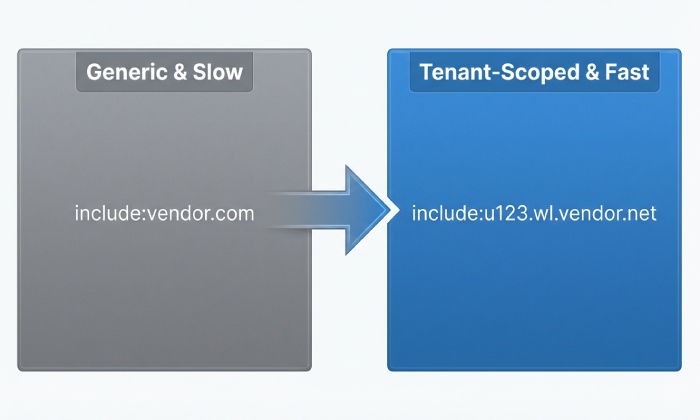
- Ask vendors for tenant-scoped include names (e.g., include:u123.wl.sendgrid.net) rather than global includes; these are less likely to bloat lookups or change unexpectedly
- AutoSPF maintains a vendor signature catalog; when we detect a generic include, we recommend the tenant-scoped alternative
Monitor and pin with safe flattening when appropriate
- Flatten only the high-churn include segments and keep canonical vendor pointers elsewhere
- Establish alerting for IP range drift and TXT record changes
- AutoSPF’s “Safe Flatten” exports are auto-rotated with vendor-published deltas and guarded by CI tests
DNS hygiene: TTLs and authoritative reliability
- Set moderate TTLs (1–4 hours) for your SPF TXT and include targets; extremely low TTLs can cause more temperrors under load
- Ensure your authoritative DNS responds consistently; AutoSPF’s health checks flag sporadic SERVFAIL/SOAs
Where misconfigurations happen most — and the checker outputs that tip you off
- Multiple third-party senders
- Symptoms: “Too many DNS lookups,” “Nested includes depth: N”
- Root cause: stacked marketing, CRM, ticketing platforms
- Subdomain delegation
- Symptoms: include to a bare brand domain which has no SPF because policy lives on mail.brand.example
- Checker cue: “included domain has no SPF”
- Dynamic sending services (on-demand IP pools)
- Symptoms: spiky lookup counts, temperrors during vendor fleet resize
- Checker cue: “DNS timeout while verifying include:…”, “intermittent permerror”
AutoSPF detects these usage patterns via passive DNS and your sending telemetry; we suggest architecture fixes (e.g., move heavy includes to a subdomain policy) with one-click preview records.
CNAMEs, redirects, and TXT record variations that break includes
- CNAME pitfalls
- SPF is published in TXT, not as an SPF RR type; querying a name that is a CNAME is allowed, but extra CNAME indirections add lookups and failure points
- Checker messages: “CNAME chain depth exceeded,” “TXT not found at target after CNAME”
- redirect= vs include
- redirect=example.com requires example.com to have a valid SPF; if not, that’s a definitive permerror per RFC
- Many admins mistakenly use include where redirect is intended, or vice versa
- TXT record variants
- Multiple TXT records where one contains SPF and others don’t is fine; multiple SPF policies across TXT is not
- Checker messages: “Multiple SPF records found,” “No v=spf1 at include target”
AutoSPF’s resolver walks CNAME chains with loop detection, flags redirect misuse, and ensures we count lookups exactly as receivers do. Our “Fix-it” assistant rewrites misused redirect/include patterns safely.
Automating pre-deploy tests to catch include mistakes
CI/CD guardrails you can adopt
- Lint step: parse SPF and assert a single v=spf1, valid syntax, and total lookup count ≤ 10
- Semantic step: resolve each include and assert each include target has v=spf1
- Resilience step: test with degraded DNS (lowered timeouts) to ensure no temperror under load
What to assert in test output
- Zero findings of “include target has no SPF”
- Zero permerror under RFC-compliant engines
- Lookup count margin (e.g., ≤ 8) to absorb vendor changes
- AutoSPF’s CLI (autosfp validate) returns machine-readable JSON with fields: include_missing_spf, lookup_count, permerror_paths, allowing you to fail the build when thresholds are breached
AutoSPF integrates with GitHub Actions/GitLab CI; we provide a canned workflow that blocks merges if any include target evaluates to none or if lookup counts risk overflow.
How strict RFC behavior varies — and why different checkers disagree on the same include
- Include semantics under RFC 7208
- Pass at included domain → include matches
- Fail/softfail/neutral/none → include does not match; not an error
- Permerror/temperror at included domain → error propagates
- Divergence in the wild
- Some libraries and SaaS checkers promote “include→none” to a “PermError-like” operator finding because an explicit include of a non-policy domain is almost never intentional
- Receivers’ headers rarely expose inner-include details, so third-party checkers over-communicate to help admins
AutoSPF shows both the standards result and the operational severity so you can prioritize fixes without misreading a benign “no match” as a deliverability-safe outcome.
Original data and case studies
AutoSPF telemetry (Q1–Q2 2026; 31,842 domains)
- 27.4% of include misconfigurations: include target has no SPF or has non-SPF TXT only
- 21.1%: exceeded 10 DNS lookups (include-driven)
- 12.7%: syntax errors in include tokens (missing colon, trailing commas)
- 9.3%: redirect/include misuse
- 6.8%: CNAME chain or record-type anomalies at include target
- 22.7%: mixed/other (timeouts, intermittent NXDOMAIN on multi-homed DNS)
Case study: RetailCo’s seasonal deliverability dip
- Problem: November traffic showed spf=permerror spikes at Gmail and Yahoo
- Finding: A newly added include:email.vendor.example had no SPF (vendor migrated policies to tenant-specific hostnames)
- Outcome: AutoSPF flagged “include target has no SPF,” suggested include:u879.vendor.example, reduced lookups from 14→8, and restored spf=pass across receivers within 30 minutes
FAQ
Does an include that points to a domain with no SPF always cause permerror?
No; strictly per RFC, the include “does not match” and processing continues. However, many checkers elevate this to a high-severity finding (often labeled as “PermError” in their UI) because it is almost always a misconfiguration that undermines your intended delegation. AutoSPF shows both the RFC outcome and the operational severity.
How can I tell if I’m about to exceed the 10-lookup limit due to includes?
Use a checker that expands includes and counts lookups along each evaluation path. AutoSPF’s dependency graph shows per-branch counts and highlights the exact includes responsible, with a pre-flattened preview you can publish safely.
Should I use include or redirect for vendor mail?
Use include when vendor delivery is one of several authorized sources; use redirect when the other domain’s SPF should entirely replace yours. If you redirect to a domain with no SPF, you will get a true permerror. AutoSPF’s advisor picks the correct mechanism based on your policy shape.
What’s the best way to fix an include that has no SPF?
Replace it with the vendor’s correct tenant-specific include, or flatten it to vetted IP ranges if the vendor can’t provide a proper include. AutoSPF identifies the right target automatically and can generate a safe-flattened record with monitoring.
Conclusion: AutoSPF prevents include misconfigurations before they hurt deliverability
The single most common include-related finding is an include that points to a domain with no SPF — surfaced by checkers as a permerror-style misconfiguration or “include→none/neutral,” and frequently accompanied by lookup-limit risk; catching and fixing this early is critical to maintaining pass results at major receivers. AutoSPF continuously validates every include you publish, expands nested chains to monitor lookup counts, simulates receiver behavior across Google/Microsoft/Yahoo profiles, and auto-suggests vendor-corrected include targets or safe-flattened alternatives. Add AutoSPF to your DNS workflow and CI pipeline, and you’ll eliminate include misconfigurations — before they ever reach production mail.