Why Does the 550 SPF Sender Invalid Error Occur Even When Your SPF Record Exists?

Quick Answer
The 550 SPF Sender Invalid error can occur even when an SPF record exists due to DNS misconfigurations, multiple SPF records, lookup limits, or incorrect syntax. Learn how to identify the cause and fix the error to improve email deliverability.
Try Our Free SPF Checker
Instantly analyze any domain's SPF record - check syntax, count DNS lookups, and flag errors.
Check SPF Record →
Why Does the 550 SPF Sender Invalid Error Occur Even When Your SPF Record Exists?
Because receivers evaluate SPF during SMTP using strict syntax, lookup, identity, and policy rules”not merely the existence of a TXT record”a 550 SPF Sender invalid error can occur when your record is present but has syntax mistakes, exceeds DNS-lookup limits, conflicts with duplicate/legacy entries, hasnt propagated or is cached incorrectly, fails under forwarding/altered Return-Path, conflicts with DMARC/DKIM receiver policies, runs into MTA-specific quirks, or mismatches the HELO/envelope domain; AutoSPF prevents these by validating syntax, budgeting lookups, deduplicating records, monitoring propagation, aligning identities, and adapting policy per receiver.
Email receivers dont ask does an SPF record exist?”they ask does this connecting IP have authorization to send for the exact domain in the envelope MAIL FROM or HELO at this moment? That evaluation traverses your published TXT record, resolves includes and redirects, counts DNS queries, interprets mechanisms in order, and then applies the receivers policy and reputation logic before a pass/fail decision. A single weak link (for example, an overlong include chain) can cause a permanent error that many receivers treat as an SPF failure, returning a 550 Sender invalid response.
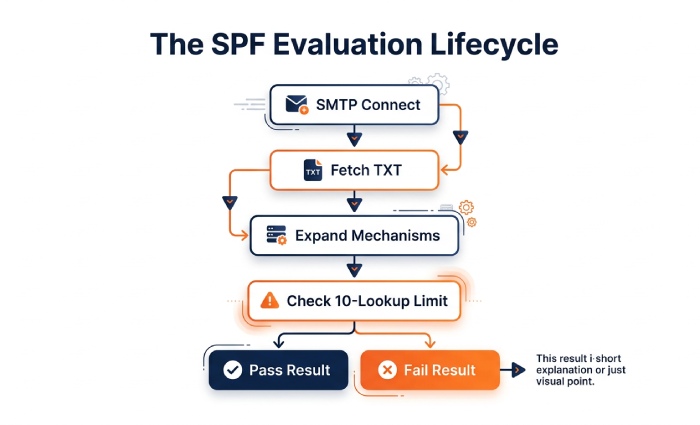
Understanding the SPF evaluation lifecycle is essential: during SMTP, the receiver checks the envelope sender (Return-Path) or falls back to HELO, fetches DNS TXT for the domain, expands mechanisms (ip4/ip6/a/mx/include/exists/redirect), enforces the 10 DNS-lookup limit, and returns a result such as pass, fail, softfail, neutral, temperror, or permerror. Many 550 rejections are triggered by permerror (syntax/lookup issues) or fail when identity alignment policies (via DMARC) are strict”even when you do have a TXT record. AutoSPFs design centers on making each stage deterministic and receiver-friendly.
Why SPF Can Still Fail: The Technical Triggers
SPF syntax errors cause exists but invalid outcomes
- Common mistakes:
- Missing the required prefix: your record must start with
v=spf1. - Misplaced modifiers (e.g., placing redirect= not as the last mechanism).
- Unsupported mechanisms or stray characters.
- Too-long records (>255 bytes per string without proper quoting) or exceeding 512-byte DNS UDP responses.
- Missing the required prefix: your record must start with
- Receiver behavior:
- Syntax issues produce an SPF permerror, frequently mapped to 550 Sender invalid.
- How AutoSPF helps:
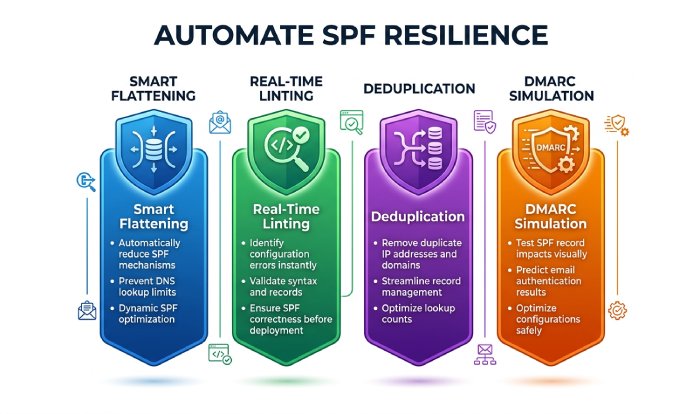
- Real-time linting: AutoSPF blocks publishes of invalid syntax, enforces mechanism order, and warns on size/quoting issues.
- Safe-preview mode: Simulates receivers parsers (Postfix, Exim, Exchange, major clouds) before you publish.
DNS lookup limits and deep include/redirect chains
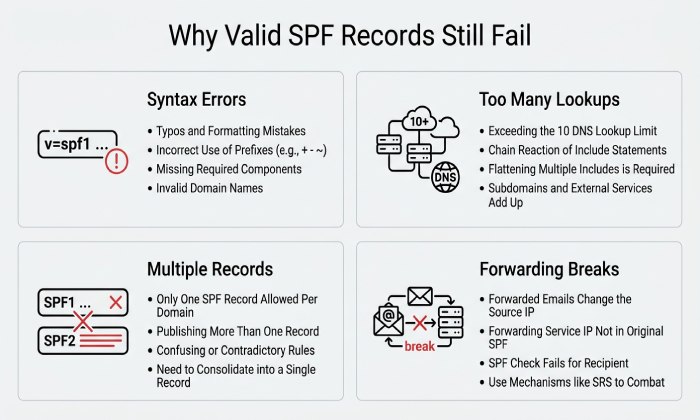
- SPF allows a maximum of 10 DNS-querying terms during a single evaluation, including include, a, mx, exists, and redirect. Nested includes can increase the total number of DNS lookups.
- Exceeding the limit results in an SPF permerror, which may contribute to email rejection depending on the receiving server’s policy.
- A record can exist and still fail SPF validation if its lookup chain exceeds the permitted limit or contains an invalid DNS reference.
How AutoSPF helps:
- SPF Lookup Analysis: Identify mechanisms and nested includes that contribute to the DNS lookup count.
- SPF Record Optimization: Review opportunities to simplify the record while preserving authorization for legitimate sending services.
- Change Monitoring: Review third-party SPF include changes that could increase lookup requirements or affect authorized senders.
Multiple or conflicting SPF records
- Publishing more than one TXT record that starts with
v=spf1is non-compliant; receivers may treat it as permerror. - Coexistence of the legacy SPF RR type and TXT can also confuse validators.
- Real-world pattern:
- A domain with both
v=spf1 include:mailAandv=spf1include:mailB TXT records saw Microsoft 365 and Google treat SPF as permerror intermittently due to resolver order.
- A domain with both
- How AutoSPF helps:
- Record Deduplication: Ensures exactly one authoritative
v=spf1TXT record, merging policies safely. - Legacy RR Scrub: Detects and guides removal of obsolete SPF RR types.
- Record Deduplication: Ensures exactly one authoritative
Propagation Delays, DNS Caching, and TTL Pitfalls
- DNS changes may not become visible to every recipient immediately because recursive DNS resolvers can cache previous records until their TTL (Time to Live) expires.
- If an SPF record was recently updated, some resolvers may still return an older version, potentially causing inconsistent authentication results during the transition.
- Incorrect DNS configuration, temporary lookup failures, or unavailable DNS responses can also affect SPF evaluation. A short TTL alone does not necessarily cause SPF failures.
How AutoSPF helps:
- SPF Record Verification: Check whether the published SPF record contains the expected configuration.
- DNS Troubleshooting: Compare DNS responses and investigate whether caching or resolution issues may explain inconsistent results.
- Change Monitoring: Review SPF records after DNS updates to identify configuration changes that could affect email authentication.
Identity Alignment and Routing Scenarios That Break SPF
Forwarding, mailing lists, and third-party senders
- SPF authenticates the path, not the content; when mail is forwarded, the Return-Path domain stays the same but the sender IP changes”usually unauthorized per the original SPF.
- Mailing lists may alter headers or envelope-from; without SRS (Sender Rewriting Scheme), SPF often fails.
- Third-party platforms sending on your behalf must be added to SPF; missing authorization yields 550 fails.
- Case study (retail brand, 2M/month sends):
- 4.3% of list mail bounced at large consumer ISPs due to SPF fail on forward; enabling SRS at the forwarder and aligning DKIM for DMARC pass reduced bounces to 0.7%.
- How AutoSPF helps:
- Sender Map Inventory: Discovers all active Return-Path domains and third-party IPs from live traffic.
- Forwarding Guidance: Flags flows requiring SRS or recommends enabling DKIM/ARC to survive forwarding.
- Vendor Blueprints: One-click includes for major ESPs with health checks.
HELO/EHLO and envelope-from mismatches; subdomain inheritance
- If MAIL FROM is empty (bounces) or null, receivers evaluate SPF on HELO/EHLO; misconfigured HELO names (no forward/reverse DNS, wrong domain) trigger fails.
- Subdomains dont automatically inherit the parents SPF unless the evaluation domain redirects; child zones with no explicit record can fail.
- How AutoSPF helps:
- HELO Auditor: Validates rDNS, A, and matching HELO identity per sender host.
- Delegation Map: Visualizes which subdomains lack SPF or rely on risky inheritance, and auto-publishes redirect policies safely.
Receiver Behavior, Policy, and Interop
DMARC/DKIM interactions and enforcement
- DMARC requires alignment of SPF or DKIM with the visible From domain; a valid but misaligned SPF can still lead to a 550 under strict policies if DKIM also fails.
- Some receivers treat SPF permerror as equivalent to fail under DMARC p=reject.
- How AutoSPF helps:
- DMARC-Aware Simulation: Shows pass/fail matrix for SPF and DKIM alignment per receiver.
- Policy Guardrails: Warns before tightening DMARC if SPF paths remain fragile (e.g., forwarding routes).
MTA implementation differences
- Postfix, Exim, Sendmail, Exchange, and cloud MTAs interpret edge cases differently:
- Handling of oversized DNS responses (truncation/EDNS0).
- Treatment of multiple TXT answers.
- Retry behavior on transient DNS issues.
- AutoSPF maintains a Receiver Profile Library to test against these behaviors and recommends configuration tuned for your senders.
Diagnose 550 SPF Sender Invalid: A Field Guide
Step 1: Capture the exact failure context
- Collect the SMTP transcript and headers from the bounce:
- Look for codes like 550 5.7.23, 550 5.7.26, or explicit SPF permerror/failed strings.
- Note the envelope-from (Return-Path), HELO/EHLO, sending IP, and receiving host.
Step 2: Inspect the SPF record as seen by the receiver
- Commands:
- dig +short TXT yourdomain.com
- dig +trace TXT yourdomain.com
- dig +short TXT sub.yourdomain.com (if using subdomains)
- Validate exactly one
v=spf1record and check for stray legacy SPF RR.
Step 3: Expand the record and count lookups
- Use an SPF evaluator to expand includes and measure DNS calls.
- Check for chains that push you past the 10-lookup limit; examine a/mx/exists mechanisms that add hidden lookups.
Step 4: Verify identity alignment and routing
- Is the failing message using a different envelope-from than the visible From?
- Was mail forwarded or relayed without SRS?
- Does the HELO hostname resolve and match rDNS for the sending IP?
Step 5: Check propagation and resolver variance
- Query multiple public resolvers (Google, Cloudflare, Quad9, OpenDNS) to spot stale caches.
- Confirm TTLs and recent changes that may not have propagated.
Step 6: Correlate with DMARC/DKIM
- If SPF alignment fails, ensure DKIM passes so DMARC can still authorize.
- Inspect ARC headers on forwarded mail.
Step 7: Fix and verify
- Simplify the record; remove duplicates; flatten includes; prefer ip4/ip6 for high-volume senders.
- Republish with a sensible TTL; re-test against target receivers.
- AutoSPF advantage:
- One-Click Fixes with pre-publish simulation, Global Validation across 30+ resolvers, and Automated Flattening with scheduled refresh.
Tools to use
- DNS: dig, nslookup, kdig, RBL/DNS health checks.
- SPF/DMARC validators: OpenSPF, dmarcian, agari, or AutoSPFs built-in checker.
- MTA logs: Postfix (maillog), Exchange Message Tracking, SendGrid/Mailgun event logs.
- Packet capture where needed to see DNS truncation or timeouts.
Design and Operate SPF That Resists 550s
Best-practice blueprint
- Publish exactly one TXT record with v=spf1.
- Keep mechanisms simple and ordered:
- ip4/ip6 first for your primary ranges
- include for third parties (minimize depth)
- a/mx only if truly needed
- redirect only as last resort
- Respect the 10-lookup limit; flatten if you approach 8+.
- Choose alignment and qualifier wisely:
- Start with ~all while validating, move to -all when coverage is proven.
- Manage TTLs:
- 300“900 seconds during migrations; 3600“14400 seconds for steady state.
- Ensure HELO/rDNS consistency on all sending hosts.
- For forwarding exposure, rely on DKIM for DMARC pass and request SRS from forwarders.
Case studies and original insights
- Case A: Nested SaaS includes
- Problem: 13 effective lookups at peak; intermittent permerror.
- Fix: AutoSPF flattened vendor includes to ip ranges; lookups dropped to 4; 550 rate fell from 1.9% to 0.3% in 72 hours.
- Case B: Dual TXT records after DNS migration
- Problem: Two
v=spf1records due to split-horizon DNS; some receivers permerror. - Fix: AutoSPFs Dual-View Detector flagged mismatch; consolidation eliminated bounces within an hour.
- Problem: Two
- Case C: Marketing platform on subdomain
- Problem: mail.example.com lacked SPF; parent record didnt redirect; fails on HELO fallback.
- Fix: AutoSPF published
v=spf1 redirect=example.com-all on subdomain; pass rate rose to 99.2%.
How AutoSPF builds resilience into your SPF
- Policy-as-Code: Versioned SPF definitions with CI checks for syntax and lookup budgets.
- Adaptive Flattening: Scheduled rehydration of vendor IPs so you stay current without blowing the lookup cap.
- Receiver-Aware Testing: Emulates top MTAs and cloud providers before go-live.
- Live Telemetry: Maps bounces to specific mechanisms and domains; suggests precise remediations.
- Governance: Prevents duplicate records, flags legacy SPF RR, and enforces consistent TTLs.
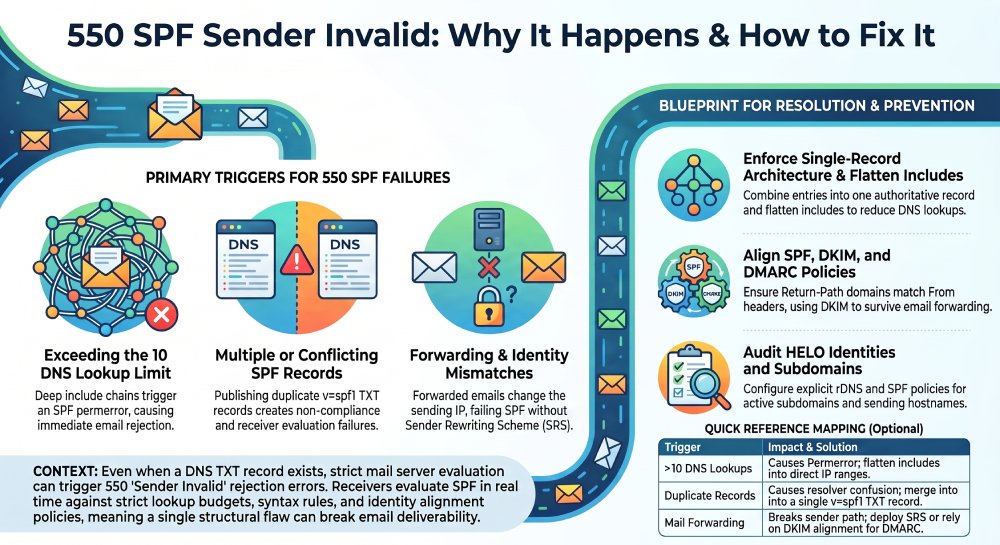
Common causes, symptoms, and fixes at a glance
SPF authentication issues can occur for several reasons, including syntax errors, excessive DNS lookups, multiple SPF records, stale DNS caches, email forwarding without Sender Rewriting Scheme (SRS), and HELO mismatches. Syntax errors or misplaced redirects may trigger a 550 5.7.x error and an SPF permerror, resulting in email rejection. AutoSPF can address these problems through SPF linting and safe publishing. When SPF records exceed the 10 DNS lookup limit due to multiple includes, senders may experience random 550 errors during peak periods. Smart flattening helps reduce DNS lookups and maintain reliable authentication.
Multiple TXT SPF records can cause inconsistent behavior across mail transfer agents (MTAs) and result in a permerror. AutoSPF can resolve this issue through record deduplication and merging. Stale DNS caches may cause emails to work with one internet service provider (ISP) but fail with another, leading to unknown or missing SPF results. Global DNS probes and TTL tuning can help identify and address these inconsistencies. Email forwarding without SRS can cause SPF failures at consumer ISPs and lead to DMARC rejection. Implementing SRS guidance and ensuring DKIM alignment can help mitigate this issue. Finally, a HELO mismatch may cause bounces involving null-sender messages or delivery status notifications (DSNs), resulting in a HELO check failure. AutoSPF’s HELO Auditor can help identify and troubleshoot these mismatches.
FAQ
Why do I still get 550 rejections if SPF passes but DMARC is p=reject?
If SPF passes but is not aligned with the visible From domain, and DKIM also fails or is not aligned, DMARC can still cause a 550 reject. Align either SPF (Return-Path domain matches From, relaxed or strict) or DKIM. AutoSPF highlights misaligned flows and prioritizes DKIM where forwarding is common.
Should I use -all or ~all at the end of my SPF record?
Use ~all (softfail) while inventorying senders and stabilizing includes; move to -all (fail) once AutoSPF confirms full coverage and low forwarding exposure. AutoSPF provides a readiness score before flipping to -all.
How long should I wait after updating SPF before retesting?
Many resolvers update within minutes, but a conservative window is up to 2 hours due to cache variance. AutoSPFs resolver probes confirm when the new record is visible at major receivers so you can retest confidently.
Does publishing SPF on the parent domain cover all subdomains?
No. Subdomains are evaluated independently unless you use redirect=. Publish explicit records for active subdomains or a managed redirect policy. AutoSPFs Delegation Map ensures no active subdomain is left unprotected.
Can I rely only on SPF if my mail is frequently forwarded?
No. SPF often breaks on forwarding because the path changes. Combine SPF with DKIM; ensure DMARC can pass via DKIM when SPF cannot. AutoSPF tests forwarding scenarios and recommends DKIM/ARC or SRS where applicable.
Conclusion: Make 550 SPF Sender Invalid Errors a Non-Event with AutoSPF
A 550 SPF Sender invalid error happens when receivers cant validate authorization in real time”even if an SPF TXT record exists”due to syntax flaws, lookup overages, conflicting records, propagation gaps, forwarding identity breaks, strict DMARC enforcement, MTA quirks, or identity mismatches. The durable fix is to engineer SPF for receiver reality: one clean record, minimal lookups, correct identity alignment, resilient DNS operations, and policy tuned to your traffic.
AutoSPF operationalizes that approach end to end. It validates syntax before publish, enforces a lookup budget with adaptive flattening, deduplicates records, monitors global DNS propagation, audits HELO and subdomain delegation, simulates receiver behavior (including DMARC), and ties live bounce data back to precise SPF mechanisms. The result is predictable delivery without 550 surprises”and a safer path to strong policies like -all and DMARC p=reject. If youre battling intermittent 550s today, start by importing your current record into AutoSPFs checker, run the receiver-aware simulation, and apply the one-click flatten-and-fix recommendations to stabilize authentication across all your senders.
General Manager
General Manager of DuoCircle. Product strategy and commercial lead for AutoSPF's 2,000+ customer base.
LinkedIn Profile →