How to Identify and Fix SPF Macro Errors That Cause Email Failures

Quick Answer
SPF macro errors can cause email delivery failures by making SPF records invalid or exceeding DNS lookup limits. Learn how to identify common SPF macro issues, troubleshoot configuration errors, and fix your SPF records to improve email authentication and deliverability.
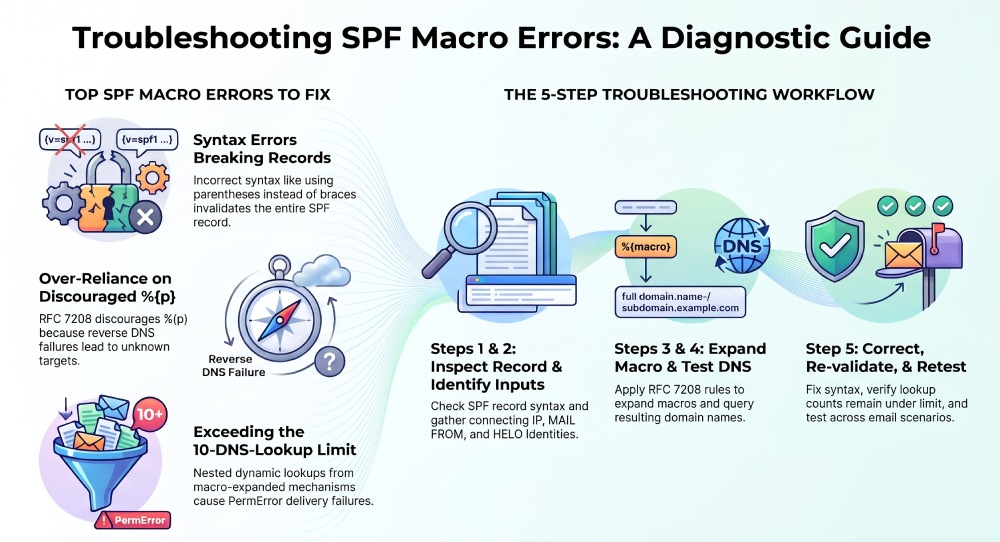
SPF macro errors can cause legitimate emails to fail authentication when a macro expands into an incorrect domain, produces an invalid DNS name, or triggers an unexpected DNS lookup. To troubleshoot these problems, inspect the SPF record, understand how its macros expand, test the resulting domain names, and correct any invalid syntax or unnecessary DNS dependencies.
The quickest way to troubleshoot an SPF macro error is to:
- Identify the macro used in the SPF record.
- Check the sender identity, connecting IP address, and HELO/EHLO domain used during evaluation.
- Expand the macro according to the rules in RFC 7208, Section 7.
- Validate the resulting domain name and any DNS queries it triggers.
- Correct the record and test it again before deploying the change.
Not every SPF failure is caused by a macro. DNS errors, incorrect sender authorization, syntax problems, and lookup-limit violations can also affect authentication.
What Are SPF Macros and How Do They Work?
SPF macros are variables that dynamically insert information about an email transaction into an SPF record. They allow a domain owner to construct domain names using information such as the sender address, sending IP address, or HELO/EHLO identity.
Macros are defined in RFC 7208 and are primarily used in SPF mechanisms and modifiers that accept a domain specification.
Common SPF macro variables
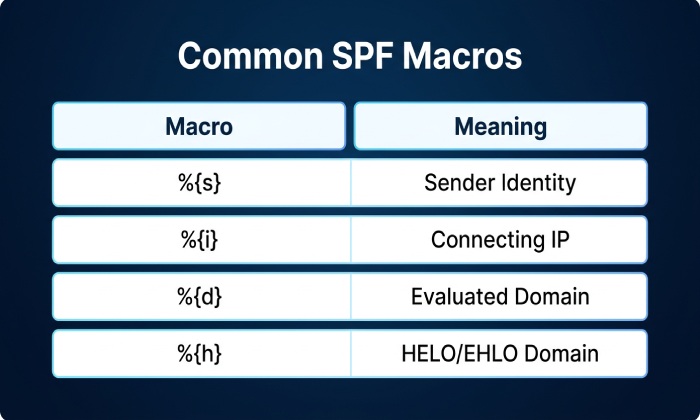
Common SPF macro variables help identify the sender, the domain being evaluated, and other details used during SPF authentication. The %{s} macro represents the sender identity, including its local part and domain, while %{l} represents the local part of the sender identity. The %{o} macro refers to the sender identity’s domain, and %{d} represents the domain currently being evaluated.
The %{i} macro represents the connecting IP address in the SPF-defined format. The %{p} macro refers to a validated domain name associated with the connecting IP address, although its use is discouraged. The %{h} macro represents the HELO/EHLO domain provided during the SMTP connection. Meanwhile, the %{v} macro returns in-addr for IPv4 addresses or ip6 for IPv6 addresses.
The macros %{c}, %{r}, and %{t} are restricted to SPF explanation text, such as the text associated with the exp= modifier. They cannot be used as general-purpose macros in mechanisms such as include or exists.
How SPF macro transformations work
SPF macros can use transformations to change how a value is split, selected, or reversed.
For example, suppose the sender identity is alex@example.com and the connecting IPv4 address is 192.0.2.10.
- %{l} expands to alex.
- %{o} expands to example.com.
- %{i} expands to 192.0.2.10.
- %{ir} reverses the dot-separated IP components to 10.2.0.192.
- %{d2} selects the two rightmost labels of the evaluated domain, when at least two labels are available.
The result depends on the input and the macro’s modifiers. Incorrect assumptions about the sender identity, delimiters, or number of labels can cause a macro to generate an unexpected DNS name.
What Common SPF Macro Errors Cause Authentication Problems?
1. Invalid macro syntax
An incorrectly written macro can prevent an SPF record from being evaluated successfully.
For example, this mechanism contains an invalid macro expression:
v=spf1 exists:%(ir).example.net -all
The opening characters %(ir) do not follow SPF macro syntax. The intended expression would use braces:
v=spf1 exists:%{ir}.example.net -all
However, correcting the syntax does not automatically make the resulting DNS query appropriate. The domain must still be valid, and the exists mechanism must be suitable for the domain’s authorization policy.
How to fix it:
- Check each percent sign in the SPF record.
- Confirm that macro expressions use the required braces and valid macro letters.
- Review any delimiters or transformation modifiers.
- Validate the complete record rather than checking only the macro expression.
2. Incorrect assumptions about sender identities
SPF evaluation can involve the SMTP MAIL FROM identity and the HELO/EHLO identity. These identities are not always identical.
A macro that works for one identity may produce a different result when a receiver evaluates another identity. For example, %{s} represents the sender identity used for the SPF check, while %{h} represents the HELO/EHLO domain.
Null reverse-path messages, commonly used for delivery-status notifications, require particular care. Under RFC 7208, when the reverse-path is empty, the SPF sender identity is constructed using postmaster and the HELO/EHLO domain. Therefore, the local-part macro does not simply become an empty string in this situation.
How to fix it:
- Identify which SPF identity is being evaluated.
- Inspect the HELO/EHLO domain and MAIL FROM value in the SMTP transaction.
- Test the record against the identities relevant to your mail flow.
- Avoid building critical authorization decisions around assumptions that a sender identity will always have the same format.
3. Incorrect macro transformations and delimiters
SPF transformations can split values into components, reverse their order, and select a specified number of rightmost components. A misunderstanding of these rules can direct a query to the wrong DNS name.
For example, %{d2} selects two rightmost labels from the evaluated domain. It does not automatically determine the registrable domain or account for public suffixes such as co.uk.
If the evaluated domain is mail.brand.co.uk, %{d2} produces co.uk. A record that assumes this expression will return brand.co.uk may therefore query the wrong domain.
How to fix it:
- Expand each macro using the actual domain being evaluated.
- Check how many labels are selected after any reversal operation.
- Account for the domain hierarchy explicitly.
- Use a fixed, verified DNS target when dynamic domain construction is unnecessary.
4. Unnecessary reliance on the %{p} macro
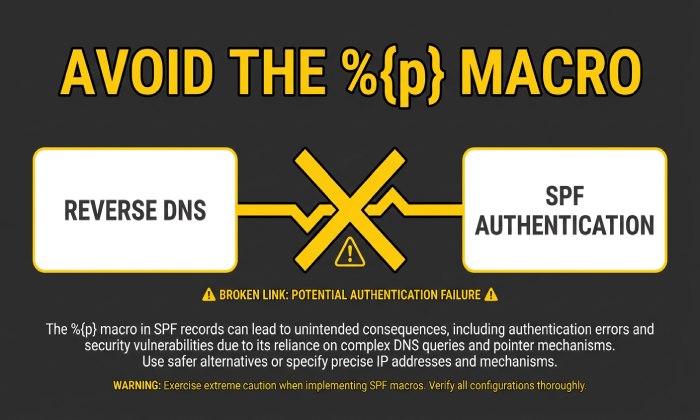
The %{p} macro represents a validated domain name associated with the connecting IP address. Its value depends on reverse DNS and forward-confirmation checks.
Because this process depends on DNS data and validation, the result may be unknown if no validated domain name is available or a DNS error occurs. RFC 7208 explicitly discourages publishing records that rely on %{p}.
For example, a record such as the following depends on a dynamically derived hostname:
v=spf1 include:%{p}.trusted-senders.example -all
If the macro expands to unknown, the resulting target may not be the intended authorization domain. The record also introduces a dependency on the validated PTR process.
How to fix it:
- Avoid using %{p} to discover or authorize sending services.
- Prefer documented SPF include domains supplied by the email provider.
- Use explicit IP authorization where appropriate.
- Review the entire record to confirm that any replacement preserves the intended sending policy.
5. Unexpected DNS lookup counts
Some SPF macros are used in mechanisms that perform DNS queries, including include, a, mx, and exists. The macro expansion itself is not a separate DNS-lookup mechanism, but the mechanism that uses the expanded domain can trigger queries.
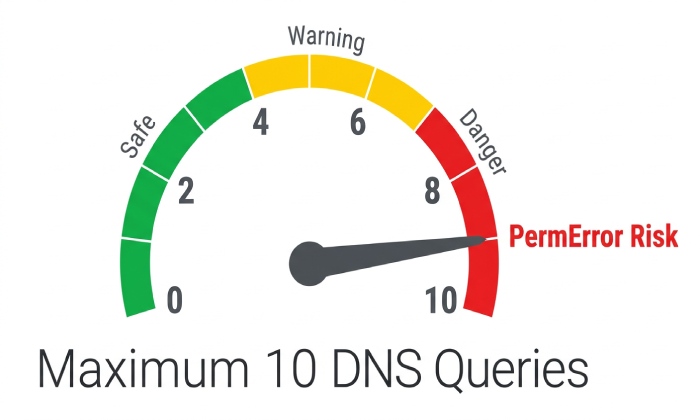
SPF evaluation is subject to a limit of 10 DNS-querying terms across the relevant evaluation, including applicable nested evaluations. Exceeding this limit can produce PermError.
For example, a macro used in an include target may lead to a domain whose SPF record contains several additional include or redirect evaluations. The total lookup cost can therefore be greater than the original record suggests.
How to fix it:
- Review nested include and redirect relationships.
- Check whether macro-expanded domains introduce additional DNS lookups.
- Remove unnecessary DNS-querying mechanisms.
- Use provider-documented SPF configurations rather than creating complex dynamic targets without a clear need.
Remember that DNS timeouts and certain DNS server errors can produce TempError, while exceeding the SPF lookup limit can produce PermError. These outcomes should not be treated as interchangeable.
How Can You Troubleshoot SPF Macro Errors Step by Step?
Follow this process to identify the cause of a suspected macro-related SPF failure.
Step 1: Inspect the SPF record
Retrieve the domain’s published SPF TXT record and confirm that it begins with v=spf1.
Look for:
- Incorrect macro syntax.
- Unexpected macro transformations.
- Multiple SPF records at the same hostname.
- Unnecessary include, exists, a, or mx mechanisms.
- Incorrect domain names and unsupported assumptions about DNS labels.
Remember that SPF is published in DNS TXT records. Multiple TXT strings used to represent one long record are different from publishing multiple independent SPF records.
Step 2: Identify the failing identity
Review the message’s Authentication-Results header and the available SMTP logs.
Where available, examine:
- The connecting IP address.
- The MAIL FROM identity.
- The HELO/EHLO hostname.
- The SPF result and any reported error details.
These values help determine which inputs the SPF evaluator used. An SPF failure alone does not prove that a macro caused the problem.
Step 3: Expand the macro
Apply the rules in RFC 7208 to the relevant sender and connection details.
Check whether the expansion produces:
- An unexpected domain.
- An empty DNS label.
- An invalid character in a hostname.
- An unintended domain hierarchy.
- A value that creates an unnecessary or expensive DNS dependency.
A domain specification that becomes syntactically invalid can cause an SPF evaluation error. The exact result depends on the error and implementation behavior.
Step 4: Test the resulting DNS name
Query the expanded hostname using appropriate DNS diagnostic tools. Inspect the response and determine whether the expected record exists.
Common responses include:
- NXDOMAIN: The queried DNS name does not exist.
- NOERROR with no relevant answer: The name exists, but the requested record may be absent.
- SERVFAIL: The DNS server could not complete the query.
- Timeout: No usable response arrived within the allotted time.
These responses have different implications. A missing record does not automatically mean that SPF will return PermError; the outcome depends on which mechanism triggered the query and the surrounding evaluation.
Step 5: Correct and retest the record
Make the smallest change that resolves the underlying problem while preserving the intended sender-authorization policy.
After changing the record:
- Validate the complete SPF syntax.
- Check the total DNS lookup budget.
- Confirm that all legitimate sending services remain authorized.
- Retest the relevant sender identities and IP address scenarios.
- Monitor subsequent authentication results for unexpected changes.
Avoid removing an SPF mechanism or changing -all to a weaker qualifier simply to make a test pass. The corrected record should accurately describe the domain’s authorized senders.
How Can You Prevent SPF Macro Errors?
The most effective prevention strategy is to minimize unnecessary macro complexity and test any dynamic construction carefully.
Follow these best practices
- Prefer simple SPF policies: Use documented provider include domains or explicit IP ranges where appropriate.
- Validate macro syntax: Confirm that each macro follows RFC 7208.
- Test actual identities: Include relevant MAIL FROM and HELO/EHLO scenarios.
- Check DNS behavior: Confirm that expanded names resolve as expected.
- Avoid %{p}: The SPF specification discourages publishing records that rely on this macro.
- Monitor lookup limits: Consider nested evaluations and the DNS-querying mechanisms they trigger.
- Review changes before deployment: Recheck SPF whenever an email vendor, sending IP, or authentication configuration changes.
Tools that validate SPF syntax, inspect DNS responses, and trace lookup dependencies can help identify configuration problems before they affect production email.
AutoSPF can be considered as part of an SPF management workflow for reviewing records and investigating configuration issues. Verify the specific features available in your AutoSPF plan before relying on any particular automated macro-testing capability.
Frequently Asked Questions
Can an SPF macro cause a PermError?
Yes. An invalid macro expression or a syntactically invalid domain produced by macro expansion can cause an SPF evaluation error. Exceeding the applicable DNS lookup limit can also result in PermError.
Does an SPF macro error always mean legitimate email will be rejected?
No. The result depends on the specific SPF evaluation error and the receiving system’s mail-handling policy. A PermError or TempError is different from a definitive SPF Fail, although any of these outcomes may affect delivery or downstream filtering.
Can SPF macros work with IPv6 addresses?
Yes. Under RFC 7208, the %{i} macro uses a dot-separated representation for IPv6 addresses, and %{ir} reverses the resulting dot-separated components. Macro-generated DNS names must still be valid and fit the intended DNS structure.
Should I use %{p} in my SPF record?
Generally, no. RFC 7208 discourages publishing SPF records that rely on %{p} because the validated domain-name process depends on reverse DNS and forward confirmation. A documented provider include or an appropriate explicit IP range is usually easier to manage.
How do I know whether a macro caused an SPF failure?
Inspect the SPF result, SMTP identity, published record, and DNS responses. Expand the relevant macros using the actual evaluation inputs, then check the resulting domain names and DNS-query behavior. This helps distinguish macro errors from unrelated SPF configuration problems.
Conclusion
SPF macro errors can be difficult to diagnose because their output depends on the sender identity, connection details, and transformation rules used during evaluation. The best approach is to inspect the published record, expand the relevant macros according to RFC 7208, investigate any resulting DNS errors, and retest the corrected policy.
Keeping SPF records simple, avoiding unnecessary macro dependencies, and monitoring DNS lookup behavior can reduce the risk of authentication problems affecting legitimate email. For ongoing SPF management, use validated configuration practices and appropriate monitoring tools to catch issues before they disrupt email delivery.
General Manager
General Manager of DuoCircle. Product strategy and commercial lead for AutoSPF's 2,000+ customer base.
LinkedIn Profile →