A Practical Guide to Delivering Power BI Reports to Customers

Quick Answer
Delivering Power BI reports to customers requires secure sharing, proper authentication, row-level security, and suitable licensing. Businesses can use guest access, Power BI Embedded, or customer portals to provide reliable, scalable reporting experiences.
A company builds a Power BI dashboard for its customers, but sharing it isn’t always straightforward. Some customers need Microsoft accounts to access reports, while others run into licensing restrictions. The process becomes harder when dozens of customers need different reports and access permissions.
Customer reporting needs a different approach from internal Power BI sharing. Businesses must control who can access each report, protect customer data, and provide a simple way to view the latest figures. They also need a system that won’t become difficult to manage as more customers join.
This guide explains how to deliver Power BI reports to customers, from choosing a sharing method to managing access and ongoing reporting.
Choose How Customers Will Access Power BI Reports
First, decide how customers will receive their reports. Power BI offers several sharing methods, but they work differently when users belong to another organization. Before deciding how to share Power BI reports externally, businesses should consider customer count, login requirements, and reporting costs.
There are three main approaches to customer reporting:
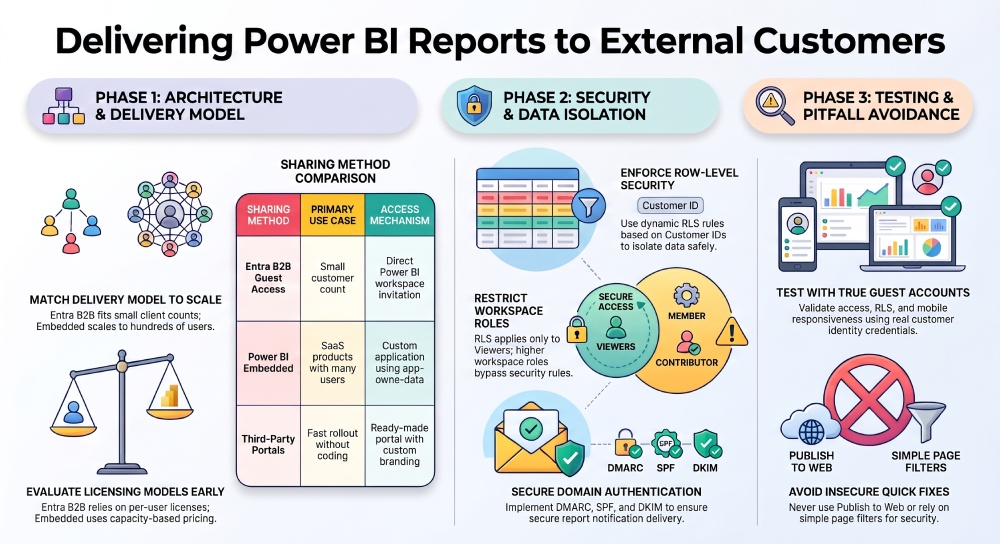
| Sharing Method | How It Works | Suitable For |
|---|---|---|
| Microsoft Entra B2B Guest Access | Customers receive invitations and access reports through Power BI. | Businesses sharing with a small number of customers |
| Power BI Embedded | Reports appear inside a custom website or application with its own login system. | SaaS companies delivering dashboards to many customers |
| Third-Party Client Portals | A ready-made portal handles customer access, branding, and report delivery. | Businesses that want external reporting without building an application |
For example, an accounting firm sharing monthly reports with five clients may find guest access sufficient. A software company serving 500 customers has different requirements, particularly if every customer needs a branded dashboard. Power BI Embedded or a ready-made client portal can provide a more manageable delivery model for that audience.
Prepare Power BI Reports for Customer Access
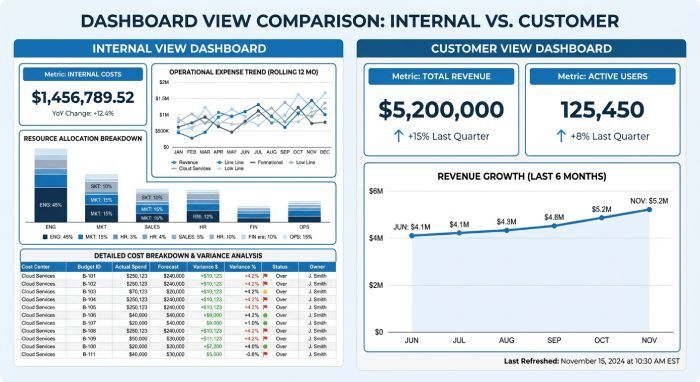
A dashboard built for internal employees may contain information that customers shouldn’t see. It may also include technical fields or pages that make sense to analysts but not to external users. Before publishing reports, businesses need to review the content from the customer’s point of view.
Organize Reports Around Customer Needs
Consider a marketing agency that manages advertising campaigns for several clients. Internal analysts may use a detailed report containing campaign costs, account notes, and performance data across every customer. Clients usually need a simpler report showing their campaign results and spending trends.
The agency can create a customer-facing report using the same semantic model while keeping internal pages separate. Report permissions can then limit which content customers can open. Clear report names and navigation also make it easier for customers to find their monthly results.
Configure Data Refresh Schedules
Customers expect report figures to reflect the latest available data. A sales dashboard showing yesterday’s figures may be acceptable, while an inventory report may need more frequent updates. The refresh schedule should match how customers use the information.
Power BI supports scheduled semantic model refreshes, although the available frequency depends on the license and capacity. Businesses can also display the last refresh time inside reports. This gives customers a clear indication of how recent the information is.
Protect Customer Data With Row-Level Security
One of the biggest risks in customer reporting is exposing another organization’s information. Consider a SaaS company that uses one Power BI semantic model to report subscription activity for 30 customers. Each customer needs to see only their own figures, but creating 30 separate models can increase maintenance work.
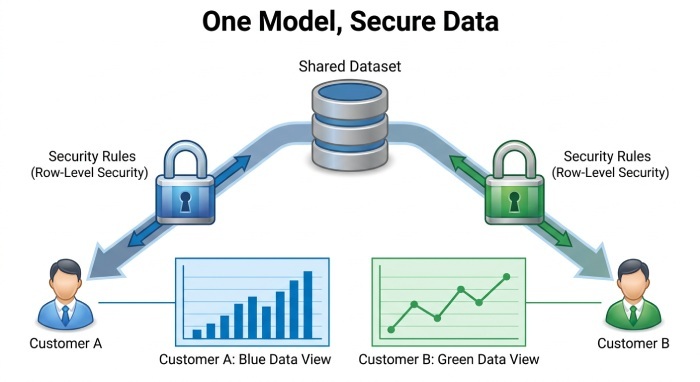
Power BI row-level security (RLS) can restrict the data returned for each user. The company can create rules based on customer IDs so the same report displays different records for different customers. This allows the reporting team to maintain one model while keeping customer data separate.
RLS needs to work alongside report access permissions. In standard Power BI workspaces, RLS applies to Viewers but not users with Admin, Member, or Contributor roles. Embedded applications must also pass the correct customer identity and security roles when generating access tokens.
Some organizations may prefer separate workspaces or semantic models for each customer. This makes sense when customers use different data sources or need stronger separation between reporting environments. The reporting structure should reflect access requirements rather than the number of dashboards.
Set Up Customer Authentication and Report Permissions
Customers need a way to sign in before viewing private reports. With Microsoft Entra B2B, businesses invite external users who then authenticate through Microsoft’s identity system. This works well when customers already use Microsoft accounts, and only a limited number of people need access.
Embedded reporting follows a different process. Customers sign in through the business’s application, which authenticates with Power BI and requests permission to display the assigned reports. Under the app-owns-data model, the customer doesn’t need to sign in to the Power BI service separately.
A customer portal can manage this process through a ready-made interface. Administrators can assign reports to users or customer groups and remove access when someone leaves an organization. Some platforms also support identity providers such as Okta and Auth0, allowing businesses to use their existing customer login system.
Review customer permissions whenever an account changes. A user moving from one client organization to another shouldn’t retain access to reports from their previous account. Remove access as part of the same process used to manage customer accounts.
Create a Customer-Friendly Reporting Experience
Customers don’t necessarily want to learn how Power BI works. They want to open a dashboard, find the figures they need, and understand what changed. A reporting experience built around internal Power BI workspaces may create unnecessary steps for people who only need to view reports.
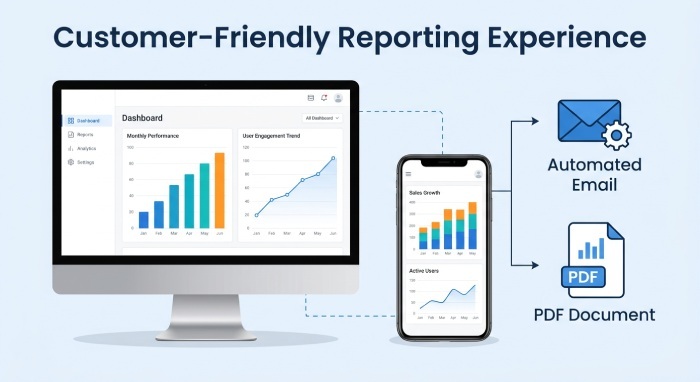
Branded customer portals offer an alternative. Businesses can present dashboards under their own domain with familiar navigation and company branding. Customers can access assigned reports without moving between different Microsoft workspaces.
The reports themselves also need attention. A customer reviewing revenue on a phone may struggle with a dashboard designed for a large desktop monitor. Report authors can create mobile layouts in Power BI and reduce the number of visuals on customer-facing pages.
Some customers also need reports outside the portal. Scheduled PDF exports or email delivery may suit executives who review figures once a month. Interactive dashboards remain useful for customers who regularly filter data or investigate performance changes.
Test Customer Access Before Launch
A report may look correct when an administrator opens it but behave differently for an external customer. Administrators often have broader permissions, which can hide mistakes in customer access rules. Testing needs to use accounts that represent actual external users.
A practical customer access test should cover:
- Report visibility: Customers see only assigned reports.
- Data access: RLS returns the correct customer records.
- Authentication: Login works with supported customer accounts.
- Report interaction: Filters and exports follow assigned permissions.
- Account removal: Former users lose access after permissions change.
- Mobile access: Dashboards remain readable on smaller screens.
Suppose a logistics company shares delivery reports with three customers. The testing team can sign in separately as each customer and check the available records. They should also test accounts with no report permissions to confirm that restricted content remains unavailable.
Power BI’s Test as role feature helps check RLS rules, but it doesn’t fully reproduce every external authentication scenario. To validate guest identity behavior, you need actual guest accounts, and you should test embedded reports through the customer application.
Manage Reports After Customers Receive Access
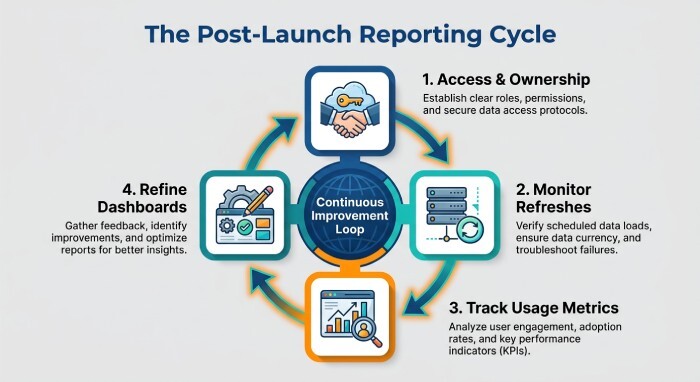
Customer reporting doesn’t end when dashboards become available. New clients join, existing customers request additional metrics, and reporting teams update semantic models. Without a clear process, administrators can lose track of which reports belong to each customer.
A reporting team needs ownership rules for published content. Someone should review refresh failures, approve report changes, and remove access when contracts end. Businesses with many customers may also benefit from keeping development and production environments separate.
Report activity provides another way to review the service. Power BI includes usage metrics for supported reporting experiences, but its standard usage reports don’t track app-owns-data embedded views. Businesses using embedded delivery may need portal analytics or application event tracking to measure customer engagement.
For example, a consulting firm may discover that customers rarely open a detailed weekly report but regularly use a monthly summary. That information can guide future reporting work and help the team decide which dashboards deserve more attention.
Effective email security is essential for reliable customer reporting. Implementing SPF, DKIM, and DMARC helps organizations prevent email spoofing, protect business communications, and ensure secure and reliable automated report notifications.
Understand Power BI Licensing Costs for Customer Reporting
The cost of delivering Power BI reports depends on how customers access them. A Power BI license may be required for each external viewer using normal guest access, while embedded reporting follows a capacity-based model. Businesses should calculate these costs before choosing a delivery method.
For Microsoft Entra B2B sharing, external viewers generally need Pro or Premium Per User licenses unless the content runs on qualifying capacity. Fabric F64 or larger capacity can support eligible Free viewers with the correct permissions. Report creators still need suitable authoring licenses.
Power BI Embedded works differently under the app-owns-data model. External customers don’t need individual Power BI licenses, but the business must pay for the capacity used to serve reports in production. Development costs and any third-party portal subscription charges also contribute to the final expense.
A company serving ten customers may find per-user licensing affordable. When the audience grows to hundreds of customers, capacity-based delivery can become more attractive. The final cost still depends on concurrent usage, model size, refresh activity, and the capacity required to run the reports.
Common Mistakes to Avoid When Delivering Power BI Reports
Customer reporting problems often come from decisions made before the first dashboard goes live. A sharing method may appear convenient during initial testing but create security or administration issues once more customers join.
Some common mistakes include:
- Using Publish to web for private reports: Anyone with access to the public report can view its data without authentication.
- Treating report filters as security: Filters change what appears on a page but don’t replace RLS.
- Giving customers excessive permissions: Broader workspace roles can expose content and bypass RLS restrictions.
- Ignoring customer onboarding: Manually assigning reports for every new user becomes difficult as the audience grows.
- Forgetting refresh failures: Customers may keep making decisions based on outdated figures.
- Overlooking embedded reporting activity: Standard Power BI usage metrics don’t cover all embedded access methods.
For instance, an agency may initially share the same report with several clients and rely on saved filters to display customer data. Those filters aren’t a security boundary, so the agency needs RLS or separate data environments before granting access. A proper review of report permissions before launch can prevent the problem from reaching customers.
Conclusion
Delivering Power BI reports to customers requires more planning than sharing dashboards internally. Businesses need a delivery method that fits their customer audience, supported by data permissions and a reliable login process.
Guest access can work for smaller reporting audiences, while embedded applications and client portals offer more options for businesses serving many customers. The reporting experience also needs regular maintenance as customer requirements change.
A well-managed setup allows customers to access current business information without dealing with the technical work behind Power BI. It also gives reporting teams a clear way to manage access as the customer base grows.
General Manager
General Manager of DuoCircle. Product strategy and commercial lead for AutoSPF's 2,000+ customer base.
LinkedIn Profile →