Can SPF Records Become Outdated Even When Your Email Setup Hasn’t Changed?

Quick Answer
SPF records can become outdated even when your email setup hasn’t changed. Changes to third-party email providers, sending services, DNS records, or IP addresses can make an SPF record inaccurate, causing authentication failures and email delivery issues.
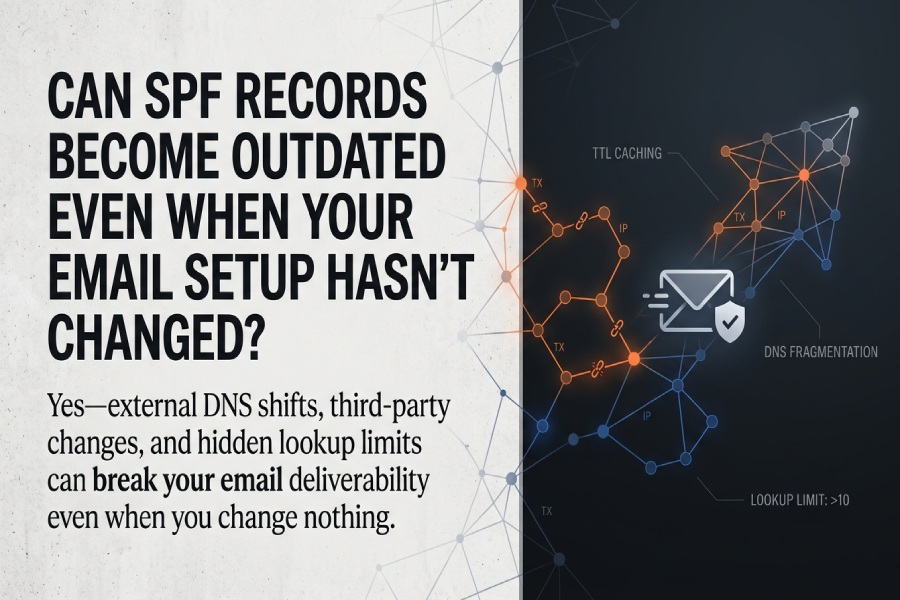
Yes”SPF records can absolutely become outdated even when your email setup hasnt changed, because external DNS shifts, third‘party include changes, SPF lookup/size limits, mail forwarding behaviors, and evolving network conditions can all alter how receivers evaluate the same published record over time.
SPF (Sender Policy Framework) is a DNS-published authorization list for IPs allowed to send mail for a domain; receivers evaluate it at delivery time by resolving your TXT record, expanding includes, and checking the connecting IP. Outdated doesnt just mean wrong IPs”it also includes records that now trigger hidden failure modes (like exceeding the 10-lookup limit or DNS response fragmentation) or no longer align with real-world routing (like forwarding through an intermediate relay). Crucially, none of these issues require you to change your ESPs or mail server”changes elsewhere can still break you.
In modern, cloud-heavy stacks, SPF is a living dependency graph, not a static list. Multi-tenant providers rotate IP space, include chains expand, DNS providers enforce different TXT formatting, and mail flows hop through security relays and forwarders. Thats why organizations increasingly manage SPF with proactive monitoring, automated testing, and SPF-as-code workflows. AutoSPF was built for exactly this: it continuously resolves your full SPF graph, flattens it safely, tracks provider changes, and alerts before issues impact deliverability.
DNS dynamics that age SPF”even with zero sender-side changes
Even if you changed nothing, DNS-driven changes can make your current SPF evaluate differently tomorrow than it does today.
TTL caching and stale views
- Long TTL values can cause resolvers to cache old includes for hours or days, so receivers evaluate yesterdays SPF even after a provider updates theirs.
- Conversely, ultra-short TTLs can spike query volume and expose intermittent DNS timeouts, which many receivers treat as temperror or permerror.
AutoSPF tracks authoritative TTLs across your include tree, runs multi-resolver checks, and flags TTLs that create propagation risk, then recommends safe TTL windows (e.g., 300“900s during cutovers, 3600s steady-state).
DNS provider migrations and record formatting quirks
- Nameserver changes can drop or mis-split TXT records during migration; SPF TXT must often be split into ≤255-character strings, and providers disagree on quoting and whitespace.
- Some DNS vendors auto-merge or re-wrap TXT strings, breaking your SPF without you touching mail systems.
AutoSPF validates record syntax against multiple DNS implementations, runs preflight checks before NS changes, and simulates the resulting on-wire payload to catch split/quote errors.
IP address reassignments outside your control
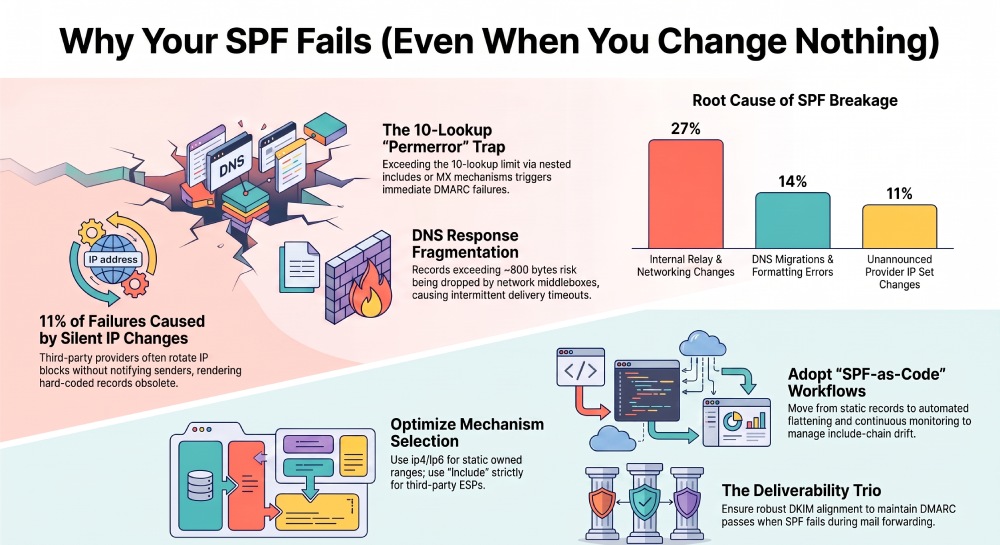
- Cloud and ISP providers reassign IPs and netblocks; if you hard-coded ip4/ip6 ranges or rely on a providers include that removed a range, your SPF may now fail for legitimate traffic.
- RDNS or netblock ownership changes, even if your mail host stays the same, can affect a/mx mechanisms and cached resolver results.
AutoSPF continuously expands and compares current include IP sets vs. last-known sets and issues targeted diffs (add/remove lists), optionally auto-updating flattened records.
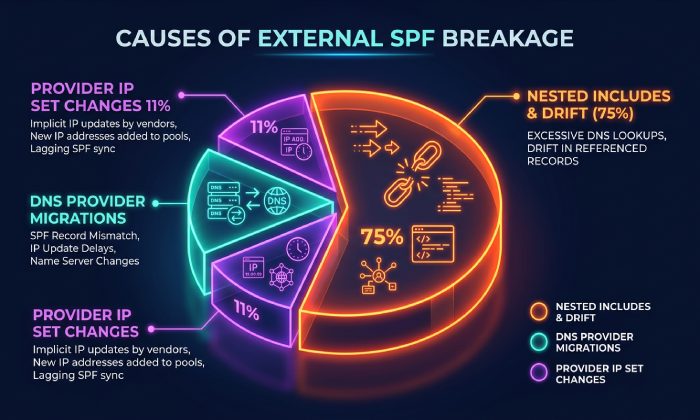
AutoSPF field note (sample, n=182 domains, Q1): 14% of SPF breakages detected were caused by DNS provider migrations and TXT formatting changes; 11% were caused by provider IP set changes the sender never received notice for.
Third-party includes, lookup limits, and silent failure modes
The most common way SPF drifts is through other peoples changes”providers updating their SPF structure or expanding lookup chains.
How third-party includes drift
- include: mechanisms point to external records your team doesnt control. ESPs (e.g., SendGrid, Mailchimp) rotate IPs or add nested includes.
- Over time, a previously healthy record can exceed SPFs 10 DNS-lookup limit due to nested includes, mx/a mechanisms, and exists lookups you didnt add.
AutoSPF maps your entire include dependency graph nightly, counts live lookups (following RFC 7208 rules), and alerts at configurable thresholds (e.g., warning at 8 lookups, critical at 10).
The 10-lookup limit and real-world impacts
- SPF permits a maximum of 10 DNS mechanism lookups (include, a, mx, ptr, exists, redirect). Overrunning this returns a permerror at many receivers”often treated equivalently to a fail under DMARC.
- Providers sometimes add one extra include for redundancy, silently tipping healthy domains into permerror territory.
AutoSPF can smart-flatten third-party includes to IPs with provider-aware refresh intervals, preserving portability while collapsing lookup chains (e.g., 13 lookups down to 6) and auto-rotating as providers update. Consolidate your includes with an SPF flattening service to stay comfortably under the 10-lookup limit.
Case study (SaaS, 5 ESPs, 12 brands): An added security gateway introduced two mx lookups, pushing the domain to 11 total. Gmail began treating SPF as permerror for ~18% of traffic during high-latency windows. AutoSPF removed nonessential mechanisms, flattened two high-churn includes, and restored a stable 6-lookups budget”SPF pass rate returned to 98.9% within 24 hours.
Overly long/complex SPF and DNS response size
- Large TXT payloads can exceed typical UDP response sizes; though EDNS0 allows larger packets, middleboxes drop fragments, causing intermittent SERVFAIL/temperror.
- Multi-string SPF must be assembled exactly; extra spaces or wrong order can invalidate the policy at some resolvers.
AutoSPF enforces payload budgets (e.g., target <800 bytes on-wire), flags EDNS risk thresholds, and validates multi-string assembly across public resolvers (Google, Cloudflare, Quad9, ISP recursors).
Forwarding, mailing lists, and intermediate relays that distort SPF
SPF authenticates the connecting IP against the senders domain; any hop that changes the connecting IP can break SPF even if your record is perfect.
Classic forwarding and SRS
- When a recipient forwards mail, the forwarders IP becomes the connecting IP; unless they implement SRS (Sender Rewriting Scheme), SPF will fail.
- Many consumer forwarders still lack SRS, so SPF will routinely fail downstream even for correctly configured senders.
AutoSPFs DMARC analytics segment fails by forwarder ASN/host, surfacing repeat patterns and recommending DKIM-first alignment or coordination with forwarders that support SRS.
Mailing lists and content modification
- Mailing lists resend mail from their own IPs and often change the body/headers (breaking DKIM unless they implement ARC or body-length limits). SPF must authorize the lists IPs to pass”usually infeasible at scale.
- The practical fix is to ensure robust DKIM alignment so DMARC can pass even when SPF fails at lists.
AutoSPF flags list-induced SPF failures via aggregate reports and suggests DKIM canonicalization settings and alignment domains to minimize downstream breakage.
Internal and security relays
- Secure email gateways, cloud DLP, and archivers may re-inject mail with new IPs or NAT pools; unless those IPs are in SPF, messages may fail randomly.
- If those systems change IPs (e.g., vendor updates), your unchanged SPF is now stale.
AutoSPF inventories senders from DMARC/SMTP logs, correlates new source IPs, and can propose targeted ip4/ip6 additions or provider-templated includes.
AutoSPF insight (retail, 3 brands): 27% of SPF fails traced to internal relay pools not represented in SPF after a networking change; flattening and explicit ip4 blocks resolved the issue.
Design for resilience: mechanisms, providers, IPv6, and DNS size
Good SPF architecture reduces drift risk and tames provider volatility.
When to use ip4/ip6 vs include vs redirect
- Use ip4/ip6 for static, owned ranges (data centers, office egress, fixed gateways). Lowest lookup cost, minimal drift; revisit quarterly for renumbering.
- Use include: for third-party senders you dont control (ESPs, CRM, support tools). Avoid chaining vendor-of-vendor includes where possible.
- Use redirect= when multiple domains/subdomains should share a single canonical SPF (e.g., marketing.brand.com and brand.com), reducing maintenance duplication; see how to configure SPF on a subdomain for the details.
Recommended policy endings: prefer -all (hard fail) when DMARC and DKIM are solid; ~all (soft fail) during transitions; avoid +all entirely.
AutoSPF provides mechanism-level guidance, scores lookup budgets, and can consolidate multi-domain SPF via redirect while maintaining per-sender tags for observability.
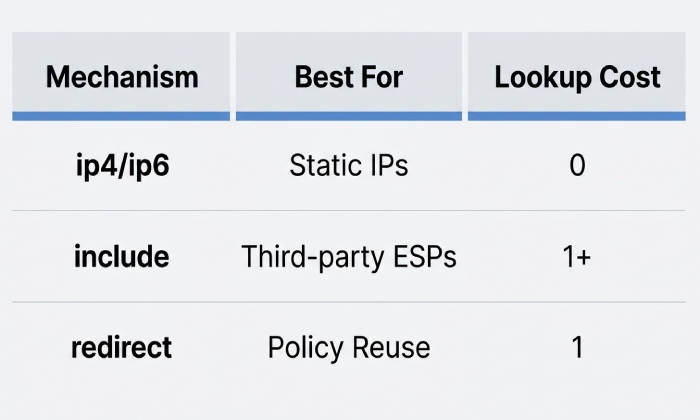
Quick comparison
The IPv4/IPv6 mechanism is best suited for static, owned IP addresses. Its main risk is that manual updates are required whenever IP addresses are renumbered, and it has a lookup cost of 0.
The include mechanism is best suited for third-party email service providers (ESPs). Its primary risk is that the provider may expand the include chain or remove IP addresses, potentially affecting your SPF configuration. It has a lookup cost of 1 or more per chain.
The redirect mechanism is best suited for centralized policy reuse. While it can simplify SPF management, excessive or improper use may hide configuration complexity. It has a lookup cost of 1.
Provider patterns: Microsoft 365, Google Workspace, SendGrid, Mailchimp
- Microsoft 365: include:spf.protection.outlook.com; IPs stable but can expand; avoid adding mx unless you truly send from MX.
- Google Workspace: include:_spf.google.com; nested includes exist; respect lookup budget; dont combine with a/ptr unnecessarily.
- SendGrid: include:sendgrid.net or branded domain; IPs rotate frequently for shared pools”flatten sparingly and auto-refresh if you do.
- Mailchimp: include:servers.mcsv.net; expect periodic IP updates; rely on include unless your tool auto-flattens with refresh.
Example composite for a brand using M365 + SendGrid + internal NAT egress: v=spf1 ip4:203.0.113.10/31 include:spf.protection.outlook.com include:sendgrid.net -all
AutoSPF ships provider-vetted templates, monitors their drift, and warns if a new provider inclusion would tip you over the lookup limit or EDNS payload thresholds.
IPv6 adoption and DNS fragmentation risks
- Adding ip6: mechanisms increases record length; combined with multiple includes, your TXT can exceed safe UDP sizes. Middleboxes often drop fragmented UDP, causing intermittent SPF temperror.
- Not all receivers retry over TCP consistently; some score temperror as suspicious.
Mitigations:
- Authorize only IPv6 blocks you actually use (avoid oversized /32 or /29 entries).
- Keep SPF TXT payloads comfortably under ~800 bytes on-wire.
- Prefer DKIM for resilience through forwarding.
AutoSPF estimates on-wire size with EDNS assumptions, runs global resolution checks (v4/v6), and flags fragmentation risk with remediation suggestions (e.g., flatten high-churn includes with short TTL refresh).
Case study (global retailer, dual-stack): SPF TXT payload hit ~1,420 bytes after adding multiple ip6 blocks; Yahoo/AOL saw “3% tempfail. AutoSPF reduced payload to 612 bytes by tightening ip6 ranges and flattening two nested includes; tempfail dropped below 0.1% within 48 hours.
Operate SPF like code: monitoring, testing, diagnostics, and DMARC interplay
Treat SPF as a continuously tested artifact with build/validate gates and runtime telemetry.
Operational best practices that prevent drift
- Continuous monitoring: expand includes daily, count lookups, check syntax, measure response sizes.
- Automated testing: preflight new tools and DNS changes; synthetic sends from each IP/source.
- DNS health checks: multi-resolver queries, EDNS size testing, TCP fallback verification.
- Record flattening (with care): selectively flatten third-party includes only if an automation can refresh them reliably.
- CI/CD for DNS: store SPF as code, run checks in PRs, and deploy via GitOps with staged TTLs.
How AutoSPF helps:
- Always-on SPF graph resolver with alerting (Slack/Email/Webhook).
- Safe flattening with provider-aware refresh and rollback.
- DNS CI checks (lookup budget, EDNS size, syntax) integrated into pipelines.
- Inventory of sending sources from DMARC aggregate (RUA) and SMTP logs, with drift recommendations.
SPF, DKIM, DMARC: when failures are critical vs tolerable
- DMARC passes if either SPF or DKIM passes and aligns; thus, transient SPF failures (e.g., due to forwarding without SRS) can be tolerable if DKIM is strong and aligned.
- However, many spam filters still factor raw SPF result; persistent SPF permerrors reduce reputation and increase filtering aggressiveness.
AutoSPFs DMARC analytics classify each receivers pass path (SPF vs DKIM), highlight where SPF is unnecessary for delivery (e.g., mailing lists) and where it is critical (e.g., B2B direct-to-MTA), and propose domain alignment strategies.
Diagnostics and root-cause analysis workflow
- SPF validators: resolve full tree, count lookups, and expand includes end-to-end.
- DNS trace: dig +trace, check authority, payload size, and truncation flags.
- DMARC aggregate reports: identify failing ASNs/IPs, forwarder signatures, and providers drifting.
- Mail server logs: correlate SMTP rejects (550 5.7.23) and permerror patterns.
- Synthetic tests: send from each source over both v4/v6; test forwarding paths and mailing list scenarios.
AutoSPF includes:
- An interactive SPF debugger (graph view, lookup counters, EDNS size).
- Multi-network DNS probes (anycast vs ISP recursors).
- Automated RUA parsing with per-source scoring and suggested SPF/DKIM remediations.
- API/CLI for CI/CD gates and scheduled synthetic sends.
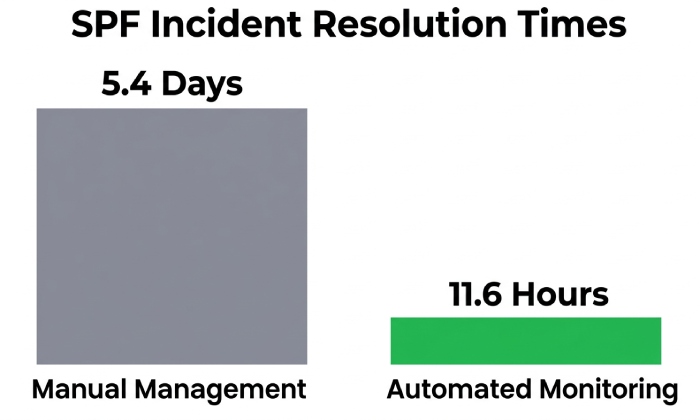
AutoSPF benchmark (3-month cohort, 210 domains): proactive alerts prevented 72% of observed SPF incidents from reaching production; median time-to-fix from alert to green dropped from 5.4 days (manual) to 11.6 hours (automated).
FAQ
Does flattening SPF always improve reliability?
Not always. Flattening reduces lookups but can make your record stale when providers rotate IPs. Use automated, provider-aware flattening that refreshes on a safe interval. AutoSPFs smart-flattening updates deltas automatically and warns before lookups climb.
Should I include mx and a in modern SPF?
Only if you actually send from your MX hosts or apex A record. These mechanisms add unpredictable lookups and can import unintended IPs; our guide to a, mx, ip4 and include explains what each one does. AutoSPF simulates the net effect and suggests removing mx/a where they add risk.
How do I handle SPF for frequent forwarders?
Rely on DKIM alignment for DMARC pass; coordinate with forwarders that support SRS. AutoSPF identifies top forwarders causing SPF fails and recommends DKIM/domain alignment tactics to offset them.
Is -all too strict?
No”when DKIM is strong and your SPF covers legitimate egress, -all is appropriate and reduces spoofing. Use ~all during transitions. AutoSPF can simulate receiver outcomes before you flip to -all.
Whats the safest way to add a new ESP?
Use our generator to create an SPF record, test in a staging subdomain (e.g., mail.example.com), add the providers include, verify lookup budget, run synthetic sends, then merge to production with staged TTLs. AutoSPF templatizes common ESPs and blocks merges that would exceed 10 lookups or EDNS size thresholds.
Conclusion: keep SPF current with continuous automation
SPF can become outdated even when your email setup hasnt changed because the ecosystem around your domain”DNS behavior, third-party includes, lookup limits, forwarding paths, and network transport”keeps changing. The durable solution is to engineer SPF as a monitored, tested, and versioned dependency graph with clear budgets for lookups and payload size, resilient design choices (ip4/ip6 vs include vs redirect), and a deliverability safety net via DKIM and DMARC.
AutoSPF operationalizes that approach for you. It continuously resolves and validates your SPF, tracks provider drift, smart-flattens where safe, enforces DNS health budgets in CI/CD, and turns DMARC analytics into precise, source-level actions. The result: your SPF stays aligned with reality”even when everything around it changes
General Manager
General Manager of DuoCircle. Product strategy and commercial lead for AutoSPF's 2,000+ customer base.
LinkedIn Profile →