DMARC Compliance Requirements: Global Rules and Email Security Policies

Quick Answer
DMARC compliance requires organizations to authenticate email with SPF and DKIM, align domains, publish a valid DMARC policy, monitor reports, and gradually enforce quarantine or reject policies to prevent spoofing, phishing, and BEC.
Try Our Free DMARC Checker
Validate your DMARC policy, check alignment settings, and verify reporting configuration.
Check DMARC Record →
What DMARC Is and Why It’s Required for Modern Email Security
DMARC, or Domain-based Message Authentication, Reporting, and Conformance, is an email authentication framework that tells mailbox providers how to handle messages that fail domain validation. It works with SPF and DKIM to confirm whether a message is legitimately sent on behalf of an email domain. A DMARC record is published in DNS, and the DMARC policy inside that record determines whether failing messages are monitored, quarantined, or rejected.
DMARC has become a critical component of modern email security because phishing, spoofing, Business Email Compromise (BEC), and ransomware campaigns often abuse trusted domains. Without DMARC, attackers can spoof the visible RFC 5322 From address and make malicious messages appear to come from a legitimate organization. DMARC helps mailbox providers determine whether the domain shown in the From address is aligned with authenticated SPF or DKIM results and provides domain owners with greater visibility and control over unauthenticated email.
For security leaders, DMARC is not just a DNS setting. It is an operational control that connects email authentication, domain governance, vendor management, and incident response. When a domain is protected by a properly enforced DMARC policy, attackers have a much harder time using that domain in impersonation campaigns. This reduces risk for employees, customers, partners, and any IT resource that relies on trusted email workflows.
How DMARC Works with SPF and DKIM
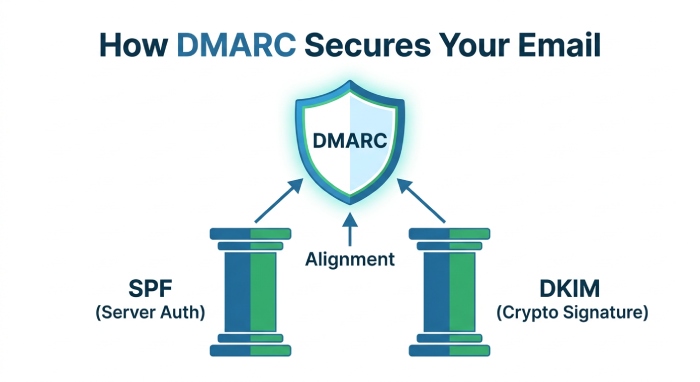
DMARC depends on two underlying email authentication mechanisms:
- SPF verifies whether the sending mail servers are authorized in DNS to send for the domain used in the Return-Path, envelope-from, or MailFrom address.
- DKIM uses cryptographic signatures in message headers to prove that the message was authorized by the signing email domain and was not altered in transit.
For DMARC to pass, SPF or DKIM must pass and align with the visible RFC 5322 From domain. These alignments are what make DMARC stronger than standalone SPF or DKIM. Many organizations now use a DKIM-first approach because DKIM signatures often survive forwarding better than SPF, especially when ARC headers are used by intermediaries.
DMARC alignment is especially important because the visible From domain is what users actually see. A message can technically pass SPF for one sending domain while displaying a different brand in the From header. DMARC closes that gap by requiring authentication to align with the domain being represented to the recipient.
Why Mailbox Providers Now Enforce DMARC
Major mailbox providers increasingly require senders to follow strict email authentication and sending standards. These requirements are particularly important for organizations that send marketing messages, transactional emails, or high-volume campaigns through popular email platforms and service providers.
DMARC improves deliverability, reduces spoofing, protects customers, and gives security teams visibility into all email sources using an email domain.
Mailbox providers also use authentication signals to decide whether email should be accepted, filtered, or rejected. If a sender does not meet authentication standards, even legitimate messages may experience delays, spam folder placement, or outright blocking. For this reason, DMARC compliance has become both a security requirement and a deliverability requirement.
Global DMARC Compliance Rules and Industry-Specific Requirements
DMARC compliance is not governed by one universal law, but global email standards and mailbox provider policies have made it a practical requirement. Organizations that fail to meet sender requirements may see mail delivery problems, higher spam folder placement, blocked messages, or SMTP error codes.
Google and Yahoo Bulk Sender Requirements
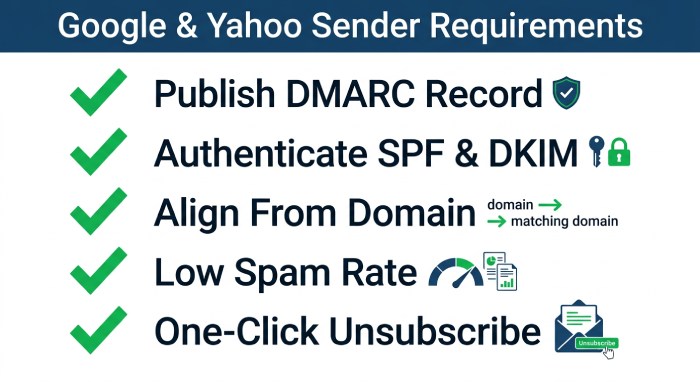
Google and Yahoo have established sender requirements for organisations that send large volumes of email to Gmail and Yahoo Mail users. For bulk senders, key requirements include:
- Publishing a valid DMARC record for the sending domain
- Authenticating email with SPF and DKIM
- Ensuring DMARC authentication passes and aligns with the visible From domain
- Maintaining a low spam complaint rate
- Supporting one-click unsubscribe for applicable marketing and promotional messages
- Using valid message formatting and properly configured email infrastructure
- Avoiding misleading or deceptive From addresses and headers
- Following appropriate consent and opt-in practices for bulk and marketing email
For many senders, a DMARC policy of p=none may satisfy the initial technical requirements, but stronger enforcement is recommended over time. Google Postmaster Tools and Yahoo Postmaster can help track spam complaint rate, reputation, authentication failures, and deliverability trends.
Organizations should also document which teams own each sender requirement. Marketing may control unsubscribe practices and opt-in records, while security and DNS administrators may control authentication records. Treating DMARC as a shared IT resource helps prevent gaps between compliance, campaign operations, and technical enforcement.
Industry-Specific Compliance Drivers
Financial services, healthcare, government, SaaS, retail, and education organizations often face stricter compliance expectations because their domains are frequent phishing targets. ISPs, MSPs, managed service providers, and enterprises with many subdomains must also inventory their email infrastructure carefully.
Industry frameworks may not always name DMARC specifically, but requirements around authentication, anti-phishing controls, secure mail delivery, TLS, and brand protection often make DMARC policy enforcement essential. A properly maintained DMARC record supports security audits by proving that the organization controls its email domain and monitors abuse.
In regulated industries, email domain misuse can create legal, operational, and reputational consequences. A forged invoice, fake password reset, or fraudulent executive request can trigger financial loss and compliance review. DMARC provides measurable evidence that the organization is reducing exposure to impersonation and improving control over outbound email channels.
Key DMARC Policy Settings: p=none, quarantine, and reject
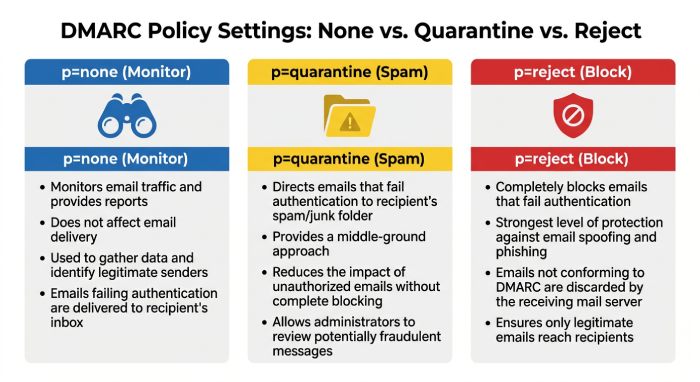
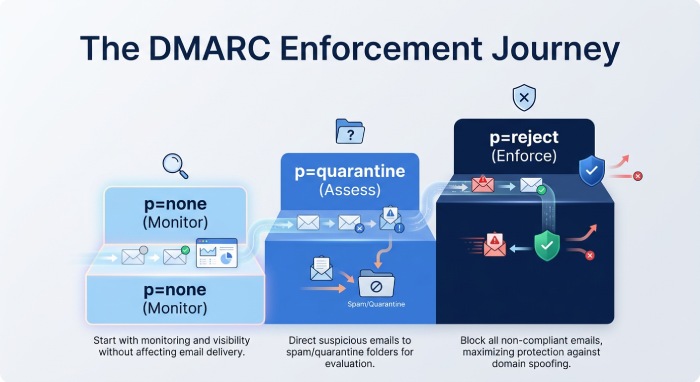
A DMARC policy has three primary modes: p=none, quarantine, and reject. Each setting is published in the DMARC record in DNS and tells mailbox providers what to do when email authentication fails.
p=none: Monitor-Only Mode
The p=none setting is a monitor-only mode. It does not instruct mailbox providers to block failing messages. Instead, it allows the domain owner to collect reporting data and identify legitimate email sources.
A basic DMARC record using p=none may look like this:
v=DMARC1; p=none; rua=mailto:dmarc-reports@example.comThis is the safest starting point for most organizations because it provides visibility without disrupting mail delivery. However, p=none does not stop spoofing. It is a discovery phase, not full enforcement.
Quarantine Policy
A quarantine policy tells mailbox providers to treat failing mail as suspicious. Depending on the provider, unauthenticated messages may be routed to the spam folder or flagged for additional filtering.
A quarantine policy is useful after validation confirms that SPF, DKIM, and authorized third-party email service providers are configured correctly. It reduces phishing risk while allowing some tolerance for misconfigured email sources.
Reject Policy
A reject policy is the strongest DMARC policy. It tells mailbox providers to reject messages that fail DMARC authentication. This provides the highest level of protection against spoofing and impersonation.
A reject policy may look like this:
v=DMARC1; p=reject; rua=mailto:dmarc-reports@example.com; adkim=s; aspf=sStrict enforcement should only happen after careful testing. If SPF, DKIM, DNS, or subdomains are misconfigured, legitimate mail delivery can fail.
DMARC Compliance Checklist for IT and Security Teams
A practical DMARC compliance checklist helps teams move from awareness to implementation. Because DMARC touches DNS, email platforms, marketing systems, security monitoring, and vendor relationships, every IT resource involved in email should be reviewed before enforcement begins.
Start with domain ownership. Confirm the organization has an authoritative list of root domains, parked domains, sending domains, and subdomains. Parked or unused domains should not be ignored because attackers often spoof dormant domains that have weak or missing DNS authentication. Even a domain that does not send mail should publish defensive records where appropriate, such as a restrictive SPF record and a DMARC policy that discourages abuse.
Next, confirm that each legitimate sending platform supports SPF, DKIM, and DMARC alignment. Some vendors send through shared infrastructure, while others allow custom Return-Path domains, branded bounce domains, or dedicated DKIM selectors. The best configuration is usually the one that creates clear alignment with the visible From domain while preserving deliverability and reporting accuracy.
A strong checklist should include:
- A complete domain and subdomain inventory
- A list of all approved sending platforms
- Current SPF records and DNS lookup counts
- Active DKIM selectors for each sender
- DMARC records for organizational domains and subdomains
- Reporting mailbox ownership and retention practices
- A review process for new email vendors
- A documented escalation path for authentication failures
- Periodic review of Google, Yahoo, and Microsoft sender requirements
This checklist should be repeated regularly, not only during the first DMARC project. Business units may add new SaaS tools, sales automation platforms, or notification systems without notifying security. A lightweight approval process ensures every new IT resource that sends email is authenticated before it reaches customers or employees.
Steps to Achieve DMARC Compliance Across Your Domains
Achieving DMARC compliance requires more than publishing one DNS record. It involves discovery, validation, alignment, reporting, and ongoing policy enforcement across every email domain.
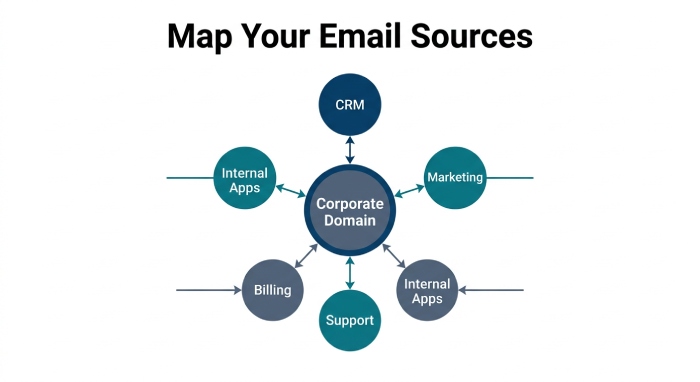
1. Inventory All Email Sources
Start by identifying every system that sends mail on behalf of your domain. This may include:
- Corporate email servers
- Business email and productivity platforms
- CRM and email marketing platforms
- Billing, customer support, and ticketing systems
- Managed service providers (MSPs)
- Cloud-based and internal applications
- Subdomains used for newsletters, alerts, notifications, or transactional emails
This inventory is critical because unknown email sources are a common cause of DMARC failures.
A complete inventory should include both human-facing and automated senders. Password reset messages, invoices, shipping alerts, application monitoring notifications, HR messages, and customer onboarding sequences may all come from separate systems. If one IT resource is overlooked, enforcement can cause legitimate mail to fail or create unnecessary support tickets.
2. Configure SPF Correctly
SPF is published in DNS as a TXT record. It authorizes specific IP addresses, services, or mail servers to send for the email domain. SPF must be accurate and kept within lookup limits.
Although reverse DNS is not part of DMARC authentication, organisations should ensure that sending infrastructure has properly configured PTR (reverse DNS) and forward DNS records. Consistent DNS configuration can support email deliverability and sender reputation.
Organizations should avoid overloading SPF records with too many includes. The DNS lookup limit can cause authentication to fail, especially when multiple cloud services are added over time. Flattening, vendor review, or restructuring sending domains may be necessary for complex environments.
3. Deploy DKIM for Every Sender
DKIM should be enabled for all major email vendors and internal mail systems. DKIM gives mailbox providers strong evidence that the message was authorized by the domain owner. It also helps when SPF breaks because of forwarding.
For many enterprises, a DKIM-first approach is the most reliable path to DMARC compliance. DKIM keys should be rotated periodically, and selectors should be documented for each platform.
When possible, use vendor-specific selectors so each platform can be identified and managed independently. This makes troubleshooting easier when authentication reports show failures from a specific source. It also helps security teams retire old selectors when an email service is no longer approved.
4. Publish and Validate the DMARC Record
After SPF and DKIM are in place, publish the DMARC record in DNS. Tools such as dmarcian, DMARC Inspector, and a DMARC Record Wizard can help with validation and syntax checks.
A starter record often uses p=none, while a mature configuration progresses toward quarantine policy and then reject policy. Always confirm that the DMARC policy applies correctly to the organizational domain and any subdomains.
Validation should include syntax, reporting destinations, policy inheritance, and alignment mode. Some organizations use strict alignment for high-risk domains and relaxed alignment for domains that rely on several third-party providers. The right setting depends on the sending environment and risk tolerance.
Common DMARC Compliance Mistakes to Avoid
Many DMARC projects stall because the organization treats deployment as a one-time DNS task. In reality, DMARC compliance is a lifecycle. The most common mistakes involve incomplete discovery, poor vendor coordination, and moving to enforcement before legitimate mail is ready.
One frequent issue is publishing p=reject too quickly. While reject policy offers the strongest protection, premature enforcement can disrupt invoices, password resets, support tickets, and customer communications. A safer approach is to collect aggregate reports, fix alignment problems, and gradually increase enforcement only after mail streams are verified.
Another mistake is assuming that SPF alone is enough. SPF can fail when messages are forwarded, and it authenticates the envelope sender rather than the visible From domain. DKIM provides a more durable authentication signal, especially when email passes through forwarding systems or mailing lists. For this reason, mature DMARC programs usually require DKIM for every important sender.
Organizations also forget about subdomains. A root domain may have a good DMARC record, but subdomains used by marketing, regional teams, partners, or legacy applications may have weak controls. Attackers look for these gaps. Clear subdomain policy, DNS ownership, and monitoring help close them.
Finally, some teams do not assign ownership. DNS administrators may maintain records, but security teams need reports, marketing teams need deliverability, and application owners need reliable transactional mail. Without a defined owner for each IT resource, configuration drift is likely. Assigning responsibility makes DMARC compliance easier to maintain over time.
How DMARC Supports BEC Prevention and Brand Protection
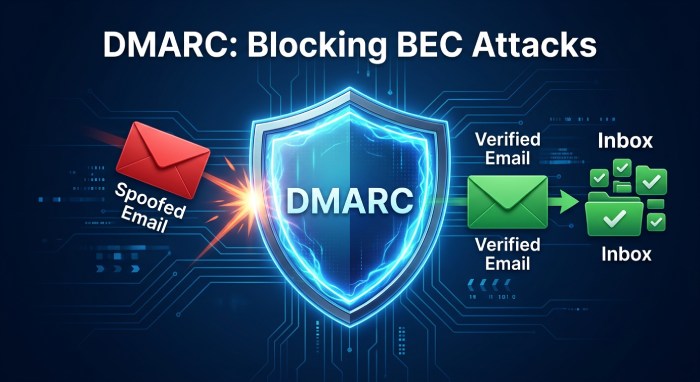
BEC (Business Email Compromise) attacks rely on trust. Attackers impersonate executives, finance teams, vendors, or customers to convince recipients to send money, change payment details, reveal credentials, or approve sensitive actions. While DMARC does not stop every form of social engineering, it significantly reduces the attacker’s ability to spoof a protected domain directly.
For example, if an attacker tries to send a message that appears to come from ceo@example.com, a reject policy can instruct participating mailbox providers to block the message when it fails authentication and alignment. This makes exact-domain impersonation much harder. Attackers may still attempt lookalike domains, display-name spoofing, or compromised accounts, but DMARC removes one of the most convincing tactics.
DMARC also supports brand protection. Customers are more likely to trust messages that appear to come from banks, retailers, healthcare providers, universities, and SaaS platforms. If those domains are easy to spoof, attackers can damage brand reputation and customer confidence. Enforced DMARC policies help demonstrate that the organization takes domain protection seriously.
Security awareness training should explain what DMARC does and does not do. Employees should still verify unusual payment requests, use secure approval workflows, and report suspicious messages. DMARC is most effective when combined with inbound filtering, user education, multi-factor authentication, vendor verification, and incident response procedures.
 For incident response teams, DMARC reports can also provide early warning of abuse. A sudden spike in unauthenticated traffic from unknown sources may indicate a spoofing campaign. By monitoring these patterns, organizations can respond faster, alert affected teams, and reduce the impact of phishing and BEC attempts.
Choosing Tools and Ownership for Ongoing DMARC Management
The right DMARC management approach depends on organizational size, domain complexity, and available expertise. Small organizations may start with DNS tools and basic reporting, while enterprises often need a dedicated platform to parse aggregate reports, identify sources, and track enforcement progress across many domains.
DMARC reports are delivered in XML format, which can be difficult to review manually. A reporting tool can convert raw data into dashboards that show sending IPs, vendors, authentication results, alignment status, and policy outcomes. This helps teams distinguish legitimate services from suspicious traffic. It also makes it easier to prioritize fixes by volume and business impact.
Ownership should be clearly defined. Security teams often own policy goals and risk reduction. Infrastructure or DNS teams usually maintain records. Marketing and customer communications teams own campaign practices. Application teams own transactional senders. Procurement and vendor management teams can ensure new email vendors meet authentication requirements before contracts are finalized.
A good governance process should answer these questions:
- Who approves a new sender for a domain?
- Who updates DNS records and validates changes?
- Who reviews DMARC aggregate reports?
- Who investigates unknown sending sources?
- Who decides when to move from p=none to quarantine or reject?
- Who maintains documentation for each IT resource that sends email?
When these responsibilities are clear, DMARC becomes easier to operate. The organization can onboard new tools faster, reduce accidental authentication failures, and maintain stronger protection as the email environment changes.
Monitoring, Reporting, and Maintaining Long-Term DMARC Compliance
Long-term DMARC compliance depends on continuous reporting and operational discipline. Email infrastructure changes constantly: new email vendors are added, mail servers are retired, IP addresses change, and business units launch new marketing messages.
Use DMARC Reports for Visibility
DMARC aggregate reports show which email sources are sending for your email domain, whether SPF and DKIM pass, and whether alignments are correct. These reports provide visibility into legitimate systems, unauthorized senders, and possible spoofing campaigns.
Security and IT teams should review reporting regularly, especially after onboarding new platforms or changing DNS. If an email source fails authentication, determine whether it needs SPF updates, DKIM enablement, or decommissioning.
Reports should be reviewed in context. A low-volume failure from an unknown IP may represent spoofing, while a high-volume failure from a known vendor may indicate a misconfiguration that could affect customers. Prioritizing by business impact helps teams focus on the most important fixes first.
Maintain Sender Requirements Over Time
Mailbox providers continue to refine sender requirements, especially for high-volume senders. To maintain compliance, organizations should:
- Monitor spam complaint rate in Postmaster Tools and Yahoo Postmaster
- Keep one-click unsubscribe working for marketing messages
- Preserve List-id headers where relevant
- Maintain opt-in records
- Review SMTP error codes and bounce patterns
- Confirm that SPF, DKIM, and DMARC record settings remain valid
- Ensure TLS is supported for secure transport
- Recheck bulk sender requirements before major campaigns
These practices help protect deliverability and keep messages out of the spam folder.
Long-term maintenance should also include change management. Any new email platform, acquisition, domain launch, or rebranding project should trigger a DMARC review. This ensures each IT resource is authenticated before mail volume increases.
Move Gradually Toward Enforcement
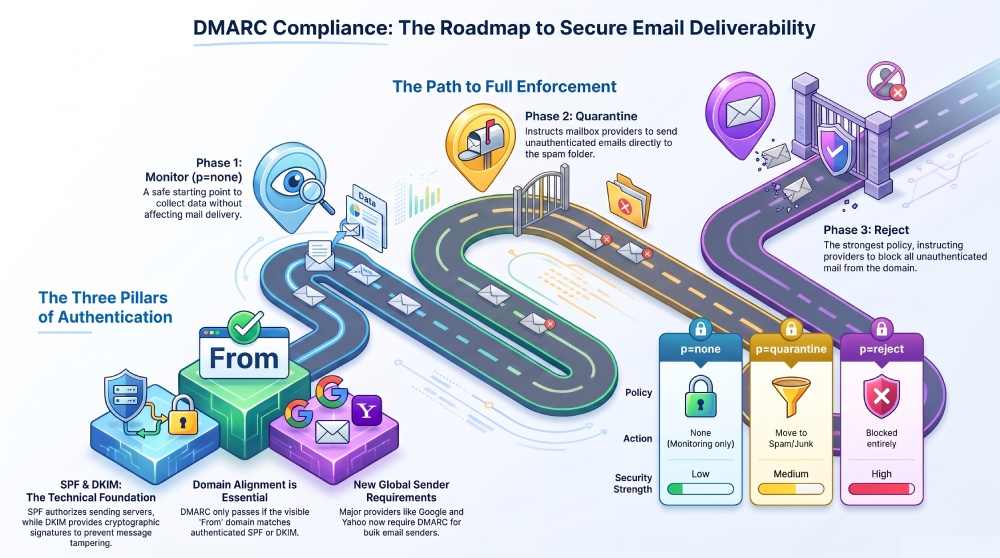
A practical DMARC rollout usually follows this path:
Phase 1: Discovery
Start with p=none and collect reports. Identify all email sources, including third-party email service providers and MSP-managed platforms.
Phase 2: Alignment Fixes
Correct SPF, DKIM, MailFrom, Return-Path, and message headers. Confirm that the visible email domain aligns with authenticated domains.
Phase 3: Partial Enforcement
Move selected domains or subdomains to quarantine policy. Monitor mail delivery, user reports, and provider feedback.
Phase 4: Full Protection
Advance to reject policy once validation is complete. At this stage, the DMARC policy provides strong enforcement against spoofing while supporting trusted mail delivery across your approved email infrastructure.
After full enforcement, continue reviewing reports and authentication performance. DMARC compliance is strongest when it becomes part of normal email operations, vendor onboarding, and security monitoring rather than a one-time project.
General Manager
General Manager of DuoCircle. Product strategy and commercial lead for AutoSPF's 2,000+ customer base.
LinkedIn Profile →