What Is Email Header Parsing? How It Helps Troubleshoot SPF, DKIM & DMARC

Quick Answer
Email header parsing converts raw email headers into useful diagnostic information. It helps troubleshoot SPF, DKIM, and DMARC authentication, trace message routes, identify delivery delays, investigate spoofing, and verify sender and domain alignment
Try Our Free DMARC Checker
Validate your DMARC policy, check alignment settings, and verify reporting configuration.
Check DMARC Record →
What Email Header Parsing Is and Why Headers Matter
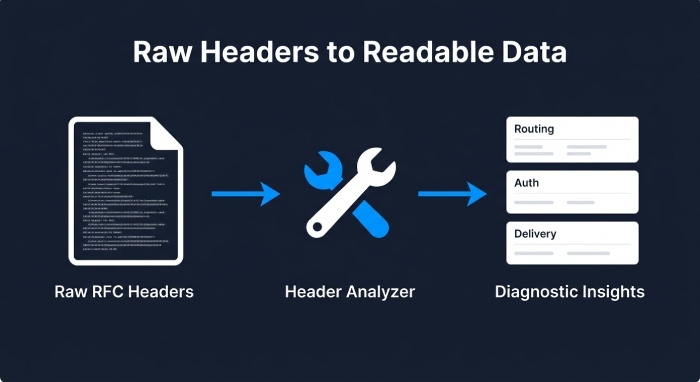
Email header parsing is the process of reading, structuring, and interpreting the metadata inside an email header to understand how a message was created, routed, authenticated, filtered, and delivered. Every email contains raw email headers that follow a defined header format based largely on RFC 822 and later internet message standards. When you parse email headers, you convert dense technical lines into usable diagnostic information.
An email header contains far more than the visible from address, subject, and content-type. It can reveal the message path, sending infrastructure, source IP, relay servers, timestamps, authentication checks, anti-spam results, and hop delays between mail servers. This is why header parsing is essential for investigating email authenticity, mail delivery failures, email spoofing, phishing, and domain verification problems.
Why RFC 822 Still Matters
RFC 822 established the foundational structure for Internet message headers, defining common header fields and their formatting. Although modern email standards have evolved beyond RFC 822, its terminology remains widely used in email troubleshooting, technical documentation, and tools that parse RFC 822 data.
When administrators examine raw email headers, they often encounter RFC 822-style fields. A message header analyzer can parse this information and organize it into a clear, readable format, making header analysis faster and easier. This is especially useful when investigating email routing, authentication, delivery issues, and other message-related details.
To troubleshoot an email, users can view the message source, extract the header information, and paste the raw headers into a message header analyzer. The tool can then process the header data and display key diagnostic details without requiring users to manually interpret or decode every header line.
Key Email Header Fields to Review During Troubleshooting
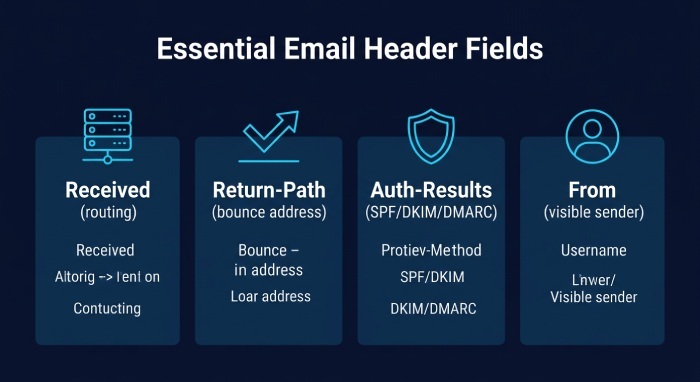
The most important header fields provide evidence about origin, routing, and authentication. During headers analysis, focus first on the fields that identify where the message came from, who handled it, and whether authentication passed.
Key fields include:
- received headers: Show each mail server hop and are critical for tracking message path and hop delays.
- delivered-to: Shows the final recipient mailbox or alias.
- return-path: Identifies the bounce address and often the envelope sender used for SPF.
- authentication-results: Reports SPF, DKIM, and DMARC outcomes.
- from address: The visible sender address users see.
- subject: Useful for correlating incidents and user reports.
- content-type: Helps identify formatting, attachments, and potential payload behavior.
- smtp id: A server-generated identifier used to correlate logs.
- X-Forefront-Antispam-Report: Common in Microsoft 365 and Exchange Online, providing anti-spam results and filtering signals.
Reading the Message Path and Hop Delays
Received headers are generally read from bottom to top. The earliest Received line is usually closest to the original sending infrastructure, while the newest line is closest to the recipient’s mail server.
By comparing timestamps between Received headers, administrators can identify delivery delays and determine where a message may have spent excessive time during transit.
A header analysis tool can simplify this process by converting timestamps into readable hop delays and organizing the message path into a structured view.
What “Approximate Source” Means in Header Analysis
When you analyze the header, the “approximate source” usually refers to the earliest trustworthy server or source IP found in the message path. It does not always mean the human sender’s device. In phishing or email spoofing investigations, attackers may forge some header fields, so headers analysis should prioritize trusted received headers added by your own mail infrastructure.
Trust Boundaries in Received Headers
Header parsing is most reliable when you know which mail servers you control. A received line added by Microsoft Exchange Online, Google Gmail infrastructure, or your own Postfix server is usually more trustworthy than a line inserted before the message reached your domain.
How Header Parsing Reveals SPF Authentication Results
SPF checks whether the sending mail server is authorized to send email for the envelope sender domain. Header parsing helps reveal the SPF result by exposing the return-path, source IP, authentication-results field, and related diagnostic information.
A typical authentication-results field may show whether spf passed, failed, softfailed, or returned neutral. For example:
spf=pass smtp.mailfrom=example.comor:
spf=fail smtp.mailfrom=example.com client-ip=203.0.113.10When you parse email headers, you can compare the source IP against the domain’s SPF record. This is especially useful when investigating mail delivery failures, email authenticity concerns, or domain verification issues. If SPF fails, the cause may be a missing include, an unauthorized sending platform such as Zapier, an incorrect DNS record, or forwarding that changed the envelope sender. Our guide to SPF validation troubleshooting walks through each of these causes in detail.
SPF Failures, Forwarding, and SRS
 Forwarding is a common reason SPF authentication can fail. When a message is forwarded, the receiving server may see the forwarder’s IP address rather than the original sender’s IP address.
Without Sender Rewriting Scheme (SRS), the forwarded message may fail SPF because the forwarding server is not authorized by the original sender’s SPF record. Header analysis can help identify this situation by showing the Return-Path, source IP, Received headers, and authentication results.
For organizations managing multiple email-sending services, maintaining an accurate SPF record can become increasingly difficult. AutoSPF helps automate SPF management by flattening and optimizing SPF records while keeping them within the RFC 7208 10-DNS-lookup limit.
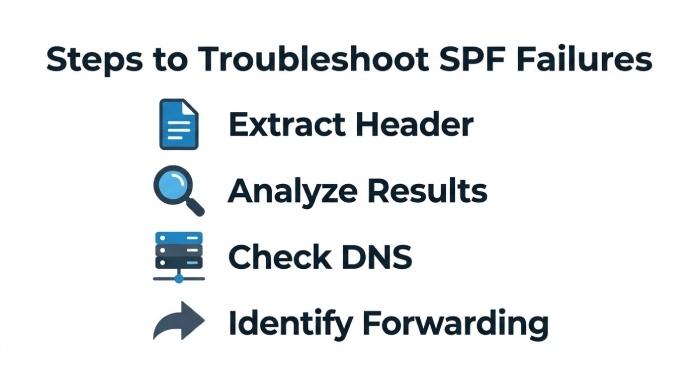
To troubleshoot SPF effectively:
- View the message source in your email client.
- Extract the complete email header.
- Copy the header into a trusted header analysis tool.
- Review Authentication-Results, Return-Path, source IP, and Received headers.
- Compare the SPF result with the domain’s published DNS record.
- Check whether forwarding or other sending services affected the authentication result.
- If the SPF record exceeds the DNS lookup limit, review its configuration and consider automated SPF management.
Using Parsed Headers to Diagnose DKIM and DMARC Issues
DKIM and DMARC troubleshooting depends heavily on email header parsing because both rely on header identity, cryptographic signatures, and domain alignment. DKIM signs selected header fields and message body content. DMARC evaluates whether SPF or DKIM passes and whether the authenticated domain aligns with the visible from address.
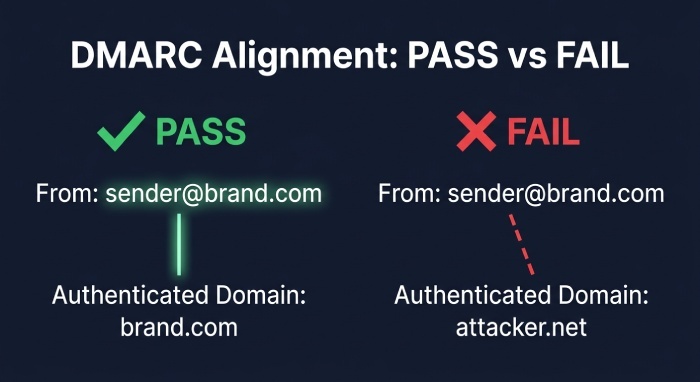 When you parse email headers, look for:
dkim=passordkim=failin authentication-resultsdmarc=pass,dmarc=fail, orbestguesspass- DKIM selector and signing domain
- The visible from address domain
- Forwarding indicators such as SRS0
- Modifications to subject, body, or content-type
A failed DKIM result may occur if an intermediate system modifies the message. For instance, a mailing list, disclaimer tool, or gateway can alter the body, subject, or content-type after signing. Header parsing can expose where that change may have occurred by correlating hop delays, server names, and diagnostic information.
DMARC issues often appear when SPF passes for one domain but the from address uses another domain. In that case, SPF authentication may pass technically, but DMARC can fail due to alignment. If that distinction is unfamiliar, our explainer on what is SPF alignment breaks it down. Headers analysis lets you analyze headers and confirm whether the authenticated domain matches the organizational domain in the visible sender.
DMARC Alignment and Email Authenticity
DMARC is designed to protect email authenticity by preventing unauthorized use of a domain in the from address. If a message claims to come from a trusted brand but authentication-results show DKIM and SPF failures, the email authenticity is questionable.
This is especially important in phishing investigations. Attackers may spoof the from address while hiding behind unrelated infrastructure. By using header parsing to parse email headers and analyze raw headers, teams can separate legitimate senders from fraudulent ones.
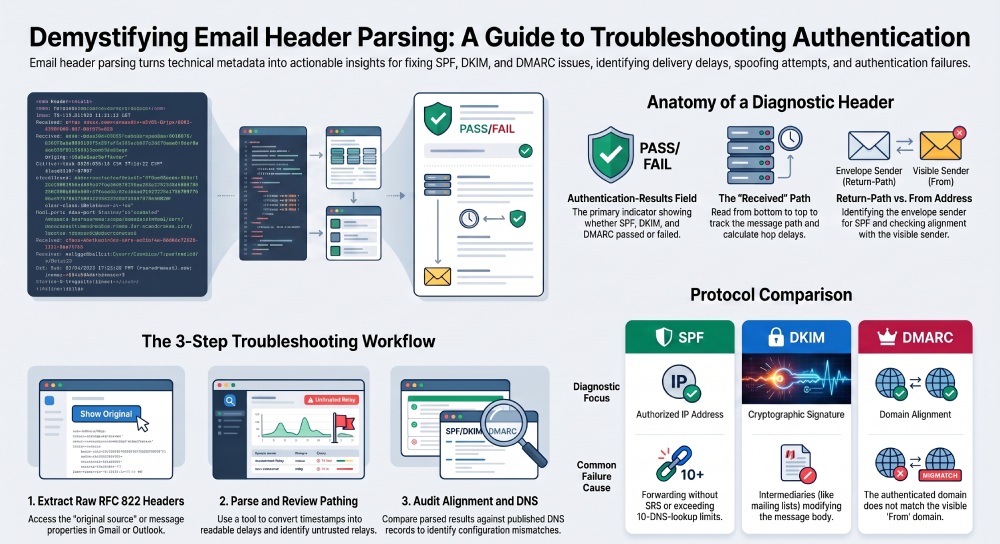
Best Practices and Tools for Faster Email Authentication Troubleshooting
he fastest troubleshooting workflow combines manual header inspection with reliable analysis tools. Always collect the complete internet message headers rather than relying on screenshots or forwarded copies.
In Gmail, users can access the original message information through the message’s original-source view. In Outlook and other email clients, administrators can access message headers or message source information through the available message properties.
A useful header analysis solution should be able to:
- Parse raw email headers.
- Organize Received headers.
- Calculate or display hop delays.
- Highlight SPF, DKIM, and DMARC results.
- Identify important sender and routing information.
- Display anti-spam and filtering results.
- Preserve the original header information for manual verification.
Use this practical sequence:
- Parse the raw RFC 822-style message header.
- Review Received headers and hop delays.
- Check the SPF authentication result.
- Check the DKIM authentication result.
- Check DMARC authentication and alignment.
- Compare the source IP and envelope sender with the published SPF record.
- Review anti-spam and filtering information.
- Check for forwarding, SRS, or other message-routing changes.
- Review whether any intermediary modified the message.
For repeatable investigations, document the Message ID, Delivered-To value, Return-Path, From address, Subject, source IP, and Authentication-Results. This creates a useful evidence trail for security, compliance, and email-delivery teams.
Email header parsing turns complex internet message headers into structured diagnostic information. By analyzing Received headers, authentication results, sender information, routing details, and filtering signals, administrators can investigate delivery delays and authentication problems more efficiently.
Header analysis is particularly useful when troubleshooting SPF, DKIM, and DMARC because it provides evidence about how a message was authenticated and routed. When SPF problems are caused by complex records or excessive DNS lookups, dedicated SPF management can provide an additional layer of protection and reliability. These are exactly the conditions that trigger a PermError, and our SPF PermError guide covers how to resolve it.
For organizations managing multiple email-sending services, AutoSPF automatically manages and optimizes SPF records to help keep them within the 10-DNS-lookup limit while supporting reliable email authentication and deliverability.
General Manager
General Manager of DuoCircle. Product strategy and commercial lead for AutoSPF's 2,000+ customer base.
LinkedIn Profile →