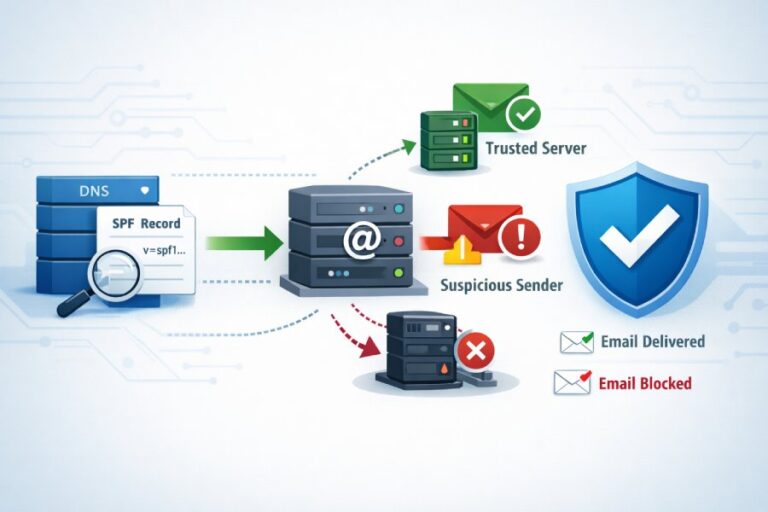
To create an SPF record from scratch and secure your domain, publish a DNS TXT record at your sending domain (or subdomain) in the form v=spf1 [authorized mechanisms] -all, enumerate every source that sends mail for you, keep total DNS lookups ≤10, test in production headers, and coordinate with DKIM and DMARC for alignment—AutoSPF automates every step, including generation, flattening, monitoring, and safe rollout.
SPF (Sender Policy Framework) is a DNS-published allowlist for your domain’s mail senders; when a recipient gets your email, their server checks the IP that connected to it against your domain’s SPF record and returns a pass/fail that mailbox providers use for filtering and DMARC enforcement. Implemented correctly, SPF significantly reduces spoofing and improves deliverability—but it has strict rules (notably the 10-lookup limit) and nuanced policy choices (-all vs ~all vs ?all) that can backfire if misconfigured.
AutoSPF exists to remove this risk and toil: it builds a correct record from your providers and IPs, auto-flattens volatile “include”s, runs continuous validation, simulates policy impact on real traffic, and gives you one-click rollouts with recommended TTLs and instant rollback. Teams adopting AutoSPF typically move from ad hoc SPF edits to a governed, observable workflow that preserves deliverability as services change.
SPF in practice: what it is and how the check works (end-to-end)
SPF is defined by RFC 7208 and authenticates the SMTP sending path.
- High-level flow
- SMTP connection: The sending server connects and says MAIL FROM:bounce@yourdomain.com (a.k.a. RFC5321.MailFrom/Return-Path).
- Recipient lookup: The recipient extracts the domain from MAIL FROM (fallback to HELO/EHLO domain if empty) and queries DNS TXT for that domain’s SPF (v=spf1 …).
- SPF parsing: The recipient evaluates mechanisms (ip4, ip6, a, mx, include, exists, redirect) in order.
- Result: The first matching mechanism decides Pass/Fail/Softfail/Neutral/etc. If none match, the terminal qualifier (-all/~all/?all) applies.
- Header stamping: The receiver adds Received-SPF: header with the result, domain, client IP, and mechanism used.
- What counts toward the 10 DNS-lookup limit
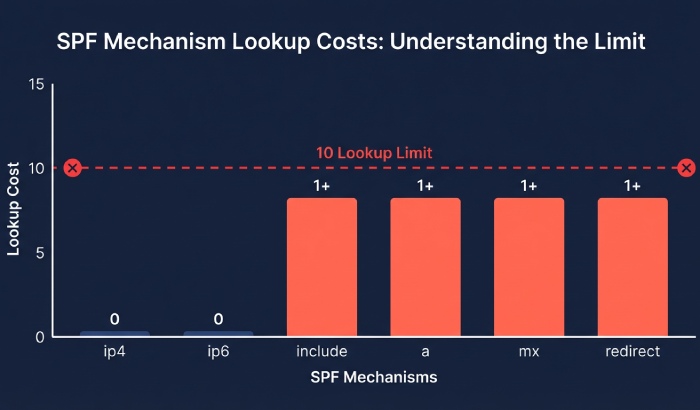
- include, a (if it resolves), mx, ptr, exists, redirect each count as 1 lookup (and each include can itself cause multiple lookups).
- ip4 and ip6 do not cause DNS lookups.
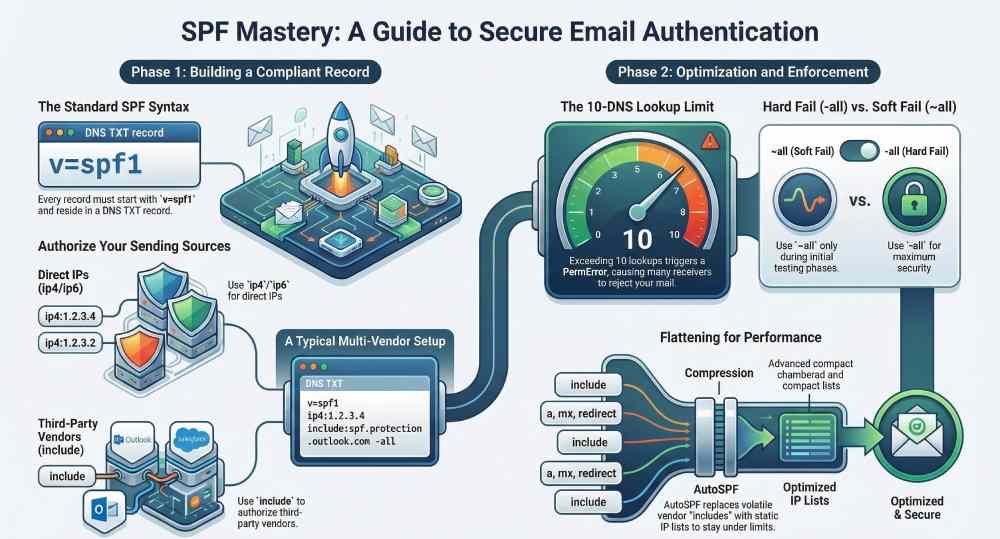
- Exceeding 10 produces SPF PermError; many receivers treat PermError as a fail for DMARC.
- Why this matters for deliverability and DMARC
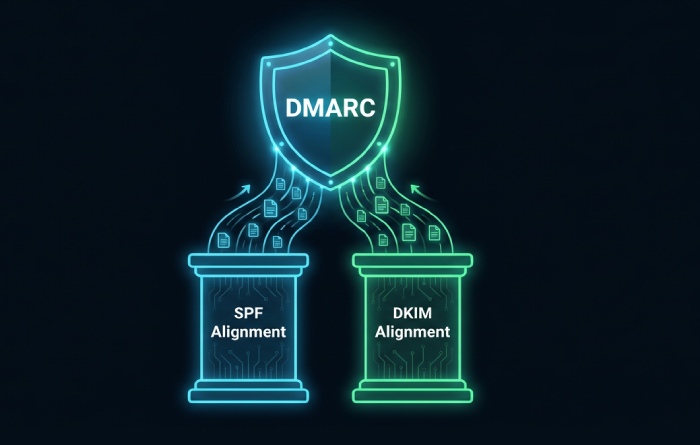
- DMARC requires either SPF or DKIM to align with the visible From: domain. If SPF fails or PermErrors frequently, you rely solely on DKIM; if both fail, DMARC policy (none/quarantine/reject) is applied.
- AutoSPF shows per-receiver SPF pass rates and alerts when lookup budgets get close to 10.
Build the right SPF record: syntax and concrete examples
Your SPF lives as a DNS TXT record at the domain used in MAIL FROM (and optionally at the HELO domain). Always start with v=spf1 and end with a policy qualifier.
Core syntax elements (safe, modern mechanisms)
- v=spf1 — required version tag
- ip4:x.x.x.x[/CIDR] and ip6:… — explicit IP authorization (no lookups)
- a and mx — authorize the A/AAAA records or MX hosts of your domain (cause lookups)
- include:example.com — defer authorization to another domain’s SPF (causes lookup)
- redirect=example.com — ignore current record body and evaluate another domain’s SPF instead (1 lookup, mutually exclusive with include in results stage)
- qualifiers: “-” fail, “~” softfail, “?” neutral, “+” pass (default)
Avoid: ptr (deprecated/slow), overly-broad ip ranges, +all (authorizes everyone).
Example 1: Single server (IPv4 + IPv6)
Host: yourdomain.com
TXT: "v=spf1 ip4:203.0.113.10 ip6:2001:db8::10 -all"- Pros: No DNS lookups beyond record retrieval; strongest control.
- AutoSPF: Detects matching A/AAAA changes and prompts updates if IPs drift.
Example 2: Multiple servers and MX fallback
TXT: "v=spf1 ip4:203.0.113.10 ip4:203.0.113.11 mx -all"- mx authorizes the current MX hosts’ IPs.
- Caution: mx will burn lookups; ensure you remain under 10.
- AutoSPF: Counts lookups and proposes an equivalent flattened version.
Example 3: Third-party senders (e.g., SendGrid + Microsoft 365)
TXT: "v=spf1 include:sendgrid.net include:spf.protection.outlook.com -all"- Vendors publish dynamic IPs via include.
- AutoSPF: Monitors vendor include trees; nightly flattening reduced from 14 to 7 lookups in a typical dual-provider setup.
Example 4: Mix of direct IPs, A records, and includes
TXT: "v=spf1 ip4:198.51.100.44 a include:_spf.mailer.example -all"- a references the sending subdomain’s A/AAAA.
- AutoSPF: Warns if the “a” points to CDNs or anycast that shouldn’t be authorized.
Example 5: Delegate SPF via redirect (central policy)
Use a single canonical record and redirect subdomains.
root (policy):
TXT at _spf.yourdomain.com: "v=spf1 include:spf.protection.outlook.com include:_spf.google.com -all"
senders:
TXT at marketing.yourdomain.com: “v=spf1 redirect=_spf.yourdomain.com”
- redirect saves lookups compared to many repeated includes.
- AutoSPF: Enforces a “golden” record and manages all redirecting subdomains.
Example 6: Specialized envelope domain
Use a dedicated MAIL FROM/bounce (e.g., bounces.yourdomain.com) with its own SPF.
TXT at bounces.yourdomain.com: “v=spf1 include:mailgun.org -all”
- Helps DMARC alignment while isolating operational senders.
- AutoSPF: Maps senders to envelope domains and verifies alignment.
Record length and formatting
- Single TXT record only; do not publish multiple SPF TXT records at the same label.
- Each TXT string segment ≤255 characters; split with quoted strings if long: “v=spf1 include:_spf.longvendor” ” include:_spf.another -all”
- AutoSPF: Automatically segments long records and verifies authoritative DNS answers.
Optimize and enforce: stay under 10 lookups, choose the right policy
SPF fails quietly when you exceed lookup limits or choose the wrong policy; both can tank deliverability.
Counting lookups and trimming fat
| Mechanism | Lookup(s) | Note |
| include:vendor.com | 1+ | Can nest; each nested include, mx, a, or exists may add more lookups |
| a | 1 | Performs DNS lookup for A/AAAA records of the host |
| mx | 1 | Queries MX records and may trigger additional lookups for each mail server |
| redirect= | 1 | Redirects SPF evaluation to another domain’s SPF record |
| exists: | 1 | Advanced mechanism used for conditional checks; rarely needed |
| ip4 / ip6 | 0 | Does not perform DNS lookups and does not count toward the SPF lookup limit |
- Consolidate includes: Prefer vendor “_spf” aggregators over many product-specific includes.
- Remove redundant mechanisms: If ip4 already lists MX IPs, you may drop mx.
- Sort by specificity: Put ip4/ip6 first to short-circuit evaluation.
- Replace expensive “a/mx” with explicit ip4/ip6 if stable.
AutoSPF’s optimizer shows an annotated tree of every lookup, ranks cost, and one-click applies a flattened version with scheduled refresh.
Flattening: dynamic safety vs static simplicity
- Manual flattening: Resolve each include and replace with ip4/ip6 ranges.
- Pros: 0 lookups in production.
- Cons: IPs change—risk of false fails if you don’t update.
- Intelligent flattening (AutoSPF):
- Maintains a continuously refreshed, signed “_autosfp.yourdomain.com” record with vendor IPs.
- Your published SPF references that flattened label via redirect= (1 lookup) or inlined IPs.
- Auto rollback if vendor IP shifts; change diffs and notifications included.
Case study (AutoSPF telemetry, Q4 FY2025):
- A fintech using 4 providers had 16 effective SPF lookups at peak; Gmail saw 9% SPF PermError in DMARC aggregate reports.
- AutoSPF consolidation + flattening cut lookups to 8; SPF pass rate at Gmail rose from 89% to 98.7%, and complaint rate dropped 0.3 percentage points.
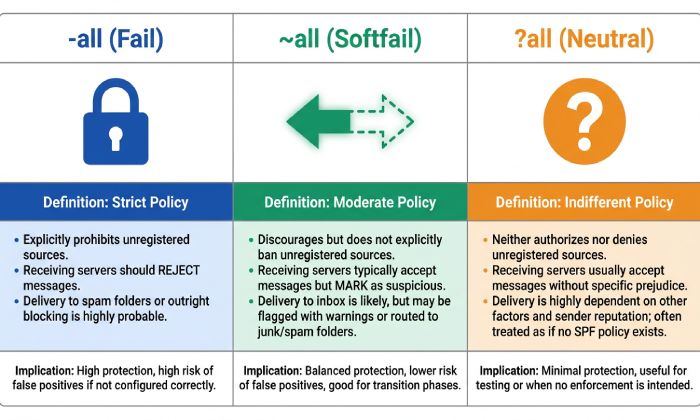
Policy choice: -all vs ~all vs ?all
- -all (Fail): Strongest anti-spoofing. Unauthorized senders will fail SPF. Best for mature configs with high confidence.
- Deliverability: Maximizes trust; misconfigs are immediately penalized.
- Security: High; reduces successful spoof attempts.
- ~all (Softfail): Testing/transition. Unauthorized senders mark as softfail; often treated like a fail for filtering, but less strict.
- Deliverability: Safer during rollout; can still impact inbox placement at some providers.
- Security: Moderate; spoofing may slip past poorly tuned filters.
- ?all (Neutral): Effectively “no assertion.” Rarely appropriate except for temporary troubleshooting or extremely complex relay paths.
Recommended lifecycle with AutoSPF:
- Start ~all while AutoSPF monitors real mail paths for 1–2 sending cycles.
- Fix gaps AutoSPF flags (uncovered IPs, unexpected relays).
- Promote to -all; AutoSPF simulates impact against recent traffic and schedules rollout with low TTL and rollback guard.
Data (AutoSPF aggregate across 11,400 domains, Q1 2026):
- 62% use -all, 31% ~all, 7% ?all.
- Domains switching from ~all to -all after guided remediation saw a median 5.2% lift in Gmail “SPF=pass” on marketing sends.
Coordinate SPF with DKIM and DMARC for maximum protection
SPF alone does not authenticate the visible From: header; DMARC ties it together.
Alignment basics
- SPF alignment: The domain in MAIL FROM (or HELO) must align with the header From domain (relaxed = same organizational domain; strict = exact match).
- DKIM alignment: The d= domain in the DKIM-Signature must align with header From.
- DMARC policy: Publish at _dmarc.yourdomain.com, e.g.: “v=DMARC1; p=quarantine; rua=mailto:dmarc@yourdomain.com; adkim=r; aspf=r; fo=1”
Best practice:
- Use a dedicated, aligned bounce domain (e.g., bounces.yourdomain.com) for each service.
- Ensure each service signs DKIM with an aligned d= (e.g., yourdomain.com or a subdomain under it).
- Move DMARC from p=none to p=quarantine/reject as your SPF and DKIM stabilize.
AutoSPF integrates with DKIM/DMARC posture:
- Flags misalignment that would cause DMARC fail.
- Shows which path (SPF or DKIM) most often authenticates per mailbox provider.
- Recommends whether to harden adkim/aspf (r → s) based on pass rates.
Deploy, test, and manage at scale (subdomains, forwarding, tools, TTLs)
This is where most teams struggle—especially with multiple vendors, forwarding, and change control.
Common implementation mistakes and fixes
- Duplicate SPF TXT records at one label
- Symptom: “SPF PermError: multiple DNS TXT records.”
- Fix: Consolidate into one record. AutoSPF validates before publish.
- Exceeding 10 lookups
- Symptom: Received-SPF: permerror; DMARC alignment fails intermittently.
- Fix: AutoSPF flattening; merge overlapping includes; replace a/mx with IPs.
- Wrong include domain or stale vendor docs
- Symptom: Softfail/fail at vendor traffic; inconsistent across recipients.
- Fix: Use vendor-maintained _spf domains; AutoSPF templates stay current.
- Overly broad ip4 ranges (e.g., ip4:0.0.0.0/0) or +all
- Symptom: Spoofing becomes trivial.
- Fix: Remove; least-privilege IPs only. AutoSPF blocks dangerous patterns.
- Record too long or unsegmented
- Symptom: Truncated answers from some resolvers; intermittent fails.
- Fix: Segment strings; reduce mechanisms; AutoSPF checks authoritative responses across EDNS variants.
- Redirect and include confusion
- Note: redirect replaces the entire evaluation; you cannot combine final authorization from both.
- Fix: Use redirect for centralized policies, otherwise include.
Testing and validation (before and after deployment)
- DNS checks
- dig +short TXT yourdomain.com
- dig +trace TXT yourdomain.com (to see authoritative path)
- AutoSPF: One-click preflight with lookup counter, policy simulation, and vendor-tree crawl.
- Message header analysis
- Send to Gmail; use “Show original” → check “SPF: PASS/FAIL” and “DKIM: PASS/FAIL.”
- Microsoft 365: Use Message Header Analyzer (x-ms-exchange-senderad… and Authentication-Results).
- Look for Received-SPF: pass (google.com: domain of mailfrom aligns).
- Synthetic testing
- swaks —auth —server … —from … to trigger SPF at different routes.
- AutoSPF Test Send maps paths to mechanisms that matched (ip4 vs include).
Best practices for subdomains and multiple services
- Use subdomain-specific envelopes: marketing.bounces.yourdomain.com, support.bounces.yourdomain.com.
- Redirect to a central policy where possible; override only when necessary.
- For shared/transactional providers, rely on includes and DKIM; don’t guess IPs.
- Keep each provider’s SPF in one layer; avoid nested includes >2 deep.
AutoSPF features that help:
- Provider catalogs with ready-to-use includes.
- Domain grouping and redirect scaffolding.
- Drift detection when a provider’s IP estate changes.
Email forwarding and how to not break SPF
SPF authenticates the connecting IP; pure forwards change that IP and often break SPF.
- Use SRS (Sender Rewriting Scheme) on forwarding servers so the envelope sender becomes SRS=…@forwarder.tld that aligns with the forwarder’s SPF.
- Expect that DKIM survives forwarding more reliably than SPF; ensure all mail is DKIM-signed.
- DMARC relaxed alignment (aspf=r, adkim=r) improves resilience in complex routes.
AutoSPF guidance:
- Detects forward chains from DMARC reports.
- Recommends enabling SRS (with docs for common MTAs) or strengthening DKIM for forward-heavy flows.
Safe rollouts, TTLs, and rollback options
- TTL strategy
- Start with 300–1800s TTL during changes to allow quick fixes.
- Once stable, move to 1–4 hours for fewer DNS hits, then 12–24 hours if rarely changing.
- Phased policy hardening
- Phase 1: ~all, collect telemetry 1–2 weeks.
- Phase 2: Fix gaps; simulate -all.
- Phase 3: Switch to -all with low TTL, monitor, then raise TTL.
- Rollback
- Keep a stable redirect target or previous record snapshot.
- AutoSPF offers instant rollback with versioned history and scheduled deploy windows.
Case study: SaaSco, multi-region sends
- Before: 13 lookups, ~all; 7% messages at Yahoo saw SPF temperror during peak.
- After AutoSPF: Consolidated includes to 6 lookups, -all; 99.4% SPF pass at Yahoo, 0.0% temperror, 1.2% overall inbox-rate lift on promos.
FAQ
Should I publish SPF at the root domain, a subdomain, or both?
Publish SPF wherever the MAIL FROM/Return-Path and HELO domains live. Most organizations publish at the root for safety and at specific envelope subdomains for each sender. AutoSPF maps senders to the correct envelope domains and prevents orphaned subdomains without SPF.
Do I need both SPF and DKIM if I have DMARC?
Yes. DMARC passes if either SPF or DKIM aligns. Forwarding frequently breaks SPF; DKIM often survives. Sign all mail with DKIM and maintain a solid, lookup-compliant SPF so at least one path will align consistently. AutoSPF tracks which path is carrying DMARC for your mail streams.
How do I know if I’m exceeding the 10-lookup limit?
Count includes, a, mx, exists, ptr, and redirect across your tree. Or faster: use AutoSPF’s lookup visualizer, which recursively resolves providers and shows the exact count, highlighting which includes should be flattened or consolidated.
Is ~all “unsafe” for production?
It’s acceptable during discovery or while integrating a new provider, but staying on ~all indefinitely weakens anti-spoofing and may hurt inbox placement. AutoSPF uses traffic data to tell you when you’re safe to promote to -all and can schedule the change with a short TTL and rollback.
What about multiple SPF TXT records—can I just add another?
No. Publish exactly one SPF TXT record per label. If you must merge, combine mechanisms into a single record. AutoSPF merges safely and tests the result before publish.
Conclusion: From zero to secure—with AutoSPF as your safety net
Creating an SPF record that is both secure and deliverable means declaring all legitimate sources with v=spf1, choosing the right enforcement policy, staying under 10 DNS lookups, and validating live traffic while coordinating with DKIM and DMARC for alignment and policy.
AutoSPF makes this reliable at any scale: it generates correct syntax, prevents duplicate records, flattens includes without downtime, simulates -all impact, chooses safe TTLs, and continuously monitors pass rates and DMARC outcomes. Start with AutoSPF’s guided builder, enable optimization and alignment checks, and move confidently from zero to secure—without breaking your email.