How To Configure Sendgrid DKIM Alongside DMARC And SPF Records?

Quick Answer
For SendGrid customers, email authentication is the foundation of email delivery and email security. The trio of DKIM, SPF, and DMARC lets mailbox providers verify message origin, preserve message integrity, and apply domain-based policies that protect the domain owner. DomainKeys Identified Mail (DKIM) uses a dkim signature generated by the sender to create a digital fingerprint of selected header fields and body content.
Try Our Free DMARC Checker
Validate your DMARC policy, check alignment settings, and verify reporting configuration.
Check DMARC Record →
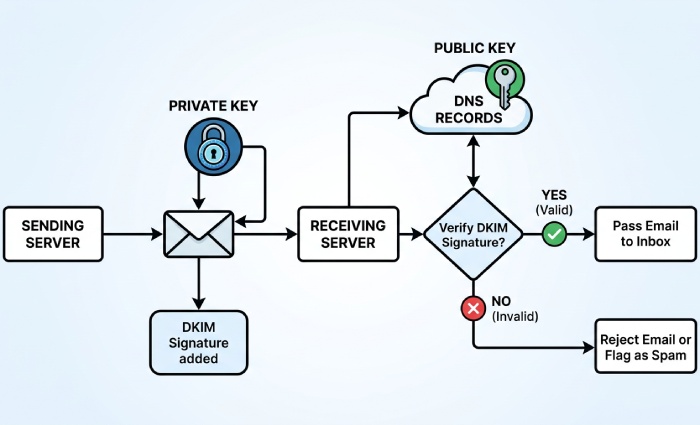
For SendGrid customers, email authentication is the foundation of email delivery and email security. The trio of DKIM, SPF, and DMARC lets mailbox providers verify message origin, preserve message integrity, and apply domain-based policies that protect the domain owner. DomainKeys Identified Mail (DKIM) uses a dkim signature generated by the sender to create a digital fingerprint of selected header fields and body content. That dkim signature is validated by recipients with Public Key Cryptography: the sending server signs with a private key, and receivers fetch the matching public key from DNS to verify message authenticity.
In practice, sendgrid dkim is implemented with dkim cname records that point to Twilio SendGrid signing endpoints. When your sender domain is aligned and domain authentication is complete, your dkim record publishes the public key through a TXT record or, with SendGrid, via CNAME indirection. The resulting dkim signatures allow recipients to decode and decrypt the signature’s hash values with the public key and confirm that the private key transforms were applied by an authorized sending service. This verification process hinges on consistent canonicalization and stable header fields, per the Internet Message Format in RFC5322.
SPF complements DKIM by authorizing the sending server IPs that may send email messages for your sender domain. Your SPF dns txt record typically includes include:sendgrid.net so recipients can confirm the message sender is allowed. DMARC then ties it together: it checks alignment between the RFC5322 From domain and the authenticated domains of your DKIM and SPF results. With DMARC, you can request enforcement, reporting, and alignment modes (relaxed or simple) to control policy. Build a valid record with our free SPF record generator.
Why this matters to deliverability: mailbox providers trust authenticated messages. A proper dkim selector strategy, accurate dkim record publication, and a valid SPF record reduce false positives, strengthen brand protection, and improve inbox placement. By using sendgrid dkim with DMARC and SPF, you provide strong authentication signals, minimize spoofing, and raise your reputation with algorithms that evaluate encryption-backed verification, Base64-encoded signatures, and consistent hash values over time.
Prerequisites, domain strategy, and planning the DNS changes
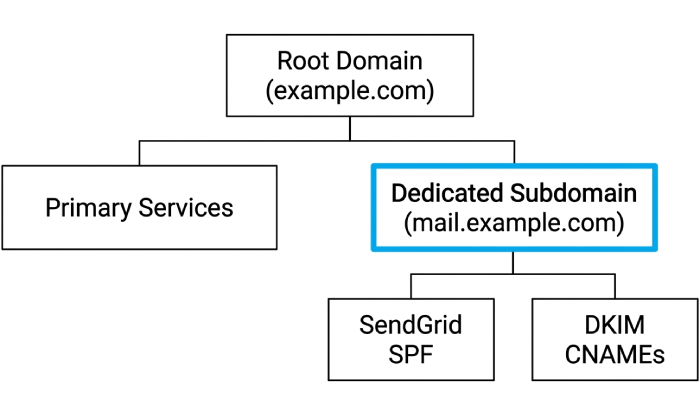
Before you begin, decide on your sender domain and how it fits your organization’s routing. For domain authentication, SendGrid recommends authenticating a dedicated subdomain such as mail.example.com, which will host your cname records and dkim cname records. This avoids conflict with existing records at your apex and keeps marketing and transactional streams separate if you manage multiple brands or a Subuser structure under one account.
Plan your dkim selector scheme up front. A dkim selector (e.g., s1) identifies which public key a receiver should fetch. A custom dkim selector lets you run parallel keys per stream, rotate keys safely, and test new configurations. Keep a map of selectors to business units or subusers to avoid confusion. Because sendgrid dkim uses CNAME indirection, the dkim record you publish at your DNS does not hold the public key directly; the cname records point to Twilio SendGrid, which serves the TXT record containing the public key material. This keeps rotation seamless while preserving your DNS hygiene.
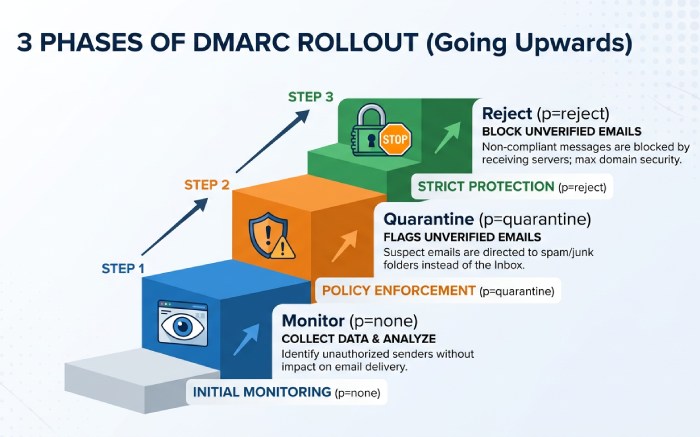
Review your DNS and resource record limits with your dns provider. You will add CNAME and TXT records, often several per sender domain. Note TTLs and propagation windows in DNS so you can schedule rollout and verification, then confirm what resolves with an SPF record lookup. Confirm that no legacy dkim record, cname records, or SPF entries will conflict with the new setup. Also plan your DMARC policy (start with p=none for monitoring, then move to quarantine or reject) and decide on alignment modes (relaxed or simple). For canonicalization, most senders use relaxed for headers and simple for bodies, but ensure your content pipeline preserves stable header fields and body content so the dkim signature hash values remain valid.
Security considerations: guard your private key operationally. While SendGrid manages the private key in the cloud signing service, you still control the surface area via your DNS. Use SSL/TLS on your Email Server infrastructure, apply Automated Security features in Twilio SendGrid where applicable, and document dkim settings, dkim configuration, and change control in Account Management.
Configure, publish, and verify records with SendGrid
Generate DKIM (CNAME) and SPF records with SendGrid’s Domain Authentication
In your Twilio SendGrid account, go to Settings > Sender Authentication and select Domain Authentication. The guided setup will prompt for your dns provider and whether you want to use a custom dkim selector. Choose a clear dkim selector (for example, s1) and enable custom dkim selector if you plan to rotate or run multiple streams. The wizard will generate dkim cname records for sendgrid dkim, typically three CNAMEs that resolve to uNNNNNN.wl.sendgrid.net, plus an SPF include you’ll add to your domain’s SPF txt record.
Conceptually, this process uses public key encryption and Base64 encoding to create and publish the digital fingerprint. The private key transforms your selected header fields and body content into hash values via an algorithm, and receiving servers fetch the public key to verify the signature and verify message authenticity.
Publish DKIM and SPF in your DNS (provider-agnostic steps and tips)
With the generated details in hand, log into your dns provider and add the following resource records:
- DKIM: Add the dkim cname records exactly as supplied. Each host will look like s1._domainkey.mail.example.com (your dkim selector plus _domainkey) and must be a CNAME pointing to the SendGrid target. These cname records delegate the dkim record resolution so that the TXT record with the public key can be managed by Twilio.
- SPF: Edit or create your SPF txt record at the root of the sender domain you authenticated (often the organizational domain, not the subdomain). Include include:sendgrid.net (or the host provided). Ensure you have only one SPF txt record; merge values as needed by combining SPF records into a single policy.
- DMARC: If you don’t have one, publish a DMARC TXT record at _dmarc.example.com with a monitoring policy initially (e.g., v=DMARC1; p=none; rua=mailto:dmarc@yourdomain; adkim=r; aspf=r). Later, you can enforce p=quarantine or p=reject.
Topics
General Manager
General Manager of DuoCircle. Product strategy and commercial lead for AutoSPF's 2,000+ customer base.
LinkedIn Profile →