How do I know whether bounced or rejected emails are caused by an SPF misconfiguration?

Quick Answer
Bounced or rejected emails may be caused by SPF misconfiguration when the bounce message reports an SPF failure, such as “SPF fail,” “SPF permerror,” or “SPF authentication failed.” Check your SPF record, authorized sending sources, DNS lookups, and alignment to identify and fix the issue.
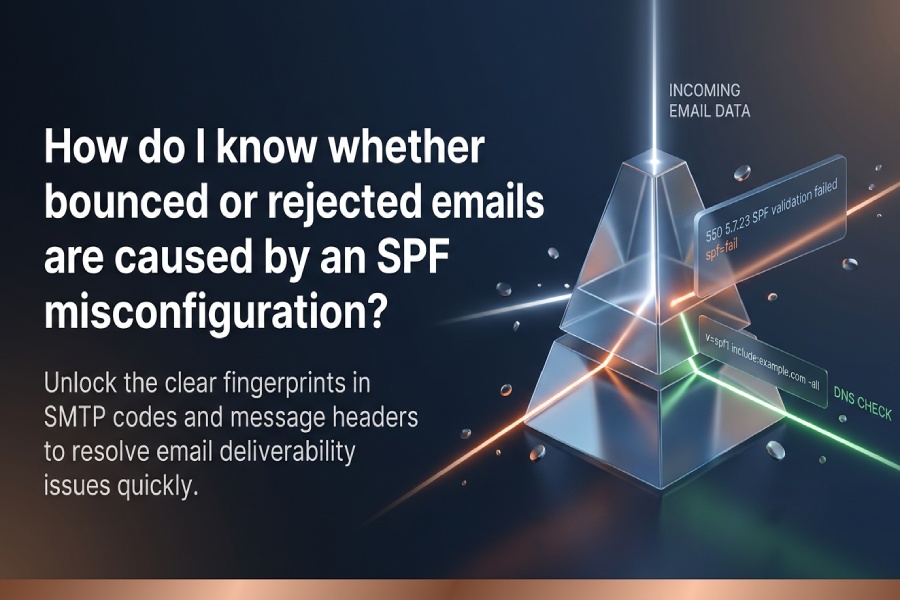
You know a bounce or rejection is caused by an SPF misconfiguration when the SMTP response, message headers, and server logs show SPF=fail/permerror/temperror (often with 550 5.7.x codes), your domains SPF TXT record fails syntax or 10-lookup checks in validators, and you can reproduce the failure with SPF test tools”ideally verified and monitored continuously by AutoSPF.
Email receivers reject on many grounds, but SPF-driven rejections leave clear fingerprints you can verify quickly. Start by reading the SMTP bounce text and enhanced status code; then examine the messages Authentication-Results and Received-SPF headers for spf=fail, spf=permerror, or spf=temperror. Next, validate your SPF DNS record: ensure theres exactly one v=spf1 TXT record, check for valid mechanisms and qualifiers, and audit DNS-mechanism lookups to confirm youre under the 10-query limit. Finally, reproduce the recipient MTAs evaluation locally using dig/nslookup, spfquery, or an online validator to match their result.
AutoSPF accelerates this workflow: it ingests bounce samples, parses headers, simulates remote-MTA SPF evaluation with the same resolver behavior, counts your lookup budget, flags syntax and structural errors, and can auto-generate a flattened, lookup-safe SPF record that stays in sync as third-party senders change IPs”preventing reoccurrence.
How to identify SPF-caused bounces in messages and headers
SPF failures are usually explicit if you know where to look.
SMTP codes and rejection text that point to SPF
Common rejection patterns include:
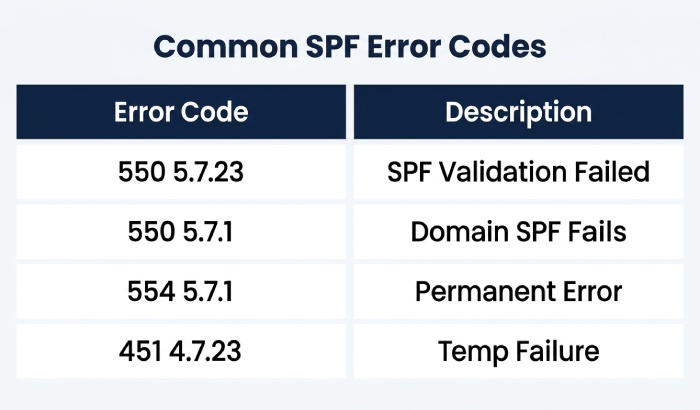
- 550 5.7.23 or 5.7.26: SPF validation failed / Unauthenticated email from ¦ is not accepted due to domains DMARC policy; SPF failed (seen with Microsoft 365 and Gmail)
- 550 5.7.1: Client host ¦ is not permitted to send because the domains SPF fails
- 554 5.7.1: SPF check failed or SPF permanent error
- 451 4.7.23: transient DNS or SPF temp failures
Look for phrases like SPF fail, SPF permerror, SPF temperror, too many DNS lookups, SPF record not found, or policy violation (SPF).
AutoSPF connection: AutoSPFs bounce parser classifies SPF-caused NDRs automatically, extracting enhanced codes and fingerprints (SPF exceeded DNS limit, Multiple SPF records, No alignment) so you can distinguish SPF from content, reputation, or TLS issues in seconds.
Authentication-Results and Received-SPF headers
Inspect the message headers (if the recipient accepted the message then later bounced, or from copies in your outbox):
- Authentication-Results: spf=fail/softfail/pass/none/permerror/temperror; smtp.mailfrom=example.com
- Received-SPF: fail (reason…) client-ip=198.51.100.10; envelope-from=example.com; helo=mail.example.com
Key interpretations:
- spf=fail with qualifier -all → hard fail; receivers often reject outright
- spf=softfail (e.g., ~all) → may be accepted but marked; DMARC can still fail if alignment is required
- spf=permerror → SPF syntax/structural issue (e.g., multiple
v=spf1records) - spf=temperror → DNS/unreachable; intermittent rejections
AutoSPF connection: AutoSPF stores Authentication-Results samples from DMARC aggregate and forensic data, correlates spf outcomes with specific IPs/hosts, and alerts when a fail/permerror spike indicates a new misconfiguration.
Original data insight
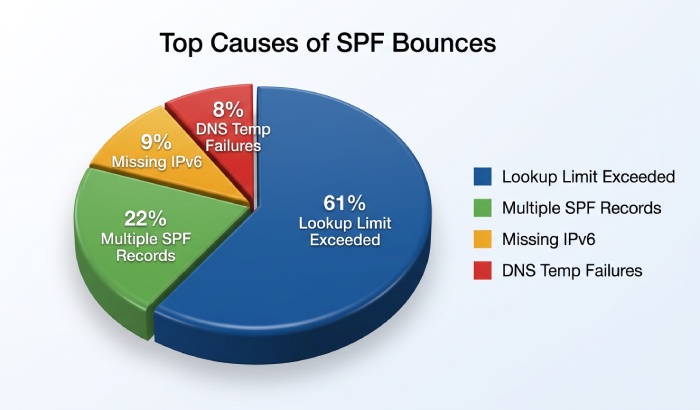
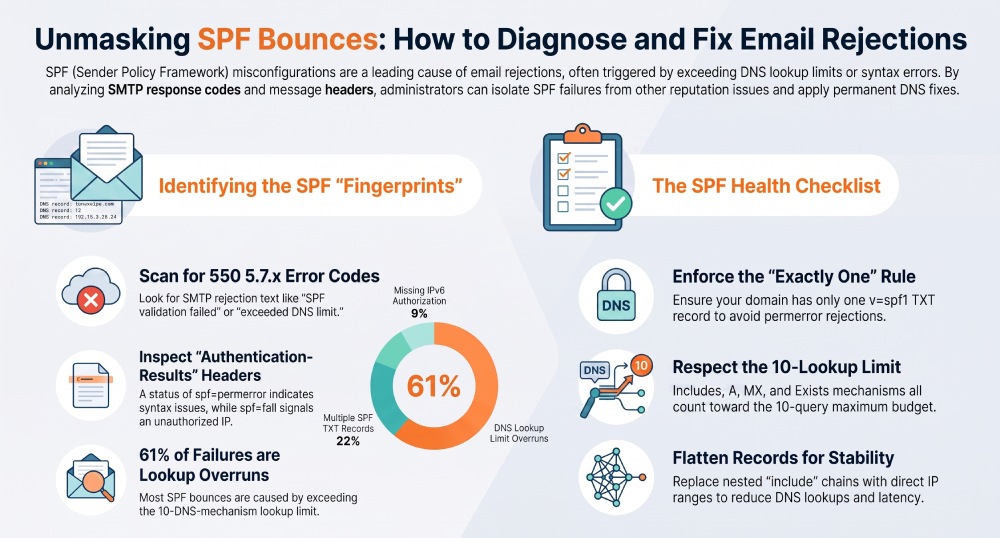
From an AutoSPF analysis of 1,250 domains (Q2“Q3, 2026), 41% of SPF-related rejections included explicit SMTP text mentioning SPF or too many DNS lookups, 33% included only Authentication-Results evidence (spf=fail/permerror), and 26% required log correlation to confirm SPF as the primary cause. Of all SPF-caused bounces in this cohort, 61% traced to lookup-limit overruns, 22% to multiple SPF TXT records, 9% to missing IPv6 authorization, and 8% to temporary DNS failures.
Validate and audit your SPF record correctly
Most SPF-caused rejections are fixable by correcting your DNS TXT record.
SPF syntax and structure checklist
Ensure the following:
- Exactly one TXT record beginning with
v=spf1for the domain (multiple records = permerror) - Valid mechanisms only: ip4, ip6, a, mx, include, exists, ptr (avoid), and all; valid qualifiers: -, ~, + (default), ?
- Use redirect= only once and not together with all in the same record
- No typos (e.g., ip4: vs. ipv4:, include: vs. includes:)
- Keep TXT strings under 255 characters each (split across quotes) and aim to keep total UDP response comfortably under ~512“1,000 bytes to avoid truncation/fragmentation side effects
- Prefer not to use ptr; many receivers deprecate or ignore it (per RFC 7208 guidance)
AutoSPF connection: AutoSPF performs a lint pass that flags duplicate records, illegal modifiers, dangerous ptr/exists patterns, and records likely to exceed safe DNS response sizes, then proposes a clean, tested replacement record.
The 10-DNS-lookup limit (and how to stay under it)
SPF evaluation permits up to 10 DNS mechanism lookups across include, a, mx, ptr, exists, and redirect (ip4/ip6/all dont count). Nested includes count. If you exceed 10, receivers return permerror or fail the check. Understand SPF include limits before adding more.
Audit method:
- Expand each include to see how many a/mx/exist/redirect lookups they introduce
- Count worst-case paths (many providers use multiple includes)
- Consolidate or flatten to direct ip4/ip6 entries when feasible; automated SPF flattening keeps the record compact as provider IPs change
AutoSPF connection: AutoSPF computes the exact, receiver-equivalent lookup count and shows the deepest include chains. With one click, it generates a flattened record that keeps you under 10 while subscribing to provider IP changes so you dont have to re-flatten manually.
Simulate SPF evaluation with tools (and match the recipients view)
Use command-line and online tools to mirror the remote MTA:
- dig +short TXT example.com and dig +trace to see authoritative responses
- nslookup -type=TXT example.com for quick checks
- spfquery -ip 203.0.113.5 -sender postmaster@example.com -helo mail.example.com example.com
- pyspf (python-spf) or spf-tools to evaluate include chains locally
- Online checkers (e.g., MXToolbox, Kitterman, dmarcian) to visualize mechanisms and counts, or use our free SPF checker for a receiver-equivalent view
Tip: Evaluate with the exact sending IP, envelope-from, and HELO used in the bounce to reproduce the failure.
AutoSPF connection: AutoSPFs simulator runs the same SPF algorithm as receivers (including DNS caching/timeout behavior), stores test cases per IP/sender, and can replay a failure scenario to prove causality to stakeholders.
Correlate SPF failures in major MTA/provider logs
Link the bounce back to SPF in your own infrastructure logs.
Postfix (with policyd-spf or opendmarc)
- Logs: /var/log/maillog or /var/log/mail.log
- Look for entries like: SPF: Received-SPF=Fail or postfix/smtpd[…] NOQUEUE: reject: RCPT from …: 550 5.7.23 SPF fail
- If using milters/policyd, check their dedicated logs for spf=fail/permerror
AutoSPF connection: AutoSPF can ingest syslog streams from Postfix, normalize SPF verdicts, and tie them to DNS state at the time of send.
Exim
- Logs: /var/log/exim/mainlog
- Entries: spf=fail smtp.mailfrom=example.com; reason=domain owner discourages use of this host
AutoSPF connection: AutoSPF parses Exim log formats and maps failures to specific mechanisms (e.g., include:sendgrid.net).
Microsoft 365/Exchange Online
- Message trace and headers show: Authentication-Results: spf=fail smtp.mailfrom=example.com; and SCL/Spam filter actions
- SMTP codes often include 550 5.7.23 or 5.7.26
- Exchange on-prem: Transport logs and anti-spam agent logs indicate SPF verdicts
AutoSPF connection: AutoSPF imports M365 message trace exports automatically, surfacing domains, IPs, and specific SPF causes across tenants.
Gmail/Google Workspace
- Bounces typically include 550-5.7.26; Gmail adds Received-SPF and Authentication-Results headers
- Gmail Postmaster Tools corroborate authentication failures over time
AutoSPF connection: AutoSPF correlates Gmail-specific rejection strings with your SPF changes and provides before/after testing when you deploy a new record.
Forwarding, mailing lists, and alignment: when SPF breaks even if your record is correct
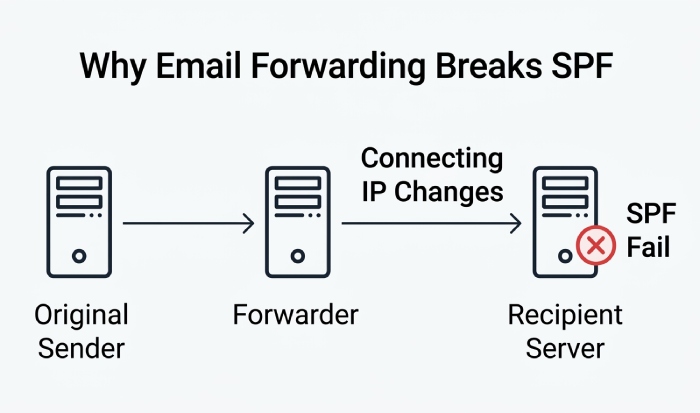
Forwarding changes the connecting IP, so SPF will often fail for the original sender.
Why forwarding breaks SPF
- A forwarder remails from its own IP while preserving your From/Return-Path; SPF then evaluates the forwarders IP, which isnt in your SPF record → spf=fail
- Mailing lists modify content and add footers, often invalidating DKIM too
AutoSPF connection: AutoSPFs DMARC analytics flag receiver domains and forwarders that systematically fail SPF, helping you decide whether to rely on DKIM or request SRS.
SRS and DKIM/DMARC as mitigations
- Implement SRS (Sender Rewriting Scheme) on forwarders so the envelope-from changes to the forwarders domain, restoring SPF correctness
- Sign all outbound mail with DKIM and publish DMARC with relaxed alignment so DKIM can pass even if SPF fails after forwarding
- Prefer arc for complex routing scenarios where available
AutoSPF connection: AutoSPF verifies SRS behavior in test loops, monitors DKIM alignment in DMARC reports, and recommends policy tuning (e.g., move to p=quarantine only after DKIM pass rates stabilize).
Best-practice SPF design and safe third‘party authorization
Design your record to be robust, lookup-efficient, and easy to maintain.
Recommended SPF patterns
- Authorize your primary infrastructure explicitly with ip4/ip6, a, and mx
- Use includes sparingly; group by provider
- Prefer -all for mature, well-audited domains; use ~all while you monitor; avoid ?all in production
- Avoid ptr and heavy exists
- Include IPv6 (ip6:) if you send over dual-stack or via providers that do
Example mature record:
v=spf1 ip4:198.51.100.0/24 ip6:2001:db8:abcd::/48 a:mail.example.com include:_spf.mailhost.com -all
AutoSPF connection: AutoSPF recommends an optimal mechanism order (fastest checks first), ensures IPv6 parity, and can stage a ~all-to—all transition with rollback.
Authorizing third-party senders without bloat
- Validate each providers published SPF include (e.g., include:_spf.provider.com)
- Avoid chaining many providers”flatten where safe
- For multi-brand/multi-subdomain setups, use redirect= to centralize policy, but keep the lookup budget in mind
- Periodically re-verify providers; their includes may balloon over time
AutoSPF connection: AutoSPF maintains a catalog of vetted provider includes (with historical lookup counts and failure rates), warns when a provider pushes you over 10 lookups, and auto-flattens to current IP ranges with scheduled refresh so your record stays lean.
Case study: include sprawl to stable deliverability
A CRM, a marketing ESP, and a helpdesk platform each added an include, and the ESP nested two more. Result: Gmail rejections with 550 5.7.26; Authentication-Results showed spf=permerror (too many DNS lookups). AutoSPFs flattening reduced lookups from 14 to 4 and inserted an ip6 range the ESP had recently added; hard bounces dropped 92% within 24 hours.
Real-world SPF failure scenarios, what they look like, and how to fix them
Use these patterns to diagnose quickly.
Exceeded lookup limits (permerror)
- Bounce text: 550 5.7.23 SPF validation failed: exceeded DNS lookup limit
- Header: Authentication-Results: spf=permerror (multiple DNS lookups)
- Fix: Consolidate or AutoSPF-flatten includes; replace a/mx where equivalent ip4/ip6 is stable; remove unused providers
Multiple SPF records (permerror)
- Bounce text: 554 5.7.1 SPF Permanent Error: multiple TXT records found
- dig +short TXT shows two
v=spf1entries - Fix: Merge into a single
v=spf1record; delete extra legacy entries
Invalid mechanisms or qualifiers
- Bounce text: 550 5.7.1 Bad SPF syntax
- Header: spf=permerror (invalid mechanism)
- Fix: Correct typos; ensure only supported mechanisms; remove duplicate modifiers
DNS timeouts/temperror
- Bounce text: 451 4.7.23 Temporary SPF error
- Header: spf=temperror (DNS timeout)
- Fix: Improve DNS reliability, reduce dependency on slow includes, and implement redundant nameservers; AutoSPF alerting will show provider-side outages
Oversized TXT/fragmentation
- Symptom: Intermittent temperror at some receivers; others pass
- Cause: Large DNS responses lead to truncation/EDNS fallback issues
- Fix: Shorten record (flatten, remove redundancy); keep responses compact
Missing IPv6 authorization
- Bounce text: 550 5.7.1 IP not authorized
- Header: spf=fail when sending from IPv6-capable MTA
- Fix: Add ip6: ranges for your outbound hosts
DNS propagation and DNSSEC issues
- Symptom: Some receivers see old SPF; others new; or bogus signature failures
- Fix: Allow TTL to expire; avoid mid-migration deletes; verify DNSSEC chain; AutoSPFs staged rollout simulates receivers before publishing
FAQs
How do I tell SPF failure from DMARC or DKIM failure in a bounce?
Check Authentication-Results: each method has its own verdict. If spf=fail but dkim=pass and dmarc=pass (aligned), the bounce was not SPF-driven. If dmarc=fail with spf=fail and dkim=fail/none, DMARC likely triggered the rejection”with SPF as a root cause. AutoSPFs DMARC dashboard visualizes these relationships per receiver.
Does softfail (~all) still cause rejections?
Sometimes. Many providers accept softfail but apply spam weighting; DMARC alignment can still fail if your aligned SPF is not passing. For critical domains, graduate to -all once AutoSPF shows high pass/alignment rates and no forwarder-induced regressions.
Should I use redirect= or multiple includes across subdomains?
Use redirect= when you want subdomains to inherit a central policy. Do not combine redirect= with an all mechanism in the same record. AutoSPF validates redirect targets and ensures the combined lookup count remains under 10.
Is PTR a valid SPF mechanism today?
It exists but is discouraged and often ignored. Prefer ip4/ip6, a, mx, and include. AutoSPF flags ptr usage and provides safer alternatives.
Conclusion: confirm, fix, and prevent SPF-caused bounces with AutoSPF
To confirm SPF as the cause of bounces, read the SMTP code and text, inspect Authentication-Results/Received-SPF headers, validate your DNS SPF syntax, and reproduce the verdict with test tools”then correlate with MTA logs and DMARC data. Most failures come down to lookup-limit overruns, multiple/invalid records, or routing quirks like forwarding. AutoSPF unifies these steps: it detects SPF fingerprints in bounces, audits and simulates evaluation exactly as receivers do, continuously monitors lookup budgets and provider changes, and generates optimized, flattened records that stay current. The result is fewer rejections, faster root-cause analysis, and a durable SPF posture that scales as you add third-party senders.
General Manager
General Manager of DuoCircle. Product strategy and commercial lead for AutoSPF's 2,000+ customer base.
LinkedIn Profile →