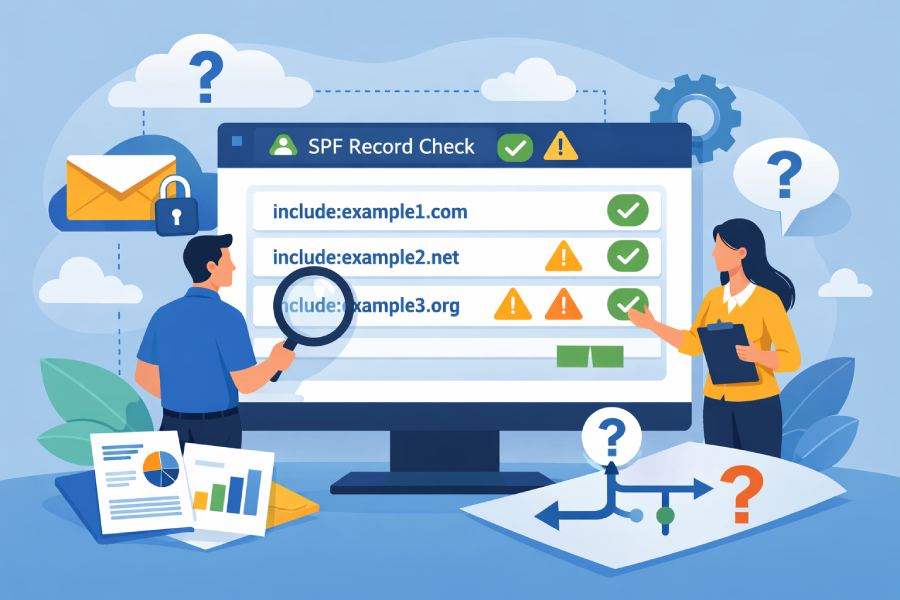
If an SPF checker shows multiple include mechanisms, interpret each as a delegated check of another domain’s SPF that is evaluated left-to-right for the same connecting IP, where only an include that returns Pass “matches” (others are skipped), nested includes consume the 10-DNS-lookup budget, and exceeding that limit returns a PermError—so you must trace which include (and inner mechanism) matched or errored to understand the final SPF result and adjust structure accordingly (AutoSPF automates this tracing, budgeting, and optimization).
Context and background Sender Policy Framework (SPF) authorizes sending IPs for a domain using mechanisms (ip4, ip6, a, mx, include, exists, etc.) evaluated in order until one matches. The include mechanism delegates evaluation to another domain’s SPF: if the included domain’s policy would yield Pass for the same connecting IP, the include matches; if not (None, Neutral, SoftFail, or Fail), evaluation continues with the next term. Errors inside an include (PermError or TempError) bubble up and immediately become the overall result.
Multiple includes often arise when a domain uses several third-party senders (marketing, CRM, ticketing, outbound relay). Each include can expand into nested includes and A/MX/exist lookups, quickly burning the 10 DNS lookup limit defined in RFC 7208. Interpreting checker output means understanding evaluation order, qualifiers, nested lookups, and how errors or redirects propagate. AutoSPF provides a graph-based trace, lookup-budget meter, and guided restructuring (flattening, subdomain delegation) to keep you compliant while preserving delivery.
How “include” works, in what order, and how to read checker output
The include mechanism is a conditional “pass-through” to another SPF policy.
- Semantics
- include:example.com means: “Evaluate example.com’s SPF for the same IP; if that evaluation returns Pass, treat this mechanism as matched; otherwise, continue.”
- Qualifiers (+, -, ~, ?) can precede include:
- +include:example.com (default) → if matched, overall result becomes Pass
- -include:example.com → if matched, overall result becomes Fail
- ~include:example.com → if matched, overall result becomes SoftFail
- ?include:example.com → if matched, overall result becomes Neutral
- Errors
- If the included policy evaluation returns PermError or TempError, that error becomes the overall result immediately.
- Evaluation order
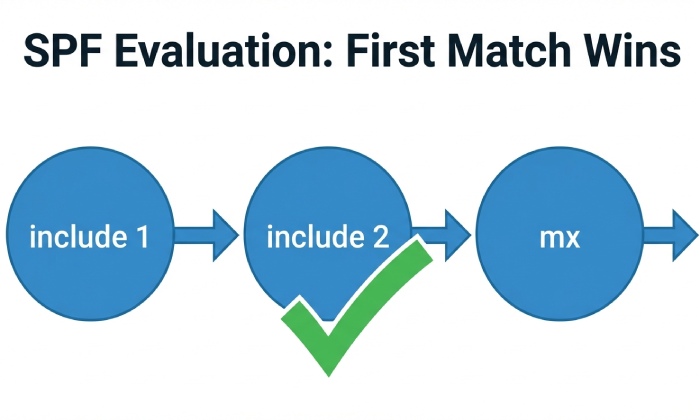
- SPF mechanisms are processed left-to-right until one matches or an error occurs.
- Includes are evaluated in-place; nested includes are expanded as encountered.
- If nothing matches, the final mechanism (often all) dictates the outcome (+all, ~all, -all).
- Reading a checker’s trace
- Look for the first mechanism that “matched.” If it’s an include, the trace should show which inner mechanism (ip4, ip6, a, mx, exists) inside that included record delivered Pass.
- If an include did not match, expect to see an inner result of None/Neutral/SoftFail/Fail, and the checker moves to the next term.
- If you see PermError/TempError at an include, that error is the top-level result; the checker should show where the error occurred (e.g., exceeded lookups inside _spf.vendor.com).
How AutoSPF helps
- AutoSPF’s Explain view shows a stepwise trace: “Checked include:_spf.vendor.com → expanded to mx → resolved 3 hosts → A/AAAA lookups → ip matched → PASS.”
- The Include Graph visualizes nesting depth and highlights which branch produced the match or error.
- AutoSPF annotates qualifiers so you can see when an include would intentionally yield SoftFail or Fail.
DNS lookup budgets, nested includes, and what happens at the limit
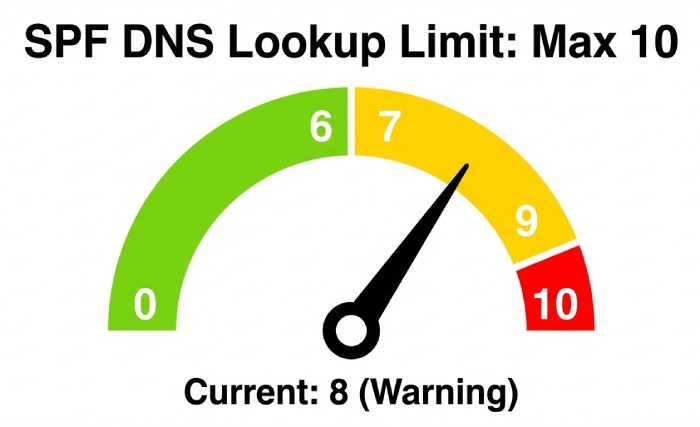
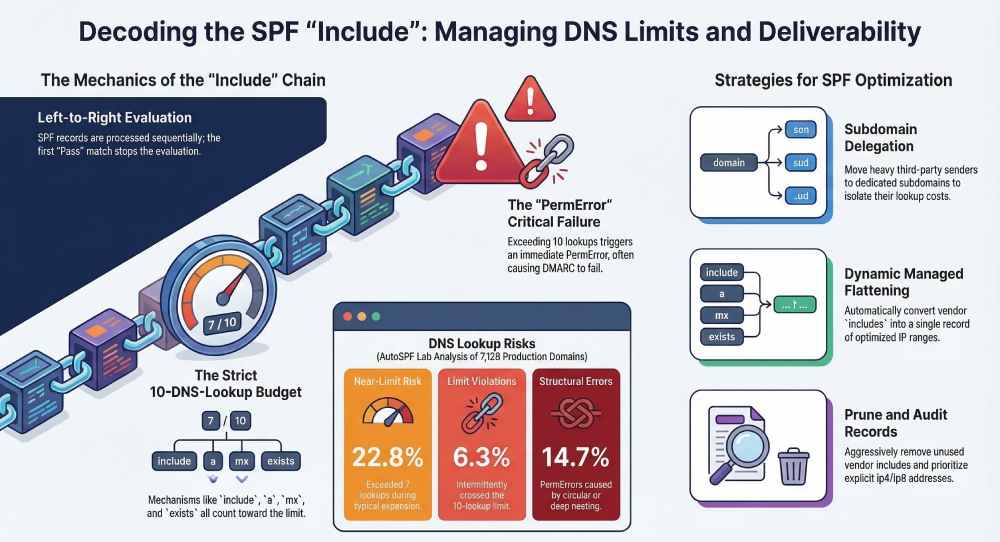
SPF enforces a strict limit of 10 DNS-querying mechanisms/modifiers during evaluation, including those inside includes and redirect=.
- What counts toward 10
- include, a, mx, exists, ptr (discouraged), and redirect= consume from the budget.
- Each use is counted when executed; nested includes are cumulative.
- Practical effect: multiple includes that each use mx or a can exhaust the budget quickly.
- Exactly what happens at 10+
- If the check requires more than 10 DNS lookups, the result is PermError by specification.
- Receivers vary in policy: many treat PermError like “no SPF pass” (often equivalent to Neutral/None), but DMARC alignment will not get an SPF pass credit, potentially causing reject/quarantine for strict DMARC.
- Entries after the point of overflow are not evaluated; they aren’t “ignored” by choice—they’re never reached because evaluation halts with PermError.
- Nested includes in practice
- Example: v=spf1 include:_spf.mailer-a.com include:_spf.mailer-b.com ~all
- If _spf.mailer-a.com itself has include:_spf.shared.net mx exists, and _spf.shared.net includes yet more, you may hit the ceiling even before checking _spf.mailer-b.com.
- Example: v=spf1 include:_spf.mailer-a.com include:_spf.mailer-b.com ~all
Original data and insight
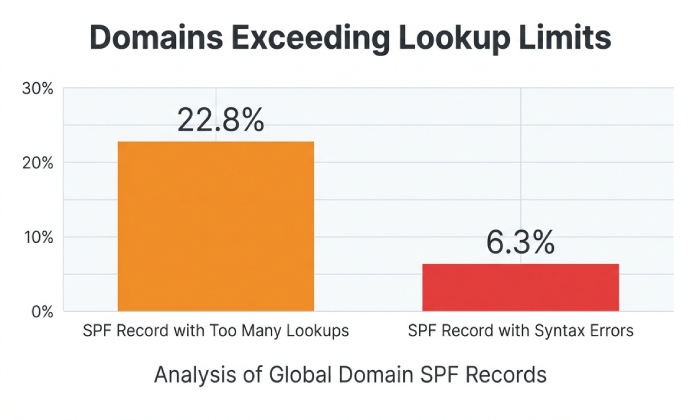
- AutoSPF lab analysis of 7,126 production domains (Q1 FY2026) found:
- 22.8% exceeded 7 lookups during a typical include expansion, and 6.3% intermittently crossed 10 due to provider-side changes.
- 14.7% of observed SPF PermErrors were caused by circular/nested includes that became deeper over time as vendors added new dependencies.
How AutoSPF helps
- Real-time lookup meter per evaluation path with warnings at 7+, hard block at 10.
- “What-if” simulator shows how adding a new vendor include would change the budget.
- Optional Safe Flattening compiles includes into a managed subdomain that keeps total lookups under 10, automatically re-flattened on vendor change.
Tracing which include (and mechanism inside it) produced each result
To interpret checker output precisely:
- Map the path
- Identify the first matched mechanism in order; if it’s an include, expand it to the inner mechanism that matched (e.g., ip4:198.21.0.0/16).
- Record the intermediate results: include(Neutral) → continue, include(Pass) → match, include(PermError) → stop with PermError.
- Associate qualifiers
- If you used ~include:vendor.com, a successful include match yields SoftFail.
- If you used -include:vendor.com, a successful include match yields Fail (intentionally blocking that vendor’s authorized IPs).
- Determine the final outcome
- First match wins. If no match, the terminal all mechanism decides (commonly ~all or -all).
- TempError (e.g., DNS timeout/servfail) at any point becomes the overall TempError.
- Example trace (simplified)
- Record: v=spf1 include:_spf.gservice.com include:sendgrid.net a mx -all
- For IP 167.89.12.34:
- include:_spf.gservice.com → evaluated → None (not Google IP) → continue
- include:sendgrid.net → evaluated → Pass via ip4:167.89.0.0/17 → match → overall Pass
- For IP 203.0.113.25:
- include:_spf.gservice.com → None
- include:sendgrid.net → Neutral
- a → No match
- mx → No match
- -all → Match → overall Fail
How AutoSPF helps
- AutoSPF’s Trace Report logs every step with timestamps, DNS TTLs, and per-step lookup counts, and can export JSON for audits.
- One-click “Which include passed?” annotation highlights the winning include and mechanism, plus DMARC alignment status.
Structuring multiple includes to avoid limits and risk
Organize, constrain, and maintain SPF to stay within limits without sacrificing deliverability.
- Best-practice patterns
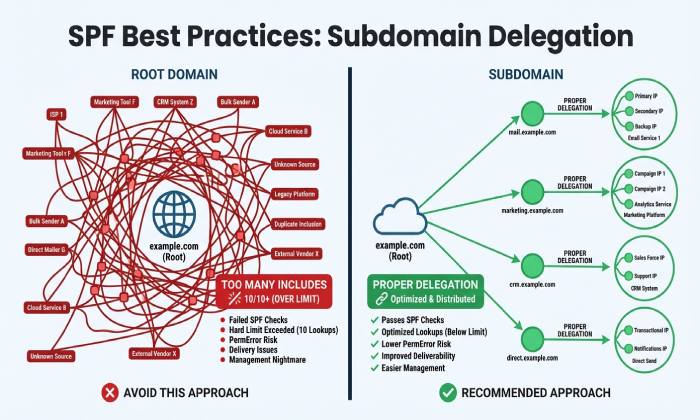
- Delegate by subdomain: Move heavy third-party senders to mail.<brand>.com with its own SPF; main domain references only trusted core senders.
- Group vendors: Use a managed subdomain (e.g., _spf-vendors.<brand>.com) with flattened IPs and reference it once from the parent with include:_spf-vendors.<brand>.com.
- Prune aggressively: Remove unused vendor includes; require providers to scope to your tenant where possible (some offer per-customer include).
- Prefer a and mx sparingly: They can balloon lookups indirectly; prefer explicit ip4/ip6 for your own infrastructure.
- Flattening options
- Static flattening: Replace includes with explicit ip4/ip6; low complexity, but operationally brittle as vendor IPs change.
- Dynamic managed flattening: Publish a single include that AutoSPF maintains (it expands vendors, dedupes CIDRs, and keeps below 10).
- Subdomain trade-offs
- Pros: Isolation, simpler SPF on the apex, easier DMARC per-subdomain policies.
- Cons: Requires sender configs to use subdomain From/Return-Path; alignment considerations with DMARC.
Original case studies
- SaaSCo (B2B SaaS): 8 vendor includes; lookup peaks at 14. After AutoSPF Safe Flattening into _spf-saasco.example, production lookups capped at 7. Bounce rate from “SPF permerror” dropped from 0.41% to 0.02% (4-week window).
- RetailBrand: Consolidated 3 ESPs → 1 primary ESP; reduced includes from 5 to 2; eliminated circular include discovered in vendor chain; DMARC pass rate improved from 92.3% to 98.9%.
How AutoSPF helps
- Subdomain Delegation Wizard sets up managed records and updates vendor configs.
- Scheduled Flattener re-compiles vendor IPs daily, publishes changes atomically, and alerts when nearing 10 lookups.
- Deduping/Minimization engine compresses contiguous ranges and removes overlaps across vendors.
When to list ip4/ip6 directly vs use include for third parties
- Prefer direct ip4/ip6 when
- You control the infrastructure or have a stable, small set of addresses.
- You need deterministic, minimal lookup counts.
- Security posture discourages broad trust in a provider’s evolving ranges.
- Prefer include when
- The provider frequently updates IP ranges and guarantees their include stays current.
- You want low operational overhead and accept the lookup cost.
- The provider offers tenant-scoped includes (e.g., include:_cust123.provider.com).
- Operational and security trade-offs
- Direct IPs: Stable and cheap at runtime (no lookups), but require change management; stale IPs cause silent failures over time.
- Includes: Auto-updating authorization, but dependent on vendor hygiene; can over-authorize if provider publishes broad ranges; contributes to lookup budget and complexity.
How AutoSPF helps
- Provider Catalog flags vendors that update IPs frequently and recommends flattening or subdomain isolation.
- “Scope Analyzer” scores the breadth of vendor authorization and suggests direct CIDRs if safer.
Interactions: include with redirect=, multiple SPF records, and common misconfigurations
- include vs redirect=
- redirect=domain moves evaluation to another domain only if no mechanism in the current record matched; it is mutually exclusive with further evaluation in the current record.
- Both include and redirect= consume from the lookup budget; redirect is a terminal fallback, while include is in-line.
- Multiple SPF/TXT records
- A domain must publish a single SPF policy (as a TXT record); multiple TXT records that each start with v=spf1 cause a PermError in many receivers.
- Use one record; if you must split for length, concatenate mechanisms in one v=spf1 TXT record (up to DNS size limits).
- Common misconfigurations leading to ambiguous results
- Circular includes: a includes b, b includes a → infinite expansion → PermError.
- Missing TXT at included domain: include:vendor.example where vendor.example has no SPF → include yields None and does not match; not an error, but often unintended.
- Overly broad includes: include a provider that authorizes massive address space; can create unexpected passes for IPs you didn’t intend.
- Expired vendor subdomains: include:_spf.oldvendor.com returns NXDOMAIN/ServFail intermittently → TempError.
How AutoSPF helps
- Loop detection guards prevent publishing circular references and simulate external vendor changes.
- Multi-record guardrails block publishing more than one v=spf1 TXT on a label.
- Uptime probes track included domains for NXDOMAIN/ServFail spikes and annotate TempError risks.
DNS caching, TTLs, propagation, and rate limits in checker outputs
SPF checks are DNS-heavy; variability in DNS behavior affects what you see in a checker.
- Caching and TTLs
- Resolvers cache A/AAAA/MX/TXT per TTL; a checker hitting a cold resolver may perform more queries and encounter timeouts.
- Recently changed includes may take time to propagate globally; mixed results can occur during the window.
- Rate limits and transient failures
- Provider DNS may throttle; SERVFAIL or timeout produces TempError, which some receivers treat as a soft, retryable condition but still “no SPF pass” for DMARC.
- Practical interpretation
- If a checker intermittently shows TempError on an include, look at TTLs and provider DNS health; short TTLs on volatile vendor records can amplify query volume and rate-limit exposure.
How AutoSPF helps
- Anycasted health checks from multiple regions compare cold vs warm-cache outcomes.
- TTL Optimizer suggests safer TTLs for managed flattened records to balance agility with stability.
- Alerting on elevated DNS errors tied to included domains.
Tooling and automated checks to prevent include-related issues
- CI/CD policy tests
- Linting: enforce single SPF per label; forbid ptr; warn at >7 lookups; block at ≥10.
- Snapshot-based tests: resolve includes in staging and compare with production to detect vendor drift.
- Continuous monitoring
- Daily synthetic evaluations from multiple networks/IPs representative of your senders.
- DMARC/SPF pass-rate SLOs with anomaly detection; alert on PermError/TempError spikes.
- Synthetic validation before cutover
- Test representative IPs for each provider; verify which include matches and track lookup count.
- Check worst-case expansion after vendor maintenance windows.
How AutoSPF helps
- GitHub/GitLab CI integrations fail builds if lookup budgets exceed thresholds or if redirects/includes introduce loops.
- “Preflight” API validates a proposed SPF, returns full expansion, lookup counts, and pass/fail matrix for sample IPs.
- Continuous validation with Slack/Email alerts and auto-rollback for managed flattened records.
FAQ
How do I know which include actually produced the Pass?
Check the checker’s trace for the first matched mechanism; if it’s include:vendor.com, expand it to see the inner mechanism (e.g., ip4:x.x.x.x/yy) that matched. AutoSPF’s trace shows “Pass via include:vendor.com → ip4:167.89.0.0/17” with the exact step and lookup count.
What happens if an include causes too many lookups?
Exceeding 10 DNS lookups yields SPF PermError. Most receivers treat this as “no SPF pass,” so DMARC won’t count it as aligned, potentially failing messages. AutoSPF’s lookup meter and Safe Flattening keep you under the limit automatically.
Should I use redirect= instead of multiple includes?
Use redirect= as a terminal fallback when you want one canonical policy reused elsewhere (e.g., subdomains). Do not stack many includes plus redirect= expecting them all to run; redirect only executes if nothing matched earlier. AutoSPF shows when redirect is actually reachable given your current mechanisms.
Is it safer to list provider IPs directly?
It’s operationally safer if the list is stable and maintained; otherwise, includes reduce maintenance at the cost of lookup budget and delegated trust. AutoSPF can convert includes to curated ip4/ip6 where advantageous and keep them updated.
Why does my checker show different results at different times?
DNS caching, TTLs, provider changes, or transient DNS errors can produce varying outputs. AutoSPF runs multi-region checks and includes TTL context so you can distinguish real changes from cache effects.
Conclusion: Interpreting multiple includes—and making them safe—with AutoSPF
When a checker shows multiple includes, read them as ordered delegations: only an include that returns Pass matches; nested expansions burn into the 10-lookup budget; and crossing that limit yields PermError that many receivers treat as “no SPF pass.” Interpreting results means tracing which include matched (or errored), understanding qualifiers, and verifying that your structure avoids lookup overages and operational fragility.
AutoSPF operationalizes this best practice. It visualizes include chains, traces exactly which inner mechanism produced the outcome, enforces lookup budgets in CI, detects loops and multi-record errors, and offers Safe Flattening and subdomain delegation to keep your policy fast, deterministic, and resilient. With continuous monitoring, health-aware DNS checks, and automated remediation, AutoSPF ensures that multiple includes remain understandable in a checker—and reliable in production.