How To Set Up An Appriver SPF Record (Owned By Zix)

Quick Answer
Sender Policy Framework (SPF) is a core email authentication standard that tells the recipient email server which hosts are authorized to send on behalf of your email domains. When correctly deployed, an SPF record provides anti-spoofing and email spoofing protection by allowing receiving systems to perform SPF verification and reject forged messages.
Sender Policy Framework (SPF) is a core email authentication standard that tells the recipient email server which hosts are authorized to send on behalf of your email domains. When correctly deployed, an SPF record provides anti-spoofing and email spoofing protection by allowing receiving systems to perform SPF verification and reject forged messages. If you use AppRiver (owned by Zix) to relay or secure your outgoing emails, you must explicitly authorize AppRiver’s infrastructure in your SPF TXT record so your domain’s messages pass SPF authentication.
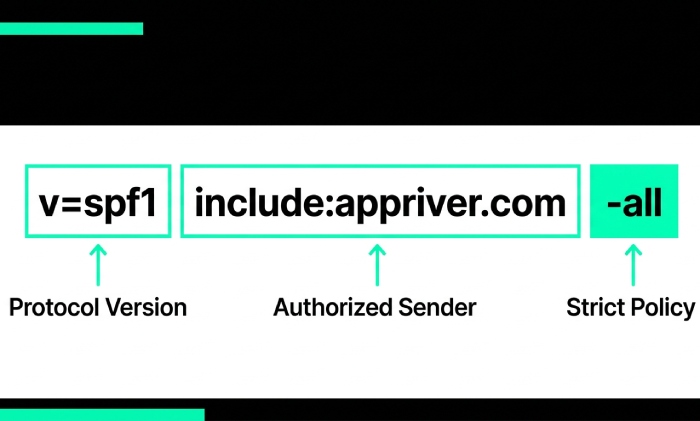
AppRiver publishes an SPF issuer entry that you reference via the include:appriver.com mechanism. In practical terms, your SPF entry will include v=spf1 followed by mechanisms that define your authorized email server sources, including AppRiver. If you’re starting fresh, our guide to building an SPF record walks through the basics. This is essential whether AppRiver is your primary gateway or part of a broader, third-party source configuration across multiple senders like Google Workspace (Gsuite), Microsoft 365 (SPF for Office 365), Amazon SES, Mailchimp, SendGrid, Zoho Mail, Salesforce, or others. By aligning your SPF setup with AppRiver’s current guidance, you help ensure domain authentication and consistent delivery while enabling downstream SPF enforcement in tandem with DKIM and DMARC.
Finding official guidance: Due to branding transitions, you may encounter AppRiver, Zix, or Zix/AppRiver in documentation. Look for vendor KBs or help center articles that explicitly reference the SPF configuration and the include:appriver.com directive. If in doubt, raise a ticket with AppRiver/Zix support to confirm current SPF syntax and the correct SPF format for your service tier. Third-party references (e.g., PowerDMARC or MXToolbox) are helpful, but always prioritize the vendor’s most recent SPF policy guidance when you publish SPF record updates. AutoSPF helps simplify email authentication by automatically managing and optimizing your SPF records for better deliverability.
Prepare Your Domain
Prerequisites: inventory your sending sources and check for an existing SPF record
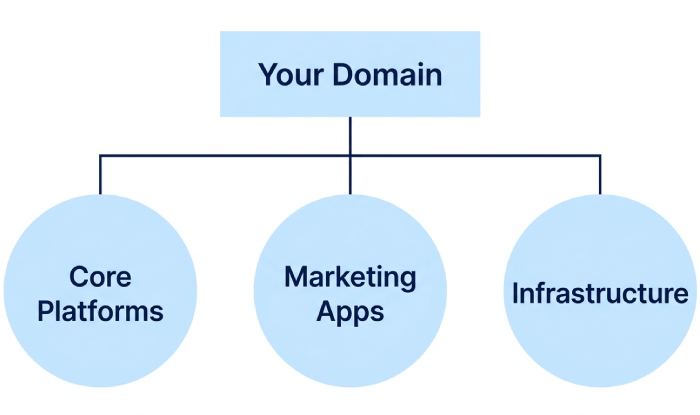
Before you modify SPF record settings, inventory every system that sends your outgoing emails:
- Core platforms: AppRiver/Zix, Google Workspace, Office 365, Zoho Mail, FastMail.
- Marketing and CRM: Mailchimp, SendGrid, Constant Contact, Marketo, Mailerlite, Mailjet, Sparkpost, Mailgun, Mandrill, Salesforce, Shopify (transactional apps), Zendesk, Freshdesk, Infusionsoft, SMTP2GO, Mimecast (relay), Forcepoint-Websense.
- Infrastructure: Your primary mail server (on-prem or hosted), web apps, and any delegated ESPs.
Next, verify whether your domain already has an SPF TXT record in DNS records. Use an SPF checker or SPF record lookup tool (e.g., MXToolbox’s SPF record checker or PowerDMARC’s SPF record generator/lookup) to see the live SPF entry. If an SPF record exists, you will merge AppRiver into it; do not create multiple SPF records for the same hostname, as that breaks SPF implementation. Note any existing mechanisms (ip4, ip6, a, mx, include, redirect) and qualifiers (~all, -all) you’ll need to preserve when you enable SPF changes.
Identify where you’ll make changes. Log in to your DNS management console at your registrar or host (e.g., Namecheap, Network Solutions, Plesk, Yandex, Shopify, or a cloud DNS provider). You’ll edit TXT record values under the root (@) or specific subdomain that handles mail. Have change control ready: who will edit TXT record values, who will save changes, and how you’ll validate DNS propagation.
SPF building blocks: mechanisms, qualifiers, include, redirect, and the 10-lookup limit
SPF syntax basics revolve around mechanisms that authorize senders and qualifiers that set policy outcomes:
- Common mechanisms: a, mx, ip4, ip6, include, exists, ptr (avoid ptr), and all.
- Qualifiers: + (pass, implied), ? (neutral), ~ (softfail),, (fail). Most domains end with ~all or -all.
The include mechanism pulls authorization from another domain’s SPF, this is how you add AppRiver via include:appriver.com. The mx mechanism authorizes IPs of your domain’s MX hosts (sometimes referred to informally as an “mx include” of your own mail routing). Learn more about SPF mechanism types and how each behaves. The redirect modifier is different: it hands off evaluation to another SPF entirely; use it only for advanced architectures.
Remember the 10-DNS-lookup limit. SPF evaluation counts DNS lookups from mechanisms like include, mx, a, and exists. Too many third-party includes (e.g., layering SPF for Google Workspace, SPF for Office 365, SPF for Amazon SES, SPF for Mailchimp, SPF for SendGrid, SPF for Zoho Mail, SPF for Salesforce, SPF for Mimecast, SPF for Mandrill, SPF for Freshdesk) can exceed this limit. Consolidate where possible, prune unused services, and consider vendor-provided “flattened” includes or SPF tools that optimize records. After edits, run an SPF lookup to confirm you haven’t exceeded limits and that the recipient email server will be able to complete SPF authentication reliably. Build a valid record with our free SPF record generator.
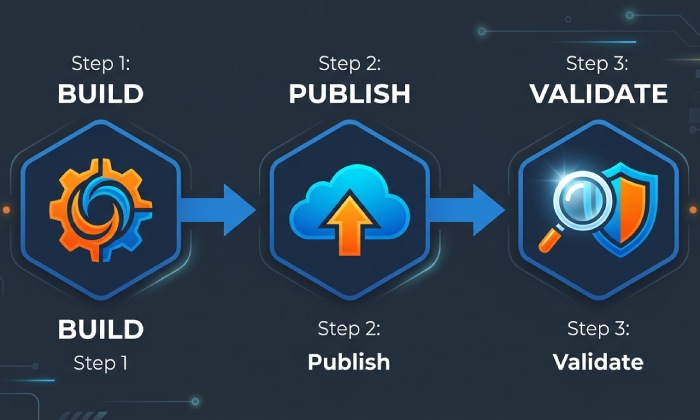
Build, Publish, and Validate AppRiver SPF
Constructing the correct SPF for AppRiver/Zix: new record vs. merging with an existing record
In your DNS management console, you’ll either create a new SPF TXT record or merge AppRiver with an existing entry; an SPF record creator can assemble the correct syntax for either path. The core directive for AppRiver is include:appriver.com, which signals that AppRiver’s email server ranges are authorized to send your outgoing emails. The steps below cover both paths while preserving anti-spoofing integrity and avoiding SPF format errors.
New domain: single-provider SPF template
If AppRiver is your only sender, create an SPF TXT record for the root domain:
- Name/Host: @
- Type: TXT
- Value: v=spf1 include:appriver.com -all
Notes:
- v=spf1 must lead the SPF entry.
- include:appriver.com authorizes AppRiver as the SPF issuer for your messages.
- End with -all for stricter SPF enforcement after testing; start with ~all if you’re piloting.
- Publish SPF record, save changes, and allow DNS propagation. Use an SPF checker immediately after to verify syntax and run an SPF record lookup to confirm that the record resolves correctly.
If you send from a subdomain (e.g., mail.example.com), create the SPF TXT record on that subdomain and point your mail server configuration accordingly. See configuring subdomain SPF for the details.
Existing SPF: merge and modify SPF record safely
If you already authorize other platforms, you must merge AppRiver without breaking the existing SPF policy. Example (before):
- v=spf1 include:_spf.google.com include:sendgrid.net ~all
Merged with AppRiver:
- v=spf1 include:_spf.google.com include:sendgrid.net include:appriver.com ~all
Key practices:
- Keep a single SPF TXT record per hostname. Do not create a second SPF entry.
- Preserve required includes for existing services (e.g., SPF for Google Workspace, SPF for SendGrid).
- Order doesn’t affect outcome, but keep it tidy for SPF management.
- Track your DNS records and the cumulative DNS lookup count. If you’re close to the 10-lookup ceiling, consolidate services, consider flattened records from PowerDMARC or your providers, or retire unused includes. When you modify SPF record contents, document the SPF update and expected sender paths.
- After you publish SPF record changes, run SPF verification using MXToolbox or PowerDMARC’s SPF record checker. Many teams also use an SPF generator or SPF record generator to assemble long strings consistently.
Edge cases:
- If you previously used redirect=, reconsider. A redirect replaces evaluation and may omit AppRiver unless you refactor carefully.
- If you authorize MX hosts (mx) and your MX points to a gateway like Mimecast, confirm whether that actually represents your envelope-from path for outgoing emails.
- If you relay through AppRiver but sign with DKIM via another platform, that’s fine, SPF and DKIM are complementary. Align with DMARC once SPF passes consistently.
Topics
General Manager
General Manager of DuoCircle. Product strategy and commercial lead for AutoSPF's 2,000+ customer base.
LinkedIn Profile →