How to Set Up SilverSky BAE Systems SPF Records to Protect Your Domain

Quick Answer
Learn how to set up SilverSky BAE Systems SPF records to authorize trusted mail servers, prevent email spoofing, improve email deliverability, and protect your domain from phishing attacks with the correct SPF configuration and best practices.
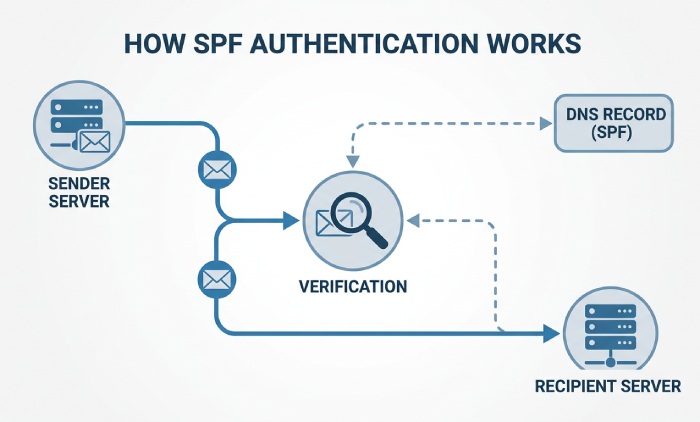
#Sender Policy Framework (SPF) is a DNS-based email authentication standard that defines which mail servers and services are authorized to send email on behalf of your domain. When a receiving mail server gets a message claiming to come from yourdomain.com, it checks the domains SPF record in DNS to verify whether the sending IP address or email service is permitted. For organizations using SilverSky-managed email security services connected with BAE Systems, correctly configuring SPF helps prevent unauthorized email activity, reduce spoofing risks, and improve email deliverability.
Organizations using SilverSky-related services should identify whether those platforms send outbound email on behalf of their domain. If they do, the correct SPF mechanism must be added to authorize those sending systems and prevent SPF authentication failures. In enterprise environments, proper SPF management helps maintain secure email communication, reduce spoofing risks, and ensure legitimate messages are delivered successfully.
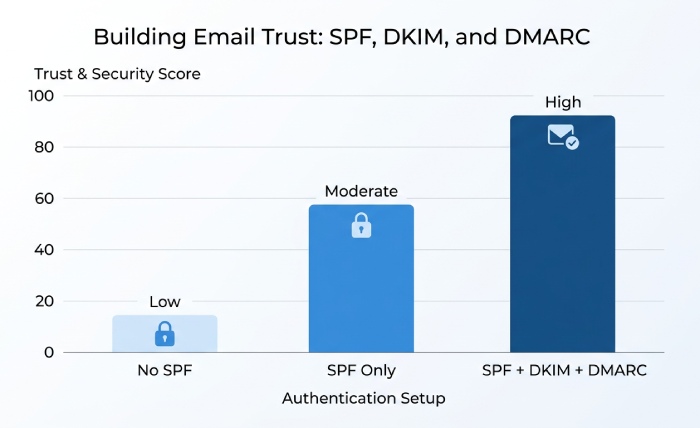
SPF does not encrypt email and does not verify the visible From header by itself, but it provides an important foundation for email trust. When combined with DKIM and DMARC, SPF helps your organization reduce impersonation risk, protect brand reputation, and improve email deliverability.
In complex enterprise environments, SPF management requires clear ownership, documentation, and approval processes. Organizations should regularly review authorized email senders to prevent authentication failures and maintain reliable email delivery.
What SilverSky BAE Systems Is and How It Relates to Email Security
SilverSky-related SPF configuration depends on whether SilverSky services send email on behalf of your domain. If your organization uses SilverSky-managed email security, secure messaging, monitoring alerts, or automated notifications, those sending systems may need to be authorized in your SPF record. Before making any DNS changes, verify the official SPF mechanism provided by SilverSky or your email administrator to ensure legitimate email sources are included without adding unnecessary DNS lookups.
Organizations using SilverSky-related services should identify whether those platforms send outbound email on behalf of their domain. If they do, the correct SPF mechanism must be added to authorize those sending systems and prevent SPF authentication failures. In enterprise environments, proper SPF management helps maintain secure email communication, reduce spoofing risks, and ensure legitimate messages are delivered successfully.
SilverSkys relevance to SPF depends on whether it sends email on behalf of your domain. If SilverSky handles outbound email, alerts, secure messaging, reporting, or managed cyber notifications, then your SPF record may need to include a SilverSky-authorized sending mechanism. That mechanism might be an include: statement, an IP address, or another DNS reference provided by SilverSky or BAE Systems support.
Organizational Context for SPF Ownership
In large enterprises, SPF management is rarely just a DNS task. It often crosses security, IT, compliance, brand, communications, and vendor-management functions.
Aligning SPF With BAE Systems Governance
BAE Systems public information often organizes topics under Our Company, Our Leadership, Our Businesses, Our Locations, Our History, People and Culture, Our Strategy, Innovation, Cyber, Digital and Data Services, Electronics, and Operational Support. For SPF planning, those same themes are useful because they help identify who owns email-sending systems and which teams approve changes.
Mapping Email Services to Business Functions
A SilverSky-related SPF update may support cyber alerts, digital and data services workflows, electronics business communications, operational support notifications, or innovation programs. If different divisions use different tools, our businesses and our locations should be mapped before any SPF edit is made.
Considering Legacy Systems After an Acquisition
After an acquisition, legacy email services may continue running for months or years. SilverSky records may remain active, be migrated into BAE Systems platforms, or be retired. This is why acquisition due diligence should include SPF, DKIM, DMARC, MX records, vendor contacts, and historical sending sources.
Key Internal Reference Areas
When documenting SPF ownership, include references to our company security policies, our strategy for domain protection, leadership approval paths, our businesses that send external mail, our locations by region, our history of acquired platforms, people and culture communications, innovation programs, cyber operations, digital and data services teams, electronics divisions, and operational support functions.
When You Need to Add SilverSky BAE Systems to Your SPF Record
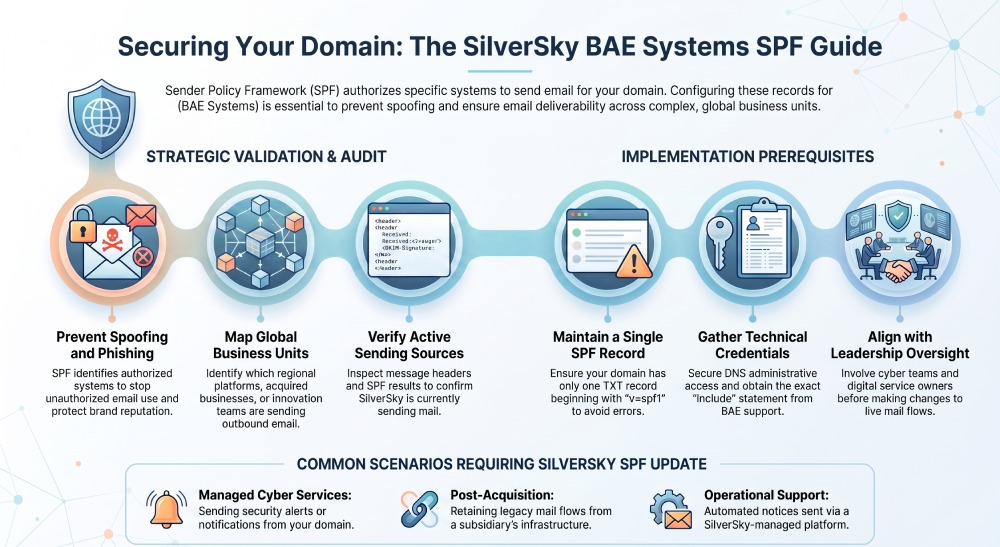
You need to add SilverSky BAE Systems to your SPF record only if SilverSky or a BAE Systems-managed SilverSky service sends email using your domain. Adding unnecessary senders weakens your SPF posture, while failing to add legitimate senders can cause delivery failures.
Common situations include:
- SilverSky sends security alerts or managed cyber service notifications from your domain.
- A BAE Systems subsidiary or acquired business still uses SilverSky infrastructure.
- Your organization has migrated services after an acquisition but retained legacy mail flows.
- Digital and data services teams use SilverSky-based reporting or customer communications.
- Operational support groups send automated notices through a SilverSky platform.
- Electronics or innovation teams rely on older vendor-integrated mail systems.
- Leadership communications, people and culture updates, or our company announcements are routed through a managed email security service.
Before making changes, verify whether SilverSky is actually sending mail. Review message headers from legitimate emails, check the sending IP, inspect SPF authentication results, and confirm with BAE Systems or SilverSky support. Do not rely only on assumptions from our history, company history, or acquisition records.
BAE Systems-related public resources such as the newsroom, news releases, stories, insights, events, regulatory news, contacts, and image library may help identify official communications channels, but DNS changes should come from technical documentation or authorized support contacts. Similarly, sustainability, supporting our communities, climate and environment, responsible business, and sustainability reporting teams may send public-facing communications, but each sender must be validated before SPF authorization.
Managing SPF in Enterprise Environments
In large organizations, SPF management requires coordination between multiple teams, including IT administrators, cybersecurity teams, email administrators, and DNS owners. Since SPF records control which services can send email on behalf of a domain, every change should be reviewed carefully to avoid disrupting legitimate email communication.
Before adding SilverSky to your SPF record, organizations should:
- Identify all third-party services and internal systems that send email using the domain.
- Review the existing SPF record and document current include statements, IP addresses, and authorized senders.
- Confirm whether SilverSky is actively sending emails on behalf of the domain.
- Obtain the correct SPF configuration details from approved technical documentation or service providers.
- Test SPF changes before applying them to production environments.
- Maintain updated SPF documentation whenever email services are added, removed, or migrated.
Prerequisites: Access, DNS Details, and Existing Email Services to Review
Before setting up a SilverSky BAE Systems SPF record, gather the required DNS details and review your existing email services. If this is your first record, our step-by-step guide on how to create an SPF record covers the syntax. Incorrect SPF changes can cause legitimate messages to fail authentication and impact email delivery.
You will need:
- DNS administrative access: Access to the authoritative DNS provider for your domain, such as Cloudflare, Route 53, Azure DNS, GoDaddy, Network Solutions, or another registrar/DNS host.
- The current SPF record: SPF records are published as TXT records. Your domain should have only one SPF record beginning with
v=spf1. - SilverSky sending details: Obtain the exact SPF include, IP range, or hostname from SilverSky, BAE Systems, BAE support, or an authorized technical contact. Avoid guessing values.
- A list of all existing email services: Review Microsoft 365, Google Workspace, Salesforce, ServiceNow, marketing automation, ticketing systems, security platforms, and any legacy acquisition-related systems.
- Change approval: SPF affects email authentication, so involve leadership, cyber teams, digital and data services owners, operational support stakeholders, and DNS administrators.
- DMARC and DKIM status: SPF should be reviewed alongside DKIM and DMARC. A strong SPF record alone does not fully protect your domain.
If you are starting fresh, our free SPF record generator can assemble a valid record for you. After publishing your updated SPF record, verify that it is correctly configured. AutoSPF can help detect syntax errors, identify duplicate SPF records, monitor DNS lookup limits, validate include mechanisms, and confirm that your domain’s SPF policy is functioning as expected. You can also look up your SPF record at any time to confirm the exact value receiving servers see.
General Manager
General Manager of DuoCircle. Product strategy and commercial lead for AutoSPF's 2,000+ customer base.
LinkedIn Profile →