How to Verify DKIM and DMARC After DNS Provider Migration

Quick Answer
After a DNS provider migration, verify DKIM and DMARC records by checking DNS propagation, selector accuracy, TXT record syntax, policy alignment, and reporting addresses. Send test emails and review authentication results to ensure reliable email delivery and prevent spoofing.
Try Our Free DMARC Checker
Validate your DMARC policy, check alignment settings, and verify reporting configuration.
Check DMARC Record →
Why DKIM and DMARC Verification Matters After Moving DNS Providers
A DNS provider migration can disrupt email authentication if DNS records are missing, incorrect, or published under the wrong hostnames. Even when the website works properly, outdated SPF, missing DKIM, or incorrect DMARC records can affect email delivery and increase the risk of spoofing and phishing.
SPF, DKIM, and DMARC work together to verify email authenticity and protect your domain. After migration, check each record for correct syntax, alignment, and configuration. Proper email authentication helps maintain reliable email delivery, strengthen security, and protect your brand.
Gather Existing DKIM Selectors, DMARC Policies, and Mail-Sending Sources
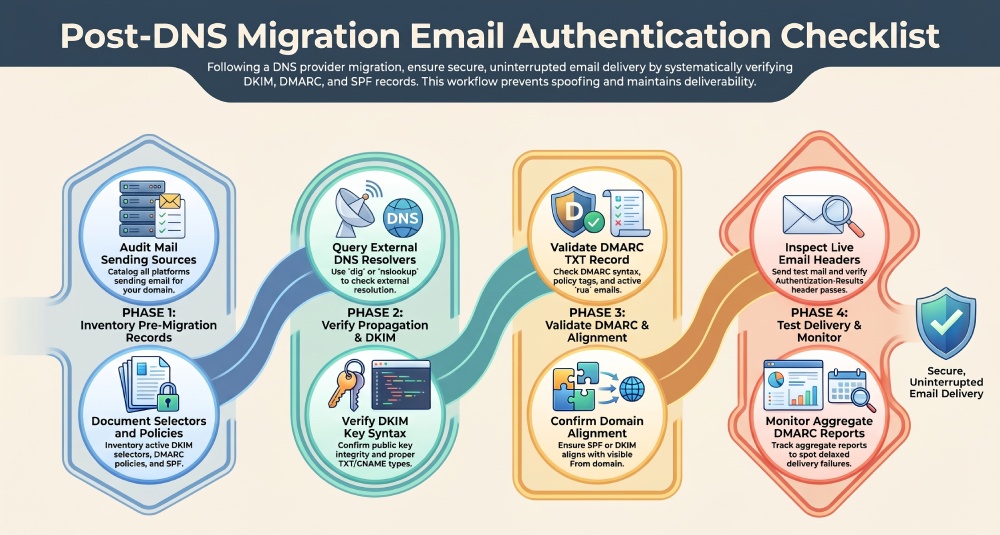
Before you validate the new DNS zone, inventory the authentication records and sending services that existed before the migration. This step helps you verify that the new provider contains the same DKIM record, DMARC record, and SPF record data as the previous DNS host.
Start by listing every platform in your email program that sends mail using your domain. This may include Microsoft 365, Google Workspace, marketing automation platforms, CRM systems, support desks, billing systems, ecommerce platforms, transactional email providers, and internal mail servers. Each source may require a unique SPF record mechanism, DKIM selector, CNAME, or TXT record.
For DKIM, gather each selector used by each sending service. A selector is the label before ._domainkey, such as:
selector1._domainkey.example.com
If a DKIM record is missing after DNS migration, messages from that platform may fail the DKIM check even though the platform is still signing outbound messages. Also check whether any subdomain sends email independently, such as mail.example.com, news.example.com, or billing.example.com. DMARC can involve subdomain inheritance, but many organizations publish separate DMARC policies for important subdomains.
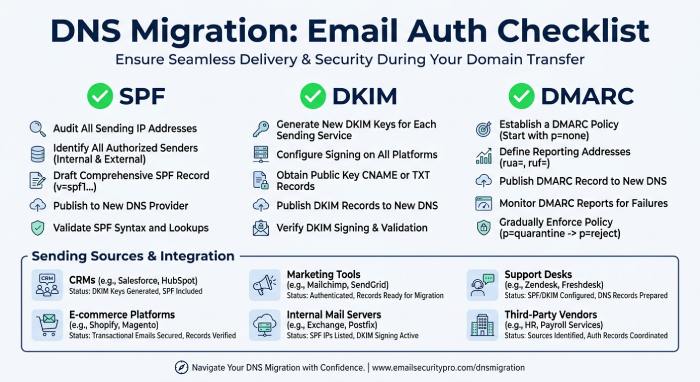
For DMARC, document the current DMARC record and its policy. A typical DMARC TXT record looks like:
_dmarc.example.com TXT "v=DMARC1; p=none; rua=mailto:dmarc-reports@example.com; ruf=mailto:dmarc-forensics@example.com; adkim=s; aspf=s”`
During migration, confirm whether the domain is in monitoring mode with p=none, enforcement mode with p=quarantine, or full rejection with p=reject. A Quarantine policy can protect the domain while still allowing some suspicious messages to be reviewed, but it must be configured carefully to avoid blocking legitimate email.
For SPF, export the current SPF record and identify every included service. If your SPF record approaches the 10-DNS-lookup limit, consider using AutoSPF to simplify SPF record management, monitor DNS lookup usage, and maintain an optimized SPF configuration as your authorized sending services change. Use only one SPF record per domain; multiple SPF records are a common source of email authentication failures.
Check DNS Propagation and Confirm DKIM TXT Records Are Published Correctly
Once records have been recreated at the new DNS provider, verify DNS propagation from multiple geographic locations and resolvers. Do not rely solely on the DNS provider’s control panel. A record may appear saved but still fail externally due to syntax issues, zone-file formatting, TTL delays, or incorrect hostname placement.
Use DNS diagnostic tools and command-line utilities such as dig and nslookup to query each DKIM record, SPF record, and DMARC record. These checks help confirm whether the records are publicly accessible and match the expected configuration.
dig TXT selector1._domainkey.example.com
dig TXT _dmarc.example.com
dig TXT example.com
The output should match the expected TXT record exactly. For DKIM, confirm that the public key is complete and correctly published. Check whether the sending provider requires a TXT record or a CNAME record for its selector. Some DNS providers split long TXT values into multiple character strings, which is acceptable when the returned DNS value is reconstructed correctly.
Common DKIM Record Errors After DNS Migration
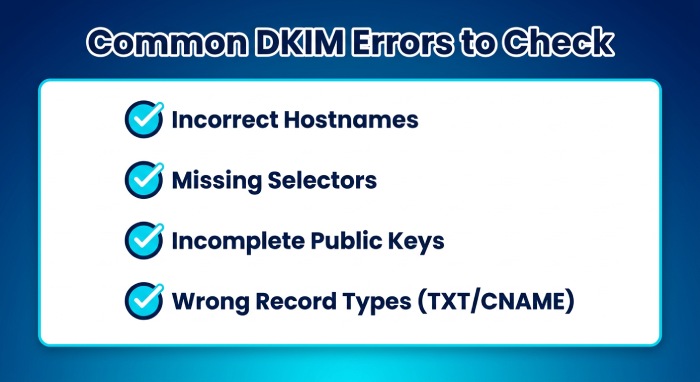
Common DKIM issues after DNS migration include incorrect hostnames, missing selectors, incomplete public keys, and incorrect TXT or CNAME record types. Verify each DKIM record’s selector, key length, and syntax against the required configuration. Also, review sender requirements to ensure all DNS entries contain the correct values and support successful email authentication.
Validate the DMARC TXT Record, Alignment, and Reporting Addresses
Validate the DMARC record at _dmarc.yourdomain.com to ensure its syntax, policy, uniqueness, and reporting addresses are correctly configured.
The DMARC record should include a valid version tag, policy, and reporting configuration. For example:
v=DMARC1; p=none; rua=mailto:dmarc@example.com; pct=100; adkim=r; aspf=r
Maintain the existing DMARC policy after DNS migration and avoid changing enforcement levels without proper validation. Before moving to quarantine or reject, verify all SPF and DKIM records for authorized senders. Also, verify that at least one authentication mechanism, either SPF or DKIM, passes and aligns with the visible From domain. Proper alignment is essential for DMARC to pass and helps reduce spoofing risks.
Confirm Reporting and Human Review Workflows
Ensure the rua mailbox or reporting endpoint remains active after DNS migration. DMARC aggregate reports provide visibility into sending sources, authentication results, alignment failures, and potentially unauthorized email activity. Reviewing these reports helps administrators identify configuration problems and investigate suspicious sending patterns after migration.
Test Email Authentication Results and Monitor Reports After Migration
After DNS records validate, send real test messages from every approved platform to Gmail, Yahoo, Outlook.com, Microsoft 365, and other representative mailbox provider destinations. Then perform header analysis to verify authentication results. Look for headers such as:
Authentication-Results: spf=pass dkim=pass dmarc=pass
A successful SPF check, DKIM check, and DMARC check confirms that email authentication records are working correctly. Monitor DMARC reports for at least one full reporting cycle to identify delayed failures, unauthorized senders, and email delivery issues. Keep TTLs low until validation is complete, maintain a DNS change log, validate records regularly, and ensure every domain and subdomain has the correct SPF, DKIM, and DMARC configuration. These practices help prevent spoofing, reduce phishing risks, and maintain reliable email delivery after migration.
General Manager
General Manager of DuoCircle. Product strategy and commercial lead for AutoSPF's 2,000+ customer base.
LinkedIn Profile →