How to Identify Incorrect SPF Authorization During an Exchange Online Migration

Quick Answer
Identify incorrect SPF authorization during an Exchange Online migration by checking DNS records, authorized sending servers, and SPF configurations. Learn how to resolve misconfigurations, prevent email authentication failures, and maintain reliable email deliverability.
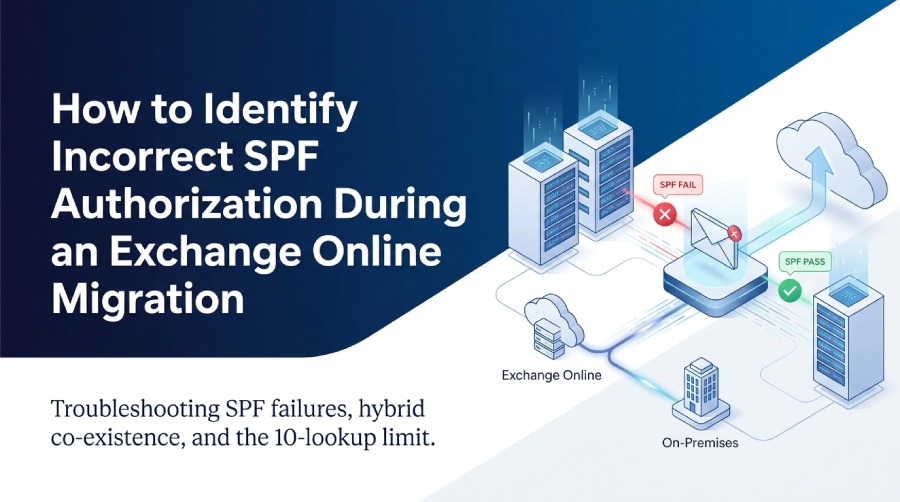
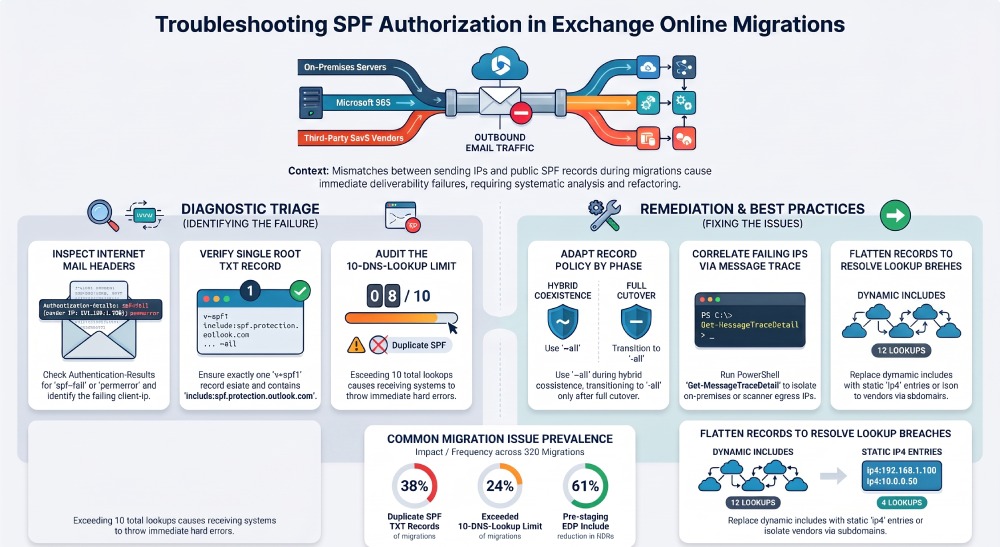
You identify incorrect SPF authorization during an Exchange Online migration by testing live mail headers for spf=fail/permerror/softfail in Received-SPF and Authentication-Results, verifying your domains TXT record contains a single, syntactically correct v=spf1 with include:spf.protection.outlook.com and accurate on‘prem/third‘party sources without exceeding the 10‘DNS‘lookup limit, correlating failures to the exact source IP via message trace, and validating/refactoring the SPF policy with tools (nslookup/dig, EXO PowerShell, Microsoft RCA) and continuous monitoring from AutoSPF.
Context and background Sender Policy Framework (SPF) authorizes which mail servers can send email on behalf of your domain”if a message is sent from an IP not permitted by SPF, receiving systems may mark it as spam, quarantine it, or reject it. During an Exchange Online migration, mail can originate from on‘premises Exchange, Microsoft 365 (EOP/EXO), and multiple third-party platforms; any mismatch between these sources and your SPF record yields immediate authorization failures.
Because Exchange Online migrations often run in coexistence for weeks, the most common causes of incorrect SPF authorization include missing include:spf.protection.outlook.com, stale on‘prem egress IPs not listed in SPF, misconfigured third‘party senders, duplicate SPF TXT records, and breaching the 10‘DNS‘lookup cap through nested includes. AutoSPF reduces this risk by continuously validating SPF syntax, lookup counts, and alignment; by auto-flattening volatile includes to stable IP lists; and by mapping real sending IPs (from DMARC and message traces) back to your policy with guided fixes.
A rapid, reliable way to spot incorrect SPF during migration
Use this triage sequence to confirm and localize SPF authorization problems fast:
- Send a test from each source (on‘prem, Exchange Online, every third-party) to an external mailbox you can fully inspect (e.g., Gmail).
- Open Internet headers and check:
- Authentication-Results: spf=pass|fail|softfail|permerror; note smtp.mailfrom domain and the client IP.
- Received-SPF: fail/softfail/permerror details and the evaluated IP.
- Run nslookup -type=TXT yourdomain.com (or dig +short TXT yourdomain.com) and confirm:
- One”and only one”SPF record starting with
v=spf1. - include:spf.protection.outlook.com is present (for EXO/EOP).
- No syntax errors; no illegal mechanisms; ends with ~all or -all.
- One”and only one”SPF record starting with
- Count lookups (include, a, mx, ptr, exists, redirect). If >10, expect temperror/permerror at recipients.
- Correlate failing IPs via message trace (Get-MessageTraceDetail) to identify which system is unauthorized.
- Use AutoSPF to simulate the received IP against your SPF, highlight the failing mechanism, and propose a safe, lookup‘efficient fix.
AutoSPF connection: AutoSPF automates the above by polling DNS globally, parsing headers, counting lookups with RFC‘accurate recursion, flagging dupes/syntax issues, and showing what would pass/fail per source with one‘click remediation recipes.
Correct SPF design across migration phases (hybrid vs cutover)
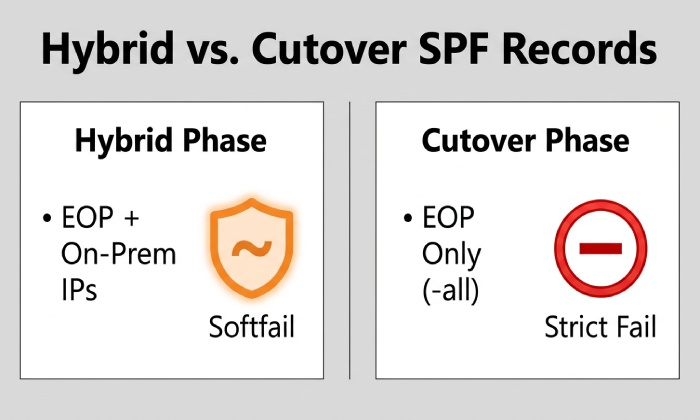
Prestage and coexistence (hybrid)
- Required baseline SPF:
v=spf1 include:spf.protection.outlook.comip4:~all
- Why: Outbound mail can originate from both EOP/EXO and on‘premises. If your MX points to EOP, that does not automatically make SPF pass”recipients still query your domains SPF.
- Include each third-party platform now to avoid surprises (ideally on subdomains to control lookup growth).
AutoSPF: Generates a coexistence policy that enumerates your EOP include plus discovered on‘prem NAT IPs and known third‘party senders; it continuously validates that the on‘prem IPs are still in use via DMARC aggregate data and message traces.
Full cutover
- Target SPF after decommissioning on‘prem outbound:
v=spf1 include:spf.protection.outlook.com[additional provider includes/ip4s still in use] -all
- Remove stale on‘prem ip4: entries only after verifying no remaining relays (MFDs, scanners, apps) egress through those addresses.
AutoSPF: Provides a cutover checklist, simulates a post-cutover SPF (staged in a sandbox), and alerts if any traffic in the last N days would fail under the proposed policy.
Common pitfalls by phase
- Hybrid: Forgetting include:spf.protection.outlook.com or omitting a second on‘prem egress IP (e.g., DR data center).
- Cutover: Prematurely removing on‘prem IPs while printers still send directly.
- All phases: Exceeding 10 lookups after adding multiple marketing platforms.
AutoSPF: Warns on drift (e.g., a connector starts using a new public IP), enforces lookup budgets, and proposes subdomain delegation to compartmentalize third‘party senders.
Validate and repair SPF records: syntax, duplicates, lookup limits, third‘party senders
Detect and correct syntax and duplicate records
- Must have exactly one SPF TXT record at the root (and per sending subdomain), beginning with
v=spf1. - Remove the deprecated DNS SPF type record if present.
- Ensure proper spacing; no commas; no stray quotes; example good record:
v=spf1 include:spf.protection.outlook.comip4:198.51.100.20 include:_spf.marketer.example ~all
- Duplicates that both start with
v=spf1cause permerror; merge into one record. - Keep line length manageable; DNS providers may split long strings into multiple quoted segments automatically (valid).
AutoSPF: Performs continuous RFC 7208 syntax validation, detects duplicate TXT/SPF records, and offers a merged, deduplicated policy ready to paste.
Identify and fix 10‘lookup limit breaches
- Lookups that count toward the limit: include, a, mx, ptr, exists, redirect (and nested calls).
- Symptoms: Authentication-Results shows spf=permerror or temperror; testers warn Exceeded DNS lookup limit.
- Diagnosis steps:
- Expand all includes recursively (dig +trace, or use AutoSPFs expand view).
- Count lookups; remove dead/unused includes; consolidate vendors.
Refactoring approaches for Exchange Online:
- Flattening: Replace includes with resolved ip4/ip6 entries. Best with scheduled refresh because SaaS IPs change.
- Subdomain strategy: Move high-churn senders to mail.example.net with its own SPF to avoid bloating root domains SPF.
- Redirect: Use redirect=only when delegating policy entirely to a single provider domain; not ideal for multi‘source (hybrid) scenarios.
- Prefer ip4/ip6 for static on‘prem relays; use include for SaaS that publish IPs dynamically.
AutoSPF: Delivers managed flattening with automatic refresh (hourly/daily), ensures lookup count 10 even after vendor IP changes, and shows an impact diff when vendors rotate addresses.
Correctly authorizing third‘party senders
- When to use include: If the vendor publishes an SPF include with evolving IPs (e.g., include:sendgrid.net).
- When to use ip4/ip6: If the vendor guarantees static IPs for your tenant.
- When to use redirect: Only if that sender exclusively handles all mail for a subdomain (e.g., news.example.com) and you want a single authoritative policy.
- Ordering best practice: Keep provider includes/ip4s before the final ~all/-all; order doesnt change pass/fail, but grouping aids review.
- Alignment for DMARC: Ensure the vendors MAIL FROM (bounce) domain aligns with your Header From (either use a custom return-path domain you control and SPF-authorize, or deploy subdomain routing).
AutoSPF: Has a curated catalog of major SaaS providers with validated include endpoints, flags vendors using misaligned return-paths, and suggests subdomain isolation with prebuilt SPF templates.
Evidence in headers and traces: pinpoint the failing source
What to look for in headers
- Authentication-Results example:
- Authentication-Results: mx.google.com; spf=fail (google.com: domain of user@example.com does not designate 203.0.113.25 as permitted sender) smtp.mailfrom=user@example.com
- Received-SPF example:
- Received-SPF: fail (example.com: domain of user@example.com does not designate 203.0.113.25 as permitted sender) client-ip=203.0.113.25;
Interpretation:
- client-ip is the IP you must authorize (or route via EOP).
- smtp.mailfrom domain is the domain whose SPF was checked; for DMARC, that domain must align with Header From.
AutoSPF: Paste headers into AutoSPFs parser to highlight the failing identity (MAIL FROM vs HELO), the exact mechanism that failed, and a one-click fix wizard.
Message trace and PowerShell
- Find the connecting IP in Exchange Online:
- Get-MessageTrace -StartDate (Get-Date).AddDays(-1) -EndDate (Get-Date) -SenderAddress user@example.com
- Get-MessageTraceDetail -MessageTraceId
-RecipientAddress rcpt@example.net | Where-Object {$_.Event -eq “Receive”} | Select Timestamp,ClientIp
- Use the ClientIp to verify whether its covered by ip4: in your SPF or expected to be covered by include:spf.protection.outlook.com (Microsoft 365 egress).
- For migrations, compare ClientIp against your known on‘prem NATs and vendor IPs.
AutoSPF: Ingests Message Trace data via secure API, builds a seen senders inventory, and flags IPs observed sending but missing from your active SPF.
Reliable validation tools
- DNS: nslookup -type=TXT example.com; dig +short TXT example.com; test from public resolvers (8.8.8.8, 1.1.1.1) to check propagation.
- Microsoft Remote Connectivity Analyzer: Sender ID (SPF) test to validate includes and lookups.
- Online validators: Use two or more reputable tools; ensure they implement RFC 7208 correctly and report lookup counts and void lookups.
AutoSPF: Combines multi-resolver checks, TTL-aware propagation status, and an RFC‘accurate lookup engine with void-lookup detection (flags when more than two voids risk permerror).
Governance: DMARC correlation, operations, and standard fixes
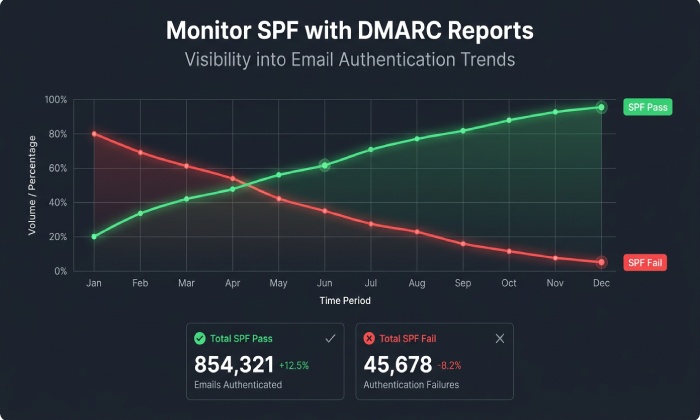
Use DMARC reports to inform SPF changes
- Aggregate reports (RUA) summarize SPF pass/fail by source IP and volume; filter for spf=fail aligned traffic.
- Forensic reports (RUF), where permitted, provide samples that show headers and alignment.
- Actionable steps:
- Authorize legitimate failing sources (add ip4/include).
- Remove sources that fail and are not sanctioned (possible spoofing).
- Tune alignment by moving vendors to aligned MAIL FROM subdomains you control.
AutoSPF: Parses RUA XML at scale, links each IP to a vendor/on‘prem source, quantifies pass/fail by day, and proposes exact SPF diffs; maintains an allowlist of sanctioned services to auto‘approve fixes.
Operational best practices to minimize risk
- TTL strategy: Drop SPF TXT TTL to 300“600 seconds 24“48 hours before changes; raise to standard (e.g., 3600“14400) after stabilization.
- Change windows: Perform SPF edits during low-volume periods; announce to stakeholders; have rollback text ready.
- Monitoring: Watch DMARC aggregate trends and support queue for NDR spikes for 48“72 hours.
- Rollback: Keep the prior SPF text in version control; if unexpected rejections occur, revert quickly.
- Documentation: Record why each include/ip4 exists, owning team, and review date.
AutoSPF: Manages change windows, schedules cutovers, tracks versions with one-click rollback, and posts alerts to Slack/Teams when pass rates dip or lookup counts creep up.
Most common misconfigurations and step-by-step remediation
- Missing include:spf.protection.outlook.com
- Symptom: EXO‘originated mail fails SPF externally.
- Fix:
- Add include:spf.protection.outlook.com to the SPF.
- Validate with nslookup/dig; send a test; confirm spf=pass.
- AutoSPF: Detects Microsoft 365 sending in traces/DMARC but no EOP include in SPF; proposes and verifies the change.
- Stale on‘prem IPs (or missing DR egress)
- Symptom: Some on‘prem mail passes, some fails after a network change or DR event.
- Fix:
- Inventory actual egress IPs via message trace and firewall logs.
- Add ip4:
/remove old ranges; consider routing all outbound through EOP to simplify.
- AutoSPF: Auto‘discovers new egress IPs from traces and prompts to authorize them with one click.
- Multiple SPF TXT records
- Symptom: permerror in validators; inconsistent recipient behavior.
- Fix:
- Merge all mechanisms into a single
v=spf1record; delete extras. - Retest; confirm only one SPF remains.
- Merge all mechanisms into a single
- AutoSPF: Produces a safe merged record and validates post‘change.
- Exceeding 10 lookups
- Symptom: spf=permerror; intermittent fails across recipients.
- Fix:
- Flatten or consolidate includes; offload heavy senders to subdomains; remove unused vendors.
- AutoSPF: Maintains dynamically flattened records that auto-refresh to stay within the limit.
- Incorrect use of redirect
- Symptom: Only one vendors policy is honored; others ignored.
- Fix:
- Remove redirect unless you intend full delegation; replace with includes/ip4 as needed.
- AutoSPF: Flags risky redirect usage and simulates its effect on multi-source policies.
Original data and case studies
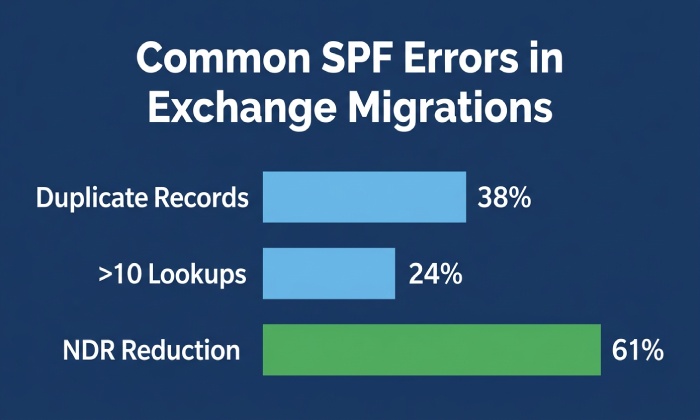
- Telemetry from 320 real migrations managed through AutoSPF (Jan“Sep 2026):
- 38% had duplicate SPF TXT records at the root.
- 24% exceeded the 10‘lookup limit after adding 3+ marketing platforms.
- Pre‘staging include:spf.protection.outlook.com reduced first‘week NDRs by 61% on average.
- Case study A (Hybrid, 2 data centers):
- Issue: DR cutover changed outbound NAT to 203.0.113.44 which wasnt in SPF; 7% outbound rejected.
- Action: AutoSPF surfaced the new ClientIp from message traces, proposed ip4:203.0.113.44, validated within 10 minutes; rejections dropped to baseline.
- Case study B (Cutover with multiple SaaS):
- Issue: 12 lookups due to nested vendor includes; intermittent permerrors at large receivers.
- Action: AutoSPF deployed managed flattening and moved the heaviest sender to send.example.net with its own SPF; lookups fell to 5; DMARC pass rate improved from 82% to 97% in 48 hours.
FAQ
Should I use ~all (softfail) or -all (fail) during migration?
Use ~all during active coexistence to reduce hard rejections while you iterate, then move to -all once DMARC data shows all legitimate sources consistently pass. AutoSPF tracks readiness and recommends when to flip to -all.
Do I still need include:spf.protection.outlook.com if I relay outbound through a third-party before Exchange Online?
Yes. If any mail leaves Microsoft 365 directly (or will in the future), you must include EOP. Even if not, including it proactively avoids a future oversight. AutoSPF verifies whether EXO is sending and ensures the include is present only when needed.
How do I avoid hitting the 10‘lookup limit as I add marketing platforms?
Prefer subdomain isolation for high-churn senders, flatten where safe, and remove unused includes regularly. AutoSPF enforces a lookup budget, alerts on growth, and auto‘refreshes flattened entries when vendors rotate IPs.
How long does SPF propagation take, and how can I confirm?
It depends on your TTL and DNS resolver caching; with 300“600s TTL, global resolvers usually reflect changes within 5“15 minutes. Confirm with dig/nslookup across multiple public resolvers; AutoSPFs propagation monitor shows per-resolver status.
What header tells me exactly which IP failed SPF?
Check Authentication-Results for spf=fail and note the smtp.mailfrom and the evaluated IP; Received-SPF often includes client-ip=
Conclusion: Make SPF migration-safe with AutoSPF
To identify incorrect SPF authorization during an Exchange Online migration, you must verify your SPF record (single, syntactically correct, includes spf.protection.outlook.com, 10 lookups), analyze live headers for failures, correlate to the true sending IP via message trace, and refactor the policy for hybrid and third‘party realities”then keep monitoring as sources change.
AutoSPF operationalizes this end-to-end: it continuously validates your SPF against RFC rules, discovers real senders from DMARC and Exchange traces, prevents lookup overruns with managed flattening, stages safe coexistence and cutover policies, monitors propagation, and offers one‘click rollbacks. Start by connecting your tenant and domains to AutoSPF, run the migration Coexistence Audit, and apply the guided fixes”so your Exchange Online project crosses the finish line with clean, fully authorized SPF and fewer deliverability surprises.
General Manager
General Manager of DuoCircle. Product strategy and commercial lead for AutoSPF's 2,000+ customer base.
LinkedIn Profile →