Postmark SPF Record Setup: Step-by-Step DMARC & DKIM Guide

Quick Answer
Set up a Postmark SPF record correctly to improve email authentication and deliverability. This step-by-step guide explains how to configure SPF, align DMARC and DKIM, verify DNS records, and prevent spoofing while ensuring your emails reach recipients' inboxes.
Try Our Free DMARC Checker
Validate your DMARC policy, check alignment settings, and verify reporting configuration.
Check DMARC Record →
SPF, or Sender Policy Framework, is an email authentication method that lets a domain owner publish which approved senders are allowed to send mail for that domain. In practice, an SPF record is added to your domains DNS records as a TXT record. Our guide to building an SPF record walks through the syntax step by step. When a receiving server gets a message, it checks the sending domains SPF policy to see whether the connecting mail server and its sending IP address are authorized.
For Postmark, SPF is especially important because Postmark is an email service provider focused on reliable transactional email delivery. Messages such as password resets, receipts, account notifications, and product alerts are often time-sensitive. If the receiving server cannot validate the sending IP address, the message may be delayed, filtered, or rejected, creating email deliverability and user experience issues.
The basic SPF syntax starts with the SPF version prefix:
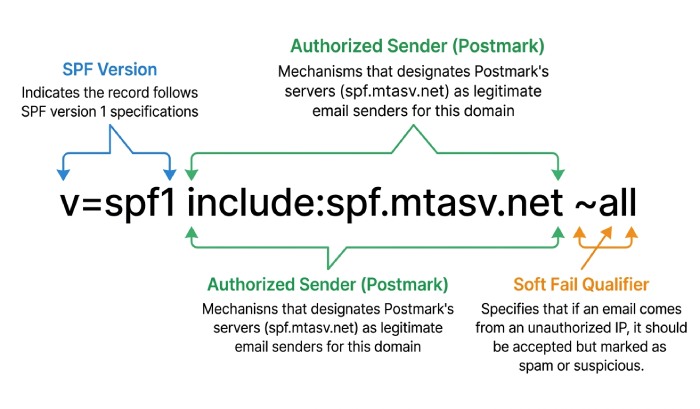
v=spf1 include:*spf*.*mtasv.net* ~all
In this example, include:spf.mtasv.net is the include mechanism that authorizes Postmarks infrastructure. The ~all ending is a soft fail, meaning mail from non-authorized sources should be treated as suspicious but not always rejected. These SPF mechanisms and SPF qualifiers help the receiving server decide whether the message should produce an SPF pass or SPF fail. For advanced setups, SPF macros can match senders dynamically.
SPF in Postmarks Mail Flow
Postmark sends through its own mail infrastructure, commonly associated with mtasv.net and spf.mtasv.net. During email transmission, the SMTP protocol carries the message from the sending mail server to the recipients mail server. The receiving server then evaluates the SPF record, reviews email headers, and checks the Return-Path domain used for bounces and SPF validation.
Return-Path and Email Headers
The Return-Path is the envelope sender address used for email bounces, not necessarily the visible from address your recipient sees. For example, a sender might use sales@example.com as the from address while the Return-Path is *bounces@*example.com* or a Postmark-controlled bounce domain. The email headers show these details, including the Postmark Return Path, SPF results, DKIM signatures, and DMARC evaluation.
This distinction matters because Sender Policy Framework checks the domain in the Return-Path, not always the visible from address. That is why a custom Return-Path can improve domain alignment, domain reputation, and email deliverability when configured correctly in Postmark.
Why SPF, DKIM, and DMARC Matter for Postmark Deliverability
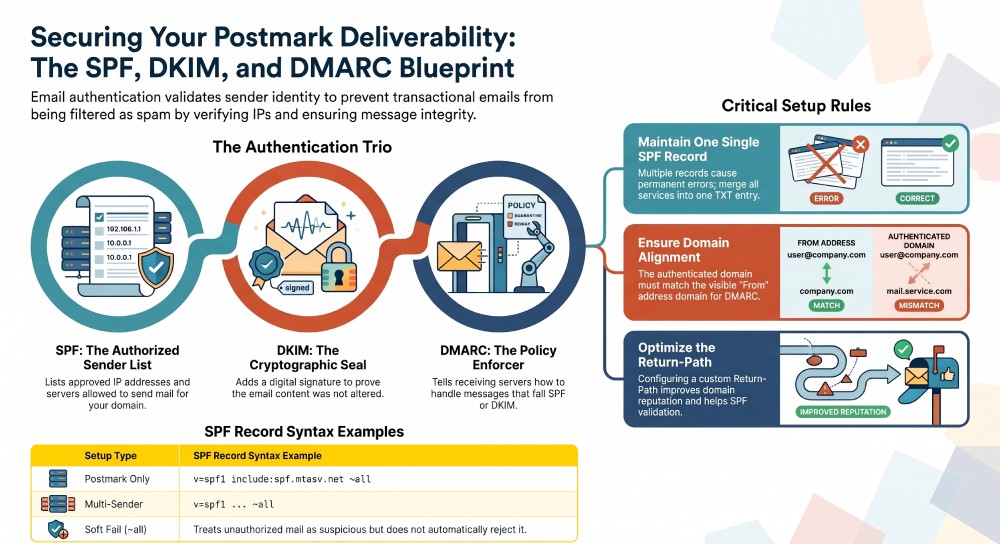
SPF, DKIM, and DMARC work together as modern email authentication controls. SPF confirms that a sending IP address belongs to the domain approved server list. DKIM adds a cryptographic signature to prove the message was not altered. DMARC tells receiving server systems such as Google, ISPs, and corporate gateways what to do when SPF or DKIM fails.
For Postmark users, this trio protects transactional email from being treated like suspicious marketing emails or bulk spam. A strong setup reduces deliverability problems, improves spam protection, and strengthens domain reputation over time. Poor or missing DNS records can cause an SPF fail, failed DKIM checks, or DMARC misalignment, all of which can keep messages out of the recipient inbox. Strong email security measures help improve email deliverability while preventing unauthorized access.
DKIM, DMARC, and Domain Alignment
DMARC depends on domain alignment. That means the authenticated domain used by SPF or DKIM should align with the visible from address domain. If your from address is billing@*example.com*, your Postmark DNS records should authenticate *example.com* or an aligned subdomain.
A DMARC guide from providers like Google, HubSpot, or Postmark will usually recommend setting up DKIM first, then SPF, and then DMARC. In Postmark, DKIM often uses DNS records supplied in your account, while SPF may involve authorizing spf.mtasv.net or configuring a custom Return-Path. If you need to create a signing key outside Postmark, use our DKIM generator. Together, these controls support phishing prevention, reduce email spoofing, and help prevent email impersonation and other email scams.
Security and Deliverability Impact
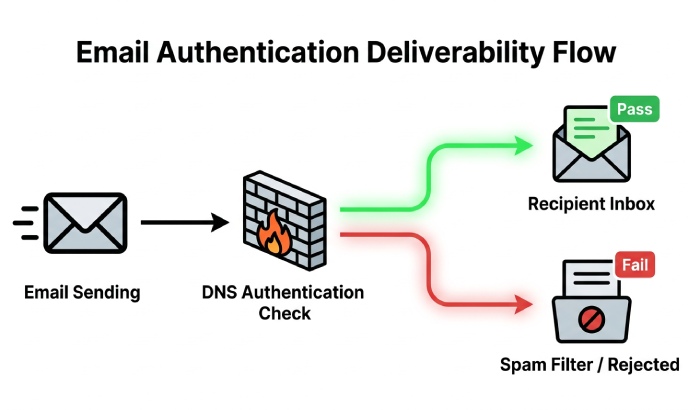
Email authentication is now a practical security standard, not an optional technical upgrade. A valid SPF record, aligned DKIM, and a clear DMARC policy help ISPs understand that Postmark is an authorized email service provider for your domain. This improves email deliverability, protects domain reputation, and reduces the risk that legitimate transactional email, newsletter emails, or carefully segmented marketing emails are filtered as abuse.
Prerequisites Before Setting Up Postmark SPF Records
Before editing DNS records, gather the current sending setup for your domain. You need access to your domain DNS settings through your hosting provider, DNS host, registrar, or web hosting platform. For example, if your domain uses Namecheap, you will edit the Namecheap DNS settings. Other teams may manage DNS through Cloudflare, Google Domains, a web hosting provider, or an enterprise DNS platform.
You should also identify all approved sending sources that send mail for the same domain. Postmark may handle transactional email through its email API or SMTP credentials, while another ESP may send marketing emails. For example, Campaign Monitor may require include:*_spf.createsend.com* for campaign monitor SPF, and Helpscout may use helpscoutemail.com for help desk emails. If you also use Google Workspace, HubSpot, or other email software, each email service provider may need to be considered.
Check Existing Senders and Subdomains
Review all subdomains and root-domain senders before you update DNS. A domain like example.com might use Postmark for application alerts, Campaign Monitor for marketing emails, and Helpscout for support replies. These are multiple senders, but they must be represented cleanly in one SPF text record for the same hostname.
Use email authentication tools, an SPF check, or DNS lookup utilities to inspect your existing SPF record entry. Look for older IP addresses, outdated includes, or abandoned vendors. If a retired mail server remains authorized, your approved senders list is broader than necessary, which weakens email abuse prevention.
Avoid Multiple SPF Records
A common mistake is publishing more than one SPF record on the same domain. SPF requires one SPF text record per hostname. If the receiving server finds multiple SPF records, SPF validation may return a permanent error, causing SPF fail results and email deliverability problems.
Instead of creating separate records, merge services into a single SPF policy. You can build that merged record with our SPF record generator. For example:
v=spf1 include:spf.mtasv.net include:_spf.createsend.com include:helpscoutemail.com ~all
This combined spf record syntax authorizes Postmark, Campaign Monitor, and Helpscout as approved senders. Keep the record concise, because SPF has DNS lookup limits. Too many includes can cause failures at the receiving server.
General Manager
General Manager of DuoCircle. Product strategy and commercial lead for AutoSPF's 2,000+ customer base.
LinkedIn Profile →