How to Detect Unexpected SPF Include Changes Before They Cause Email Failures

Quick Answer
Learn how to detect unexpected SPF include changes before they cause email failures. Discover how to monitor DNS records, prevent SPF authentication errors, protect email deliverability, and keep business emails reaching the inbox without disruption.
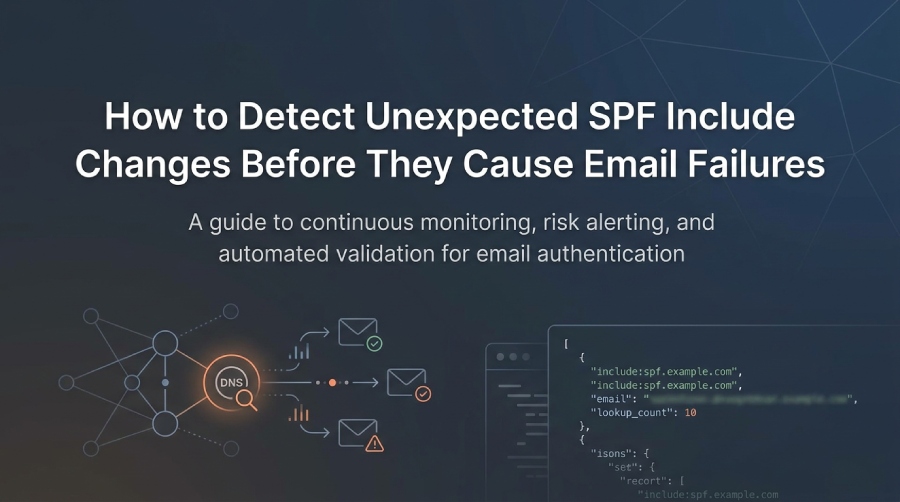
Unexpected changes to SPF include records can affect email authentication and delivery without warning. When an email service provider updates its sending IP addresses, modifies a nested SPF include, or introduces DNS resolution problems, your domain’s SPF configuration may no longer work as expected.
Monitoring SPF include changes helps identify these issues before they affect legitimate email traffic. Regularly reviewing DNS records, tracking authorized sending sources, checking SPF lookup consumption, and validating record changes can help organizations maintain reliable email authentication.
In this guide, you’ll learn how to monitor SPF include changes, identify unexpected DNS updates, investigate potential SPF failures, and validate configuration changes. We’ll also explore how automated SPF monitoring solutions, such as AutoSPF, can help simplify SPF record management and reduce email authentication risks.
Continuous Monitoring and Risk-Scored Alerting for SPF Includes
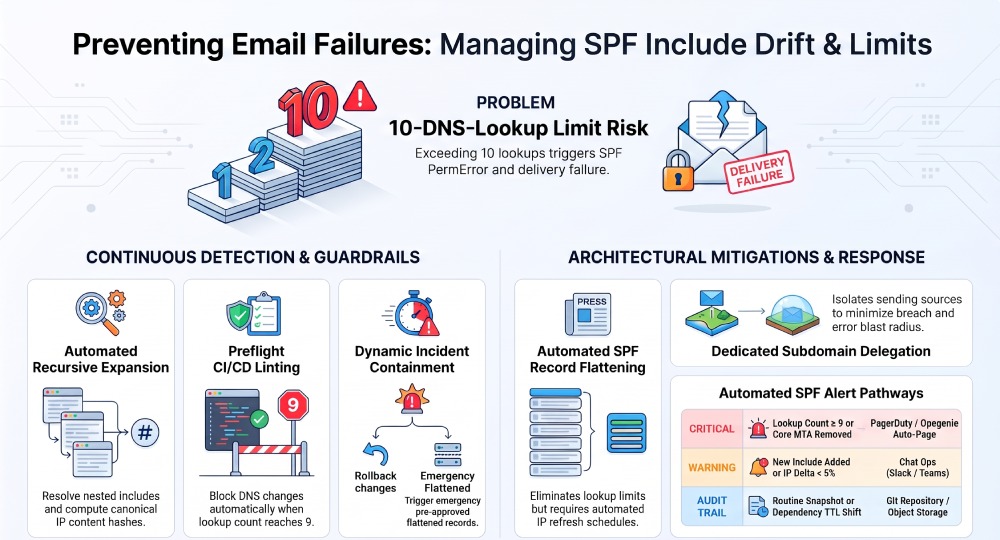
A strong detection strategy starts with recursive SPF expansion and diffing, layered with thresholds and notification policies that highlight meaningful changes while suppressing noise.
Automated DNS Monitoring Strategies
- Recursive expansion with caching:
- Follow all include: and redirect= modifiers, resolve nested includes, and compute the effective set of mechanisms and authorized IP blocks.
- Track the DNS lookup count consumed by include, a, mx, ptr, exists, and redirect (limit: 10).
- Maintain a visited set to avoid loops and mark potential infinite recursion.
- Normalize and hash:
- Normalize to a canonical model: ordered mechanisms, deduplicated IPs/CIDRs, flattened includes (logical expansion), and a count of lookups per branch.
- Compute content hashes to minimize duplicate alerts.
- TTL-aware scheduling:
- Schedule rechecks based on the lowest TTL in the dependency graph (e.g., if a nested include has TTL 300, poll at 5“10 minutes).
- Health-aware resolvers:
- Query through multiple resolvers, retry on timeouts (with jitter), and detect SERVFAIL/FORMERR patterns that imply upstream issues.
Example: Python recursive SPF expander (dnspython)
import dns.resolver, dns.exception, ipaddress, json, time

resolver = dns.resolver.Resolver()
resolver.lifetime = 3.0
resolver.timeout = 2.0

def txt_records(name):
    try:
        return [b"".join(r.strings).decode() for r in resolver.resolve(name, "TXT")]
    except Exception:
        return []

def parse_spf(spf_txt):
    if not spf_txt.lower().startswith("v=spf1"):
        return None
    return spf_txt.split()[1:]  # tokens after v=spf1

def expand_spf(name, visited=None, lookups=0):
    if visited is None: visited=set()
    if name in visited: return {"loops":[name]}, lookups
    visited.add(name)

    spfs = [t for t in txt_records(name) if t.lower().startswith("v=spf1")]
    if not spfs: return {"errors":[f"No SPF at {name}"]}, lookups

    # Choose first SPF (avoid multiple-variant conflicts)
    mech = parse_spf(spfs[0]) or []
    result = {"name":name, "mech":[], "ip4":[], "ip6":[], "includes":[], "redirect":None, "errors":[], "loops":[]}
    for token in mech:
        if token.startswith("include:"):
            target = token.split(":",1)[1]
            lookups += 1
            sub, lookups = expand_spf(target, visited, lookups)
            result["includes"].append(sub)
        elif token.startswith("redirect="):
            target = token.split("=",1)[1]
            lookups += 1
            sub, lookups = expand_spf(target, visited, lookups)
            result["redirect"] = sub
        elif token.startswith("a") or token.startswith("mx") or token.startswith("exists:") or token.startswith("ptr"):
            # These cause lookups; for brevity we don't resolve A/MX here
            lookups += 1
            result["mech"].append(token)
        elif token.startswith("ip4:"):
            result["ip4"].append(token.split(":",1)[1])
        elif token.startswith("ip6:"):
            result["ip6"].append(token.split(":",1)[1])
        else:
            result["mech"].append(token)
    result["lookup_count"]=lookups
    return result, lookups

def flatten_ips(tree):
    ips=set()
    if "ip4" in tree: ips.update(tree["ip4"])
    if "ip6" in tree: ips.update(tree["ip6"])
    for inc in tree.get("includes", []):
        ips.update(flatten_ips(inc))
    if tree.get("redirect"): ips.update(flatten_ips(tree["redirect"]))
    return ips

domain = "_spf.example.com"  # or your apex if SPF is at example.com
tree, lookups = expand_spf(domain)
ips = sorted(flatten_ips(tree))
snapshot = {"domain": domain, "lookup_count": lookups, "ips": ips, "tree": tree, "ts": int(time.time())}
print(json.dumps(snapshot, indent=2))- Store the JSON output (e.g., in S3 or Git) and diff snapshots to detect:
- New/removed includes
- Net changes in authorized IP space
- Lookup count creeping toward 10
- Redirect changes
Alerting Thresholds, Deduplication, and Channels
- Thresholds that matter:
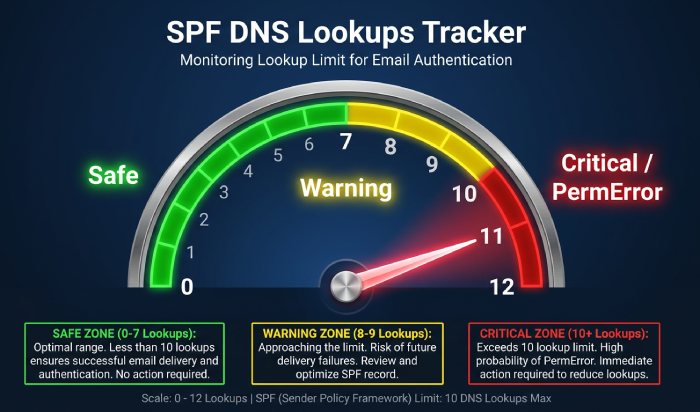
- Critical: lookup_count ≥ 9; redirect target changed; include add/remove that changes IPs by >5% of total; removal of any include with transactional senders.
- Warning: new include added; IP set change <5%; TTL reduced <300s; repeated timeouts on a vendor include.
- Deduplication:
- Group by change fingerprint (hash of normalized expanded set) and suppress repeats for N hours.
- Vendor-aware suppression for known churners (e.g., daily IP rotations) with allowlisted ranges.
- Notification channels:
- Chat (Slack/Teams) for warnings; PagerDuty/Opsgenie for criticals; Email/webhooks for audit; Ticketing (Jira) for follow-up.
- Escalation policy:
- Auto-page if lookup_count hits 10 on any production domain, or if net-removed IPs include primary MTA ranges.
Track, Store, and Visualize SPF History for Audits
A durable history of SPF and its includes is invaluable for audits, RCA, and troubleshooting intermittent failures.
Versioning and Storage Patterns
- Git-based history:
- Commit JSON snapshots per domain to a repo path (e.g., dns/spf/example.com.json) with a bot user. Each commit forms an immutable audit trail.
- Object storage:
- Bucket per environment; object key by domain and timestamp; lifecycle policies keep 180“365 days.
- Metadata:
- Store the expanded tree, IPs, lookup count, includes, redirect, TTLs of each dependency, and the resolvers used.
Validate Effective SPF in Real Time and Pre-Deployment
Validation prevents outages by ensuring SPF still authorizes senders and remains within limits before and after changes.
Real-Time Validation and Health Checks
- Resolver diversity checks:
- Expand SPF via multiple resolvers (public + corporate) to detect inconsistent views or EDNS truncation.
- Live evaluation:
- Compare expanded IP list to actively sending IPs (from MTA logs) to ensure coverage.
- Lookup headroom guardrails:
- Alert if lookup_count ≥ 8; auto-create a ticket to plan flattening or consolidation.
How AutoSPF helps: AutoSPF continuously recomputes effective authorization (expanded IPs), correlates with your sender IP telemetry (via log/API integrations), and flags uncovered senders.
Pre-Deployment Tests and Linting
- SPF linting rules:
- Single SPF record, no multiple v=spf1; no ptr; exists only with clear justification; no redundant mechanisms; total mechanisms manageable.
- 10-lookup simulation:
- Expand includes and simulate A/MX/exist lookups to estimate worst-case consumption.
- Safety checks:
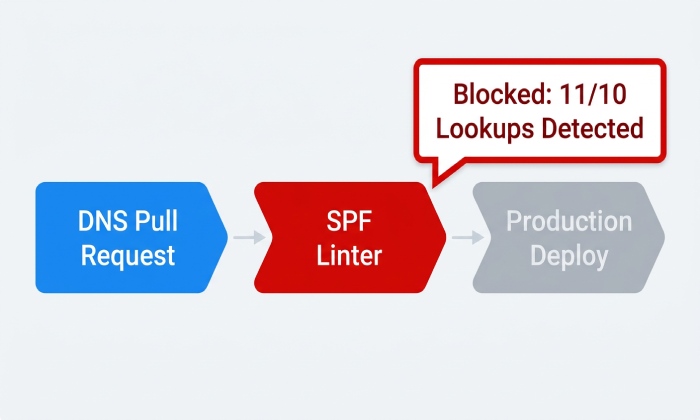
- Block merges if lookup_count would exceed thresholds, or if an include introduces overlapping or conflicting redirects.
How AutoSPF helps: AutoSPF ships a CI linter (autospf lint) and a GitHub Action/GitLab CI template that fails PRs if:
- lookup_count_post ≥ 10
- new include increases risk score past policy
- SPF TXT exceeds configured length thresholds or multiple-SPF detected
Example: GitHub Action to lint SPF before DNS changes
name: SPF Preflight
on:
  pull_request:
    paths:
      - 'dns/**'
jobs:
  spf_check:
    runs-on: ubuntu-latest
    steps:
      - uses: actions/checkout@v4
      - uses: autospfhq/action-spf-lint@v1
        with:
          domain_file: dns/domains.txt
          fail_on_lookup: 9
          block_ptr: true
          report_comment: true
Pre-Change Dry Runs
- Staging zone tests:
- Publish candidate SPF under _spf-candidate.example.com; run complete expansion and deliverability simulations without touching production.
- Shadow evaluation:
- Temporarily configure a non-routable envelope-from subdomain to test SPF passes at major receivers.
How AutoSPF helps: AutoSPF supports dry-run expansion against staged SPF labels and generates receiver-specific pass/fail projections.
Mitigations, Failure Modes, and Incident Response
Some problems require design choices (flattening, pinning, delegation), while others demand fast containment when they surface.
Mitigations: Pros, Cons, and Implementation
- SPF flattening
- Pros: Fewer DNS lookups; immunity to upstream timeouts; deterministic authorization.
- Cons: Staleness risk; larger TXT records; needs automation to refresh.
- Implementation: Generate ip4/ip6 lists by expanding vendor includes; republish on schedule (e.g., every 6“12h) with change-safe windows.
- AutoSPF: Offers policy-based flattening that auto-refreshes before TTL expiry and warns on oversized TXT strings.
- Include pinning
- Pros: Stability when vendors offer versioned or tenant-scoped includes.
- Cons: Risk of missing vendor emergency IPs unless coordinated.
- AutoSPF: Detects when a vendors generic include replaced a pinned include; suggests safe migration paths.
- Subdomain delegation and dedicated sending subdomains
- Pros: Blast-radius reduction; clearer ownership; easier canaries.
- Cons: Requires envelope-from alignment planning for DMARC.
- AutoSPF: Maps includes/senders to subdomains and simulates DMARC alignment outcomes.
Detect and Handle Common Failure Modes
- Nested include expansion and loops:
- Detection: Track visited nodes; depth caps; loop markers.
- Mitigation: Flatten or vendor escalation.
- DNS timeouts and SERVFAIL:
- Detection: Multi-resolver retries; record per-branch latency.
- Mitigation: Switch to flattened profile; increase caching; vendor ticket.
- CNAME chains at SPF host:
- Detection: Query conflicts (TXT absent, CNAME present).
- Mitigation: Eliminate CNAME at SPF label; publish TXT directly.
- Record size limits:
- Detection: String >255 chars or excessive total size leading to truncation/TC.
- Mitigation: Split strings correctly; reduce mechanisms; flatten; or leverage subdomain SPF with redirect.
- Lookup overflows (>10):
- Detection: Preflight count; production alarms at ≥9.
- Mitigation: Consolidate includes; remove a/mx; switch to flattening.
How AutoSPF helps: AutoSPFs risk engine flags each failure mode with precise guidance and can auto-switch to a pre-approved flattened record (break-glass mode) if a threshold breach is detected.
Incident Response Playbook
- Detection
- Triggers: lookup_count >= 10; sudden drop in SPF pass rate; vendor include SERVFAIL; critical diff in authorized IPs.
- AutoSPF automatically opens an incident with impact assessment and affected sender map.
- Containment/Rollback
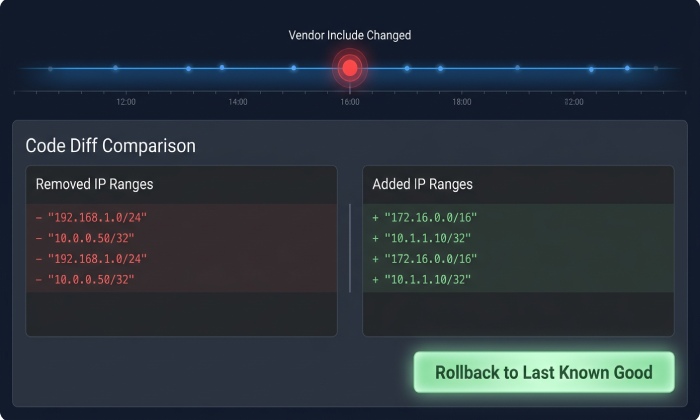
- Options: Revert to last-known-good SPF snapshot; enable flattened emergency record; temporarily relax DMARC (quarantine to none) if DKIM alignment is solid.
- AutoSPF supports one-click rollback and publishes the prior TXT via API/IaC.
- Temporary Overrides
- Add explicit ip4/ip6 for critical MTAs; remove expensive mechanisms (a/mx/exists); raise TTL for stability.
- Communications
- Notify stakeholders (Email, Marketing Ops, Security, Support); vendor escalation; status page update.
- Post-incident RCA
- Analyze dependency that changed, detection latency, gaps in alert policy, and process improvements.
Original case study (hypothetical): A fintech delegated marketing sends to mkt.example.com with two vendor includes. A vendor rotated to nested includes overnight, pushing lookups from 8 to 11. AutoSPF alerted at 9 (critical), switched to a pre-approved flattened record, and opened PagerDuty. Impact was limited to 7 minutes with zero bounce spikes; postmortem led to vendor versioned include and a 6-hour flatten refresh SLA.
Quick Reference: What to Monitor vs. How AutoSPF Maps It
- Monitor: Added/removed includes; redirect changes; lookup counts; IP set deltas; resolver errors; TTL shifts.
- AutoSPF: Graph fingerprints; risk scoring; multi-resolver health; TTL-aware polling; vendor labels; one-click rollback.
FAQs
How often should you monitor SPF include changes?
SPF include records should be monitored regularly because third-party email providers can update their DNS configurations without changing your main SPF record. Automated monitoring can help identify changes as they occur and reduce the need for manual checks.
Can a third-party SPF update cause an SPF PermError?
Yes. A third-party update can introduce problems such as exceeding the 10-DNS-lookup limit, creating recursive dependencies, or publishing an invalid SPF configuration. These issues can cause SPF evaluation to return PermError.
What should you do when an SPF include domain stops resolving?
First, verify whether the DNS issue is temporary or persistent. Check the provider’s official SPF documentation, confirm the correct include domain, and investigate DNS responses. Correct the SPF configuration only after confirming the appropriate replacement.
What counts toward the 10 DNS lookup limit in SPF?
The SPF DNS lookup limit applies to the include, a, mx, ptr, exists, and redirect mechanisms or modifiers. The total limit is 10 during a single SPF evaluation. Mechanisms such as ip4 and ip6 do not consume this DNS lookup allowance.
Does SPF flattening prevent unexpected include changes?
SPF flattening replaces include-based authorization with IP address mechanisms. It can reduce DNS lookup consumption, but it also creates a maintenance requirement because IP address changes made by email providers must be reflected in the flattened record.
Conclusion: Make SPF Changes Safe-by-Design with AutoSPF
Unexpected SPF include changes can affect email authentication, DNS lookup consumption, and legitimate email delivery. Regular monitoring, historical record comparisons, DNS validation, and timely investigation help organizations identify these problems before they become larger disruptions.
By monitoring third-party SPF dependencies and reviewing changes before updating DNS records, administrators can maintain more reliable email authentication configurations. AutoSPF can support this process through its verified SPF monitoring and management capabilities, helping organizations maintain better visibility into their SPF records and reduce avoidable configuration problems.
General Manager
General Manager of DuoCircle. Product strategy and commercial lead for AutoSPF's 2,000+ customer base.
LinkedIn Profile →