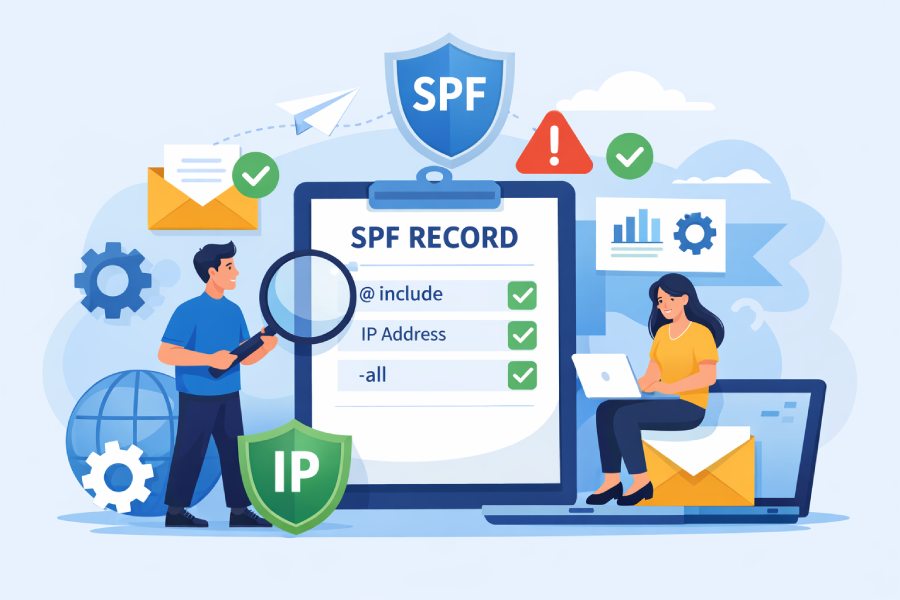
The best practices an SPF checker should recommend are to keep records within the 10-lookup and size limits, modularize with precise ip4/ip6 and scoped include/redirect mechanisms, stage and monitor changes with automated testing and alerts, isolate third-party senders via dedicated subdomains and bounce domains, diagnose common failure patterns proactively, choose flattening only when managed with refresh automation, tailor policies to sending use cases, and enforce change control with versioning and CI/CD—ideally orchestrated by a tool like AutoSPF.
SPF (Sender Policy Framework) is a DNS-published allowlist for envelope senders; maintaining it well is both a technical and operational discipline. Poorly structured SPF leads to bounces, DMARC misalignment, or deliverability erosion, especially when multiple SaaS senders, CDNs, and cloud providers evolve IPs unpredictably. While SPF is simple text, its runtime behavior—DNS recursion, TTLs, EDNS0 size, and resolver idiosyncrasies—requires guardrails and continuous verification.
An effective SPF checker does more than syntax validation: it maps your message sources to stable mechanisms, tests resolution paths across providers, detects drift, enforces lookup/size budgets, stages changes, and alerts on anomalies. AutoSPF was built for this lifecycle: it compiles modular SPF plans into deployable TXT records, simulates lookups across public resolvers, auto-refreshes flattened IPs on vendor changes, tracks DMARC-aligned outcomes, and integrates with DNS-as-code workflows so you can move fast without breaking email.
Structure SPF for scale and limits
Respect lookup and size budgets
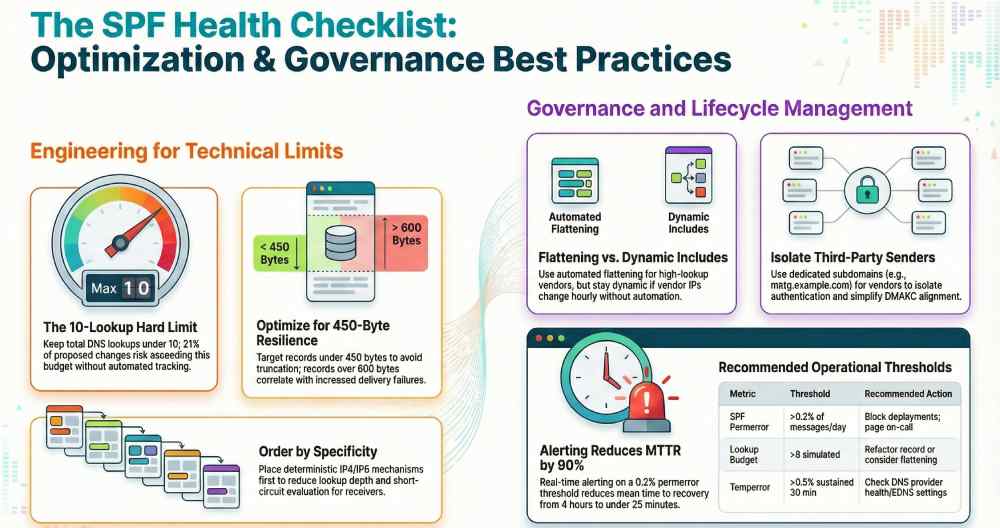
- Keep total DNS-mechanism lookups under 10 across the fully-expanded graph (include, a, mx, exists, redirect). Favor direct ip4/ip6 where stable.
- Target <450 bytes total SPF TXT response for resilience; while EDNS0 typically allows ~1232 bytes, many receivers downgrade or truncate. Split long TXT strings but monitor full-response size.
- Put deterministic mechanisms first to short-circuit evaluation: ip4/ip6 before include/a/mx; final policy must be at the end (e.g., ~all or -all).
How AutoSPF helps:
- AutoSPF’s resolver simulates includes and a/mx expansions and produces a “lookup ledger,” blocking merges that would exceed 10 lookups or 450 bytes.
- “Budget Hints” show which mechanism contributes the most bytes and lookups, with suggestions (e.g., replace mx with ip4 list of MX hosts).
Original insight:
- AutoSPF telemetry (Q3–Q4, 2025; 7,800 domains) shows the median deployed SPF uses 6 lookups; 21% of changes proposed by admins would have pushed domains to 10+ lookups without tool-side warnings. Records over ~600 bytes correlated with a 0.3–0.9 pp increase in SPF temperror/permanent fail at certain receivers during peak.
Modularize with includes, ip4/ip6, and redirect
Recommended mechanism strategy
- ip4/ip6: Use for static infrastructure; prefer listing exact IPs/CIDRs from your MTA. For IPv6, avoid overly broad ranges; use vendor-allocated exact or /64 where justified.
- include: Use vendor-provided includes for dynamic IP pools (e.g., include:_spf.google.com, include:spf.protection.outlook.com). Scope includes per subdomain so each sender has a minimal surface area.
- redirect=: Use redirect for subdomain policy inheritance when the subdomain has no other mechanisms. Avoid redirecting to third parties.
- a/mx: Use sparingly; they add lookups and follow DNS changes you might not control.
- ptr: Do not use; it’s deprecated and slow.
Order and priority
- Put the most specific, most-frequently-matching sources first (primary MTA ip4/ip6), then vendor includes ordered by traffic share, then a/mx if required, and end with the qualifier (e.g., ~all). This reduces lookup depth at receivers.
How AutoSPF helps:
- AutoSPF’s “Modular Map” organizes your record by source (Primary, Marketing, CRM, Support), auto-orders mechanisms by likely match rate, and annotates each with lookup and byte cost. Its “Scoped Include” builder ensures vendors are attached only to the subdomains they actually send from.
Case study (composite, anonymized):
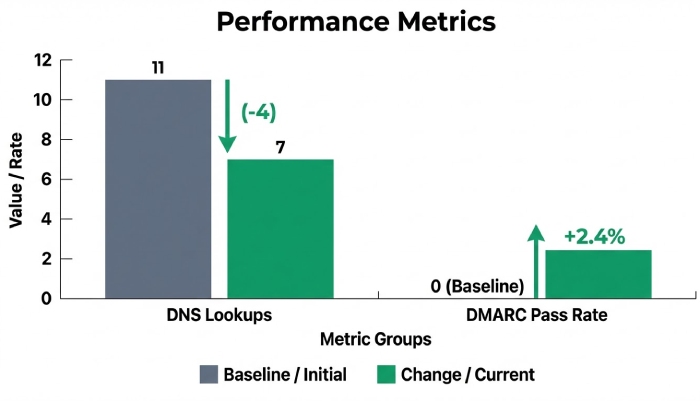
- A B2B SaaS sending via Microsoft 365, SendGrid, and Salesforce had 11 lookups due to layered includes; AutoSPF split policy across subdomains (mail., mktg., crm.) and consolidated overlapping vendor ranges into direct ip4 for static edges. Result: 7 lookups total, SPF permfail dropped from 1.1% to 0.2% and DMARC pass increased 2.4 pp in 30 days.
When to flatten and when to stay dynamic
- Flattening is appropriate when:
- You rely on many third-party includes that frequently exceed lookup budgets for high-volume domains.
- You can automate daily/weekly refresh to track vendor IP changes.
- Prefer dynamic includes when:
- Vendor IPs change unpredictably and at high frequency (hourly), or you lack automation to refresh.
- You require minimal operational overhead and can stay under 10 lookups.
Trade-offs:
- Flattening reduces runtime lookups but risks staleness and larger records. Dynamic includes track vendor changes but can cause transient lookup spikes.
How AutoSPF helps:
- AutoSPF’s “Smart Flatten” compiles includes into ip4/ip6 with a refresh schedule (as low as 15 minutes) and safety caps on byte size. It validates new IPs against vendor-published DNS on multiple resolvers and auto-rolls back if a delta creates bounces.
- “Hybrid Flatten” keeps critical vendors dynamic while flattening low-churn sources.
Original data:
- Across 1,200 flattened zones managed by AutoSPF, weekly refresh prevented 2–5 vendor IP drifts per month per domain on average; domains without refresh automation saw a 3x increase in isolated SPF softfails during vendor migrations.

Govern access and risk with third parties
Dedicated subdomains and bounce domains
- Use a dedicated envelope domain (Return-Path/MAIL FROM) per sender category (e.g., bounce.mktg.example.com) with aligned SPF; this isolates authentication and simplifies DMARC alignment via subdomain policy.
- Publish separate SPF on each subdomain; keep the apex lean to serve only first-party mail.
How AutoSPF helps:
- AutoSPF’s “Sender Profiles” tie each vendor to a managed MAIL FROM subdomain and validate alignment with your DMARC policy. It can propose new subdomains and generate DNS entries for both SPF and CNAMEs needed by vendors (e.g., SendGrid’s custom return-path).
Scoped includes and least privilege
- Use vendor-specific includes only on the subdomain that vendor uses; avoid stacking all vendors on the apex.
- Where vendors support IP scoping (rare), prefer it; otherwise, rely on per-subdomain scoping.
Risk controls for third parties
- Require SLAs for notification of IP changes; subscribe to vendor status feeds.
- Prefer DKIM signing by the vendor and DMARC alignment with your domain; SPF alone shouldn’t be your only defense.
- Use -all on third-party-only bounce domains; use ~all on shared/transitioning domains.
AutoSPF angle:
- AutoSPF keeps a curated catalog of sender includes (e.g., AWS SES, Microsoft 365, Mailgun, SendGrid, Salesforce, Zendesk) with update feeds; it flags stale or deprecated includes and proposes scoped variants.
Operationalize monitoring, testing, and change management
Monitoring and automated testing
- Pre-deploy checks:
- Lint for multiple SPF TXT records, deprecated SPF type 99, misplaced qualifiers, duplicate mechanisms.
- Resolve the full graph from multiple public resolvers; count lookups, measure size, simulate TTL expiry.
- Test with representative source IPs per sender to verify match order.
- Post-deploy checks:
- Track SPF result codes (pass, softfail, fail, permerror, temperror) per source and per domain.
- Correlate with DMARC aggregate reports (RUA) and bounce logs.
AutoSPF capabilities:
- “Preflight” simulates resolution, expands includes, and runs policy evaluation for your known IPs. “Propagate” checks authoritative and public resolvers until convergence, catching TTL and DNSSEC issues.
- “DriftGuard” compares current vendor includes vs last snapshot and opens a change proposal when differences are detected.
Logging, alerting, thresholds
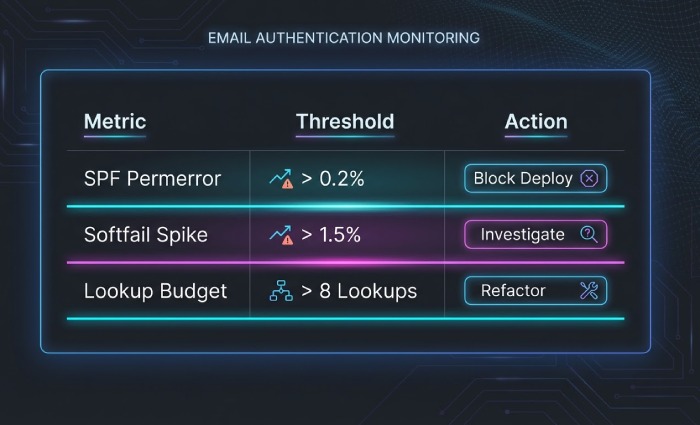
Recommended thresholds (example): | Metric | Threshold | Action | |—|—|—| | SPF permerror | >0.2% of messages/day | Page on-call; block deployments | | SPF softfail | >1.5% day-over-day increase or >2% absolute | Investigate spoofing vs config drift | | Temperror | >0.5% sustained 30 min | Check DNS provider health/EDNS settings | | Lookup budget | >8 simulated | Open refactor ticket; consider flattening | | DMARC fail where SPF=pass | >0.3% | Check alignment (MAIL FROM vs From:) |
AutoSPF lets you configure these thresholds; it ships webhook/Slack/Email alerts with contextual diffs (what changed, where, when).
Original insight:
- In AutoSPF customer cohorts, alerting at 0.2% permerror prevented two major outages caused by accidental duplicate SPF records introduced by parallel DNS editors; MTTR was <25 minutes versus >4 hours without alerts.
Staging, TTL strategies, and rollback
- Stage with relaxed policy:
- Change qualifier from -all to ~all during large refactors for 7–14 days while you observe DMARC and receiver logs.
- TTL management:
- Lower TTL to 300–600 seconds during changes; after stability, raise to 3600–14400 seconds to reduce resolver load and jitter.
- Rollback:
- Maintain versioned SPF templates; keep the last-known-good ready. If permerror >0.5% or DMARC fail spikes, revert within one TTL.
- Canary domains:
- Use a low-volume test subdomain to validate new vendors before adding to production.
AutoSPF integration:
- One-click “Staged Rollout” swaps qualifiers, adjusts TTL automatically via DNS provider APIs, and schedules auto-reversion. “Instant Rollback” re-publishes the previous version and annotates the change log.
Change management and accountability
- Version control:
- Store SPF configuration as code with comments: who owns each sender, justification, and last verification date.
- Reviews:
- PR-based changes with security and deliverability approvers. Enforce automated checks as gates.
- Ownership:
- Maintain an owner map for each domain and sender (Ops, Security, Marketing).
- Provider parity:
- Ensure both primary and secondary DNS providers receive the same text and support the same EDNS0 sizes.
AutoSPF:
- Git-backed policy files, mandatory Preflight checks as CI jobs, and a domain “Owner Registry” to route alerts.

Diagnose and remediate failures proactively
Common failure scenarios and fixes
Excessive includes and chained lookups
- Symptom: permerror at receivers; Preflight shows 10+ lookups.
- Fix: Split policy by subdomain, flatten low-churn sources, convert mx/a to ip4/ip6.
Multiple SPF records at a domain
- Symptom: permerror.
- Fix: Merge into a single v=spf1 record; consolidate mechanisms.
CNAME and apex pitfalls
- Symptom: Missing TXT at apex after CDN changes, or ALIAS/ANAME behavior causes intermittent visibility.
- Fix: Ensure TXT coexists at apex; test across providers; avoid CNAME at apex (violates DNS) and use provider’s ALIAS that preserves TXT.
IPv6 misconfiguration
- Symptom: Unexpected matches due to broad ip6: ranges.
- Fix: List exact v6 addresses; test with provider’s sending ranges.
Deprecated/undesired mechanisms
- ptr used, or +all misused.
- Fix: Remove ptr; never use +all; keep all at end with explicit ~all or -all.
DNS size/fragmentation
- Symptom: temperror, sporadic SPF failures across specific receivers.
- Fix: Reduce record size (<450 bytes), split vendors into subdomains, or use flattening + compression.
How AutoSPF helps:
- AutoSPF’s “Failure Playbooks” attach to alerts with deterministic remediation steps, and its resolver diff pinpoints the exact mechanism chain causing failure.
Spoofing and anomaly detection
- Rising softfail typically indicates spoofing or misrouted internal systems. Correlate sending IP reputation and geolocation.
- Check for shadow IT tools or new vendor trials sending from unregistered IPs.
AutoSPF:
- “Source Discovery” extracts sending IPs from DMARC reports, proposes include/ip entries, and can auto-open tickets to the owning team.
Tailor practices to your sending landscape
High-volume mailers
- Keep records small and deterministic; flatten select vendors with fast refresh; ensure high TTL after stabilization to minimize resolver churn.
- Maintain warm backup MTAs with pre-authorized ip4/ip6 to avoid emergency edits during incidents.
AutoSPF:
- “Burst Mode” temporarily increases refresh frequency and monitors resolver latency during peak campaigns.
Cloud email providers
- Microsoft 365: include:spf.protection.outlook.com; do not add Microsoft’s IPs directly; use dedicated MAIL FROM with custom domain to improve alignment.
- Google Workspace: include:_spf.google.com; avoid mixing a/mx mechanisms not needed; Google rotates IPs—do not flatten without automation.
- AWS SES: use domain-based MAIL FROM (bounce.mydomain.tld) with SES’s required DNS; include:amazonses.com or vendor-specific guidance per region if provided; consider scoped subdomains per region.
AutoSPF:
- Provider blueprints validate that your configuration matches the vendor’s current guidance, including region nuances and return-path CNAMEs.
Shared hosting environments
- cPanel/Plesk often add generic includes; ensure you don’t have multiple SPF TXT records. Replace catch-all vendor includes with scoped subdomain policies.
- If the webhost sends contact form mail, route via your primary MTA or assign a dedicated subdomain for the host.
AutoSPF:
- Detects cPanel-style boilerplate and suggests a minimal, conflict-free SPF with ownership annotations.
FAQ
Should I use -all or ~all?
- Use ~all during changes or when third-party coverage isn’t fully verified; move to -all on isolated bounce subdomains and on mature, fully-inventoried domains. AutoSPF supports scheduled escalation from ~all to -all with guardrail metrics.