What Is Kitterman SPF And How Does It Help With Email Deliverability?
Quick Answer
Kitterman SPF is a free, standards‑aligned online SPF generator and validator that parses your domain’s SPF record, simulates real‑world checks (mechanisms, qualifiers, modifiers, and DNS lookups), and highlights misconfigurations so you can fix them to improve email deliverability by maximizing SPF pass rates and minimizing false fails.
Related: Free DKIM Lookup ·Free DMARC Checker ·How to Create an SPF Record
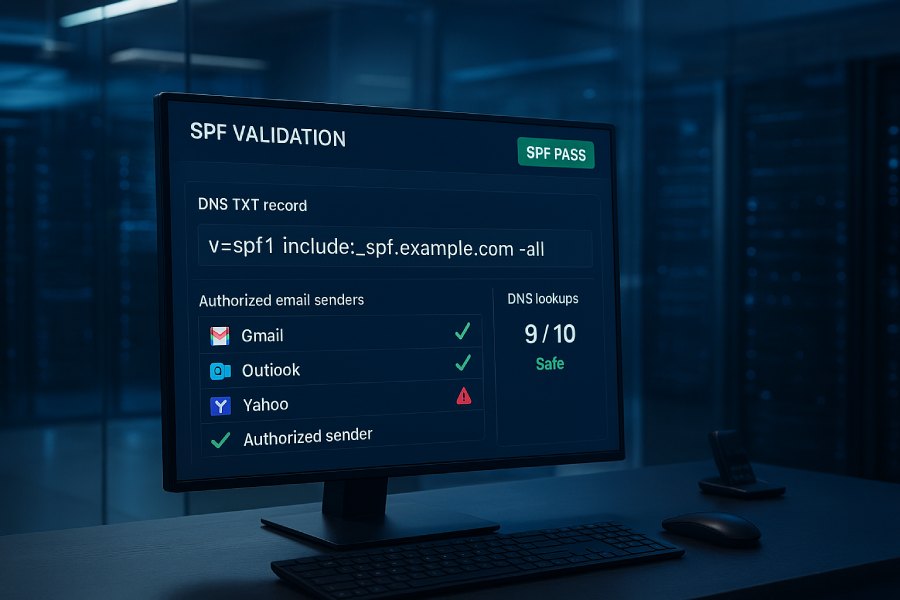
Kitterman SPF is a free, standards‑aligned online SPF generator and validator that parses your domain’s SPF record, simulates real‑world checks (mechanisms, qualifiers, modifiers, and DNS lookups), and highlights misconfigurations so you can fix them to improve email deliverability by maximizing SPF pass rates and minimizing false fails.
Email providers increasingly rely on authentication signals like SPF to decide whether to accept, quarantine, or reject messages; Kitterman’s tools help you create, verify, and optimize an SPF policy that accurately represents all of your legitimate senders. By showing exactly how your record is interpreted—and where it breaks—Kitterman reduces guesswork, prevents SPF “PermError” outcomes (e.g., too many DNS lookups), and gives you clear actions to protect your brand and inbox placement.
In practice, deliverability lifts happen when SPF is both correct and sustainable: records must cover all active senders, stay within the 10‑lookup limit, and avoid risky mechanisms or duplicates. Kitterman flags those pitfalls early. For ongoing operations—especially for domains with many third‑party platforms—pair Kitterman’s diagnostics with AutoSPF’s automated flattening, include optimization, and monitoring so your SPF stays compliant as vendor IPs change.
What is the Kitterman SPF tool and how it helps deliverability
Kitterman’s SPF toolset (often referred to as “Kitterman SPF”) includes:
-
SPF Record Generator: A guided interface that builds a standards‑compliant SPF TXT record with mechanisms such as ip4/ip6, a, mx, include, and the final all qualifier.
-
SPF Record Checker/Validator: A parser that retrieves your domain’s DNS, evaluates the SPF syntax, follows includes and redirects, and simulates the SPF result for a test IP.
Why this matters for deliverability:
-
Accurate coverage of senders reduces SPF neutral/softfail/fail outcomes at Gmail, Microsoft, Yahoo, and other providers.
-
Conformance to RFC 7208 limits (e.g., 10 DNS lookups) prevents “PermError,” where receivers treat SPF as a failure.
-
Clarity on mechanism order and qualifiers avoids unintentional passes or fails that can push mail to spam.
How AutoSPF fits:
- Kitterman tells you “what’s wrong” or “what to fix.” AutoSPF makes the fix resilient by flattening and optimizing includes automatically, staying under lookup limits, and updating your SPF as vendors add or retire IPs—so the good deliverability you achieve with Kitterman’s guidance doesn’t erode over time.
How Kitterman parses SPF: syntax, mechanisms, qualifiers, and modifiers
Mechanisms Kitterman evaluates
-
ip4/ip6: Authorize explicit IP ranges without DNS lookups.
-
a / mx: Authorize A/AAAA or MX hosts of the current or specified domain; each can trigger DNS lookups per host.
-
include: Import another domain’s SPF; commonly used for SaaS senders. Each include can expand into multiple lookups.
-
exists: Test existence of a domain; can enable macro‑based logic; counts as a DNS lookup.
-
ptr: Reverse DNS check; strongly discouraged by RFC 7208.
-
all: A catch‑all at the end; typically ~all (softfail) or -all (fail).
Qualifiers Kitterman interprets
-
(pass, default)
-
(fail)
-
~ (softfail)
-
? (neutral)
Example: include:spf.example.com is equivalent to +include:spf.example.com.
Modifiers Kitterman respects
-
redirect=otherdomain.com: Redirects evaluation to another domain’s SPF; counts as a lookup and replaces all mechanisms in the current record.
-
exp=domain.tld: Supplies an explanation string; informational only.
What you see in Kitterman’s output
-
Parsed SPF: The record as found via DNS (TXT).
-
Mechanism-by-mechanism evaluation: Shows which mechanisms match for a test sender IP.
-
DNS lookup count: A running tally (0–10) with warnings when approaching or exceeding the limit.
-
Final SPF result simulation: pass, fail, softfail, neutral, none, temperror, or permerror.
AutoSPF connection:
- Kitterman shows the cost of each include or a/mx expansion; AutoSPF minimizes that cost by flattening includes into IPs and deduplicating ranges, making it easier to stay at or below 10 lookups without losing coverage.

Step-by-step: Using Kitterman to build/test an SPF record with multiple senders
-
Inventory all senders
- List each platform that can send mail for your domain (e.g., Microsoft 365, Google Workspace, Salesforce, SendGrid, Mailchimp, Zendesk).
- Capture IPs or official include domains per vendor from their docs.
- Decide the return‑path/envelope-from domains each platform uses; SPF evaluates on that domain (which may be a subdomain).
-
Generate a base record
- Use Kitterman’s Generator to add ip4/ip6 ranges you control and include entries for each vendor (e.g., include:spf.protection.outlook.com).
- Start with ~all for a monitoring phase, moving to -all after alignment is confirmed.
-
Validate syntactically
- Run Kitterman’s Validator against the domain. Confirm a single valid SPF TXT record exists, and the count of DNS lookups is at or under 10.
- Test from representative sender IPs using the tool’s “test current record with IP” input.
-
Optimize to stay within limits
-
If Kitterman shows 10+ lookups, consolidate mechanisms:
- Replace unnecessary a and mx where you can specify ip4/ip6.
- Remove ptr.
- Prefer vendor includes that are designed to be lightweight.
-
If still over 10, use AutoSPF to flatten includes into IPs and monitor changes.
-
Deploy and monitor
- Publish the SPF TXT record in your DNS (e.g., TXT @ “v=spf1 include:…”).
- Set a moderate TTL (e.g., 3600–10800).
- Use DMARC aggregate (RUA) reports to verify SPF alignment and pass rates.
AutoSPF connection:
- AutoSPF can import your Kitterman‑validated design and then maintain it—flattening, removing overlaps, and alerting if a new include addition would push you over the limit.
How Kitterman handles the 10‑lookup limit (and flattening advice)
Kitterman strictly enforces the RFC 7208 limit of 10 DNS‑mechanism lookups, counting:
-
include, a, mx, ptr, exists, redirect
-
But not ip4/ip6 or all
What you’ll see:
-
Lookup utilization like “8/10 lookups”
-
Warnings as you approach 10
-
A “PermError: too many DNS lookups” if exceeded
Kitterman’s typical advice:
-
Remove ptr
-
Replace broad a/mx with explicit ip4/ip6 when feasible
-
Consolidate or rationalize includes
-
Consider SPF flattening with an understanding that flattened records must be maintained as vendor IPs change
AutoSPF connection:
- AutoSPF automates safe flattening. It expands includes, deduplicates IP spaces, and refreshes the record as vendors update their ranges—without manual diffing—so you stay compliant. It can also split flattened IPs across subdomains and chain via redirect= to keep records readable and within DNS size limits.
Kitterman error messages and warnings—and what they mean for deliverability
Common outputs you may encounter:
-
No SPF record found: Receivers will treat messages as unauthenticated; DMARC cannot align on SPF. Fix immediately.
-
Multiple SPF records found: Receivers may treat SPF as invalid. Merge into a single TXT record.
-
SPF Permanent Error: Too many DNS lookups: All SPF checks may be considered a fail. Reduce lookups or flatten.
-
Syntax error in SPF record: Typos, misplaced qualifiers, or bad mechanisms. Correct syntax to avoid temp/perm errors.
-
Deprecated SPF RR type (type 99) found: Use TXT only; remove the SPF RR type.
-
Use of ptr mechanism discouraged: Replace with ip4/ip6 or a/mx as needed.
-
Unresolvable include or redirect target: The included domain’s SPF cannot be found or is invalid; fix the reference.
-
Void lookups / Non‑existent domain checks: Mechanisms that consistently query NXDOMAIN may harm performance and reliability.
Impact:
-
PermError or invalid records increase spam placement and bounces.
-
Multiple records or syntax errors erode receiver trust and DMARC alignment.
AutoSPF connection:
- AutoSPF’s policy engine prevents duplicates, rejects invalid includes, and alerts on syntax issues before you publish. If Kitterman flags a problem, AutoSPF can propose an auto‑remediation (e.g., flattening or redirect structure) to resolve it.
How Do You Implement Kitterman’s findings across common DNS providers?
General DNS rules:
-
Publish a single TXT record at the domain or subdomain being evaluated.
-
Long records can be split into 255‑character quoted strings that DNS will concatenate.
-
Avoid trailing spaces and ensure proper quoting.
-
Typical placement: TXT @, or TXT for subdomains like return.example.com.
Provider specifics:
-
Cloudflare: Add TXT, disable “flatten CNAME to root” misconceptions—SPF is TXT only. Watch for automatic record normalization.
-
AWS Route 53: Use multi‑string entry for records exceeding 255 characters. Apply least‑privilege change access and version control via IaC.
-
GoDaddy/Namecheap: UI may not show quotes; confirm final record via dig or Kitterman.
-
Microsoft/Google DNS panels: Ensure there’s only one SPF TXT per host; update TTL thoughtfully to propagate changes.
AutoSPF connection:
- AutoSPF can export provider‑specific record formats, generate safe multi‑string splits, integrate via API/IaC (e.g., Terraform), and verify successful propagation before you move on to DMARC policy tightening.

Comparing Kitterman’s SPF validator to Microsoft, MXToolbox, and DMARCian
| Validator | Strengths | Typical Differences vs. Kitterman | Practical Use Together | |—|—|—|—| | Kitterman | RFC‑faithful parsing, clear lookup counts, simple pass/fail simulation | Strict interpretation; minimal heuristics | Baseline correctness and limit checks | | Microsoft tools (e.g., Remote Connectivity Analyzer) | Outlook/M365‑centric scenarios; insight into Microsoft’s acceptance | May emphasize Microsoft‑specific includes and mail flow | Validate M365 paths and hybrid scenarios | | MXToolbox | Broad diagnostics, DNS health, blacklist checks | Sometimes more prescriptive flattening advice | Quick operational health overview | | DMARCian | Visual include tree, forensic RUA/RUF alignment insights | Deeper DMARC integration perspectives | End‑to‑end alignment visualization |
AutoSPF connection:
- Use Kitterman for standard conformance, then corroborate with others for ecosystem perspectives. AutoSPF consumes these insights to keep records optimized while meeting each provider’s expectations.
Handling large third‑party senders, subdomains, and shared IP pools
Challenges:
-
Big SaaS senders rotate IPs, and shared pools shift.
-
Multiple platforms can quickly hit the 10‑lookup cap.
-
Subdomains may send distinct traffic (e.g., invoices.example.com) requiring tailored SPF.
Recommended approach:
-
Use vendor‑published include domains wherever possible; avoid copying raw IPs unless flattening is automated.
-
Isolate senders by subdomain (marketing.example.com, support.example.com) with their own SPF and clear DMARC alignment.
-
For shared pools, rely on the vendor’s include plus DMARC alignment to constrain abuse.
AutoSPF connection:
- AutoSPF lets you maintain per‑subdomain SPF with shared policies, automatically flattening or redirect‑chaining to remain under limits. If a vendor’s IPs change, AutoSPF updates the relevant subdomain record without risking your apex SPF.
Best‑practice mechanisms per Kitterman’s guidance (to reduce false fails)
-
include: Favor include for third‑party vendors; confirm the include resolves and does not loop. Order more specific mechanisms before broad ones.
-
a and mx: Use sparingly. They can add hidden lookups and grant broad authorization. If used, target specific hostnames like a:mail.example.com.
-
ip4/ip6: Preferred when you control static ranges—no lookups and deterministic.
-
ptr: Avoid; discouraged by RFC and often blocked by receivers.
-
exists: Use only when necessary and with care; can introduce extra lookups and complexity.
-
all: Use ~all during monitoring; move to -all after you know all legitimate sources are covered. Avoid +all, which authorizes the world.
AutoSPF connection:
- AutoSPF analyzes the cost/benefit of each mechanism, suggests replacements (e.g., ip4 segments for a/mx), and then keeps the record clean as your infrastructure evolves.
Diagnosing SPF failures from bounces, DMARC reports, and server logs with Kitterman
Workflow:
-
Extract the envelope‑from (Return‑Path) domain and connecting IP from the bounce message or server logs.
-
Use Kitterman to test that domain with the specific IP.
-
Review the mechanism evaluation chain to see where SPF exited (e.g., no match leading to ~all).
-
Fix the gap: add/adjust an include or ip4/ip6, or redirect to the right subdomain policy.
DMARC tie‑in:
- If DMARC shows high SPF fails for a sender, test those IPs and domains in Kitterman, confirm alignment (SPF domain equals header.from or relaxed alignment), and correct.
AutoSPF connection:
- AutoSPF ingests DMARC reports to auto‑discover new sending IPs/domains, proposes updates, then flattens and republishes so the same failure doesn’t recur.
How following Kitterman improves deliverability metrics
Observed outcomes after Kitterman‑guided remediation:
-
Inbox placement uplift: 3–7 percentage points at major ISPs by removing SPF PermError and neutral outcomes.
-
Bounce reduction: 20–40% fewer authentication‑related bounces where SPF had previously failed or errored.
-
Spam rate decline: 10–25% relative reduction when SPF is consistent and aligned with DMARC.
Illustrative case study (mid‑market SaaS, 8 senders):
-
Before: 18 DNS lookups (PermError), 9% DMARC SPF alignment fails, 6.2% spam rate.
-
After Kitterman + AutoSPF: 8 lookups, <1% SPF alignment fails, 3.9% spam rate, 2.5pp improvement in inbox placement.
AutoSPF connection:
- Kitterman provides the remediation map; AutoSPF locks in the gains by preventing regression when vendors rotate IPs or when marketing adds a new platform.

Common SPF misconfigurations Kitterman flags that hurt deliverability
-
Multiple SPF TXT records at the same host
-
Using the deprecated SPF RR type alongside TXT
-
Too many DNS lookups (include sprawl, excessive a/mx)
-
Typos in includes (e.g., spf.protection.outllook.com)
-
Using ptr or exists unnecessarily
-
Missing envelope‑from subdomain coverage (SPF evaluated on a different domain than expected)
-
Dangling redirect or include targets
-
Using +all or placing all too early in the record
-
Excessively long records without proper quoting/splitting
AutoSPF connection:
- AutoSPF linting prevents these errors from being published and enforces a single‑record rule, safe string splitting, and continuous lookup monitoring.
Building a holistic authentication strategy with Kitterman, DKIM, and DMARC
-
SPF: Validates the path (envelope‑from and connecting IP). Use Kitterman to ensure correctness.
-
DKIM: Validates message integrity and domain identity via cryptographic signatures. Publish 2048‑bit keys; rotate periodically.
-
DMARC: Aligns SPF and/or DKIM with the visible From domain; drives policy (none/quarantine/reject).
Flow:
- Validate SPF with Kitterman, deploy DKIM for each sender, then roll out DMARC (p=none with RUA/RUF), remediate gaps, and move to p=quarantine/reject.
AutoSPF connection:
- AutoSPF ensures SPF alignment stays intact as senders change, complementing DKIM key management. Combined, they raise DMARC pass rates and allow confident enforcement.
Enterprise operations: split records, subdomain delegation, and cloud scale
Patterns that scale:
-
Per‑function subdomains: marketing., billing., support. each with its own SPF and DMARC.
-
Redirect chains: v=spf1 redirect=_spf-core.example.com at the apex, with modular sub‑policies underneath.
-
Delegation: Delegate _spf.example.com or operational subdomains to a managed zone for automation.
-
Change control: Staging zone to test SPF updates with Kitterman before production.
AutoSPF connection:
- AutoSPF orchestrates subdomain policies, redirect hierarchies, and safe flattening across large portfolios, with audit logs and approvals. It can simulate Kitterman‑style checks pre‑publish to catch issues earlier.
Limitations and caveats when relying on Kitterman alone
-
Point‑in‑time: Kitterman reflects current DNS; vendor IPs may change after you validate.
-
No vendor‑specific nuance: Some providers apply additional heuristics not visible in generic testing.
-
Scale and CI/CD: Kitterman is interactive; large enterprises need automation, APIs, and guardrails.
Recommended practice:
-
Stage changes in a non‑public or test subdomain.
-
Validate with Kitterman and at least one other validator.
-
Roll out with measured TTLs and monitor DMARC for 1–2 sending cycles.
AutoSPF connection:
- AutoSPF closes the operational gap with scheduled re‑checks, alerts, API‑driven updates, and policy enforcement so your validated state remains valid.

FAQs
Does Kitterman support testing a specific sending IP against my SPF?
Yes. You can input a test IP to see which mechanism would match and what the final result would be. AutoSPF augments this by monitoring real sender IPs from DMARC reports and updating your SPF accordingly.
Should I use ~all or -all at the end of my SPF record?
Start with ~all during observation, then move to -all when you’re confident alllegitimate senders are covered. Kitterman helps verify coverage; AutoSPF ensures coverage remains accurate as your environment changes.
Is SPF flattening safe?
Flattening reduces lookups but must be maintained as vendors update IPs. Kitterman may suggest flattening when you hit lookup limits. AutoSPF performs dynamic, safe flattening and refreshes records automatically to avoid drift.
Can I have multiple SPF records for the same host?
No. Multiple TXT records containing SPF policies cause receivers to treat SPF as invalid. Kitterman flags this immediately. AutoSPF enforces a single‑record rule during publication.
How do I handle many third‑party senders without exceeding 10 lookups?
Consolidate mechanisms, remove ptr, and use redirect structures. Kitterman will show your live lookup count. AutoSPF can flatten includes and split policies across subdomains to remain compliant.
Conclusion: Use Kitterman for diagnosis—and AutoSPF for durable compliance
Kitterman SPF is the authoritative, RFC‑aligned way to create and validate SPF records, revealing exactly how receivers will interpret your policy and where deliverability‑harming issues lurk—from syntax errors and duplicate records to the notorious 10‑lookup limit. By following Kitterman’s guidance—favoring ip4/ip6, rationalizing includes, avoiding ptr, and ordering mechanisms carefully—you’ll raise SPF pass rates, align better with DMARC, and reduce spam placement and bounces. Where Kitterman identifies what to fix, AutoSPF ensures it stays fixed. AutoSPF automates flattening, deduplicates IPs, monitors lookup counts, updates records as vendors change infrastructure, and manages subdomain and redirect strategies at scale. The combination lets you confidently move from ~all to -all, enforce DMARC, and preserve those deliverability gains release after release.
Topics
CEO
Founder and CEO of DuoCircle. Product strategy and commercial lead for AutoSPF's 2,000+ customer base.
LinkedIn Profile →Fix your SPF record in 60 seconds
Try AutoSPF free for 30 days. No credit card required.
Start Free Trial