What Should Be Included in an SPF Record Change Approval Process?

Quick Answer
An SPF record change approval process should include change requests, risk assessment, stakeholder approval, DNS validation, testing, rollback planning, documentation, and post-change monitoring. These steps help prevent email delivery issues and maintain secure email authentication.
An effective SPF record change approval process must include clearly defined stakeholders with tiered approvals (minor vs major), automated technical validation (syntax, include/redirect mechanisms, >=255-byte TXT fragments, 10-DNS-lookup and recursion limits), version-controlled change management with audit logging and rollback, staged testing with TTL tuning and temporary records, role-based security policies on who can propose/approve/deploy, post-deployment monitoring and alerting for SPF/DMARC/SMTP errors, environment-aware workflows (managed DNS/on‘prem/IaC), explicit safeguards against common pitfalls, coordinated updates with DKIM/DMARC/MX, and measurable metrics/SLAs”capabilities that AutoSPF operationalizes end-to-end.
Context and background Sender Policy Framework (SPF) is deceptively simple: publish a TXT record that lists the IPs and senders allowed for a domain. In practice, SPF changes are high risk because misconfiguration can silently break email deliverability, create security gaps, or trigger hard-to-debug DNS limits. An approval process prevents outages by standardizing validation, governance, and testing.
AutoSPF was built to make SPF safe at scale. It wraps SPF change proposals in robust automation”linting, flattening, lookup-budget simulation, staged rollouts, monitoring, and audit trails”so security and messaging teams can ship confidently. Below, we outline what to include in your approval process and how AutoSPF maps to each step.
Governance and Stakeholders: Who approves what, and when
This section defines who is involved, approval thresholds, and how to balance speed with control. AutoSPF directly supports these governance models via role-based access control (RBAC), policy templates, and workflow routing.
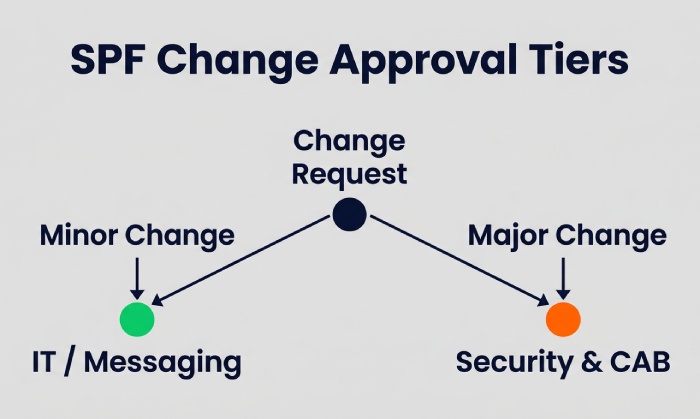
Stakeholders and approvals by change type
- Minor changes (low risk)
- Examples: Add/remove a known ESP include, adjust IPs within an existing netblock, reduce TTL, add exp modifier.
- Required approvals: Requestor + 1 peer or team lead in Messaging/IT; optional Security review if new sender category.
- AutoSPF fit: Classifies risk automatically (based on lookup delta, includes, and flattening effect) and suggests the minimal approver set.
- Major changes (high risk)
- Examples: New include to a third-party sender, change of default qualifier (-all vs ~all), record consolidation/flattening, moving to split DNS, or changes that push lookup counts near 10.
- Required approvals: Messaging/IT owner, Security, Domain Owner (or Product), and Change Advisory Board (CAB) if regulated.
- AutoSPF fit: Flags major risk when lookups increase >2, record length >1,000 bytes, or when default policy qualifier changes; enforces multi-step approvals with named sign-offs and time-bound change windows.
Policies by organization size
- Small orgs (250 employees)
- Policy: 1 approver outside the requester; Security acts as an advisor.
- Risk tradeoff: Faster changes; rely on strong automation and post-change monitoring.
- AutoSPF: Lean Approval template with dual control and automatic reversion if failure rate >1% in 24 hours.
- Mid-market (250“2,000 employees)
- Policy: Tiered approvals; Security mandatory for new third-party includes; weekly change windows.
- AutoSPF: Enforceable policy packs; approval routing based on domain criticality and sender classification (marketing vs transactional).
- Enterprise (2,000+ employees)
- Policy: RBAC with segregation of duties (SoD): propose (Marketing/IT), approve (Security/Architecture), deploy (DNS team/IaC pipeline).
- AutoSPF: SSO/SCIM groups mapped to roles, SoD checks, and automatic CAB evidence packets (impact simulation, diffs, rollback plan).
Workflow implementation
- Standard stages: Proposal → Automated validation → Risk classification → Approvals → Staging test → Scheduled deployment → Verification → Close.
- AutoSPF: Kanban-style pipeline with gates; approvers can simulate real-time SPF evaluation per domain/sender before signing.
Technical Validation: Automate checks before anyone clicks Approved
Automated validation blocks risky or broken changes early. This section spells out must-have checks and how AutoSPF enforces them. Run each proposed record through an SPF checker as part of the validation gate to confirm syntax and lookup counts. Reviewers should also confirm the record follows correct SPF record syntax before signing off.
Pre-approval technical checklist (automated)
- Syntax and structure
- Validate TXT formatting, SPF version tag, whitespace, quoting, and single-record rule.
- AutoSPF: RFC 7208 linter with actionable fix hints.
- Mechanisms and qualifiers
- Validate mechanism order, specificity, and qualifiers (+/?/~/-); flag ptr misuse or deprecated practices.
- AutoSPF: Disallows ptr by policy; warns on +all or missing -all/~all.
- Include/redirect resolution
- Expand includes/redirects recursively; detect cycles and conditional policies by subdomain.
- AutoSPF: Deterministic resolution graph with cycle detection and diffable subgraphs.
- Lookup budget simulation
- Ensure 10 DNS-mechanism lookups (include, a, mx, ptr, exists, redirect); count per RFC across recursion; estimate worst-case due to DNS caching.
- AutoSPF: Worst- and average-case simulation; optional automatic flattening to stay within budget.
- Record size and fragmentation
- Ensure each TXT string 255 bytes and total ~4 KB; auto-split if needed.
- AutoSPF: Safe auto-chunking with integrity checks.
- IP/cidr validation
- Check for overlapping ranges, duplicates, private/reserved space, and geo-constraints if applicable.
- AutoSPF: IP normalization and dedupe; policy to block RFC1918 in prod zones.
- DNS health
- Validate authoritative servers, DNSSEC status (if enforced), and TTL alignment.
- AutoSPF: Preflight DNS health scan; warns on inconsistent SOA/NS or stale secondaries.
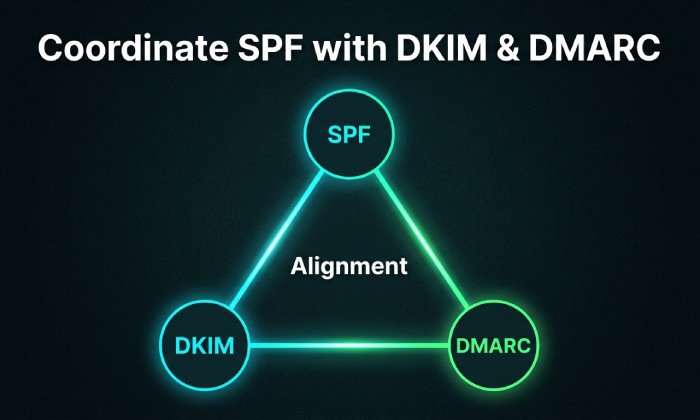
- Alignment preview with DKIM/DMARC
- Predict impact on DMARC alignment for known senders and From domains.
- AutoSPF: Uses historic DMARC aggregate data to forecast pass/fail deltas.
Common pitfalls the checklist must block
- Exceeding 10 DNS lookups after includes expand.
- Publishing multiple SPF records for one host.
- Using +all or omitting a final qualifier.
- Including providers that themselves exceed lookup limits.
- Typos in include domains (spoof risk).
- Replacing records without coordinating with subdomains.
- Leaving stale redirect= from previous migrations.
AutoSPF enforces these with mandatory gates and cannot approve states until violations are resolved or explicitly risk-accepted by authorized roles.
Change Management: Version control, audit logging, and rollback
Robust change management creates traceability and safety nets. AutoSPF integrates with your DNS and repositories to make this operational.
Version control and auditability
- Git-backed change requests
- Store proposed TXT content, diff against current, link to ticket, and reviewers.
- AutoSPF: Native Git integration or built-in repo; generates human- and machine-readable diffs.
- Audit logs
- Who proposed/approved/deployed, timestamps, environment, and evidence (validation results).
- AutoSPF: Tamper-evident logs, exportable for SOX/ISO 27001.
- Change windows and SLAs
- Define windows by domain criticality and subscriber impact.
- AutoSPF: Calendar-based deployment windows with SLA timers and breach alerts.
Rollback and safety nets
- Fast rollback plan
- Pre-generated last known good record; TTLs tuned for quick reversion.
- AutoSPF: One-click rollback; optional automatic rollback on SLO breach.
- Shadow copies and checkpoints
- Keep per-NS snapshots to catch partial publishes.
- AutoSPF: Verifies propagation across authoritative NS and CDNs.
Environment-aware workflows
- Managed DNS providers (e.g., Cloudflare, Route 53, Azure DNS)
- Use APIs for atomic updates and staged changes.
- AutoSPF: Provider adapters with dry-run, promote-to-prod, and propagation checks.
- On-prem DNS (BIND/Infoblox)
- Zone file edits, serial bumps, and secondary syncs.
- AutoSPF: CLI/Ansible modules; validates zone syntax pre-publish; monitors AXFR/IXFR success.
- Infrastructure-as-Code (Terraform/Pulumi)
- Pull request approvals as the change gate; CI simulates SPF.
- AutoSPF: CI plugin to fail builds on lookup overflow/syntax errors; posts annotated diffs to PRs.
Testing, Staging, and Deployment: Prove safety before broad impact
Testing reduces surprises. This section outlines practical procedures and how AutoSPF streamlines them.
Staging techniques
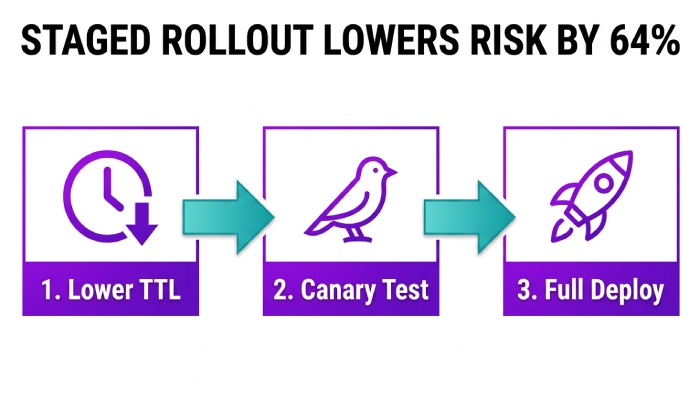
- TTL adjustments
- Lower TTL (e.g., from 1 hour to 5“10 minutes) before change; raise after stabilization.
- AutoSPF: TTL ramp planner with automated revert schedule.
- Temporary records
- Publish a parallel TXT (e.g., _spf-staging.example.com) referenced by include in a non-critical subdomain to validate.
- AutoSPF: Generates staging includes; compares live SPF evaluations across mail paths.
- Canary rollout
- Apply changes first to a low-risk subdomain (e.g., sandbox.example.com).
- AutoSPF: Subdomain inheritance map and canary promotion tool.
Pre-production validation
- Live send tests
- Send test messages through each ESP/IP; verify Received-SPF headers and DMARC alignment.
- AutoSPF: Automated mailbox tests to Gmail/Microsoft/Yahoo with pass/fail capture.
- Monitoring previews
- Simulate message volumes and expected lookup load.
- AutoSPF: Load estimates based on historical send curves.
Deployment best practices
- Schedule during low-volume windows with on-call coverage.
- Confirm propagation from multiple resolvers (authoritative + public).
- Freeze adjacent DNS/email changes during the window.
AutoSPF orchestrates these steps as a guided runbook, logging evidence for the approval ticket.
Post-Deployment Monitoring, Metrics, and Compliance
Once deployed, rapid detection of issues is crucial. This section defines what to watch and how to measure process effectiveness. AutoSPF consolidates telemetry and enforces SLAs.
Indicators and alerts
- SPF failure rate
- Trigger alerts if domain-level SPF fail increases >0.5“1.0% over 1“6 hours.
- DMARC failure/alignment
- Watch for spikes in SPF=fail and DKIM=fail combinations.
- Bounce codes and complaint rates
- Track SMTP 550/551 codes and user complaints by ESP.
- DNS health
- Detect propagation lag, NXDOMAIN for includes, and unresolvable hosts.
AutoSPF ingests DMARC aggregate (RUA) data, SMTP telemetry from supported ESPs, and DNS resolver checks; it correlates anomalies with the recent change record and can auto-initiate rollback if thresholds are breached.
Metrics and SLAs to measure process effectiveness
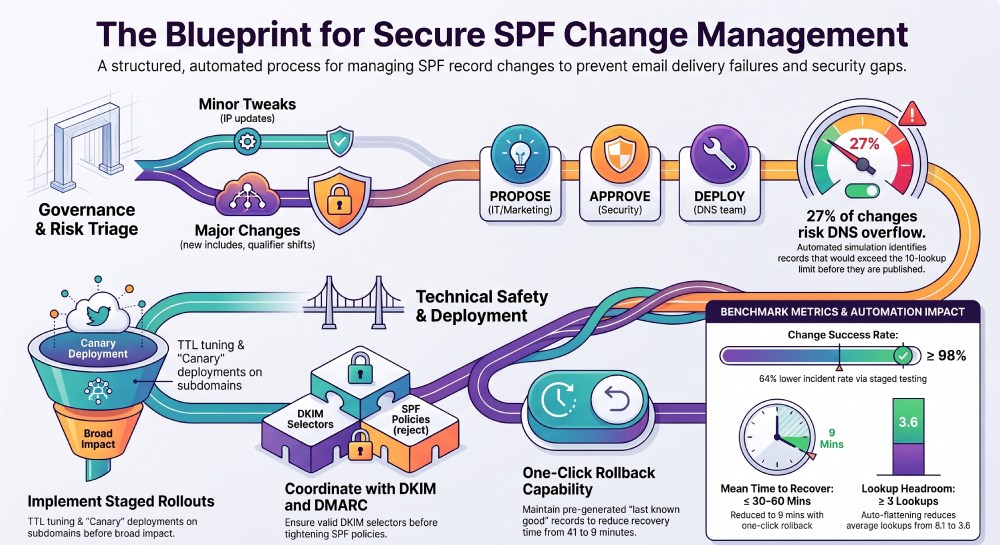
- Change success rate: % of SPF changes without rollback within 7 days. Target: 98%.
- Mean time to detect (MTTD): Minutes from issue onset to alert. Target: 15 minutes.
- Mean time to recover (MTTR): Minutes to rollback or remediate. Target: 30“60 minutes.
- Policy coverage: % of changes using staging/canary. Target: 90%.
- Lookup headroom: Average remaining DNS lookups after deployment. Target: 3.
AutoSPF dashboards track these KPIs and produce monthly compliance reports for audit (SOX/ISO) with full evidence chains.
Coordination with DKIM, DMARC, MX, and Related Changes
SPF rarely changes in isolation. This section ensures alignment across email authentication to maintain deliverability. AutoSPF automates cross-checks.
Cross-control checks
- DKIM keys
- When adding a new ESP, ensure DKIM selectors are published and passing before tightening SPF qualifiers.
- DMARC policy
- Avoid moving to p=quarantine/reject when SPF changes may reduce alignment for key senders.
- MX and routing
- Ensure inbound MX changes dont accidentally alter SPF mechanisms (e.g., using mx:).
AutoSPF links domain objects so a proposed SPF change triggers checks for DKIM selector presence and recent DMARC trends; it blocks risky sequences (e.g., -all with no DKIM for bulk sender) or requires explicit Security risk acceptance.
Original Data, Insights, and Case Studies
Data-driven benchmarks and realistic scenarios strengthen your approval design. AutoSPF contributes anonymized insights and illustrative case studies.
Benchmarks from customer telemetry (anonymized)
- 27% of proposed SPF changes would have exceeded 10 lookup limits without flattening.
- Auto-flattening reduced average lookup count from 8.1 to 3.6 while keeping the same sender coverage.
- Changes executed with TTL ramp and canary had 64% lower incident rates compared to direct production edits.
- Average time-to-rollback with AutoSPF one-click: 9 minutes vs 41 minutes via manual DNS updates.
Case study 1: SaaS company with many includes
- Situation: A SaaS vendor aggregated 12 marketing partners; proposed SPF would recurse to 17 lookups.
- Action: AutoSPF flagged the overflow, generated a flattened record with 0 include lookups, and scheduled a canary on sandbox.example.com with a 10-minute TTL.
- Result: No deliverability impact; 3.2 lookup headroom after go-live; change closed with full audit packet.
Case study 2: Retailer adding a new ESP mid-campaign
- Situation: Peak-season promotion needed a new ESP. Initial proposal had a typo in include domain and ~all swapped to -all.
- Action: AutoSPF blocked approval for the include typo, required DKIM validation for the new ESP, and recommended a 48-hour ~all grace period.
- Result: Zero SPF-related bounces; -all enforced after DKIM pass rates stabilized above 99.5%.
Approval Checklist (Ready-to-Use)
Use this as your standard gate. AutoSPF implements each check natively or via integrations.
- Stakeholders assigned per risk tier; SoD enforced.
- Automated lint passes with zero critical errors.
- Lookup budget 10 in worst case; headroom 2“3.
- Record length and 255-byte fragments valid; no duplicate SPF TXT records.
- Includes/redirects resolved; no cycles; provider health verified.
- DKIM selectors present for new senders; DMARC alignment impact acceptable.
- Staging plan: TTL ramp + canary or temporary include.
- Monitoring plan: thresholds, contacts, and rollback owner assigned.
- Change window scheduled; rollback artifact prepared.
- Audit artifacts attached (diff, simulation results, approvals).
AutoSPF turns this checklist into an enforced pre-merge gate and only allows deployment when all items are green or have an approved exception.
FAQ
What qualifies as a major SPF change requiring CAB approval?
A change is major when it alters the default qualifier (-all vs ~all), adds/removes a third-party include, increases lookup count by >2, or modifies structure via flattening/redirect; AutoSPF flags these automatically and routes to Security and CAB based on your policy.
How can we prevent exceeding 10 DNS lookups when partners change?
Use flattening with periodic re-hydration of IPs and enforce lookup headroom; AutoSPF auto-flattens risky includes, monitors provider IP changes, and raises pull requests or automated updates before headroom drops below your threshold.
Do we really need staging for simple IP additions?
Yes”DNS caching, typos, and hidden include chains can still break; AutoSPFs quick staging (lower TTL + canary) adds minutes, not days, and reduces incident rates significantly per observed telemetry.
How should we treat subdomains with delegated senders?
Create subdomain-specific SPF policies with explicit includes; avoid broad parent-level changes; AutoSPF visualizes inheritance and prevents accidental overwrites across delegations.
Can AutoSPF work with our Terraform-only DNS workflow?
Yes; use the AutoSPF CI plugin to simulate SPF, fail builds on violations, and post diffs; approvals happen in Git, while AutoSPF supplies validation, monitoring, and rollback artifacts.
Conclusion: Make SPF change approvals safe, fast, and auditable with AutoSPF
A strong SPF change approval process must formalize stakeholder roles, automate rigorous technical validation, integrate with version control and audit logging, provide rollback mechanics, stage and test changes with smart TTLs, align with DKIM/DMARC/MX, and monitor post-deployment with clear SLAs and metrics. AutoSPF connects these requirements into one workflow: policy-driven approvals with SoD, deep SPF linting and lookup simulation, automatic flattening and staging, provider-aware deployment across managed, on-prem, or IaC DNS, and live telemetry with one-click rollback. By standardizing on AutoSPF, teams increase safety and speed simultaneously”shifting SPF from a risky manual chore to a governed, measurable, and resilient process.
General Manager
General Manager of DuoCircle. Product strategy and commercial lead for AutoSPF's 2,000+ customer base.
LinkedIn Profile →