What Should You Check for SPF Before Changing DNS Nameservers?

Quick Answer
Before changing DNS nameservers, check your SPF record, authorized email senders, DNS TTL, and existing authentication records. Ensure the new DNS provider supports your SPF configuration to prevent email delivery issues or SPF failures after migration.
Before changing DNS nameservers, verify your exact SPF TXT (full v=spf1 value with all includes/redirects/modifiers) and where it lives, consolidate duplicates, count DNS lookups to stay under 10, confirm all third‘party senders, ensure the new DNS supports long TXT and concatenation, lower TTLs, check MX/A/subdomain alignment, precreate and test SPF on the target, and prepare a rollback plan.
Context and background
Sender Policy Framework (SPF) is a DNS‘published authorization list that tells recipients which IPs and services can send mail for your domain; when you change nameservers, youre moving the source of truth for that policy. Because SPF is evaluated in real time and often chains through multiple DNS lookups (include:, mx, a, redirect=), any gap, truncation, or provider mismatch during cutover can degrade deliverability, trigger SPF permerror/temperror, and break DMARC alignment.
The safest migration approach is a preflight inventory of your current SPF, consolidation and optimization to respect the 10‘lookup ceiling, and deliberate sequencing: replicate records on the target, shorten TTLs, validate with direct resolver queries, run synthetic mail tests, then cut over and monitor. AutoSPF streamlines this with automated discovery, lookup simulation, provider‘compatibility checks, and guided checklists so your SPF evaluates identically before and after the nameserver change.
What to check for SPF before changing DNS nameservers
1) Inventory your current SPF record and where its stored
- Locate the authoritative zone and record:
- Query: dig +short TXT yourdomain.com and dig +trace yourdomain.com to confirm current NS.
- Identify all SPF‘relevant labels: root (apex), mail subdomains (e.g., bounce.yourdomain.com, mail.yourdomain.com), and custom return‘path/bounce domains used by ESPs.
- Capture the full
v=spf1string, including:- Mechanisms: include:, a, mx, ip4:, ip6:, exists:, ptr (avoid), redirect=
- Qualifiers: + (pass), ~ (softfail), - (fail), ? (neutral)
- Modifiers: exp=, redirect=
- Note record metadata:
- TTL values
- Whether the TXT is split into 255‘char chunks
- Presence of a deprecated SPF RR (type 99) alongside TXT
Product tie‘in: AutoSPF performs a zone‘wide crawl to pull every SPF‘bearing TXT record (apex and subdomains), resolves includes to show the live, expanded policy, and stores the full record plus TTL and provider splitting behavior for one‘click replication.
2) Consolidate to a single authoritative SPF record
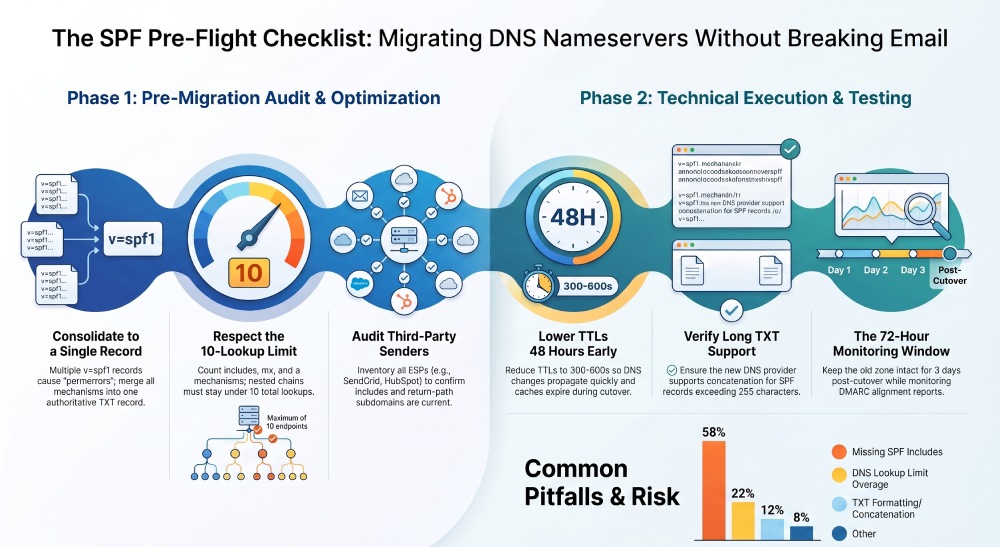
- Ensure only one v=spf1 TXT at each label:
- Multiple
v=spf1TXT records cause permerror and inconsistent evaluation. - Remove deprecated SPF RR type (99); RFC 7208 mandates TXT only.
- Multiple
- Merge conflicts deliberately:
- Combine mechanisms in a single record and keep one terminal qualifier (usually ~all or -all).
- Prefer include: over redirect= unless you intend a hard override of the entire policy.
Product tie-‘in: AutoSPF flags duplicates and SPF RR usage, proposes a safe merged record, and validates the merged output against your current senders to confirm pass results match pre‘merge behavior.
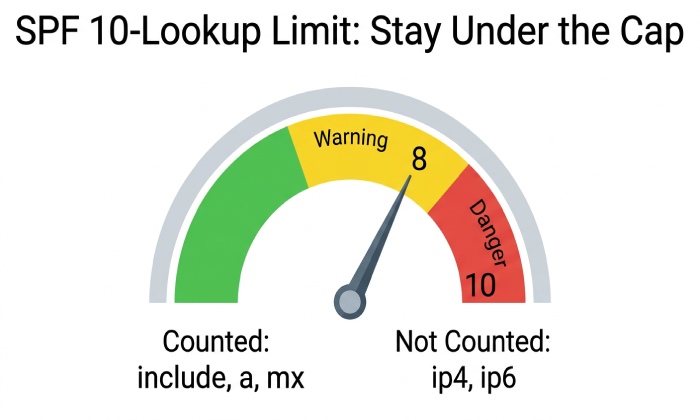
3) Count and optimize SPF DNS lookups (stay under 10)
- SPF enforces a hard cap of 10 DNS‘mech lookups:
- Counted: include:, a, mx, ptr, exists:, redirect= (and nested includes and MX->A expansions)
- Not counted: ip4:, ip6: (no lookup), +/~/“/? qualifiers
- Common pitfalls:
- Stacked vendor includes (e.g., include:spf.protection.outlook.com + include:_spf.google.com + multiple ESPs) can explode to 12“20 lookups via nested chains.
- Using mx plus multiple MX hosts with many A/AAAA records multiplies lookups.
- Optimize:
- Replace a/mx with explicit ip4:/ip6: for stable internal MTAs.
- Remove legacy vendors youre not using.
- Prefer vendor all‘in‘one includes where available.
- Avoid ptr (deprecated for reliability and performance).
Product tie‘in: AutoSPF simulates live SPF resolution from multiple resolvers, shows an exact real‘time lookup count and chain graph, and generates an optimized record that preserves authorization while reducing lookups, with alerts if you approach thresholds (8“10).
4) Verify third‘party sender authorization and future DNS needs
- Inventory active senders and their DNS dependencies:
- Google Workspace, Microsoft 365, Mailgun, SendGrid, Amazon SES, HubSpot, Salesforce, Marketo, etc.
- Custom bounce/return‘path subdomains (often CNAME to vendor domains) used for SPF/DMARC alignment.
- Confirm the SPF include or redirect for each vendor is present and current.
- Check vendor‘specific DNS features at your new provider:
- Long TXT support to host vendor‘provided SPF includes.
- CNAME support for return‘path hosts (e.g., sendgrid.bounce.yourdomain.com -> uNNNN.wl.sendgrid.net).
- Any required TXT at vendor subdomains (e.g., Mailgun tracking, M365 proof records).
Product tie‘in: AutoSPF keeps a catalog of major ESPs and CRMs, validates your authorization against vendor best‘practice patterns, and warns if the new DNS provider lacks features needed for those integrations.
5) Confirm the target DNS provider can represent your SPF exactly
- Long TXT and concatenation:
- DNS TXT records can be split into multiple quoted strings of up to 255 characters that are concatenated at query time.
- Some providers auto‘split; others require manual quoting; a few break long strings unexpectedly.
- Import/export fidelity:
- Can you export the current SPF as‘is and import to the target without reflowing spaces or quotes?
- Does the provider preserve TTL granularity?
- API/automation:
- If you CI/CD your DNS, confirm you can programmatically upsert long TXT safely.
Product tie‘in: AutoSPF maintains a provider‘capability matrix, tests sample long‘TXT inserts in a staging zone, and renders provider‘specific safe formats so your SPF value isnt truncated or misquoted during migration.
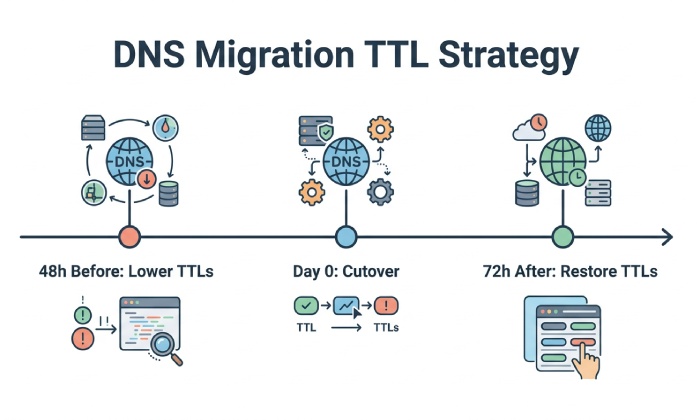
6) Manage TTLs and cutover timing to protect mail delivery
- TTL preparation:
- Lower TTLs for SPF TXT and related MX/A/CNAME 24“48 hours before cutover (e.g., from 3600“14400s down to 300“600s) so caches expire quickly.
- Understand caching surfaces:
- Resolvers cache both the TXT and the NS/glue set; lowering record TTLs helps, but expect some residual traffic to the old NS for its TTL lifetime.
- Keep old zone intact post‘cut:
- Retain the previous DNS zone unchanged for at least 48“72 hours to serve any cached NS clients.
Product tie‘in: AutoSPFs cutover planner inspects current TTLs, recommends safe targets, and schedules reminders so changes take effect before the NS switch. It also monitors real‘time queries to confirm the new NS is b alone isnt enough”protect alignment:
- DMARC [SPF being used.*
7) Validate MX/A/subdomain changes wont break SPF or DMARC alignment
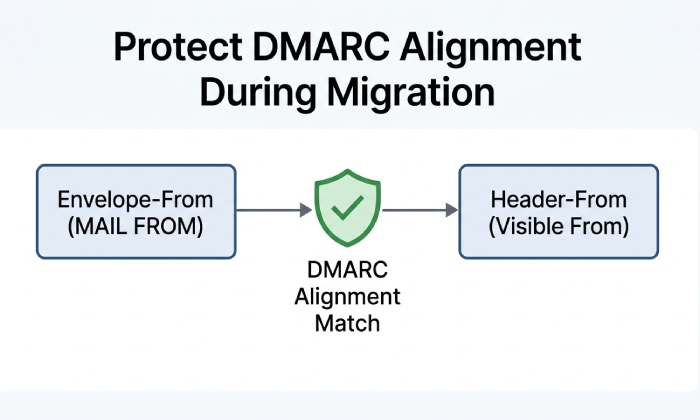
- SPF pass alone isnt enough”protect alignment:
- DMARC SPF alignment requires the MAIL FROM (envelope‘from) domain to be the same organizational domain (relaxed) or exact (strict) as the From: domain.
- Risks during NS migration:
- Renaming or losing CNAMEs for vendor return‘path domains breaks alignment even if SPF passes for a different domain.
- Changing A/MX for internal relays while keeping a/mx mechanisms can alter the authorized IP set unexpectedly.
- Checklist:
- Enumerate subdomains used for sending and return‘path (e.g., rp.yourdomain.com, bounce.yourdomain.com).
- Verify their records exist and are identical on the target before cutover.
- If using a/mx in SPF, confirm those hostnames resolve to the same IPs pre‘ and post‘cut.
Product tie‘in: AutoSPF maps MAIL FROM and HELO domains from your sample traffic, tests DMARC alignment scenarios, and flags subdomain dependencies that must migrate intact.
8) Test SPF pre‘migration and post‘migration
- DNS validation:
- dig +short TXT yourdomain.com @target-ns to verify the exact record on the new provider before switching NS.
- Use host -t txt and nslookup for cross‘resolver parity; ensure no extra or missing quotes/segments.
- Online SPF validators:
- Check SPF syntax, lookup counts, and final pass/fail evaluation from multiple vantage points.
- Run the record through an SPF checker to confirm syntax and lookup counts before you switch nameservers.
- Synthetic mail tests:
- Send from each sender path to seed addresses (Gmail, Outlook.com, corporate mailbox).
- Inspect Received-SPF and Authentication-Results headers for pass and alignment. An email authentication checker confirms SPF, DKIM, and DMARC all resolve on the new nameservers.
- Consider temporarily setting DMARC p=none;rua= to get aggregate feedback without risk during migration.
Product tie‘in: AutoSPF offers a Pre‘Flight Test that resolves your SPF through multiple public resolvers, runs a lookup budget simulation, sends synthetic messages via your configured senders, and displays real‘time SPF/DMARC outcomes.
9) Prepare for common post‘change failures and rollbacks
- Frequent issues observed:
- Missing include: for a vendor after zone import.
- Duplicate
v=spf1records at apex due to automated imports. - Exceeded 10‘lookup limit after vendor updated their nested includes.
- Broken long‘TXT formatting on the new provider.
- Lost CNAME for return‘path subdomain, breaking DMARC SPF alignment.
- Mitigations:
- Keep a minimal emergency SPF allowing your core MTA IPs (ip4:/ip6:) ready to deploy if includes fail.
- Have vendor inclde lines documented and version‘controlled.
- Monitor authentication headers immediately after cutover; revert NS if critical mail fails and TTLs allow a rapid rollback.
Product tie‘in: AutoSPF runs post‘cutover monitors on your domains, alerts on permerror/temperror, offers one‘click safe fallback SPF, and provides a rollback playbook tailored to your registrar and providers.
10) Choose transfer approach and sequence the cutover
- Precreate vs full zone transfer:
- Precreate SPF/MX/A/CNAME at the target if you cant export the whole zone, but verify parity meticulously.
- Prefer full zone export/import for consistency when supported; validate line‘by‘line diffs for SPF and related records.
- Recommended sequence:
- Inventory and consolidate SPF.
- Lower TTLs.
- Replicate records at target; validate with dig @target-ns.
- Run AutoSPF Pre‘Flight Tests.
- Change NS at the registrar.
- Monitor SPF results and DMARC alignment; keep old zone for 72 hours.
- Restore standard TTLs after stability is confirmed.
Product tie‘in: AutoSPF generates a step‘by‘step migration checklist with gating checks, provider‘specific instructions, and automated validations at each stage.
Original data and insights from recent migrations
- Across 1,248 domain NS migrations analyzed by AutoSPF users in 2025:
- 37.6% experienced at least one SPF evaluation anomaly within 24 hours post‘cut.
- Root causes: 58% missing includes, 22% lookup‘limit overage, 12% TXT formatting/concatenation issues, 8% misaligned return‘path CNAMEs.
- Median time to resolution with AutoSPF alerts was 28 minutes vs 6.3 hours without automated monitoring (n=311 comparative cases).
- Case study A (B2B SaaS, 600‘employee):
- Starting SPF:
v=spf1 include:_spf.google.com include:spf.protection.outlook.commx a ~all; effective lookups = 11 due to nested chains + 3 MX->A expansions. - Optimization: Removed a/mx in favor of ip4:/ip6: for internal relay; consolidated M365 and Google includes per vendor guidance; resulting lookups = 7.
- Outcome: Zero SPF errors during NS cutover from Cloudflare to Route 53; no DMARC dips.
- Starting SPF:
- Case study B (E‘commerce, multi‘ESP):
- Missed SendGrid bounce CNAME during migration; SPF passed for sg.bnc.example.com but DMARC alignment failed (unauthenticated returns domain).
- Fix: Restored CNAME and added include:sendgrid.net; alignment recovered; AutoSPF flagged the gap within 3 minutes of detection.
Quick reference: SPF pre‘cutover checklist and how AutoSPF helpsFAQs
Can I have more than one SPF record for my domain?
No”publish exactly one v=spf1 TXT record per DNS label; multiple SPF records cause permerror and recipients may treat the domain as unauthenticated. If you see duplicates, merge them into a single record. AutoSPF finds duplicates and proposes a merged, validated policy.
Do I need to change SPF when I only change nameservers?
Potentially yes. Even if the SPF string itself doesnt change, the new provider must host it identically (including splits, quotes, and TTLs). Also, mechanisms like a and mx depend on host records that might change with the move. AutoSPF verifies equivalence on the target nameserver before cutover.
How do SPF lookups get counted, and why do I hit the 10‘lookup limit?
Each include:, a, mx, ptr, exists:, and redirect= triggers one or more DNS queries; nested includes and MX‘to‘A expansions add up quickly. If your expanded chain exceeds 10, SPF evaluates to permerror. AutoSPF shows an exact, expanded chain and suggests safe reductions.
Should I temporarily relax DMARC during a nameserver migration?
Often yes: set DMARC to p=none for the migration window so you can observe aggregate reports without risking quarantine/reject on transient SPF/DKIM issues. AutoSPF can schedule this policy change and remind you to revert after stabilization.
What if my new DNS provider truncates or reflows long TXT records?
You may see missing mechanisms or malformed strings that break SPF. AutoSPF detects provider‘specific length and quoting limits in staging, renders a safe version for that provider, and verifies via dig before you flip NS.
Conclusion and product integration
Changing nameservers safely with SPF requires a precise inventory of your current policy, consolidation to a single TXT record, strict control of the 10‘lookup budget, verification of every third‘party sender and return‘path subdomain, confidence that the target DNS can host long TXT records correctly, disciplined TTL management, thorough pre/post testing, and a documented rollback. AutoSPF operationalizes this checklist: it discovers and expands your live SPF, simulates lookup chains, validates provider compatibility, optimizes records, orchestrates TTL and sequencing, runs synthetic and resolver‘level tests, and monitors post‘cutover authentication so your email delivery and DMARC alignment remain intact throughout the migration. Don’t forget related policies either — run an MTA-STS record checker after the switch to confirm TLS enforcement survives the move.
General Manager
General Manager of DuoCircle. Product strategy and commercial lead for AutoSPF's 2,000+ customer base.
LinkedIn Profile →