Who Is Name Services Com? A Guide to Setting Up SPF for Enom

Quick Answer
Name Services Com is associated with Enom’s domain and DNS services. This guide explains how to set up an SPF record for Enom, helping authenticate legitimate email sources, reduce spoofing, and improve email deliverability.
name-services.com is associated with Enoms DNS infrastructure and often appears when a domain name uses Enoms default nameservers. If you run a Whois lookup on Whois.com, Enom Central, enomdomains.com, or another lookup tool and see entries such as DNS1.name-services.com, DNS2.name-services.com, DNS3.name-services.com, DNS4.name-services.com, or DNS5.name-services.com, it usually means the domain name is using Enom-provided DNS hosting.
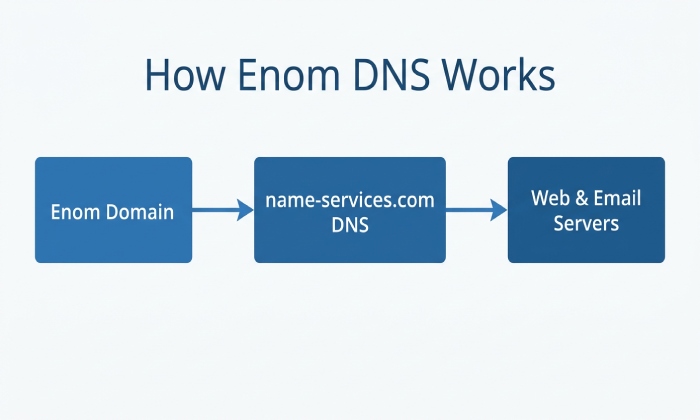
In practical terms, these nameservers are responsible for answering queries about your DNS records. When someone types your URL into a web browser, the DNS system finds the correct IP address for the related web server. That process allows a dot-com name or other TLD to resolve to website hosting, an email service, or another online destination.
When a domain uses Enoms DNS hosting, its authoritative nameservers may point to name-services.com. These nameservers host the domains DNS records, including TXT records used for SPF. Understanding this relationship is important when configuring SPF because the SPF record must be added to the DNS provider that is authoritative for the domain.
Enoms name services may appear in records when a customer uses default nameservers, sometimes called the default Enom nameservers:
- dns1.name-services.com
- dns2.name-services.com
- dns3.name-services.com
- dns4.name-services.com
- dns5.name-services.com
These are Enoms authoritative nameservers for domains using its DNS hosting. If your domain registration is with Enom or an Enom reseller, these name services may be part of the standard configuration. In the domain control panel, you can often view or edit host records, DNS host records, and other DNS server settings that control where the URL, naked domain, subdomains, and mail services point. Strong email security practices help protect businesses from phishing, spoofing, malware, and other email-based threats.
Understanding the Connection Between Name Services Com, eNom, and Domain Management
Enom is a domain registrar and DNS service provider that allows customers and resellers to manage domain names and DNS settings. When a domain uses Enoms DNS hosting, its DNS records can be managed through the relevant Enom or reseller control panel. This includes TXT records used for SPF, DKIM, domain verification, and other email authentication settings.
The relationship is straightforward: Enom handles the domain registration and may also provide DNS hosting through name services at name-services.com. The domain management interface”often found under My Account, the domains menu, or Advanced Tools”lets you manage a domain by changing nameservers, editing host records, or creating TXT records such as SPF. You may need a login, password, or in some cases a domain access password to make changes.
A domain control panel is the administrative area where the owner or administrator can manage a domain. In that domain control panel, you might:
- Point the domain to a specific IP address for a web server
- Add an A record for IPv4 or an AAAA record for IPv6
- Configure MX records for an email service
- Add SPF, DKIM, or verification TXT records
- Enable or review DNSSEC if supported
- Change from Enoms default nameservers to custom nameservers
- Submit a support request if records do not resolve correctly
If you use a third-party provider for website hosting or email, the provider may ask you to either update nameservers or add specific records in Enoms domain control panel. For example, Google may ask for TXT verification before enabling Google Workspace, while a hosting company may ask you to point the domain to its web server IP address. If you use our DNS hosting, Enoms systems answer the DNS queries; if you switch to a third-party provider, that providers authoritative nameservers take over.
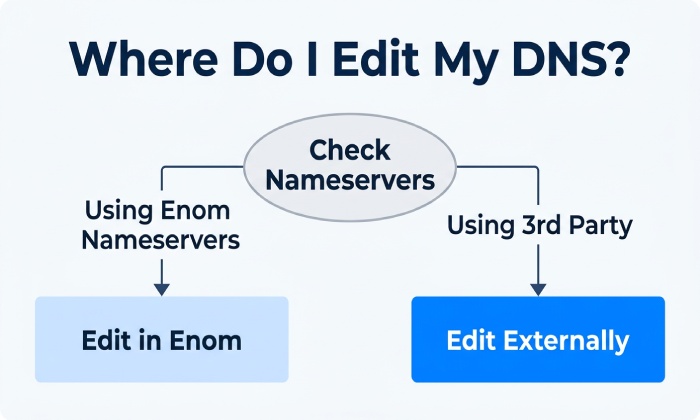
When a domain uses Enoms nameservers, Enoms DNS infrastructure becomes authoritative for that domains DNS records. This means SPF, DKIM, DMARC, MX, and other DNS records should be added or updated through the DNS provider that currently hosts the domains authoritative zone. If the domain uses different nameservers, SPF changes must be made with that DNS provider instead of Enom.
Step-by-Step Guide to Adding an SPF Record in eNom
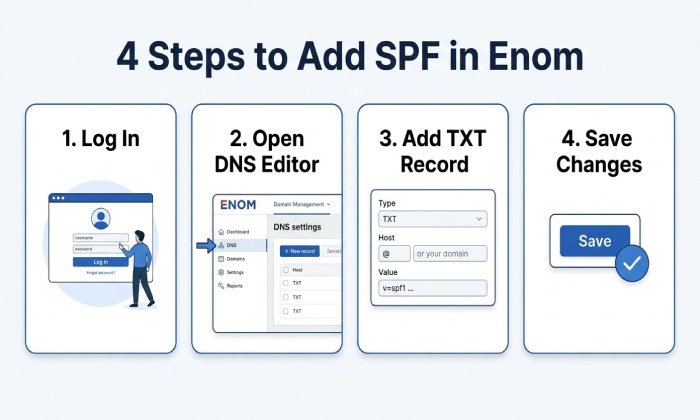
To add SPF in eNom, sign in to Enom Central, Access.Name-Services.com, or the reseller interface associated with your domain registration. In My Account, open the domains menu, select the domain name, and go to the domain control panel. Depending on the interface, the area may be labeled Host Records, DNS Settings, or Advanced Tools.
Adding the TXT record safely
- Open the DNS or host records editor for the selected domain name.
- Look for an existing TXT record beginning with v=spf1. A domain should have only one SPF TXT record.
- If no SPF record exists, add a TXT record for the root host. In eNom, the host field may be blank or use @, depending on the domain control panel.
- Enter the SPF value supplied by your email service or third-party provider.
- Save changes and wait for DNS propagation.
For example, if you use Google Workspace, your TXT value is usually:
v=spf1 include:_spf.google.com ~all
If your web server also sends transactional messages from the same domain name, include that platform as well. However, avoid adding an IP address unless it is stable. A changing IPv4 or IPv6 address can cause SPF failures after a server migration, cache update, or hosting change.
If your domain does not use eNoms default nameservers, you should add or update the SPF record with the DNS provider that hosts your domains authoritative DNS zone. If you want to use eNoms DNS hosting, configure your domain to use the appropriate eNom nameservers. Avoid changing nameserver settings unless you understand how the change may affect your website, email, and other DNS records.
When SPF belongs outside eNom
If your DNS server settings are hosted by Cloudflare, Google, a hosting company, or another third-party provider, eNom may still handle the domain registration, but it does not manage the active DNS. In that case, eNom remains important for domain management, domain transfer, ID Protect, renewals, and other value-added services, while the external DNS platform controls SPF.
FAQs
How do I add an SPF record to an eNom domain?
Log in to your Enom account, open the domain control panel, and edit the DNS host records for the domain name. Add or update the TXT record that starts with v=spf1, then save the change and allow time for DNS propagation.
What nameservers should I use for eNom DNS hosting?
If you want eNom to host your DNS, use the default Enom nameservers: dns1.name-services.com, dns2.name-services.com, dns3.name-services.com, dns4.name-services.com, and dns5.name-services.com. If your nameservers point elsewhere, edit the SPF record at that third-party provider instead.
Can I have more than one SPF record?
No. A domain should have only one SPF TXT record for a given host, such as the root domain (apex domain) or a specific subdomain. If you use multiple email services, combine their authorised mechanisms into one SPF record.
General Manager
General Manager of DuoCircle. Product strategy and commercial lead for AutoSPF's 2,000+ customer base.
LinkedIn Profile →