Why Does nslookup Show Different SPF Results Than Checkers?

Quick Answer
An SPF checker may show a different record than nslookup due to DNS caching, propagation delays, resolver differences, or multiple SPF TXT records. Learn how to identify the correct SPF record and resolve DNS inconsistencies.
Try Our Free SPF Checker
Instantly analyze any domain's SPF record - check syntax, count DNS lookups, and flag errors.
Check SPF Record →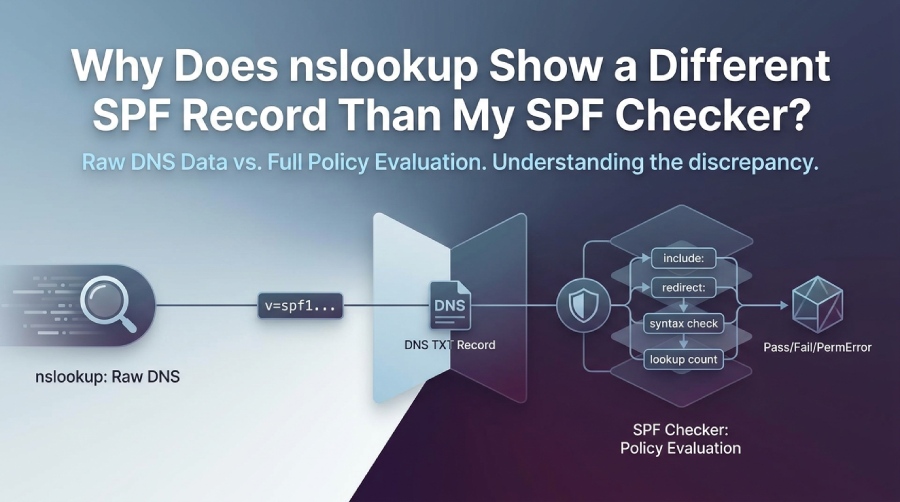
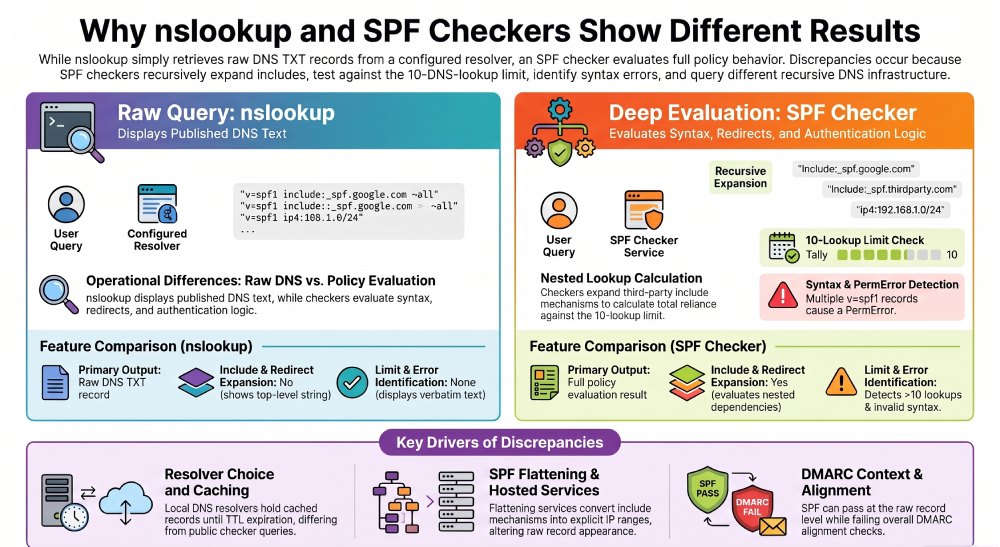
nslookup and an SPF checker may show different results because they perform different functions. The nslookup command retrieves DNS TXT records from a specific resolver, while an SPF checker can evaluate the published SPF policy, follow include and redirect mechanisms, identify syntax errors, and calculate DNS lookup usage. The results may also differ when the tools query different DNS resolvers or use cached records.
TL;DR: Why the Results Differ
An nslookup SPF query displays the TXT records returned by a DNS resolver, while an SPF checker analyzes the SPF policy and its DNS dependencies. Depending on the tool, it can identify invalid syntax, duplicate SPF records, nested includes, redirect mechanisms, and violations of the 10-DNS-lookup limit. Full SPF authentication evaluation also requires the connecting IP address and the relevant SMTP identity, such as the MAIL FROM or HELO domain.
In practical terms, nslookup is a raw DNS inspection tool, while an SPF checker is a policy evaluation tool. If they disagree, the cause is usually one of these:
- DNS caching or propagation delay
- Different recursive resolvers
- Multiple TXT records or multiple SPF records
- SPF syntax errors
- Flattening or hosted SPF behavior
- Includes, redirects, and SPF lookup limit issues
- SPF checker interpretation of DMARC, SPF alignment, or email authentication context
For example, a domain owner may see different SPF information when a local DNS resolver retains an older TXT record while an online SPF checker queries another resolver. Duplicate SPF records and changes to nested third-party include domains can also contribute to confusing or inconsistent diagnostic results.
How an nslookup Check SPF Query Retrieves TXT Records
An nslookup check SPF query retrieves the raw TXT data published in DNS for a domain, usually by asking a recursive resolver for TXT records. It does not perform full SPF policy evaluation.
What nslookup Actually Shows
When you run nslookup, you are asking DNS a direct question: What TXT records exist for this domain? A typical PowerShell command looks like this:
nslookup -type=txt example.comOr in newer PowerShell, you may use:
Resolve-DnsName example.com -Type TXTBoth commands help with a basic SPF record lookup, but they do not fully check SPF the way a specialized SPF checker does.
nslookup usually returns:
- The raw SPF record
- Other TXT records, such as verification tokens
- The resolver response from your configured DNS server
- Cached data, depending on resolver behavior
This matters because a full SPF validation requires more than a raw TXT record check. A receivers mail server evaluates the connecting SMTP IP address against the domains SPF policies, including every relevant spf mechanism.
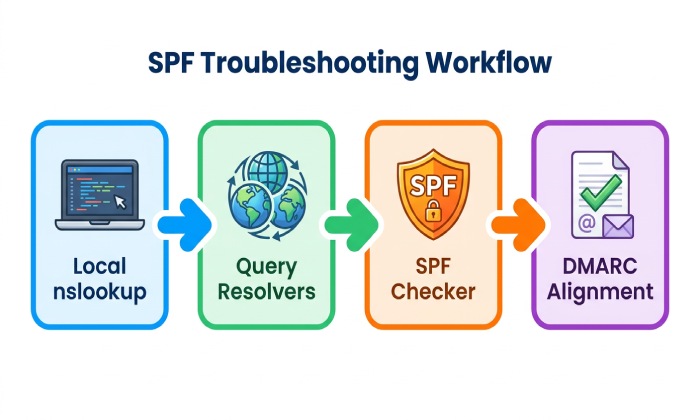
nslookup vs SPF Checker
The nslookup command retrieves raw DNS TXT data, making it useful for viewing published SPF records. However, it may not identify includes, redirects, DNS lookup limits, or SPF alignment issues. The dig command provides more detailed DNS query inspection, but it does not perform full SPF validation unless the results are evaluated manually. An SPF checker goes further by performing SPF lookups and policy evaluation, although its results may vary depending on the DNS resolver used or cached data. A domain analyzer reviews the broader email authentication posture but may not display low-level DNS details.
A tool like a SPF Checker, SPF Generator, SPF Lookup Counter, Domain Analyzer, or Email Deliverability Tester may go beyond a basic SPF record lookup and provide an spf result explanation.
Why This Is Connected to nslookup Check SPF
A manual nslookup check SPF process is useful for confirming what DNS publishes, but it is not the same as a full SPF validation. That distinction is the core reason nslookup, PowerShell, and an SPF checker may show different results for the same domain.
Example Edge Case: TXT Record Wrapping
DNS TXT records can contain multiple character strings within a single TXT resource record. DNS tools such as nslookup may display these strings as separate quoted segments. However, the strings belonging to the same TXT record are concatenated when interpreted as the record’s value. This formatting does not necessarily indicate a broken SPF record. Administrators should distinguish between multiple character strings in one TXT record and multiple separate SPF records.
Common Reasons SPF Results Differ Between nslookup and SPF Checkers
SPF results differ because the raw SPF record is only one part of the evaluation path. A checker may expand includes, identify syntax problems, detect duplicate records, and test whether the policy exceeds the DNS lookup limit.
Multiple SPF Records or Duplicate TXT Entries
A domain should publish only one SPF record beginning with v=spf1 for a given SPF evaluation domain. If DNS returns multiple SPF records for that domain, SPF evaluation results in a PermError (permanent error). This is different from an SPF Fail or Neutral result. Although nslookup can display both records, an SPF checker can identify the duplicate-policy problem and explain why the configuration is invalid.
For example:
v=spf1 include:_spf.google.com -all
v=spf1 include:sendgrid.net -all
This is invalid spf record syntax. A good SPF checker will flag it, while nslookup only displays what DNS returns.
Includes, Redirects, and SPF Lookup Counter Limits
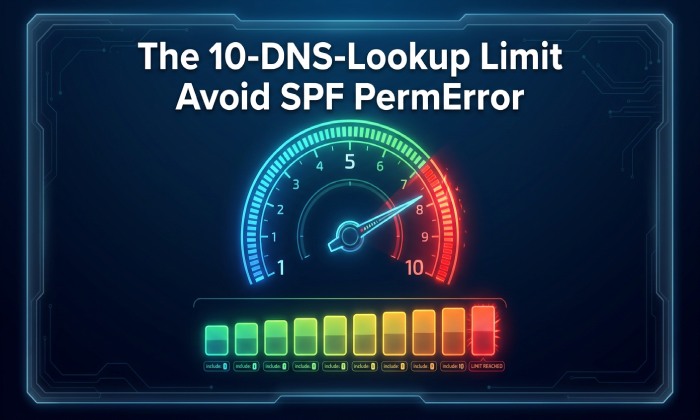
SPF evaluation has a limit of 10 DNS-querying terms across the evaluation process. These include, a, mx, ptr, exists, and redirect mechanisms or modifiers. Nested include statements also contribute to the lookup count because their referenced SPF policies must be evaluated. Exceeding the limit can cause SPF evaluation to return PermError. An SPF lookup counter helps administrators identify which mechanisms and nested dependencies consume the available lookup budget.
Common high-risk patterns include:
- Too many include: mechanisms
- Nested third-party SPF included domains
- Excessive mx lookups
- Vendor records that change over time
- A redirect= mechanism pointing to another large policy
A dedicated SPF checker or SPF record lookup tool may report too many DNS lookups, while nslookup may show a seemingly normal SPF record.
Syntax and Policy Interpretation
SPF syntax matters because one misplaced character can change the spf result. A professional SPF generator or SPF record generator can reduce errors by producing valid spf configuration.
Common syntax issues include:
- Missing v=spf1
- Multiple all mechanisms
- Invalid CIDR notation
- Unsupported macro usage
- Broken quoted strings in DNS
Example Edge Case: Softfail vs Hardfail
The SPF qualifiers ~all and -all communicate different policies for senders that do not match the authorized mechanisms. The ~all qualifier produces a SoftFail result, while -all produces a Fail result. Neither qualifier changes how nslookup retrieves the TXT record, but an SPF checker can explain the policy’s meaning. Receiving systems may use these results when applying their email filtering policies.
DNS Caching, Propagation, and Resolver Differences
DNS caching is one of the most common reasons nslookup and an SPF checker disagree. Different resolvers may hold different versions of the same SPF record until the TTL expires.
Resolver Choice Changes What You See
When you run nslookup from your laptop, PowerShell, or a server, you may query your ISP resolver, corporate resolver, VPN resolver, or a public resolver. An online SPF checker may use Google DNS, Cloudflare, Quad9, or its own recursive DNS infrastructure.
Try comparing:
nslookup -type=txt example.com 8.8.8.8
nslookup -type=txt example.com 1.1.1.1
You can also use dig:
dig TXT example.com @8.8.8.8
dig TXT example.com @1.1.1.1
If these differ, the issue is not the SPF checker itself; it is likely DNS propagation or caching. This is especially common shortly after publishing a new SPF record.
TTL, Propagation, and Hosted SPF
A hosted SPF service can dynamically manage or flatten SPF data to reduce lookup counts. Services such as Hosted SPF and tools like AutoSPF are often used when a domain has many senders and risks exceeding the lookup limit.
SPF flattening replaces include mechanisms with IP addresses or address ranges obtained from the referenced SPF policies. As a result, nslookup may display a record containing multiple ip4 or ip6 mechanisms instead of the original include statements. An SPF checker can analyze the published record, but it may not identify every original provider dependency unless it has access to the relevant configuration history or source information. Flattened records also require ongoing maintenance because authorized sending IP addresses can change.
Operational Data Point
DNS changes do not become visible to every resolver simultaneously. The time required for updated SPF records to appear depends on the previous record’s TTL, resolver caching behavior, and DNS provider configuration. Administrators should compare authoritative DNS responses with results from multiple recursive resolvers before concluding that an SPF update has propagated successfully.
Resolver-Specific Verification
Use both PowerShell and web-based SPF tools to compare results. A reliable verification path includes nslookup, dig, a public SPF checker, and a broader domain analyzer that also checks dmarc, DKIM, and DNS Security Compliance.
SPF Syntax, Includes, Redirects, and Flattening Effects
SPF checkers often differ from nslookup because they interpret the full SPF policy, not just the visible TXT string. The more complex your SPF record, the more likely you are to see differences.
SPF Flattening Can Change What Appears
SPF flattening replaces include mechanisms with direct IP ranges. This can reduce DNS lookups but requires ongoing spf monitoring, because vendor IP ranges can change.
For example, this:
v=spf1 include:_spf.vendor.com include:mail.example.net -allMay become:
v=spf1 ip4:192.0.2.10 ip4:198.51.100.0/24 -allAn SPF checker may identify this as flattened, while nslookup only shows the published output. Hosted solutions such as Hosted DMARC, Hosted DKIM, Hosted MTA-STS, Hosted BIMI, and Hosted SPF can help centralize policy management across dmarc record, dkim record, SPF, and transport-layer protections.
Relationship Between SPF and DMARC
DMARC requires at least one authentication method, SPF or DKIM, to pass and align with the domain in the visible From address. Therefore, an email can pass SPF authentication but fail DMARC if the authenticated MAIL FROM domain does not align with the visible From domain under the applicable DMARC alignment mode. A basic nslookup query cannot determine this alignment because it does not evaluate an individual email message.
Related Diagnostic Tools
A broader email authentication investigation may also involve:
- DKIM record verification to check public key configuration.
- DMARC record analysis to review authentication and alignment policies.
- Email header analysis to inspect SPF, DKIM, and DMARC results.
- DNS monitoring to identify unexpected changes to authentication records.
How to Troubleshoot and Verify the Correct SPF Record
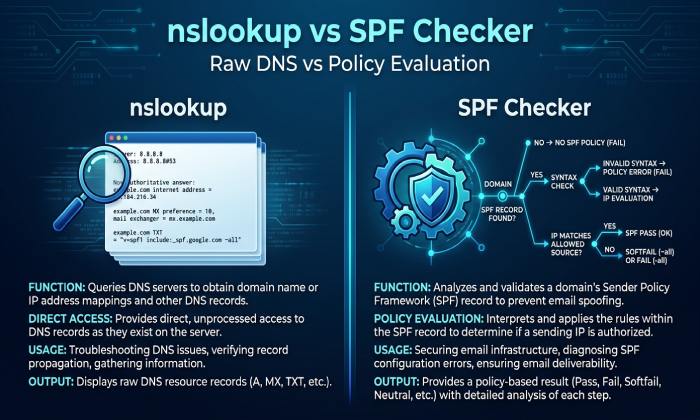
To troubleshoot, compare raw DNS results, run SPF validation, check lookup counts, and confirm DMARC alignment. This gives you a complete picture of what nslookup, an SPF checker, and receiving mail systems are likely to see.
Step-by-Step Verification Workflow
Use this process when nslookup and your SPF checker disagree:
- Run nslookup locally
- Use PowerShell: nslookup -type=txt yourdomain.com
- Confirm whether the visible SPF record starts with
v=spf1.
- Query multiple resolvers
- Test Google DNS, Cloudflare DNS, and your default resolver.
- This identifies caching or propagation differences.
- Run an SPF record lookup
- Use a trusted SPF checker for full SPF validation.
- Review includes, redirects, and lookup count.
- Check syntax and duplicate records
- Use an SPF generator or SPF record generator if rebuilding the policy.
- Verify spf record syntax before publishing.
- Validate DMARC and DKIM
- Confirm your dmarc record and dkim record.
- Check whether SPF alignment works for your sending sources.
- Review live email evidence
- Use an Email Header Analyzer to inspect authentication results.
- Confirm whether the message received spf pass, spf failure, or another spf result.
What Correct Means in SPF
The correct SPF record is not always the one that appears first in nslookup. The correct record is the one that:
- Is currently authoritative in DNS
- Has valid SPF syntax
- Contains one v=spf1 policy
- Stays under the 10-lookup limit
- Authorizes every legitimate spf host and sender
- Produces successful SPF validation
- Supports dmarc and SPF compliance
A strong SPF setup is both technically valid and operationally accurate. It should authorize legitimate senders without over-permitting unknown infrastructure.
FAQ
Why does nslookup show no SPF record, but my SPF checker finds one?
This usually happens because nslookup is querying a different DNS resolver or the SPF checker is following a CNAME, redirect, or cached DNS path. Run a fresh SPF record lookup against multiple resolvers and compare the TTL values.
Also check whether you queried the correct hostname. SPF is normally published at the domain used in the SMTP MAIL FROM or Return-Path, not always the visible From domain used by dmarc.
Is nslookup enough to check SPF?
No. nslookup is useful for raw DNS inspection, but it is not enough for full SPF validation. It can show the published SPF record, but it does not evaluate includes, redirects, lookup limits, SPF alignment, or the final spf result.
For a complete check SPF process, combine nslookup, PowerShell, dig, an SPF checker, and email header analysis.
Why does my SPF checker say too many DNS lookups when nslookup looks fine?
nslookup only shows the top-level SPF record, while an SPF checker expands every include and redirect during SPF lookup. If the expanded policy exceeds 10 DNS lookups, receivers may return a permanent error.
This is where hosted SPF, flattening, spf monitoring, or an spf-lookup-counter can help maintain SPF compliance.
Can SPF pass but DMARC fail?
Yes. SPF can pass while DMARC fails if the SPF-authenticated domain does not align with the visible From domain. This is an SPF alignment issue, not necessarily an SPF syntax issue.
That is why mature programs monitor SPF and DMARC, DKIM, DMARC Reporting, and SPF analytics together instead of relying only on one SPF checker or one nslookup check SPF result.
General Manager
General Manager of DuoCircle. Product strategy and commercial lead for AutoSPF's 2,000+ customer base.
LinkedIn Profile →