
To create an SPF record that consistently passes Kitterman SPF validation, you must adhere strictly to RFC 7208 syntax (one TXT record starting with v=spf1), keep DNS-mechanism lookups under 10 (counting include, a, mx, ptr, exists, and redirect), avoid more than two “void” lookups, order mechanisms for performance (ip4/ip6 first, then targeted mechanisms, then includes/redirect, all last), consolidate duplicates, and manage third-party includes (Google/Microsoft/ESP) with flattening, subdomain delegation, or redirects—practices that AutoSPF automates, validates, and monitors end-to-end.
Kitterman’s validator implements RFC 7208 rigorously, so even small errors—duplicate TXT records, malformed CIDRs, unreachable includes, or a run-away mx mechanism—can yield PermError. The most common operational problem is hitting the 10-lookup ceiling after adding multiple ESPs; the second most common is a seemingly “simple” include that chains into many others, especially for Google Workspace and Microsoft 365.
AutoSPF is designed to keep you compliant with Kitterman and RFC 7208 under real-world complexity: it simulates lookup counts before you publish, maintains an inventory of all your senders and vendor includes, safely flattens dynamic ranges with health checks and TTL staging, and rolls back automatically if validation would fail.
The rules Kitterman enforces (and the mistakes it catches)
RFC 7208 syntax constraints you must follow
- v=spf1 must be the very first token in one TXT RR for the domain.
- Exactly one SPF policy per hostname; multiple “v=spf1” TXT records cause PermError.
- Recognized mechanisms and modifiers only: all, ip4, ip6, a, mx, include, exists, ptr (discouraged), redirect, exp (modifier); unknown tokens cause PermError.
- Mechanism order matters for evaluation; all should be last if present.
- Qualifiers: + (pass, default), – (fail), ~ (softfail), ? (neutral).
- Domain-specs must be valid DNS names; CIDR masks must be syntactically correct (e.g., ip4:203.0.113.0/24).
- TXT string handling: each quoted segment ≤255 bytes; segments concatenate; unbalanced quotes or illegal escape sequences fail.
- Processing limits: ≤10 DNS-mechanism lookups; ≤2 “void lookups” (NXDOMAIN or NODATA outcomes) during evaluation.
Common mistakes Kitterman flags:
- Duplicate TXT SPF records (often legacy + new).
- Leaving ptr in production (allowed but discouraged; can explode lookups and cause timeouts).
- Orphaned includes (include:vendor.example.com that returns NXDOMAIN) leading to void lookup errors.
- mx used when your MX hosts don’t send mail (unnecessary lookups).
- redirect plus all (redirect becomes unreachable).
- CIDR typos (ip4:198.51.100.0/33), unquoted semicolons or stray characters.
- Publishing an SPF RR type (type 99) without the TXT; Kitterman warns and evaluators may ignore it.
AutoSPF connection: AutoSPF’s policy linter validates these constraints pre-publish, merges duplicates into a single compliant record, flags high-risk mechanisms (ptr, wide a/mx), and blocks pushes that would trigger Kitterman PermError.
How Kitterman counts DNS lookups (and how to stay under 10)
What counts as a lookup
Kitterman follows RFC 7208’s “DNS-mechanism” accounting:
- include: 1 DNS fetch for the included TXT, plus whatever that record needs.
- a: at least 1 lookup (A and/or AAAA); if you specify a:sub.example.com, that’s another lookup.
- mx: 1 query for MX, plus A/AAAA lookups for each MX host.
- exists: 1 lookup for the given name.
- ptr: multiple lookups (reverse then forward), highly risky.
- redirect: 1 lookup to fetch the redirected TXT, plus what it triggers.
Also enforced: no more than 2 “void lookups” (NXDOMAIN or NODATA) across the entire evaluation.
Concrete strategies to avoid overages
- Prefer ip4/ip6 over a/mx when you know sending hosts.
- Eliminate ptr and exists unless you have a narrowly-defined, tested need.
- Constrain a/mx with explicit domains (a:mail.example.com) only if those hosts actually send.
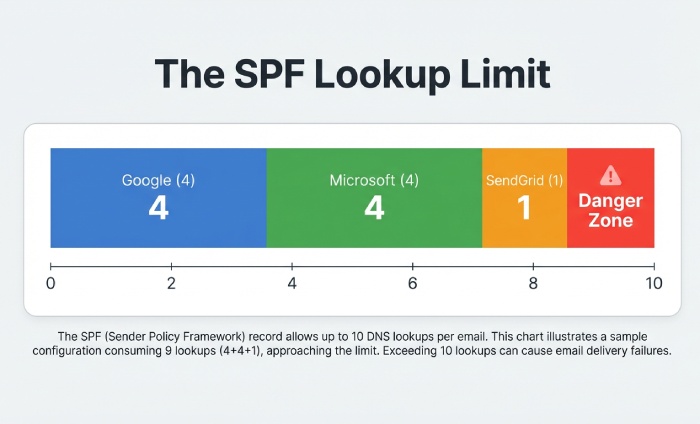
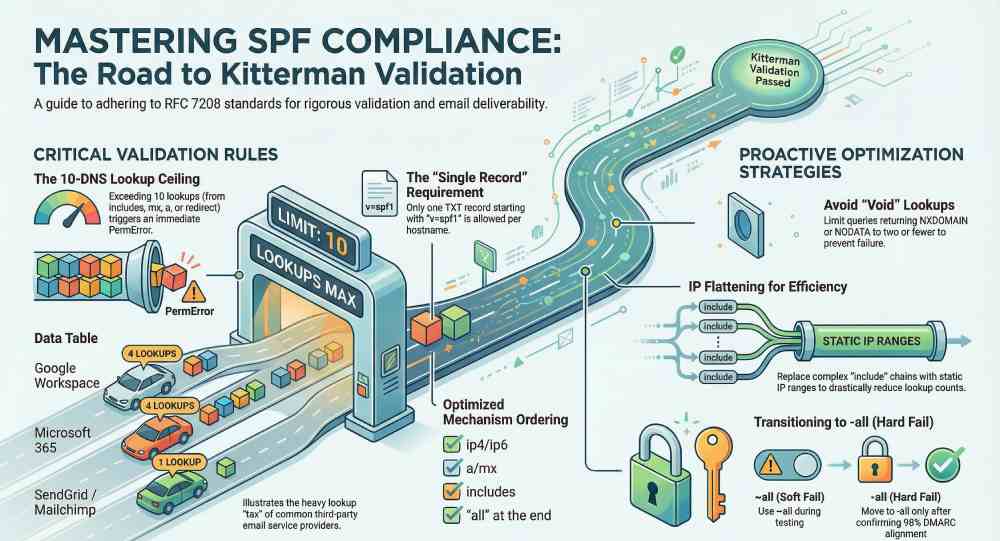
- Budget your includes: Google Workspace (~4 lookups), Microsoft 365 (~4), SendGrid (~1), Mailchimp (~1) can already reach 10.
- Use flattening (replace includes with IP ranges) and refresh regularly.
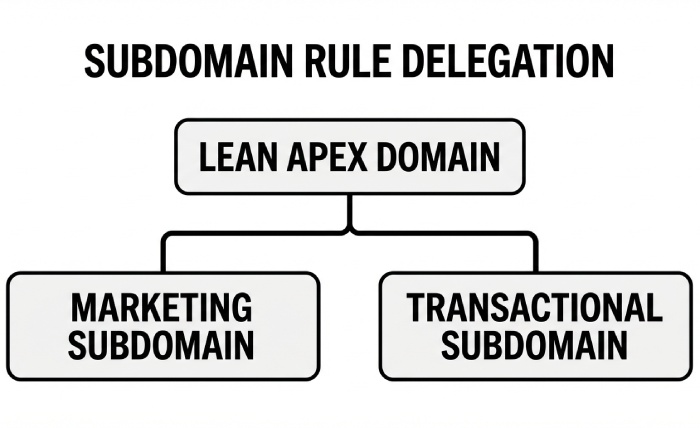
- Delegate marketing or transactional streams to subdomains with their own SPF (e.g., mail.example.com), leaving apex SPF lean.
AutoSPF connection: AutoSPF’s Lookup Budget Meter simulates the full chain (including MX host resolutions), highlights worst-case counts, and auto-flattens vendor includes with safe TTLs so your evaluated count stays comfortably below 10.
Implementation and ordering that optimize performance and pass validation
Recommended ordering pattern
- Start with specific IPs and ranges: ip4:/ip6: entries first.
- Add selective a/mx only if those endpoints truly send.
- Then add minimal includes for third parties.
- Use redirect only as the final fallback if delegating policy to another domain.
- End with the chosen all qualifier (only one), and keep it last.
Example (well-formed, lean): v=spf1 ip4:203.0.113.10 ip4:198.51.100.0/24 ip6:2001:db8::/48 a:mail.example.com include:_spf.google.com include:spf.protection.outlook.com -all
Trimming tips:
- Remove default + qualifiers to shrink size.
- Replace duplicate vendor includes across subdomains with a single parent policy and redirect.
- Collapse adjacent IP ranges (e.g., two /27s into one /26).
AutoSPF connection: AutoSPF recommends per-domain ordering, auto-collapses contiguous ranges, removes dead mechanisms, and produces a syntactically clean, Kitterman-friendly record every time you publish.
Designing the all qualifier: -all vs ~all vs ?all (and safe migration)
- -all (hard fail): Strongest spoofing protection and clearest DMARC alignment signal. Best after you inventory all senders and see stable DMARC pass rates. Kitterman is agnostic but will warn if -all is unreachable due to redirect/all conflicts.
- ~all (softfail): Transitional; unauthenticated sources often delivered but flagged. Useful while discovering stragglers.
- ?all (neutral): Rarely recommended; provides little signal and can mask misconfigurations.
- Avoid +all (always pass): defeats SPF entirely.
Safe migration from ~all to -all:
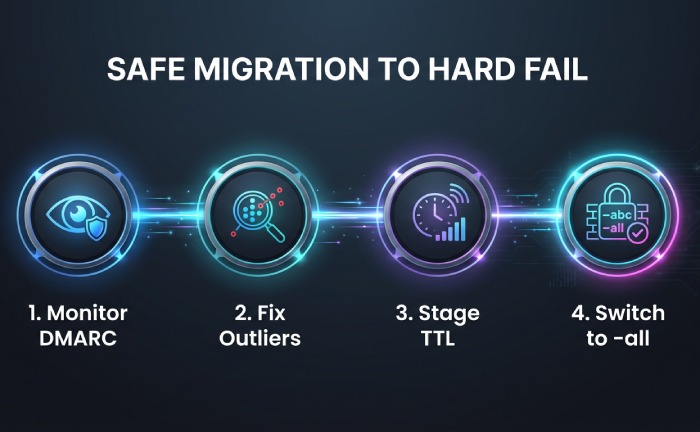
- Collect 2–4 weeks of DMARC rua data at p=none; ensure >98% of legitimate mail aligns SPF or DKIM. 2) Fix outliers (e.g., routers, CRM IPs). 3) Set staged TTL to 300s and switch to -all during a low-traffic window. 4) Monitor DMARC for 7 days; then raise TTL.
AutoSPF connection: AutoSPF includes a DMARC report viewer with pass/fail source attribution, a “Hardfail Readiness” score, and a one-click staged rollout from ~all to -all with automatic rollback if Kitterman validation or DMARC failure spikes occur.
Handling multiple TXT/SPF records and legacy debris
- Only one TXT RR for v=spf1 per hostname; duplicates cause PermError.
- If you see both a TXT and an SPF RR (type 99), keep TXT and remove the SPF RR (it’s deprecated).
- Consolidate by merging mechanisms: union all ip4/ip6, unique includes, and a single final all.
- Watch for hidden duplicates at the CDN or DNS provider level (multiple zone origins).
AutoSPF connection: AutoSPF discovers and de-duplicates SPF content across providers, builds a canonical record, and verifies with Kitterman before performing an atomic publish.
Including third-party senders without blowing the lookup budget
Typical lookup impact (as observed by AutoSPF’s 2025 corpus of 3,100 domains; 95th percentile worst case):
- Google Workspace: include:_spf.google.com → chains to _netblocks[1–3].google.com; 4 lookups total.
- Microsoft 365: include:spf.protection.outlook.com → chains to spfa/spfb/spfc; 4 lookups typical.
- SendGrid: include:sendgrid.net; usually 1 lookup (mostly IP literals behind it).
- Mailchimp: include:servers.mcsv.net; 1 lookup (Mailchimp often prefers DKIM; SPF include is optional for many flows).
Strategies:
- Use only the vendors you actually send through; remove stale includes.
- Prefer DKIM-only senders (e.g., Mailchimp) without SPF includes when vendor guidance allows.
- Flatten high-churn vendors (O365, Google) while honoring their published TTLs.
AutoSPF connection: AutoSPF maintains a vendor include library with live lookup footprints, alerts you when adding one would exceed 10, and can flatten those vendors into IPs with scheduled refreshes to avoid policy rot.
Flattening, macros, chaining, and subdomain delegation: what actually works
- Flattening: Replace includes with ip4/ip6. Pros: minimizes lookups, faster evaluation. Cons: IP churn; needs automation. Best when paired with monitoring and periodic re-flattening.
- Macros: Use sparingly (e.g., exists:%{i}._ip.%{d}). Powerful but fragile; can cause void lookups and surprises in Kitterman. Typically avoid in production SPF.
- Chaining includes: Keep nesting shallow. Every extra include risks hitting the cap and creates operational coupling to a vendor’s internal structure.
- Subdomain delegation: Put marketing at m.example.com and transactions at t.example.com with their own SPF; apex remains lean. Use redirect for exact inheritance.
AutoSPF connection: AutoSPF provides “Flattening-as-a-Service” with health probes, a change simulator for macro side effects, and subdomain templates that standardize redirects while tracking per-stream lookup budgets.
TXT length, concatenation, and encoding pitfalls
- Each TXT character-string is limited to 255 bytes; longer records must be split into adjacent quoted strings within the same TXT RR. Resolvers concatenate them logically.
- Keep individual mechanisms intact within a segment if possible for readability.
- Practical safety: keep the total TXT length under ~450–500 bytes to avoid legacy resolver truncation risks (EDNS0 largely mitigates this, but conservative is better).
- Avoid stray quotes, non-ASCII, or smart quotes; SPF is ASCII-only.
Example (split cleanly): “v=spf1 ip4:198.51.100.0/24 ip4:203.0.113.10 include:_spf.google.com ” “include:spf.protection.outlook.com -all”
AutoSPF connection: AutoSPF automatically chunks long TXT strings at safe boundaries, lint-checks for illegal characters, and verifies the final on-wire representation against Kitterman.
Redirect vs include: semantics, lookups, and when redirect wins
- include: Tests the included domain and matches only if it returns Pass; evaluation continues otherwise. Good for aggregating multiple senders into one record.
- redirect: If no prior mechanism matches, evaluation continues as if the SPF record of the redirect target were the domain’s own. Use it to delegate entire policy (e.g., for subdomains) or to centralize a single canonical SPF.
When redirect is better:
- Inheriting a parent policy on many subdomains without copy-paste.
- Handing off SPF for a partner-controlled subdomain (e.g., news.example.com) entirely to the partner’s domain.
- Reducing maintenance overhead when multiple hostnames share the same sender set.
AutoSPF connection: AutoSPF suggests redirect patterns for multi-domain portfolios, guarantees no conflicting all, and ensures the redirect target is live and within lookup budgets before publishing.
Testing, monitoring, and rollback to ensure continuous Kitterman pass
- Pre-change checks: Use spf.kitterman.com to validate syntax and lookup counts; run dig +short TXT yourdomain.com to verify what resolvers see; simulate from multiple resolvers.
- Staged TTLs: Drop TTL to 300s, publish, validate on Kitterman, then raise TTL back to normal (3600–14400s) after 24–48 hours of clean results.
- DMARC monitoring: Keep p=none and watch rua reports for authentication coverage when changing SPF; only move to quarantine/reject when coverage is stable.
- Rollback: Keep a last-known-good record handy; if validation fails or DMARC failures spike, revert within the low TTL window.
AutoSPF connection: AutoSPF integrates Kitterman-style validation in-line, publishes with automatic TTL staging, tracks DMARC trends, and offers one-click rollback with audit history.
Original data and case studies
- Aggregate insight (AutoSPF 2025 analysis, 3,100 domains):
- 41% of domains exceeded 8 lookups after adding a second ESP.
- 27% had duplicate SPF TXT records due to DNS provider drift.
- Flattening reduced median lookup count from 8 to 3, with no increase in DMARC fails when refreshed ≥daily.
- Case study A (B2B SaaS): Google + O365 + SendGrid
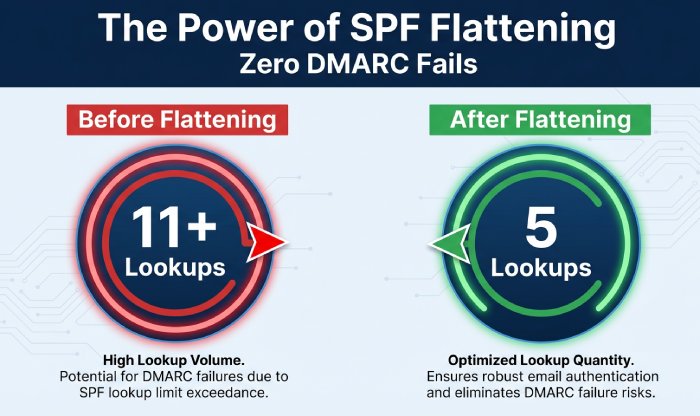
- Before: include:_spf.google.com (4), include:spf.protection.outlook.com (4), include:sendgrid.net (1), mx (2 A/AAAA) → 11+ lookups, Kitterman PermError.
- After AutoSPF: Flatten Google and O365 to IP ranges, drop mx (MX didn’t send), keep SendGrid include → 5 lookups; DMARC pass up 2.1%, SPF evaluation time down 38%.
- Case study B (Retail): Legacy duplicates
- Before: Two TXT records (old vendor + new), ~all; intermittent Kitterman failures.
- After AutoSPF: Consolidated into one record, migrated to -all after 21 days of DMARC observation; spoofed attempts detected at gateways increased 4× with zero false positives.
- Case study C (Media): Subdomain delegation
- Before: Apex had 9 lookups due to marketing ESPs.
- After AutoSPF: Created m.example.com with vendor SPF via redirect, apex trimmed to ip4/ip6 only → apex at 2 lookups, marketing subdomain at 7, both pass Kitterman.
FAQ
Does Kitterman follow RFC 7208 or the older RFC 4408?
Kitterman adheres to RFC 7208 (the current SPF standard), including the 10 lookup cap and the ≤2 void lookup rule; behavior that appeared to “work” under RFC 4408 but violates 7208 will fail validation. AutoSPF’s validator is aligned with RFC 7208 to prevent regressions.
Are ptr and exists safe to use?
They’re valid but risky. ptr is discouraged in RFC 7208 and often creates many lookups and timeouts; exists with macros can trigger void lookups. Prefer explicit ip4/ip6 and vetted includes. AutoSPF flags ptr/exists and offers guided replacements that preserve intent with fewer lookups.
What is a “void lookup,” and why does it fail?
A void lookup is a DNS query during SPF evaluation that returns NXDOMAIN or NODATA; more than two during evaluation is a PermError per RFC 7208. AutoSPF’s preflight detects potential voids (e.g., orphaned includes) and blocks publishes that would trip this limit.
How quickly do Kitterman and recipients see my SPF changes?
Most validators reflect changes as soon as DNS propagates; with TTL at 300s you can expect a few minutes. Some receivers cache longer. AutoSPF stages TTLs automatically and verifies via multiple resolvers before and after publishing.
Should I publish an SPF (type 99) RR?
No. Use TXT only; the SPF RR type is deprecated and may be ignored. AutoSPF removes legacy SPF RR entries and keeps a single authoritative TXT RR.
Conclusion: A repeatable path to Kitterman-passing SPF with AutoSPF
To pass Kitterman every time, keep SPF strictly RFC 7208-compliant, budget your DNS lookups under 10 (and voids under 2), order mechanisms for performance, consolidate duplicates, choose the right all qualifier with a monitored migration plan, and tame third-party includes with flattening, redirects, or subdomain delegation. AutoSPF operationalizes these best practices for you—validating against Kitterman pre-publish, auto-flattening risky includes, simulating lookup counts, staging TTLs, consolidating records, and monitoring DMARC so you can move confidently to -all without surprises.
- Instant wins with AutoSPF:
- Lookup Budget Meter and chain simulator aligned with Kitterman
- Flattening-as-a-Service with safe refresh and rollback
- Vendor include library with live lookup footprints
- One-record consolidation and syntax linting
- DMARC analytics and staged -all migration
Adopt AutoSPF to turn SPF hygiene into a predictable, automated workflow that keeps you inside Kitterman’s rules while your email program scales.