How To Configure SPF Builder For Web Builder CS Email Authentication

Quick Answer
Learn how to configure SPF Builder for Web Builder CS email authentication to create a valid SPF record, authorize trusted mail servers, improve email deliverability, and reduce the risk of spoofing and phishing while meeting SPF best practices.

Sender Policy Framework (SPF) is a fundamental component of modern email authentication, designed to prevent unauthorized parties from sending emails on behalf of your domain name. An SPF builder, or SPF record generator, is a specialized tool that simplifies the otherwise technical process of creating accurate SPF records. These records are critical for email security and sender reputation.
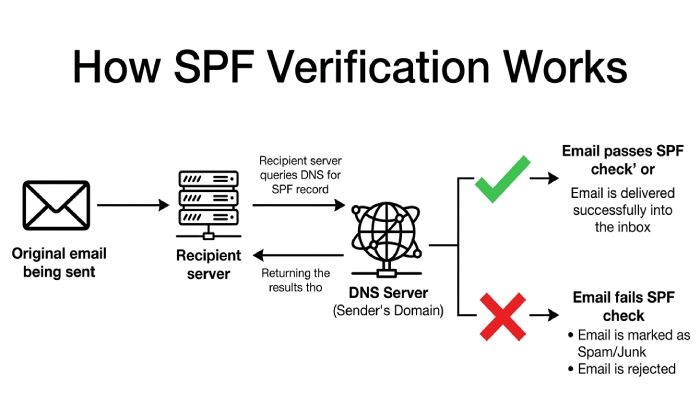
When an email is received, the recipients mail server performs an SPF record lookup to validate the authenticity of the sender. The SPF syntax found within the DNS record explicitly details which mail servers”by IPv4 and IPv6”are permitted to send emails for a given domain. By employing tools such as the EasySPF Record Generator, organizations ensure that their SPF specification is compliant and effective, reducing the risk of phishing and spoofing attacks.
The SPF builder streamlines SPF record creation by offering a user-friendly interface to select MX records, A records, and other mechanisms such as include, exists, and redirect. The resulting SPF record can then be quickly validated using an SPF checker or advanced tools like the SPF Raw Checker. This ensures proper SPF validation and adherence to SPF rules and policies, ultimately enhancing overall email deliverability and cybersecurity.
Why Web Builder CS Websites Need Proper SPF Configuration
Web Builder CS websites”commonly used for rapid deployment of marketing sites and business portals”often rely on integrated or third-party emailing systems for transactional or promotional communications. Without correctly configured SPF policies in DNS records, legitimate emails from these sources could be rejected, marked as spam, or worse”used maliciously to impersonate the brand.
Proper SPF record creation through an SPF record generator is not just a best practice; it is a necessity for maintaining robust email authentication protocols. With the ongoing threats to email security, phishing protection, and sender reputation, businesses using Web Builder CS must leverage email policy solutions such as SPF and DMARC for comprehensive domain health. Where records grow long, automated SPF flattening consolidates includes into a compact, valid record.
Misconfigured SPF records can lead to SPF failure policy triggers”softfail, fail, or neutral”causing legitimate messages to be lost or incorrectly flagged by recipient servers. This directly impacts email deliverability and effectiveness of email marketing or communication campaigns. Reputation monitoring and aggregate reports from entities such as EasyDMARC or managed DMARC services on platforms recognized by G2 Crowd, SourceForge, and Expert Insights provide valuable insights into authentication outcomes and domain scanner findings.
Prerequisites: Domain Access, DNS Settings, and Email Sending Sources
Accessing Domain Management and DNS Configuration
Before starting the SPF record creation process, you must have admin access to your domain registrar or DNS providers control panel. This is where critical DNS records”such as A records, MX records, and TXT records”are managed. The DNS configuration panel is also home to DKIM records, DMARC settings, and other security protocols like MTA-STS or TLS-RPT.
Reviewing Email Sending Sources
A comprehensive SPF policy requires an inventory of all legitimate email sources. For Web Builder CS users, these typically include:
- Built-in website contact forms or notification systems via the platforms servers (often with unique IPv4 or IPv6 addresses)
- Third-party mailing solutions (such as EasySender, MSP, or custom SMTP servers)
- Marketing tools, helpdesk systems, or SaaS integrations configured to send emails using your domain
Each senders server information”such as IPv4 addresses, include domains, or dedicated MX records”must be documented as these details will be input into the SPF builder during SPF record generation and source configuration.
Gathering Additional Authentication Components
While SPF is foundational, integrating DKIM and DMARC amplifies email protection. Collect or set up related DKIM records (with DKIM generator and DKIM checker tools), DMARC records (using a DMARC record generator or managed DMARC services), and consider future rollout of BIMI for enhanced brand visibility in from fields.
Identifying Authorized Mail Servers for Web Builder CS
Reviewing Built-In and Third-Party Email Routing
Within the Web Builder CS admin panel, determine which infrastructure components are responsible for outbound email. Is your website using the platforms default SMTP, or have you configured external relay services? The SPF builder requires precise source value identification”are emails sent directly from the hosting server, via a cloud provider, or through an external tool such as EasySender?
Using Tools for Source Discovery
Domain scanners and email header analyzers (from providers like EasyDMARC or through standalone tools such as DNS Record Checker) help map the journey of emails sent from your Web Builder CS site. By reviewing SPF test or email verification outputs, you can identify which IPs, hostnames, or A records to include in your SPF policy.
Common Sources to Gather:
- Primary MX record (if using domains own mail service)
- Platforms default send-out server (often an A record)
- Third-party IP addresses (both IPv4 and, if necessary, IPv6)
- Included domains, using the include SPF mechanism (e.g., include:_spf.easysender.com for EasySender integration)
After compiling this list, youre ready for SPF record creation.
Customizing SPF Mechanisms: include, ip4, ip6, a, mx, and all
An effective SPF record not only lists authorized mail servers but also customizes how each source is permitted to send email on behalf of your domain name. When using an SPF builder or SPF record generator, it is critical to understand and strategically deploy the core mechanisms available within SPF syntax.
Core SPF Mechanisms Explained
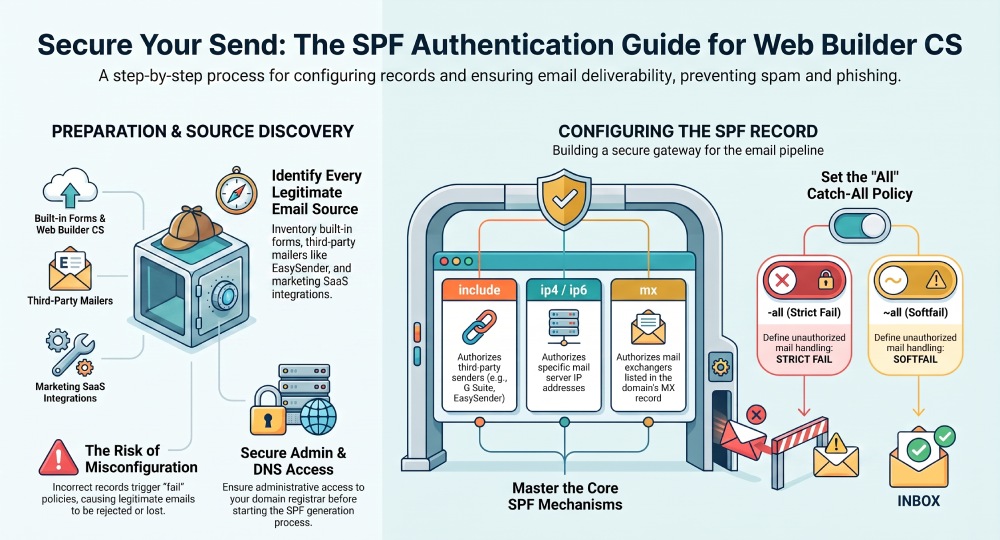
- include: The include mechanism is commonly used in SPF record creation to authorize third-party email senders (like Microsoft 365, G Suite, or EasySender). It tells recipient servers to also check the SPF record of another domain, essential for managed services and MSP solutions. If you use external providers, the SPF builder will often prompt you to add include statements during SPF record creation.
- ip4: The ip4 mechanism specifies explicit IPv4 addresses or ranges. If your mail server operates on IPv4, the SPF builder will recommend including this mechanism for direct IP specification. For example, ip4:192.0.2.10 allows that IPv4 address to send on your behalf.
- ip6: As IPv6 adoption grows, supporting email authentication for both IPv4 and IPv6 is essential. The ip6 mechanism lets you authorize IPv6-enabled sending infrastructure, protecting your email security posture across modern networks, especially as the future of SPF increasingly assumes dual-stack sending.
- a: This mechanism authorizes any server whose A record in DNS matches the domain name or specified subdomain. When using a robust SPF record generator, you can dynamically include hosts by referencing their A record without managing static IP lists.
- mx: The mx mechanism authorizes mail exchangers listed in your domains MX record. Many SPF builders automatically recommend this setting to ease the management of SPF policies, especially for traditional mail services.
- all: The all mechanism serves as a catch-all at the end of your SPF record. By adjusting the qualifier ” -all (fail policy), ~all (softfail), ?all (neutral) ” you define how strictly servers handle messages from non-listed sources. Careful policy selection here is vital: -all enforces strong email protection but may lead to legitimate bounces if not tested carefully.
Using Mechanisms Effectively with an SPF Builder
A user-friendly SPF record generator like the one offered by EasyDMARC or EasySPF typically guides you through source configuration, suggesting which mechanisms to embed based on your operational requirements. When publishing an SPF record for your domain, remember to keep your DNS record within the SPF specifications”avoid overly long records and minimize unnecessary mechanisms for optimal SPF validation and faster DNS lookup times. Too many includes can trigger SPF too many DNS lookups errors that fail authentication outright.
General Manager
General Manager of DuoCircle. Product strategy and commercial lead for AutoSPF's 2,000+ customer base.
LinkedIn Profile →