How to Update an MTA-STS Policy Without Disrupting Email Delivery

Quick Answer
An MTA-STS policy can be updated safely by validating DNS records, HTTPS hosting, MX configurations, and TLS certificates. Use testing mode before enforcement, monitor email delivery, and maintain a rollback plan to prevent SMTP delivery failures.
Try Our Free MTA-STS Checker
Validate the MTA-STS DNS record and policy file for any domain.
Check MTA-STS Policy →
Updating an MTA-STS policy requires careful planning to maintain reliable email delivery. Since MTA-STS enforces encrypted SMTP connections, incorrect changes can disrupt mail flow, cause delivery failures, and increase exposure to downgrade and man-in-the-middle attacks.
Organizations using cloud-based or hybrid email systems should validate policy changes before deployment. Reviewing the configuration, testing the policy, updating DNS and HTTPS hosting, and monitoring email delivery help ensure a secure and reliable transition.
Understand What Your Current MTA-STS Policy Controls
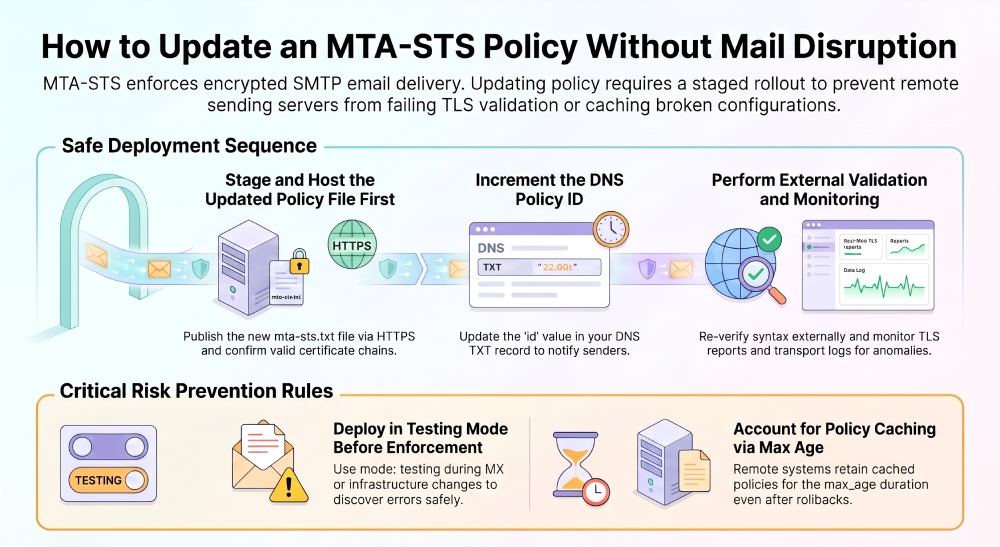
An MTA-STS policy defines how supporting external mail servers should deliver SMTP messages to your domain over TLS. Defined in RFC 8461, Mail Transfer Agent Strict Transport Security uses two key components:
- A DNS TXT record that announces the MTA-STS policy and includes a policy ID.
- An HTTPS-hosted text file, typically named
mta-sts.txt, available at the required well-known URL.
A typical MTA-STS policy file contains a version (STSv1), a policy mode (testing, enforce, or none), one or more MX hostname patterns, and a max_age value that specifies how long senders may cache the policy. For example, a domain using Microsoft 365 must list MX hostname patterns that match its actual mail exchangers. Wildcard patterns must follow MTA-STS syntax; they cannot contain arbitrary wildcards within a hostname. Always verify the policy against your domain’s published MX records before enabling enforcement.
What the Policy Actually Affects
The MTA-STS policy affects how sending mail systems verify your receiving infrastructure. When a sender supports SMTP MTA Strict Transport Security, it retrieves your policy, caches it in a policy cache, checks the advertised MX hosts, and performs certificate validity checks during SMTP over TLS negotiation.
For Microsoft 365 tenants, this frequently involves Exchange Online and mail.protection.outlook.com. If your policy lists the wrong MX host or fails to account for Microsoft Hosted infrastructure, senders may reject delivery when TLS enforcement is active.
Inbound Protection vs. Outbound Protection
For your own domain, MTA-STS primarily strengthens inbound protection because it tells other systems how to securely send mail to you. However, outbound protection also matters: your mail platform, such as Exchange Online, may perform MTA-STS validation when sending to a destination domain that publishes a valid policy.
In practice, a mature email security strategy should include SPF, DKIM, DMARC, MTA-STS validation, TLS reporting, and careful monitoring of both inbound protection and outbound protection.
Prepare and Validate the Updated Policy File
Before updating policy settings, prepare the new file locally and compare it with the current production policy. Use a local text editor and a version control system to manage changes, track revisions, and maintain a reliable copy of the policy file.
A simple policy might look like this:
version: STSv1
mode: testing
mx: contoso-com.mail.protection.outlook.com
max_age: 604800
When moving toward mode enforce, the policy may become:
version: STSv1
mode: enforce
mx: contoso-com.mail.protection.outlook.com
max_age: 604800
The MTA-STS policy must match the real MX architecture. If your domain uses Exchange Online, confirm the active MX record in DNS and verify that the mail exchanger presents a trusted certificate issued by a recognized Certificate Authority and chained to a trusted root.
Validate Syntax and Hosting Assumptions
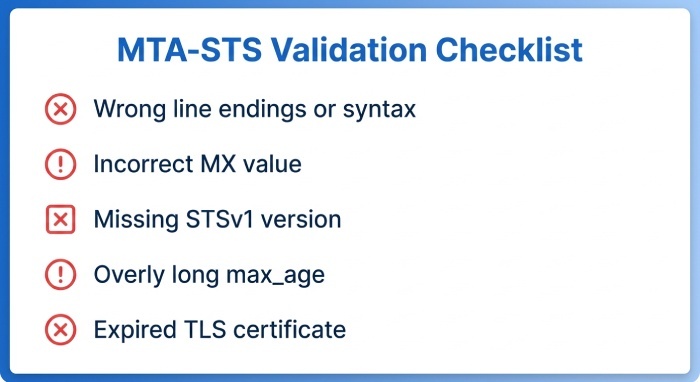
Before any policy update, run validation tools to check syntax, DNS visibility, HTTPS availability, and certificate validity checks. The most common mistakes are simple but disruptive:
- Wrong line endings or invalid syntax in
mta-sts.txt - Incorrect
mx:value, especially when using a wildcard MX - Missing version STSv1
- Overly long
max_ageduring early rollout - Expired or mismatched TLS certificate
- Invalid certificate binding on the hosting endpoint
Example: Contoso Policy Review
Assume ContosoCorporation owns contoso.com and routes mail through Exchange Online. The domain owner should confirm that DNS points to Microsoft 365, Outlook delivery is stable, and the target resembles contoso-com.mail.protection.outlook.com.
If Contoso publishes a policy that lists an old on-premises mail server, external senders performing MTA-STS validation may fail delivery once TLS enforcement is active. That would directly disrupt mail flow, weaken expected inbound protection, and create avoidable troubleshooting work.
Use Testing Mode Before Enforcing Changes
The safest way to update policy content is to use mode testing first. Testing mode does not enforce the MTA-STS policy’s TLS requirements. Senders may still deliver mail without the required TLS conditions being met. This gives the organization time to identify mismatches, certificate problems, and unexpected routing paths before enabling mode enforce.
Why Testing Mode Matters
SMTP MTA Strict Transport Security can become strict very quickly when the policy is cached. If you publish enforce mode too soon with a long max_age, remote senders may continue using the broken policy from their policy cache even after you correct it.
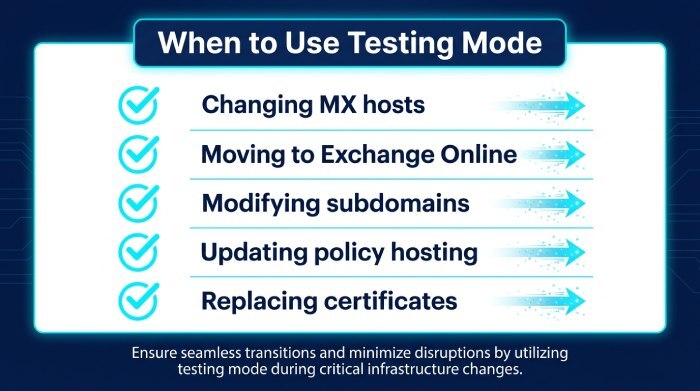
Use mode testing when:
- Changing MX hosts
- Moving from on-premises SMTP to Exchange Online
- Adding or removing a subdomain
- Updating policy hosting
- Replacing certificates
- Validating a new deployment pipeline
During this phase, review TLS reports if configured, observe mail flow, and watch for NDR error codes. The objective is to prove that MTA-STS validation passes consistently before switching to TLS enforcement.
Update DNS Records and HTTPS Hosting Safely
MTA-STS requires reliable DNS and HTTPS publication. The DNS side uses a TXT record similar to:
_mta-sts.contoso.com TXT "v=STSv1; id=2025020101"The id value is the policy id. When you change the policy file, you should also change the policy id so senders know to retrieve the updated file instead of relying on a cached copy.
The HTTPS side requires the policy to be available at:
[https://mta-sts.contoso.com/.well-known/mta-sts.txt](https://mta-sts.contoso.com/.well-known/mta-sts.txt)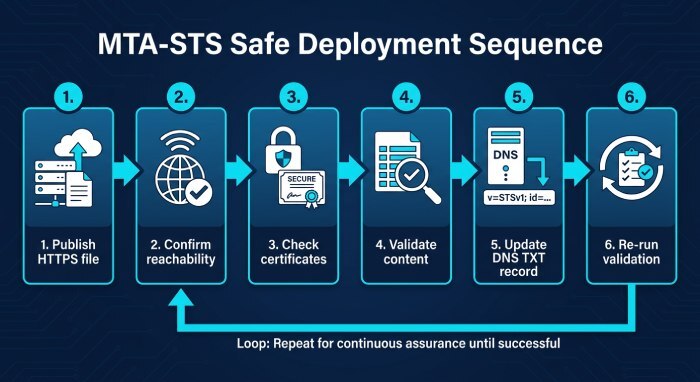
That HTTPS URL must serve the file over a valid HTTPS endpoint. Some teams implement this as a static website with an index.html placeholder and the required .well-known/mta-sts.txt path.
Safe Deployment Sequence
A reliable deployment pipeline should follow this order:
- Publish the updated
mta-sts.txtto the HTTPS host. - Confirm the HTTPS webpage and file path are reachable.
- Run certificate validity checks and verify the certificate chains to a trusted root.
- Confirm the content through external validation tools.
- Update the DNS TXT record with the new policy id.
- Re-run MTA-STS validation from outside the corporate network.
Monitor Mail Flow and Roll Back if Needed
After the policy update, monitor mail flow closely. In Exchange Online, use message trace, transport reports, and any available TLS reporting data to detect delivery anomalies. Administrators should also watch Outlook user reports, help desk tickets, and sender-side failures from partners.
What to Monitor After the Update
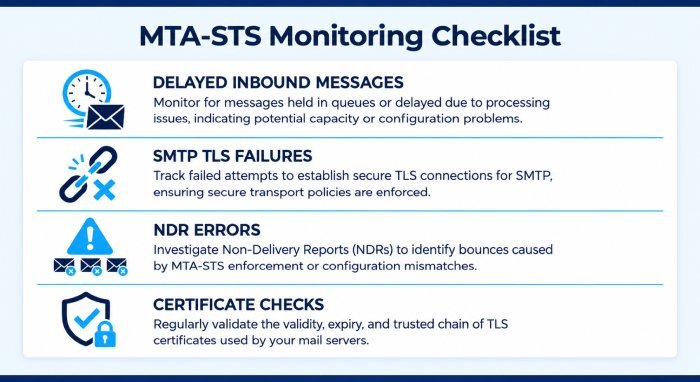
Focus on the signals most likely to reveal MTA-STS problems:
- Spikes in delayed or failed inbound messages
- External partners reporting SMTP TLS failures
- NDR error codes related to certificate or STARTTLS negotiation
- Failed certificate validity checks
- Unexpected rejection after enabling TLS enforcement
- Differences between production MX hosts and the MTA-STS policy
Because SMTP MTA Strict Transport Security depends on both HTTPS and DNS, check both repeatedly from multiple networks. A configuration may appear correct internally but fail externally because of DNS propagation, CDN behavior, firewall rules, or certificate chain issues.
Rollback Strategy
If an MTA-STS policy update causes email delivery problems, restore the last known-good policy configuration and investigate the cause before making further changes. If appropriate, switch the policy from enforce to testing while troubleshooting.
After updating the HTTPS-hosted policy file, change the id value in the _mta-sts DNS TXT record to signal that a new policy is available. However, remote sending systems may not retrieve the updated policy immediately. Previously retrieved policies can remain cached for the duration specified by max_age, so lowering max_age in a new policy does not immediately shorten the lifetime of policies already cached by remote senders.
During recovery, verify that the policy file is accessible at the required HTTPS URL, its TLS certificate is valid, and its MX patterns match your domain’s actual mail exchangers. Monitor TLS-RPT reports, message delays, and delivery failures to assess whether the correction has taken effect.
For domains using Exchange Online, confirm that the published MX records match the active Microsoft 365 configuration. If delivery problems persist, coordinate with affected sending organizations or their email administrators to investigate cached policies and TLS validation failures.
General Manager
General Manager of DuoCircle. Product strategy and commercial lead for AutoSPF's 2,000+ customer base.
LinkedIn Profile →