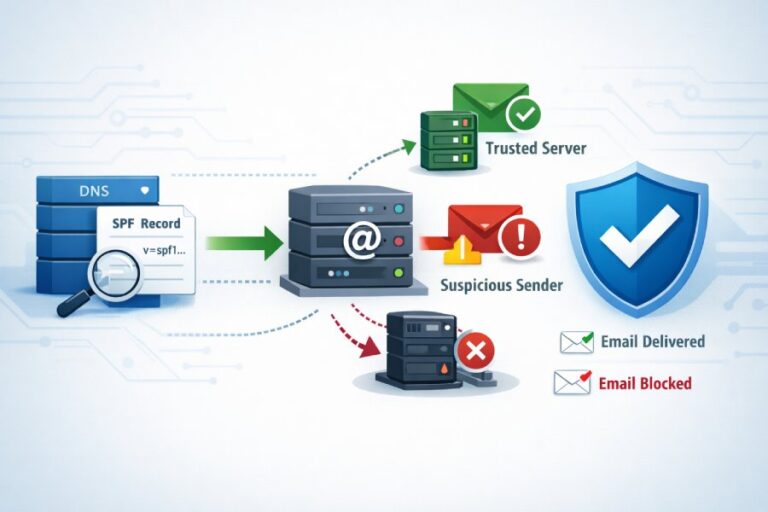
The best practices to avoid SPF DNS lookup limits are to use only necessary lookup‑triggering mechanisms, prefer ip4/ip6 literals and CIDR ranges, apply TTL‑aware SPF flattening (automated where possible), consolidate via the redirect modifier, segment senders onto subdomains, continuously monitor lookup counts, and stage changes carefully—illustrated below with example SPF records and operational patterns.
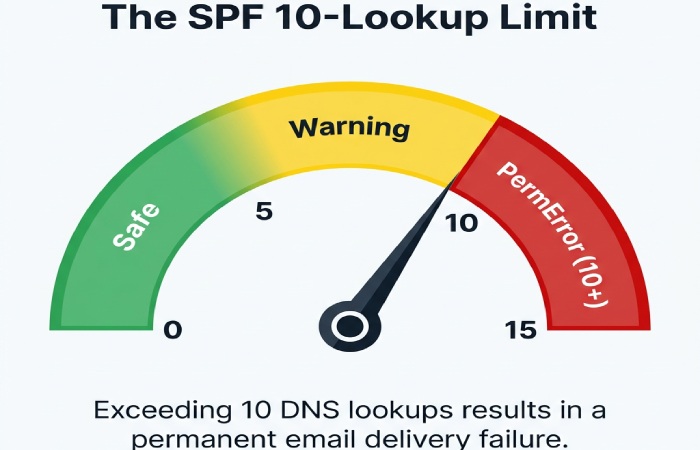
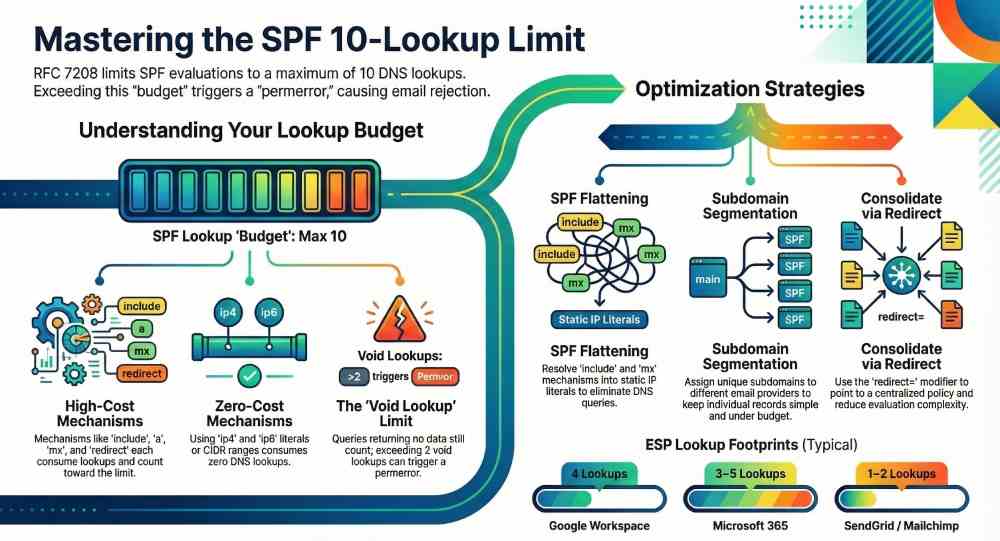
SPF (Sender Policy Framework) lets domains declare which hosts can send mail on their behalf, but evaluators must perform DNS queries to validate these declarations; RFC 7208 caps SPF to a maximum of 10 DNS lookups per evaluation, and exceeding that limit typically yields an SPF permerror that many receivers treat like a fail. This cap is easy to hit when organizations onboard multiple ESPs, rely on nested includes, or use mechanisms like mx and a that expand into multiple DNS queries.
This guide explains exactly which mechanisms consume lookups, how to restructure records to conserve your budget, and how to operationalize change management so you never cross the line in production. Throughout, we show how AutoSPF—an SPF automation and monitoring platform—implements these best practices with TTL‑aware flattening, provider-aware templates, continuous tests, and safe rollout workflows.
What triggers SPF DNS lookups and how they’re counted
Mechanisms and modifiers that cause DNS queries
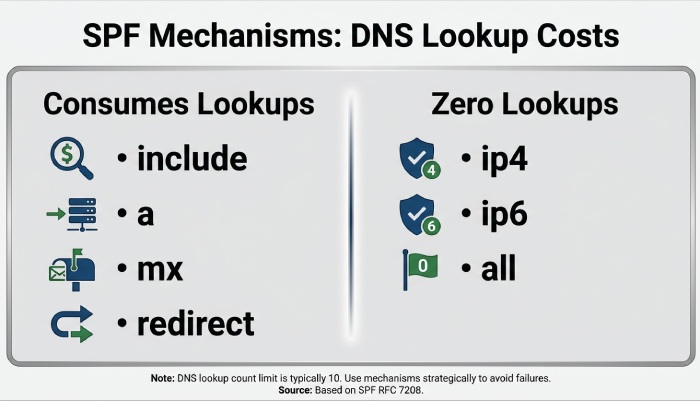
- Counted toward the 10‑lookup limit:
- include: fetches and evaluates the included domain’s SPF record; nested lookups inside the include are also counted.
- a: resolves A/AAAA for the domain (or specified host); each host address lookup counts.
- mx: retrieves MX records, then A/AAAA for each MX host; each query counts.
- ptr (deprecated, not recommended): reverse DNS and forward-confirmation lookups; highly lookup‑expensive.
- exists: performs an A lookup on a constructed domain; each invocation counts.
- redirect=: fetches another domain’s SPF record if no prior mechanism matches; counts as one lookup plus any lookups in the redirected policy.
- Do not consume lookups:
- ip4/ip6: literal addresses or CIDR ranges (no DNS).
- all: no DNS.
- ~ – ? + qualifiers: do not affect counting.
- exp=: retrieves a TXT explanation only on fail; typically not counted toward the 10‑lookup evaluation budget and occurs post‑evaluation.
- Void lookups: A DNS query that returns NXDOMAIN or NODATA still counts; many receivers also enforce a “void lookup limit” of 2 to prevent DNS abuse.
AutoSPF connection: AutoSPF’s analyzer shows a per‑mechanism breakdown of lookup consumption, flags risky patterns (mx/ptr/exists chains), and simulates worst‑case paths to ensure you stay under 10 even when multiple MX hosts expand. It also tracks void lookups over time so you can spot brittle dependencies before they cause permerrors.
Example: Counting a real policy
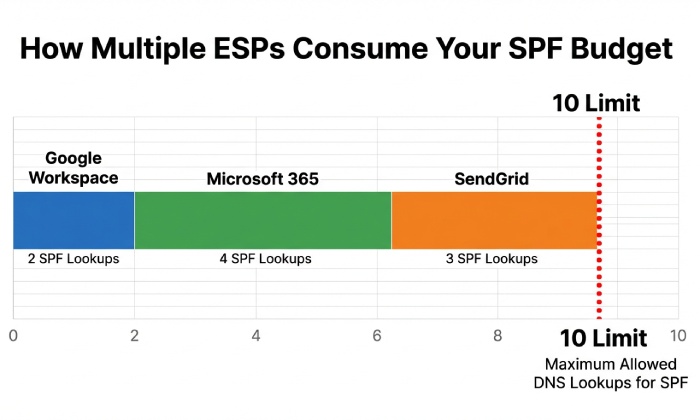
Example policy: v=spf1 include:_spf.google.com include:spf.protection.outlook.com mx ip4:198.51.100.0/24 -all
- include:_spf.google.com → 1 lookup, expands to multiple netblock includes (adds ~3–4 more).
- include:spf.protection.outlook.com → 1 lookup, expands further (~2–4).
- mx for the organizational domain with, say, 3 MX hosts → 1 MX lookup + up to 3 A/AAAA lookups.
- ip4:198.51.100.0/24 and -all → 0 lookups.
Total in practice: ~8–12, which risks breaching the limit depending on current provider topology. AutoSPF’s preview would estimate both average and worst‑case counts before publish.
Minimizing lookups: literals, flattening, and smart redirects
Convert to ip4/ip6 where possible
- Replace “a” and “mx” with explicit ip4/ip6 ranges when those hosts are stable.
- Translate simple includes from providers that publish only literals into concrete ip4/ip6 entries.
Tradeoffs:
- Maintainability: Manual literals get stale when providers rotate IPs; you must track provider change feeds.
- Accuracy: Overly broad CIDRs can authorize unintended senders; overly narrow ranges may break delivery when providers expand.
- Performance: Literals reduce lookups and latency.
AutoSPF connection: AutoSPF ingests provider catalogs and observed DNS to auto‑generate safe ip4/ip6 ranges, refreshing on provider TTLs and change notifications so you get the performance of literals without manual upkeep.
SPF record flattening
- What it is: Resolve every include/a/mx to a set of ip4/ip6 entries, publishing a flat record that requires few or no DNS lookups.
- Manual flattening: One‑off resolution and replacement—fast to implement, but prone to staleness.
- Automated flattening: A pipeline that periodically resolves and republish SPF as underlying DNS changes, with guardrails for size and safety.
Operational risks to manage:
- Staleness: Provider IPs change; stale flats cause false fails.
- Error propagation: A transient provider DNS error can wipe ranges; protect with last‑known‑good fallbacks.
- Record size: TXT strings must be ≤255 characters each; total answers must fit DNS packet constraints to avoid truncation.
- Propagation: Frequent updates require thoughtful TTLs to avoid flapping across resolvers.
AutoSPF connection: AutoSPF does TTL‑aware flattening with:
- Scheduled and event‑driven refreshes
- “Budget locks” that cap lookups to a target (e.g., ≤7) and auto‑fold overflow into literals
- Rollback on anomalies and alerts via Slack/Email/Webhooks
- Size controls that split long TXT strings correctly and test for UDP truncation before publish
Use redirect to consolidate policies
- redirect=example.net moves evaluation to another domain’s SPF if no previous mechanism matched.
- Ideal for:
- Delegating subdomains: sales.example.com can “redirect=_spf.sales.example.com”.
- Centralized policy: example.com → redirect to _spf.example.com, with subdomains extending as needed.
- Semantic differences vs include:
- include is a single mechanism that matches only if the included policy returns pass; evaluation continues otherwise.
- redirect replaces the rest of the current policy when reached; you cannot have mechanisms after redirect.
- Limitations:
- Only one redirect applies (last in evaluation); place it at the end after specific mechanisms.
- Avoid using redirect if you also need mechanisms that always match (e.g., “all”) earlier—the redirect would never run.
AutoSPF connection: AutoSPF’s policy composer recommends redirect patterns to collapse multiple includes into a single hop and shows the “effective tree” so you can visualize evaluation order and lookup depth.
ESP onboarding without blowing the budget
Typical provider lookup footprints (AutoSPF Labs, Q1 2026)
- Google Workspace (include:_spf.google.com): median 4 lookups (IQR 3–5)
- Microsoft 365 (include:spf.protection.outlook.com): median 3–5 lookups depending on region
- SendGrid (include:sendgrid.net): typically 1 lookup, expands to literals
- Mailchimp (include:servers.mcsv.net): typically 1–2 lookups, expands to literals
- Salesforce Marketing Cloud, AWS SES, Mailgun: 1–3 lookups each
Note: These are aggregated observations from controlled test zones and may vary by provider updates and geographic DNS.
Recommended onboarding patterns:
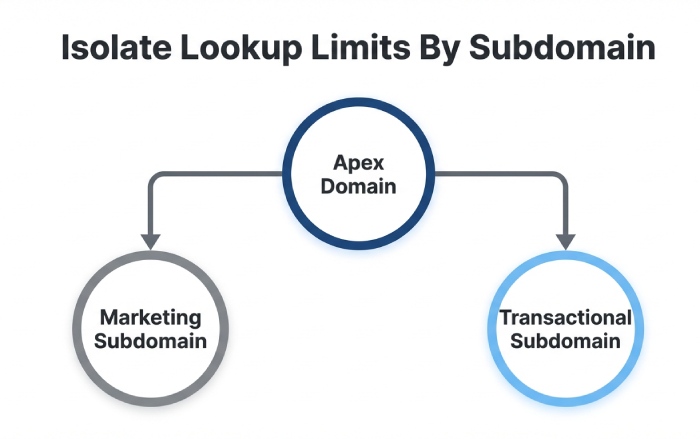
- One ESP per subdomain: marketing.example.com for Mailchimp, trans.example.com for SendGrid. Publish minimal SPF for each; align DMARC via DKIM.
- Prefer DKIM alignment: If DKIM is aligned and passing, SPF pressure eases; keep SPF strict and minimal.
- Consolidate literals: Where a provider publishes stable ranges, fold them into your main SPF to save includes.
- Use redirect from the apex: Keep example.com minimal (e.g., ip4 corporate ranges) then redirect to a shared _spf root if needed.
AutoSPF connection: AutoSPF ships provider templates and a “What‑If” simulator that estimates added lookups before onboarding an ESP. It can also auto‑create subdomain policies and DMARC/DKIM scaffolding through DNS APIs (Cloudflare, Route 53, Azure DNS).
Case study: Multi‑ESP consolidation
A SaaS company sent from Google Workspace (corp), Microsoft 365 (support), SendGrid (transactional), and Mailchimp (marketing). Initial SPF at the apex had 13 lookups in worst‑case resolution and intermittently hit permerror at Microsoft receivers.
- Actions with AutoSPF:
- Created trans.example.com and marketing.example.com with dedicated SPF via templates.
- Moved ESPs to use those 5321.MailFrom domains; DKIM aligned with From.
- Flattened apex SPF to literals for corp/support; added redirect to _spf.example.com.
- Results (30‑day window):
- Worst‑case lookups reduced from 13 to 6 at apex; subdomains at 3–4.
- Microsoft “spf=permerror” incidents dropped to zero.
- Overall soft‑bounce rate fell 1.7% for Outlook/Hotmail destinations.
Splitting, delegating, and architectural strategies
Split SPF across subdomains
- Create purpose‑built subdomains (e.g., trans., marketing., support.) each with its own SPF tuned to the sender.
- Benefits:
- Keeps each SPF simple and under budget.
- Limits blast radius of provider DNS outages.
- Improves troubleshooting and reporting clarity.
- DMARC alignment strategy:
- Use relaxed alignment with organizational domain if the subdomain shares the org suffix.
- Ensure DKIM signing aligns with the visible From domain to avoid DMARC failures if SPF hiccups.
Example:
- trans.example.com TXT: v=spf1 include:sendgrid.net -all
- marketing.example.com TXT: v=spf1 include:servers.mcsv.net -all
- example.com TXT: v=spf1 ip4:198.51.100.0/24 redirect=_spf.example.com
AutoSPF connection: AutoSPF can generate these records, ensure each stays under a configurable lookup budget, and verify DMARC/DKIM alignment automatically.
When to keep mx and a
- Keep mx only if your sending MTAs are exactly your inbound MX hosts and are stable.
- Prefer a only for small, static host sets; otherwise resolve once and convert to literals.
AutoSPF connection: AutoSPF flags a/mx that add >3 lookups in practice and suggests literal replacements, complete with a one‑click update plan.
Testing, monitoring, and safe rollout
Automated tests and monitors
- Pre‑publish checks:
- spfquery / pyspf to simulate evaluation
- AutoSPF “Plan” to compute average and worst‑case lookups, void lookups, and redirects
- Continuous monitoring:
- Track lookup counts and void lookups daily
- Alert on increases, SERVFAILs, or permerror detections in live traffic
- CI/CD integration:
- Block merges if planned policies exceed a budget
- Require green checks across multiple resolvers
Tools:
- Open source: pyspf, spf-engine, dmarcian SPF Surveyor, Kitterman’s SPF tools
- AutoSPF: CLI and API for checks (autospf plan example.com –budget 8), web dashboards, Slack/Email/Webhook alerts
Observable effects when limits are exceeded
- SPF evaluators typically return permerror when the 10‑lookup limit is exceeded; mailbox providers may treat permerror as fail, neutral, or none—impact varies.
- DMARC impact:
- DMARC requires SPF=pass with alignment or DKIM=pass with alignment.
- SPF permerror yields “spf=permerror” and DMARC will fail unless DKIM passes.
- Mitigations:
- Ensure DKIM is deployed and aligned for all streams.
- Keep DMARC at p=quarantine (not reject) during major SPF changes until stability is confirmed.
AutoSPF connection: AutoSPF ingests DMARC aggregate reports (RUA) to correlate “spf=permerror” spikes with policy changes, and provides guided remediation with one‑click rollbacks.
Staging and validation
- Lower TTLs (e.g., 60–300s) during change windows; raise to 1–4 hours after stability.
- Validate from multiple resolvers (8.8.8.8, 1.1.1.1, 9.9.9.9) to catch resolver variability.
- Shadow testing:
- Publish new SPF on a test subdomain and send seed messages to a panel before production cutover.
- Watch record size:
- Ensure TXT chunks ≤255 chars; watch total UDP packet size (~1232 bytes typical EDNS); split if needed.
AutoSPF connection: AutoSPF’s publisher sets temporary TTLs, runs multi‑resolver validation, checks EDNS sizes, and can stage changes to a canary subdomain automatically.
Comparative approaches: DIY vs services
Manual maintenance
- Advantages: Full control, no vendor dependency.
- Disadvantages: Labor‑intensive, error‑prone, slow reaction to provider changes, fragile against DNS outages.
Commercial SPF‑flattening and aggregation services
- Advantages: Automated flattening, TTL‑aware refresh, monitoring, size management.
- Disadvantages: Potential single point of failure, cost, vendor lock‑in, and need for strong safeguards (rollback, last‑known‑good).
- DNS CDN/aggregation: Some providers offer synthesis records or dedicated include targets optimized for fewer lookups.
AutoSPF connection: AutoSPF combines flattening with:
- Provider intelligence and change feeds
- Budget guarantees (never publish a record that can exceed a configured lookup limit)
- Safety features (LKG rollback, anomaly detection)
- Audit logs and approvals to satisfy security/compliance
SPF example patterns you can copy
Minimal, fast apex with redirect
- _spf.example.com TXT: v=spf1 ip4:198.51.100.0/24 ip6:2001:db8:123::/48 -all
- example.com TXT: v=spf1 redirect=_spf.example.com
Lookups: 1 for redirect + 0 inside (uses literals) = 1 total.
Multi‑ESP with flattened literals and subdomain delegation
- trans.example.com TXT: v=spf1 include:sendgrid.net -all (AutoSPF flattens to literals behind the scenes)
- marketing.example.com TXT: v=spf1 include:servers.mcsv.net -all
- example.com TXT: v=spf1 ip4:198.51.100.0/24 include:_spf.google.com include:spf.protection.outlook.com -all
- AutoSPF plan ensures apex stays ≤7 lookups by flattening Google/Microsoft if/when they expand.
FAQs
Does the exp modifier count toward the 10‑lookup limit?
Generally no; exp is evaluated only after a final fail outcome and typically is not counted toward the evaluation’s 10‑lookup budget. Still, keep exp simple to avoid latency. AutoSPF flags complex exp usage that could delay bounce generation.
Is ptr ever recommended in SPF?
No. The ptr mechanism is deprecated, slow, and lookup‑expensive. Replace ptr with explicit ip4/ip6 literals or provider includes. AutoSPF will block publishing records that contain ptr by default (configurable).
What happens if an include returns permerror?
For include, only a pass counts as a match; a permerror or temperror in the included policy bubbles up and becomes the result. This is another reason to flatten unstable includes or isolate them on subdomains. AutoSPF detects and quarantines flapping includes before publish.
How many void lookups are safe?
Per common receiver practice, more than 2 consecutive void lookups can trigger a permerror to prevent abuse. Avoid constructs likely to NXDOMAIN and monitor provider hygiene. AutoSPF tracks voids over time and alerts on spikes.
Should I use -all or ~all when approaching the lookup limit?
The qualifier does not affect lookup count. Use -all when you’re confident your policy is complete; prefer ~all during transitions. AutoSPF supports staged promotion from ~all to -all with monitoring gates.
Conclusion: Make “under 10 lookups” a guaranteed property with AutoSPF
To avoid SPF DNS lookup limits, restrict lookup‑heavy mechanisms, prefer ip4/ip6 literals, use TTL‑aware flattening, consolidate with redirect, segment senders onto subdomains, continuously test and monitor, and stage changes carefully. AutoSPF operationalizes these best practices: it models your current lookup budget, auto‑flattens with provider intelligence, enforces budget caps at publish time, monitors for drift and voids, and provides safe rollout/rollback workflows. The result is an SPF posture that stays comfortably below the 10‑lookup threshold—even as your email ecosystem evolves—without sacrificing accuracy, deliverability, or agility.