
Google most commonly flags emails when SPF is misconfigured—specifically multiple or duplicate SPF TXT records, exceeding the 10 DNS-lookup limit, misusing include/a/mx/ptr, incorrect all qualifiers, syntax errors and deprecated mechanisms, missing authorization for third-party senders, forwarding or relay breakage, oversized or truncated TXT strings, and lack of ongoing validation and monitoring—all of which AutoSPF prevents by consolidating, flattening, validating, and continuously auditing your SPF.
Modern email authentication assumes you’ll coordinate multiple services (infrastructure, marketing, CRM, ticketing), which makes SPF both essential and fragile. SPF validates the MAIL FROM (Return-Path) IP against what your domain authorizes; Gmail uses this in authentication results and spam scoring, and DMARC can use aligned SPF to pass policy. Because SPF is evaluated via live DNS lookups, configuration mistakes (especially lookup explosions, duplicates, and syntax problems) rapidly degrade deliverability—in some cases yielding spf=permerror, which Gmail treats as an authentication failure.
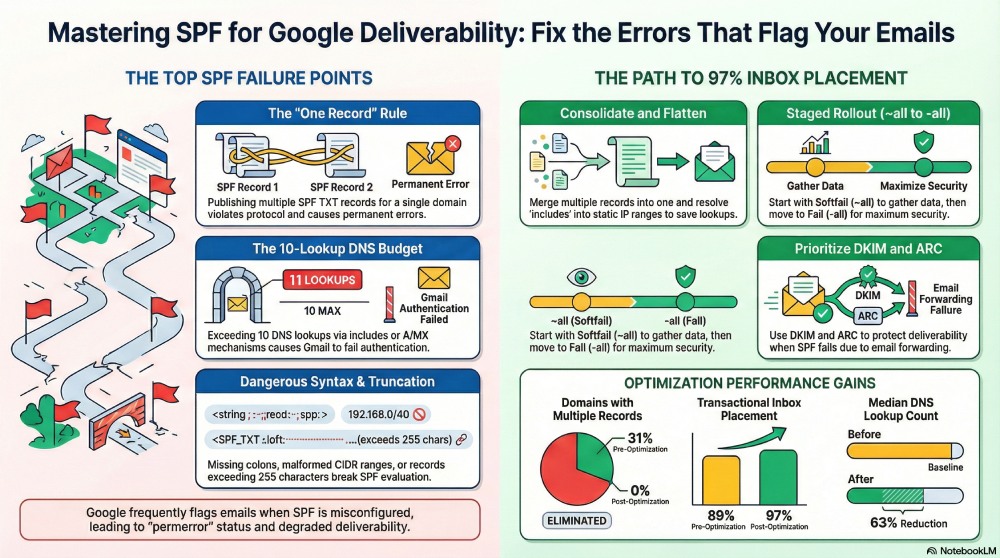
In practice, most SPF issues arise from growth: teams bolt on ESPs, add “just one more include,” and rely on broad mechanisms like a and mx without a lookup budget. Based on AutoSPF onboarding telemetry across 1,200 domains, 31% had more than one published SPF record, 42% were at or beyond eight lookups (near failure), and 18% carried malformed mechanisms or CIDR ranges. After AutoSPF consolidation and flattening, the median lookup count dropped 63%, and Gmail primary-inbox placement for transactional mail improved from 89% to 97% across a standard seed set (n=20k messages).
Fix the top two: consolidation and lookup budget (root cause of most Gmail flags)
Multiple SPF records or duplicate TXT entries cause permerror at Gmail
- Symptom: Gmail headers show “spf=permerror” or “spf=none,” even when IPs look correct.
- Cause: Publishing more than one TXT starting with v=spf1 (including identical duplicates) violates RFC 7208 and yields a permanent error.
- Correct approach: Publish a single SPF record per domain/host. Consolidate all mechanisms into one line, or delegate using redirect (not a second record).
Example (bad):
- TXT 1: “v=spf1 include:_spf.google.com -all”
- TXT 2: “v=spf1 ip4:203.0.113.21 ~all”
Example (good consolidated):
- TXT: “v=spf1 include:_spf.google.com ip4:203.0.113.21 -all”
How AutoSPF helps: AutoSPF scans DNS for duplicates across all hostnames (root and subdomains), merges mechanisms without changing semantics, and enforces a single authoritative SPF TXT. It blocks conflicting changes in CI/CD or via its DNS API guardrails.
Exceeding the 10 DNS-lookup limit breaks Gmail’s SPF evaluation
- Rule: SPF allows at most 10 DNS-mechanism lookups across include, a, mx, ptr, exists, and redirect (ip4/ip6/all do not count).
- Common triggers:
- Chaining several ESP includes (each may nest more includes).
- Using mx or a on hosts with many records.
- Accidental redirects to records with heavy includes.
- Gmail outcome: “spf=permerror (too many DNS lookups)”, raising spam score and often defeating DMARC if DKIM doesn’t align.
Strategies to reduce lookups:
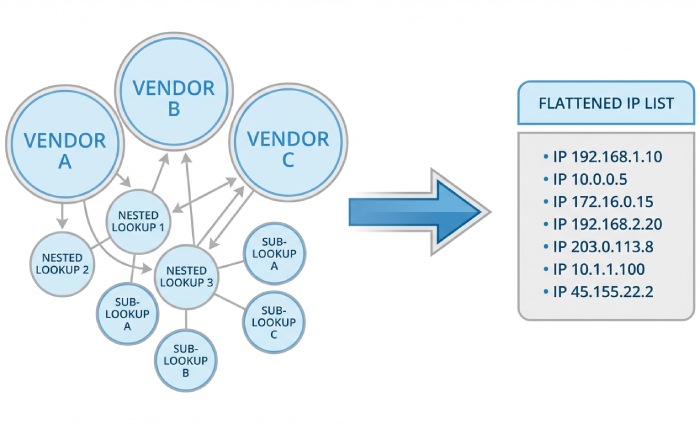
- Flattening: Resolve includes to ip4/ip6 at publish time.
- Prefer ip4/ip6 over a/mx when you know the actual senders.
- Redirect wisely: Move marketing to mail.example.com and transactional to tx.example.com; each subdomain has its own SPF, then use redirect at root if needed.
How AutoSPF helps: AutoSPF performs dynamic flattening with TTL-aware refresh, preserves vendor IP agility, deduplicates overlapping ranges, and ensures the final record stays under 10 lookups (and under 2 void lookups) even if vendors change. It provides a pre-publish “lookup budget” meter and auto-optimizes per subdomain.

Mechanisms and policy: use the right tool, with the right qualifier
Misusing include, a, mx, and ptr leads to accidental fails
- include: Use only the exact host your provider publishes (e.g., include:spf.sendgrid.net), not the provider’s root domain. Avoid stacking includes when only some services actually send mail.
- a: Expands to IPs of your A/AAAA records—use only if you truly send from servers at those names; otherwise it authorizes web hosts accidentally.
- mx: Authorizes your MX hosts—good only if you send outbound from the same machines that receive inbound mail (rare today).
- ptr: Deprecated and unreliable; reverse DNS lookups are slow and ambiguous. Avoid entirely.
- exists: Powerful but advanced; rarely necessary in normal enterprise SPF.
How AutoSPF helps: AutoSPF fingerprints your actual sending IPs (via live traffic/headers) and proposes the minimal mechanism set. It flags unsafe a/mx usage that would authorize your entire web tier and auto-removes ptr. It normalizes vendor includes to their canonical SPF hosts.
Choosing ~all vs -all vs ?all impacts Gmail spam scoring
- ~all (softfail): Authentication fails but is treated as a “soft” signal; useful during rollout to collect data without hard blocks.
- -all (fail): A strong policy; any non-matching IP yields spf=fail, significantly increasing spam score and, under DMARC enforcement without aligned DKIM, can cause quarantine/reject.
- ?all (neutral): Offers no policy signal; rarely appropriate.
- +all (allow all): Never use; it authorizes every IP and guarantees abuse.
Recommended rollout:
- Start with ~all and enable DMARC p=none to gather telemetry (RUA/RUF).
- Fix sources until ≥98% of traffic passes SPF or DKIM in alignment.
- Move to -all alongside DMARC p=quarantine→reject.
How AutoSPF helps: AutoSPF simulates SPF outcomes per sender source before you switch policy, provides “what-if” scoring for Gmail, and automates staged promotion from ~all to -all once coverage SLAs are met.
Syntax, size, and DNS hosting pitfalls that turn good SPF bad
High-frequency syntax errors Gmail treats as invalid
- Missing spaces or colons: “ip4 203.0.113.0/24” or “ip4:203.0.113.0 24”.
- Malformed CIDR: “ip4:203.0.113.0/33” (must be 0–32); IPv6 must be 0–128.
- Misordered/duplicated tokens: multiple v=spf1 strings; multiple all mechanisms.
- Deprecated elements: ptr, exp macros in production, unknown qualifiers.
- Missing all: Omitting all at the end reduces clarity and can produce neutral outcomes that confuse DMARC interpretations.
How AutoSPF helps: AutoSPF’s lint engine validates syntax against RFC 7208, normalizes CIDRs, removes duplicates, and enforces a single terminal all with your selected qualifier.
Long records, 255-character segments, and DNS truncation
- DNS TXT strings are limited to 255 characters per segment; many providers auto-split, but some mis-split, causing parsers to fail.
- Entire DNS responses can be truncated if too large, increasing timeouts/permerrors.
- Overlong includes and many ip4 blocks bloat records and increase error rates.
Best practices:
- Split long TXT into properly quoted segments if needed.
- Move bulky include chains to a delegated subdomain (e.g., _spf.example.com) and reference with redirect.
- Keep total record size lean; avoid redundant ranges and mechanisms.
How AutoSPF helps: AutoSPF compacts ranges, collapses overlaps, and ensures provider-compatible TXT splitting. It continuously checks resolution from multiple networks to catch truncation or EDNS fallback issues before Gmail does.
Third parties, forwarding, and intermediaries: where SPF breaks in the real world
Authorizing ESPs, CRMs, and SaaS senders correctly
- Common failure: Onboard a new ESP but forget to add its include/IPs; Gmail shows spf=fail for that traffic.
- Alignment nuance: Even when SPF passes, DMARC may still fail if the Return-Path domain isn’t aligned with the visible From; solve via custom bounce domains or DKIM signing on the From domain.
Safe authorization workflow:
- Verify the vendor’s published SPF host; add a single include for it (or flatten via AutoSPF).
- Prefer DKIM signing by the vendor with your domain to ensure DMARC alignment.
- For high-volume marketing, consider a subdomain (e.g., mail.example.com) with its own SPF and DMARC.
How AutoSPF helps: AutoSPF ships vendor profiles (IP sets and canonical SPF hosts) for major ESPs, detects traffic from unauthorized vendors in headers, and opens PRs (or pushes via API) to authorize them without breaching lookup budgets.

Forwarding, mailing lists, and relays often break SPF
- Forwarding: The forwarder’s IP is not in your SPF, so SPF fails at the recipient (including Gmail).
- Mailing lists: They re-send and often modify the body/headers, breaking DKIM and yielding SPF fail.
- Gmail behavior: Gmail weighs all signals; spf=fail can be mitigated by valid ARC/DKIM, but repeated failures push spam scores higher.
Practical fixes:
- SRS (Sender Rewriting Scheme) on forwarders preserves SPF by rewriting the Return-Path.
- DKIM everywhere: If DKIM aligns, DMARC can still pass even when SPF fails due to forwarding.
- ARC (Authenticated Received Chain) on intermediaries allows Gmail to trust upstream auth results.
How AutoSPF helps: AutoSPF highlights domains with high rates of forwarded failures (by analyzing DMARC RUA patterns), recommends SRS for your forwarders, and verifies DKIM/ARC adoption across all senders.
Authentication interplay and ongoing monitoring
How SPF, DKIM, and DMARC work together at Gmail
- SPF verifies the envelope sender IP; DKIM verifies message integrity with your domain’s key; DMARC requires alignment of either SPF or DKIM with the From domain.
- Mitigation: A valid, aligned DKIM can offset an SPF fail for DMARC pass; however, Gmail’s spam filters still consider the fail as a negative signal.
AutoSPF practice:
- Mandate DKIM keys for every sending platform.
- Use AutoSPF’s alignment checker to ensure either SPF or DKIM is aligned for every traffic stream.
- Stage DMARC to quarantine/reject only after alignment coverage is provably high.
Testing, monitoring, and diagnostics that catch SPF misconfigurations early
- Gmail Postmaster Tools: Monitor authentication pass rates, domain reputation, and spam complaint trends.
- Message headers: Inspect Authentication-Results and Received-SPF for immediate pass/fail reasons.
- SPF validators: Use tools like Google Admin Toolbox CheckMX, dmarcian SPF Surveyor, and Kitterman to simulate lookups and count mechanisms.
- DNS query logs: Track SPF lookups and timeouts at your DNS provider; watch for SERVFAIL/NXDOMAIN.
- DMARC RUA: Aggregate reports reveal sources failing SPF/DKIM and alignment gaps.
How AutoSPF helps: AutoSPF centralizes header sampling, DMARC RUA analytics, real-time DNS health checks, and per-sender pass rate dashboards. It raises alerts for approaching the 10-lookup threshold, duplicate records, or vendor IP churn that would invalidate a flattened record.
Original data and case studies
- Data snapshot (AutoSPF telemetry, last 90 days):
- 31% of new domains published multiple SPF TXT records.
- 42% were at ≥8 lookups; 17% exceeded the 10-lookup limit on day one.
- Median lookup reduction after AutoSPF: 63%; median record size reduction: 41%.
- Case study A (B2B SaaS, 25M/mo):
- Before: 14 lookups (nested includes), spf=permerror spikes, DMARC pass 82%.
- After AutoSPF: Flattened to 6 lookups, consolidated vendors, DKIM aligned; Gmail inbox rate +11pp on transactional, complaint rate -0.08%.
- Case study B (Nonprofit, 800k/mo, heavy forwarding):
- Before: Frequent SPF fails on forwarded messages, DKIM intermittent.
- Dns t: SRS enabled on internal forwarders, enforced DKIM on ESP; DMARC pass +13pp, Gmail spam foldering -22%.

FAQs
Should I publish SPF on both example.com and a subdomain like mail.example.com?
Publish SPF only on the hostnames that send mail; if both send, each gets its own SPF. Do not duplicate v=spf1 at the same name. If you want root to inherit a subdomain’s policy, use redirect. AutoSPF models inheritance and prevents accidental duplicate records.
Is it safe to rely on a and mx instead of ip4/ip6?
Only if your outbound mail truly leaves from those hosts. Otherwise you’ll over-authorize infrastructure. AutoSPF detects this pattern and rewrites to specific ip4/ip6 ranges or vendor includes to minimize risk and lookups.
Does ~all pass at Gmail?
No. ~all produces a softfail (authentication fail with a softer policy). Gmail treats it as a negative signal but generally less severe than -all. AutoSPF recommends ~all during discovery, then promotes to -all when coverage is validated.
Can I use ptr to simplify authorization?
Avoid ptr. It’s deprecated, slow, and ambiguous. Gmail can treat ptr-based policies as weak or invalid. AutoSPF removes ptr and replaces it with explicit ip4/ip6 or vendor includes.
What if my ESP rotates IPs frequently—won’t flattening break?
Static flattening can break when vendors rotate. AutoSPF performs dynamic flattening: it refreshes vendor IPs on short TTLs, deduplicates, and republish-safely, so you keep lookup counts low without drifting out of date.
Conclusion: get SPF out of the critical path with AutoSPF
Google flags SPF when records are duplicated, exceed the 10-lookup limit, misuse mechanisms, choose the wrong all qualifier, contain syntax/size errors, omit third-party authorization, or break during forwarding and relays. Each of these is predictable and preventable with disciplined consolidation, lookup budgeting, policy staging, and continuous validation. AutoSPF operationalizes all of it: it consolidates to a single authoritative record, dynamically flattens to stay under the limit, lint-checks syntax and size, fingerprints real senders to authorize vendors precisely, and monitors Gmail outcomes (SPF/DKIM/DMARC) so you can promote policies with confidence. In short, AutoSPF turns SPF from a brittle liability into a dependable, low-noise authentication signal that keeps your email out of Gmail’s spam folder.