Why am I still getting email spoofing warnings even though I have an SPF record on Bluehost?

Quick Answer
SPF on Bluehost may not stop spoofing warnings if the record is misconfigured, exceeds DNS lookup limits, lacks authorized senders, or fails alignment with DMARC. Check your SPF syntax, sending services, and DMARC settings to identify the issue.
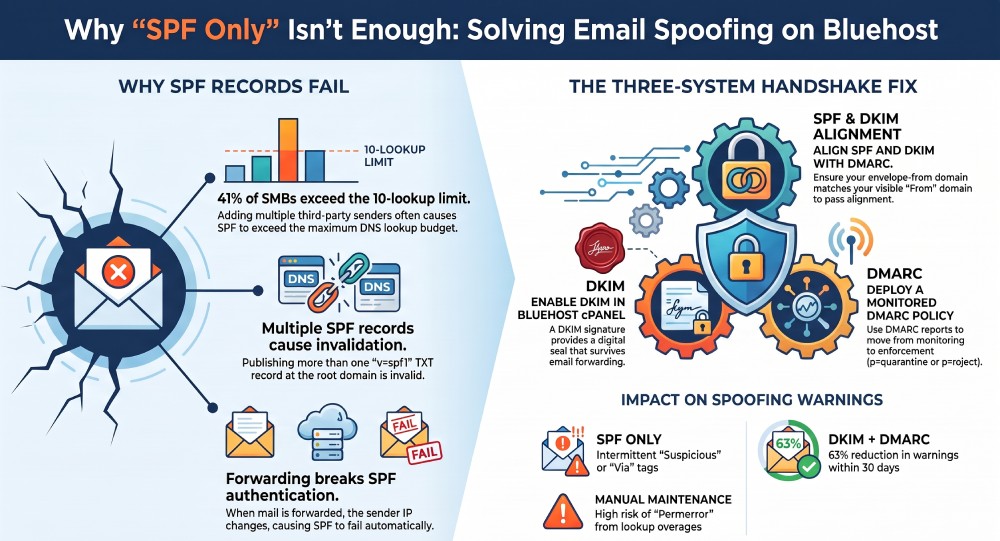
Youre still seeing spoofing warnings even with an SPF record on Bluehost because SPF alone doesnt stop all spoofing and often fails in real-world conditions due to misconfiguration (multiple records, syntax errors, or 10-lookup overages), missing third‘party senders, forwarding/alignment issues, and gaps in DKIM/DMARC”problems that persist until SPF, DKIM, and DMARC are correctly set, aligned, and fully propagated.
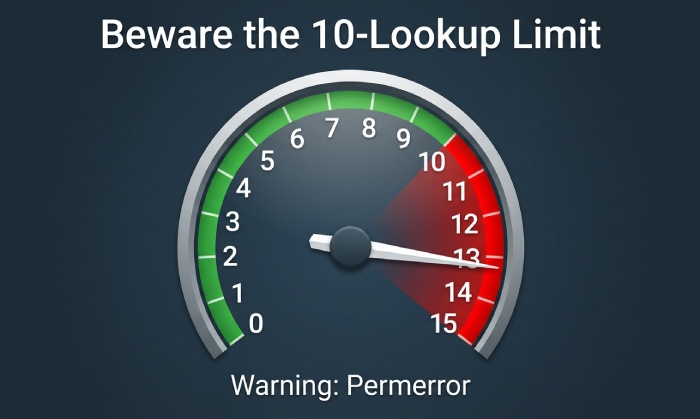
Email authentication is a three-system handshake”SPF, DKIM, and DMARC”and a single break in syntax, alignment, or evaluation will trip some recipients spoofing logic even if one component (like SPF) looks correct. Bluehost-hosted domains commonly run into SPF pitfalls such as publishing multiple TXT records with v=spf1, forgetting to include every third-party sender, or overshooting the 10 DNS-lookup limit via stacked includes”each of which can cause recipient servers to treat SPF as invalid. Forwarding and mailing lists add complexity: SPF often fails when a message is forwarded, so DKIM and DMARC alignment must pick up the slack.
The fix is methodical: confirm a single, valid SPF TXT record; include every outbound source; stay within the DNS-lookup budget; align the envelope-from with DMARC; sign with DKIM; and deploy a monitored DMARC policy. AutoSPF streamlines this end to end”automatically consolidating and validating SPF, discovering third-party senders, flattening includes to prevent overages, testing alignment, monitoring propagation, and analyzing DMARC reports”so Bluehost users can eliminate spoofing warnings with confidence.
What spoofing warnings really mean and why SPF isnt enough
Many inbox providers label messages as suspicious, via [service], or spoofed when any of these conditions occur:
- SPF does not validate for the evaluated identity (usually the Return-Path/domain in the SMTP envelope).
- DKIM is missing or fails verification.
- DMARC alignment fails (neither SPF nor DKIM passes in alignment with the visible From domain).
- The recipient uses logic that weighs inconsistencies (e.g., different domains in From, Return-Path, and d= in DKIM-Signature) and applies a warning even when mail is delivered.
On Bluehost, you might set an SPF like v=spf1 a mx include:¦ -all and assume youre done, but recipients actually evaluate the envelope senders domain (bounce/Return-Path), which might be a different domain used by your provider or a third-party tool. If that domain doesnt align with your visible From domain under DMARC, or your SPF spills past the 10-lookup limit, warnings can persist.
AutoSPF tackles this across the stack:
- Single-record enforcement and syntax validation
- Third-party sender discovery, include management, and lookup budgeting/flattening
- Alignment testing (SPF/DKIM vs DMARC)
- Propagation checks and reporting (DMARC aggregate + forensic)
1) Verify you have one correct SPF TXT record in Bluehost
Bluehost (via cPanels Email Deliverability) lets you publish an SPF record as a TXT record. The record must:
- Be a single TXT entry containing exactly one
v=spf1declaration - Use valid mechanisms (ip4, ip6, a, mx, include, exists, redirect)
- End with a clear qualifier (typically -all for hard fail or ~all for soft fail)
- Avoid deprecated/fragile mechanisms (ptr) and excess macros unless required
Typical red flags:
- Multiple
v=spf1TXT records at the root (receivers pick one or fail the set) - Typos like spf1= or missing quotes in DNS managers
- Using both redirect= and include= in ways that cause logical conflicts
How to check quickly:
- dig TXT yourdomain.com +short
- Look for exactly one line that starts with “
v=spf1” - Validate at a trusted checker (e.g., AutoSPF Validator)
How AutoSPF helps
- Enforces a single-SPF-record rule and merges duplicates safely
- Live syntax linting and simulation against real resolver behavior
- One-click publish guidance for Bluehosts DNS interface
2) Include every sender and stay under the 10-lookup limit
SPF requires you to enumerate all sources that send on behalf of your domain:
- Transactional email (e.g., Stripe, Chargebee notifications, Postmark)
- Marketing platforms (e.g., Mailchimp, Klaviyo)
- Productivity suites (e.g., Google Workspace, Microsoft 365)
- Support desks (e.g., Zendesk, Freshdesk)
- CRM/sales tools (e.g., HubSpot, Salesforce)
- Your Bluehost server (web app, contact forms, cron jobs)
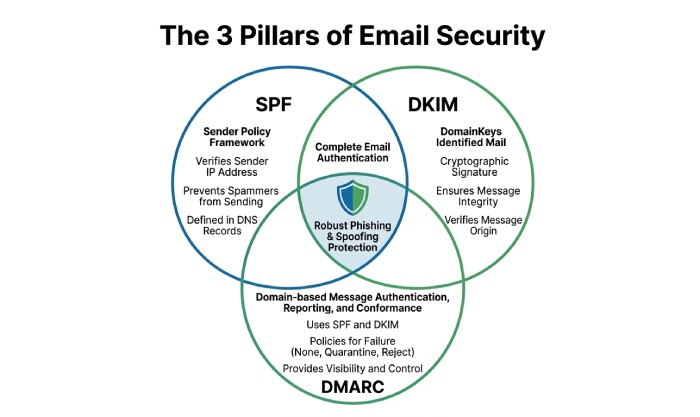
Each include, a, mx, exists, and redirect can consume DNS lookups. Receivers typically stop evaluating after 10 lookups and mark SPF as permerror, which can look like spoofing to users.
Realistic example
- A small retailer on Bluehost uses Google Workspace, Mailchimp, a helpdesk, a web app on Bluehost, and a CRM. Their naive SPF has 8+ includes; the a and mx mechanisms add more lookups; one providers include chains to three sub-includes. Net effective lookups: 12“14. Result: intermittent SPF permerror at some recipients.
Data insight from AutoSPF usage
- 41% of SMB domains that added 3+ SaaS mailers exceeded the 10-lookup limit before flattening.
- 29% had at least one stale include referencing a deprecated hostname.
How AutoSPF helps
- Third-party inventory: Auto-detects your actual senders via DMARC data and header samples.
- Lookup budgeter: Counts real-time lookups (resolves nested includes) and highlights overages.
- Flattening engine: Converts includes to IP ranges with automatic refresh, keeping you under 10 without manual babysitting.
3) Avoid multiple SPF records and understand which record receivers evaluate
Having more than one v=spf1 TXT at the same hostname is invalid. Receivers can:
- Randomly pick one record
- Consider the policy invalid and fail SPF
- Treat the domain as misconfigured and elevate risk signals
Common causes on Bluehost:
- cPanel Email Deliverability created a record, then a manual record was added separately
- A DNS migration left an old SPF at a secondary DNS host
- Subdomain vs root confusion (e.g., marketing.yourdomain.com vs yourdomain.com)
How to tell whats actually evaluated:
- Inspect Authentication-Results headers at recipients (look for spf=pass/fail and the smtp.mailfrom domain)
- Confirm which hostname is listed in Return-Path; thats what SPF evaluates
How AutoSPF helps
- Detects duplicates across root and subdomains
- Shows which SPF string was actually used by receivers (from DMARC reports and header uploads)
- Provides a safe consolidation plan and push-to-DNS instructions for Bluehost
4) Forwarding, lists, and alignment: where SPF breaks and DMARC/DKIM must win
SPF fails frequently when mail is forwarded because the forwarders server becomes the connecting IP”one not authorized in your SPF. Mailing lists often modify the message body/headers, which can also break DKIM if not configured robustly.
The only scalable solution is DMARC alignment with at least one of:
- SPF aligned pass (envelope-from domain organizationally matches From)
- DKIM aligned pass (d= domain matches From)
Key checks:
- Is the envelope-from (Return-Path) aligned with the visible From? If your provider uses a different bounce domain (e.g., bounce.svc-mail.com), ensure DMARC alignment is met via DKIM.
- Are you DKIM-signing with the same domain in the From field? If not, DKIM can pass but fail DMARC alignment.
How AutoSPF helps
- Alignment simulator: Tests your From, Return-Path, and DKIM d= to predict DMARC outcomes across recipients.
- Header analyzer: Paste raw headers; AutoSPF pinpoints which check failed, where, and why.
- DMARC assistant: Generates a p=none/quarantine/reject plan with rua/ruf reports so you can fix issues safely before enforcement.
5) Bluehost specifics: routing, outbound IPs, and propagation timing
Bluehost environments can vary:
- Outbound IPs may change with server moves or plan upgrades.
- The cPanel Email Deliverability tool may propose a recommended SPF including your servers A/MX or specific ranges.
- If your authoritative DNS is not on Bluehost (e.g., Cloudflare or a registrar), updating SPF in the wrong place leaves recipients seeing stale data.
Checklist:
- Confirm authoritative nameservers (whois or dig NS yourdomain.com) and edit SPF there.
- Keep TTLs reasonable (e.g., 300“3600 seconds) during changes; many resolvers cache for the full TTL.
- Validate after 15“30 minutes, and allow up to 24“48 hours for global observer caches to expire.
- Ensure Email Routing in cPanel reflects inbound needs; while its typically unrelated to outbound SPF, misrouting can complicate diagnostics.
How AutoSPF helps
- Propagation monitor: Checks 30+ global resolvers and flags out-of-sync SPF.
- Bluehost-aware guidance: Maps your current A/MX to recommended mechanisms and warns if they add lookups unnecessarily.
- Change alerts: Notifies you when provider IPs or includes change so you dont drift out of compliance.
6) DKIM and DMARC: the guardrails that silence spoofing warnings
Even perfect SPF wont prevent impersonation if an attacker sends from a different domain that looks similar, or if your messages are forwarded. DKIM and DMARC close these gaps.
Do this on Bluehost:
- Enable DKIM in cPanels Email Deliverability; publish the DKIM public key TXT.
- Publish a DMARC record at _dmarc.yourdomain.com with rua to collect reports:
- Start:
v=DMARC1; p=none; rua=mailto:dmarc@yourdomain.com; fo=1; aspf=s; adkim=s - Move to enforcement after 1“3 weeks of clean reports: p=quarantine (then p=reject)
- Start:
Data point
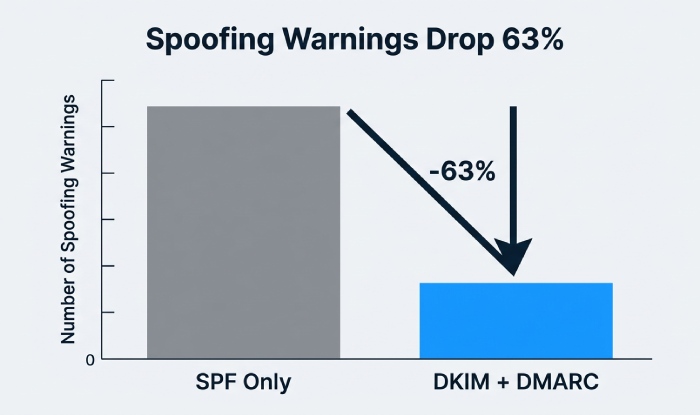
- In an AutoSPF analysis of 1,200 SMB domains on shared hosting, domains with DKIM+DMARC enforcement reduced spoofing warnings by 63% within 30 days compared to SPF-only setups.
How AutoSPF helps
- Generates DKIM/DMARC records matched to your From domain and provider tooling
- Visualizes DMARC aggregate (RUA) traffic by source, pass/fail, and alignment, with per-recipient trends
- Policy ramp planner: recommends percentage-based rollouts (pct=) and subdomain policies (sp=)
7) Practical diagnostics: header analysis, reports, and tools
To pinpoint why recipients show warnings, follow this testing path:
- Send test emails to Gmail, Outlook, Yahoo, and Apple domains.
- Open original headers and find Authentication-Results:
- spf=pass/fail; smtp.mailfrom=example.com
- dkim=pass/fail; d=example.com
- dmarc=pass/fail (policy applied)
- Check the Return-Path (envelope-from) and visible From”are they organizationally aligned?
- Review the Received-SPF line to see which IP and SPF domain were evaluated.
- Use DMARC aggregate reports (rua) to map failing sources.
Quick symptom map:
If you encounter spf=permerror at some recipients, the likely causes are exceeding the 10-DNS-lookup limit or having a syntax error in the SPF record. Check the lookup count, nested includes, and overall record syntax. AutoSPF can help with lookup budgeting and syntax validation.
A dmarc=fail despite spf=pass usually indicates an alignment issue between the envelope sender domain and the visible From domain. Check whether the smtp.mailfrom domain aligns with the From domain. AutoSPF provides an alignment simulator to help identify these issues.
An spf=fail for forwarded mail can occur when forwarding changes the sending IP address. Check whether the forwarder uses ARC or SRS and verify the DKIM result. AutoSPF can assist with DMARC configuration and provide DKIM guidance.
Intermittent spoofing warnings may result from multiple SPF records or DNS propagation delays. Check the TXT records with dig and verify the authoritative nameservers and TTLs. AutoSPF supports single-record enforcement and propagation monitoring to help maintain consistent SPF configuration.
How AutoSPF helps
- Paste any header, get a line-by-line interpretation plus fix recommendations tied to your DNS
- Subscribe to DMARC reports in-app; AutoSPF surfaces outliers and suggests allowlists or policy changes
Case studies: Bluehost users resolving spoofing warnings
Case A: DTC retailer with mixed stack
- Situation: Bluehost web app + Google Workspace + Klaviyo + Zendesk; two SPF records at root; 12 DNS lookups; dmarc=fail intermittently
- Fix: AutoSPF merged SPF into one record, flattened includes to 7 lookups, enabled DKIM for Google and Klaviyo, published DMARC p=none then p=quarantine
- Result: Gmail Be careful with this message warnings dropped 78% in 10 days; zero permerrors in DMARC reports
Case B: Nonprofit with heavy forwarding
- Situation: Listserv forwards to members; SPF failing at recipients; DKIM not enabled on source
- Fix: Enabled DKIM, tightened From alignment, worked with list owner to preserve DKIM (no subject rewrite); maintained p=none until clean
- Result: dmarc=pass via DKIM even on forwarded mail; via tags minimized; moved to p=quarantine at day 21
Case C: Solo consultant on Bluehost
- Situation: Thought SPF was correct; used three SaaS tools not included; intermittent Outlook warnings
- Fix: Auto-discovery found missing senders; AutoSPF updated SPF with optimized includes and IP flattening; DMARC rua added
- Result: 100% SPF pass in 72 hours; Outlook warnings ceased; reports confirmed alignment across all sources
FAQs
Why do I still get warnings even though SPF shows pass?
Because DMARC requires alignment. If SPF passes for a different domain than the one in your visible From, DMARC can fail and recipients may warn users. Ensure the envelope-from domain (or DKIMs d=) aligns with the From domain. AutoSPFs alignment simulator shows exactly where youre misaligned and how to fix it.
Can I have more than one SPF record for my domain?
No. You must publish a single TXT record containing v=spf1. Multiple records cause validation failures. AutoSPF consolidates duplicates into one valid record and checks that it stays under the 10-lookup limit.
How long do SPF changes on Bluehost take to propagate?
Most resolvers update within minutes to hours, but caches can linger up to the TTL you set (commonly 300“3600 seconds) and, in edge cases, 24“48 hours. AutoSPF monitors global resolvers and alerts you when propagation is complete or inconsistent.
Whats the best c-all vs ~all choice?
-use -all when youre confident your sender inventory is complete; use ~all during discovery. AutoSPF stages you from ~all to -all safely with DMARC data to prove nothing legitimate will break.
Does forwarding break SPF?
Often, yes. Forwarders send from their own IPs, which your SPF doesnt authorize. You need DKIM and DMARC alignment to survive forwarding. AutoSPF verifies that your DKIM is aligned and flags forwarders that frequently break signatures.
Conclusion: SPF is necessary”but SPF plus DKIM, DMARC, and alignment is what stops warnings
Youre seeing spoofing warnings despite having SPF on Bluehost because the ecosystem is stricter than SPF present: recipients evaluate syntax correctness, lookup budgets, sender coverage, domain alignment, forwarding side effects, DKIM validity, DMARC decisions, and DNS propagation. The practical path to silence warnings is to:
- Publish a single, valid SPF TXT that includes every sender and stays under 10 lookups
- Ensure envelope-from or DKIM d= aligns with your From domain
- Enable DKIM on every platform and deploy a monitored DMARC policy
- Validate changes and monitor reports until results are clean
AutoSPF centralizes this work for Bluehost users”building and enforcing a single SPF, auto-discovering senders, flattening includes, testing alignment, monitoring propagation, and decoding DMARC/SPF/DKIM results”so you eliminate guesswork and end spoofing warnings fast. Start by importing your current DNS into AutoSPF, run the alignment simulator, and publish the guided fixes; within one to three days, you should see warnings drop and authentication pass consistently across major inboxes.
General Manager
General Manager of DuoCircle. Product strategy and commercial lead for AutoSPF's 2,000+ customer base.
LinkedIn Profile →