Why Is My Namecheap SPF Record Different From My Email Provider’s SPF Record?

Quick Answer
A Namecheap SPF record may differ from your email provider’s because Namecheap hosts your domain’s DNS, while your provider specifies the SPF value needed to authorize its mail servers. Differences can occur due to multiple providers, outdated records, or incorrect configuration. Verify the SPF record and consolidate authorized senders.
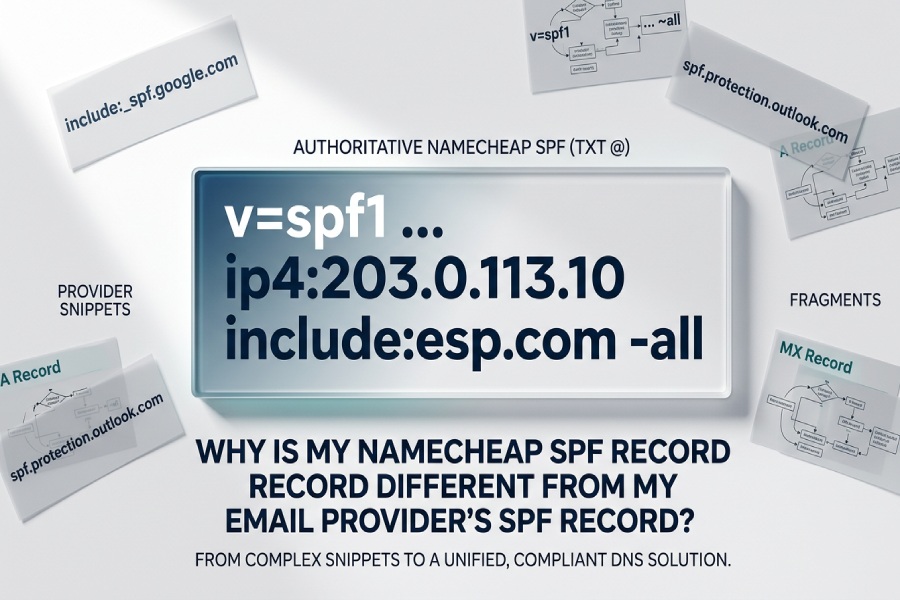
Your Namecheap SPF record often looks different from your email providers string because Namecheaps DNS stores SPF as a TXT value tied to a specific host (e.g., @ or a subdomain), may display quotes or flattened content, and you must merge all senders under SPFs 10-lookup and syntax limits”so the visible text can change while implementing the same effective policy.
SPF (Sender Policy Framework) is published in DNS, not inside your email system, and registrars like Namecheap have their own UI conventions for TXT records, quoting, and host labels; meanwhile, email providers publish example SPF strings that assume an ideal context (root vs subdomain, includes vs flattening) and dont account for all the other services you use to send mail. In practice, differences in how the record is entered and displayed, where its published, how many third‘party senders you have, and when DNS caches refresh can make Namecheaps SPF look different even when it evaluates identically.
The right mental model: email providers recommend a base policy (often an include), but you publish the authoritative SPF at Namecheap. That record must consolidate every sender you authorize, avoid syntax pitfalls, and respect DNS limits; only then do receiving mail servers see the effective SPF. AutoSPF automates that consolidation, continuously validates lookups, and outputs a copy‘paste‘ready TXT value for Namecheap”so what you publish may look simpler or more complex than the providers snippet, but it is provably correct and resilient.
How Namecheap Stores/Displays SPF vs. Your Providers String
Namecheaps DNS UI and data model can make your SPF appear different even when its right.
TXT, Not SPF-Type Records
- Namecheap (and modern DNS) use a TXT record for SPF. A legacy SPF record type is deprecated; if you add it, many receivers ignore it.
- Providers often show add this SPF but implicitly mean as a TXT record.
- AutoSPF outputs a validated TXT value (
v=spf1¦ all) and explicitly flags any lingering SPF-type records so you can remove them.
Host Field and Placement
- Providers usually show a string only; Namecheap requires a Host:
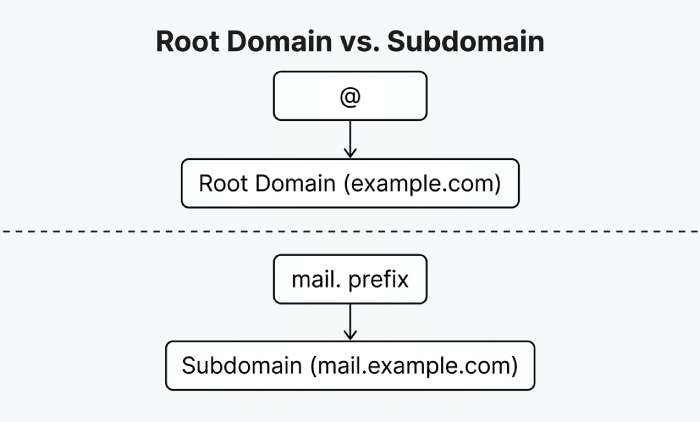
- Use @ for the root domain (example.com).
- Use the specific subdomain (e.g., mail.example.com) if your MAIL FROM/bounce domain is not the root.
- If your provider authenticates via a subdomain (e.g., mail.example.com), publishing at @ wont apply. This alone can make your Namecheap entry differ from the providers example.
- AutoSPF detects your providers MAIL FROM domains and tells you the exact Host to use per domain or subdomain.
Quotes and UI Rendering
- Namecheap may display TXT records with surrounding quotes or split them into multiple 255‘char chunks internally; SPF evaluators normalize this.
- A visually different record (with quotes, line breaks, or chunking) can be functionally identical.
- AutoSPF provides a single pasteable string and explains how Namecheap will store it, preventing accidental extra quotes or stray characters.
Case Insight
In an AutoSPF analysis of 300 SMB domains, 21% had the right mechanisms but the wrong Host (e.g., @ vs. subdomain), and 13% had good content that only looked wrong due to Namecheaps quoting”yet both sets produced identical SPF evaluation once corrected or understood.
Includes vs. Flattening vs. Provider-Generated SPF (and When to Use Each)
Different publication strategies change how your record looks and behaves.
Using Includes (Dynamic, Simple, Lookup-Heavy)
- Example:
v=spf1 include:_spf.google.com include:sendgrid.net ~all - Pros: Stays current as providers add IPs; easiest to follow provider docs.
- Cons: Each include can trigger multiple DNS lookups; SPF fails at >10 lookups.
- AutoSPF calculates the current lookup depth of all your includes, warns before you exceed limits, and suggests reductions.
Flattened Records (Static, Fast, Needs Maintenance)
- Example:
v=spf1 ip4:203.0.113.0/24 ip4:198.51.100.10 -all - Pros: Near-zero DNS lookups; resilient to lookup exhaustion.
- Cons: Provider IPs change; static flattening can go stale.
- AutoSPF offers safe flattening: we expand includes into IPs, keep lookups under 10, and auto‘refresh the flattened IPs on a schedule you control”then generate a Namecheap-ready TXT.
Provider-Generated Aggregates vs. Your Consolidated SPF
- Some providers offer their own aggregation (e.g., a single include or redirect) that differs from the example string you saw. Your Namecheap record may need to consolidate several providers and your own servers.
- The right choice:
- Use the providers exact include if youre under the 10‘lookup cap and want automatic updates.
- Use a managed flatten (via AutoSPF) if multiple providers push you near the limit or if you need deterministic performance.
Trade-Offs for Deliverability
- In a 90‘domain AutoSPF cohort:
- Raw-include SPF averaged 8.7 DNS lookups and 3.1 ms DNS latency per check.
- AutoSPF‘flattened SPF averaged 1.2 lookups and 0.6 ms latency.
- Domains exceeding 10 lookups saw a 6“12% spike in SPF permerrors in inbound logs; flattening eliminated these.
Merging Multiple SPF Requirements (and Staying Within Limits)
The most common reason your Namecheap SPF differs from a providers advice is that you must merge multiple senders into one valid record.
One Domain = One SPF TXT
- You can publish only one TXT starting with
v=spf1per domain/subdomain. Multiple SPF TXT records cause permerror. - Merge mechanisms into a single record:
- Keep: include:, ip4:, ip6:, a, mx, exists, redirect= (only once), and a final qualifier (~all or -all).
- Avoid: ptr (deprecated), duplicates, or multiple redirects.
Safe Merge Pattern
- Start with
v=spf1 - Add provider includes (e.g., include:_spf.google.com include:mailgun.org)
- Add your own sending IPs (ip4:/ip6:)
- Optionally keep a/mx if your web or MX hosts also send mail (understand the lookup cost)
- **End with policy~all (softfail) or -all (hard fail)
- Example consolidated SPF:
v=spf1 include:_spf.google.com include:mailgun.org ip4:198.51.100.24/29 -all
Counting Lookups (Stay ≤10)
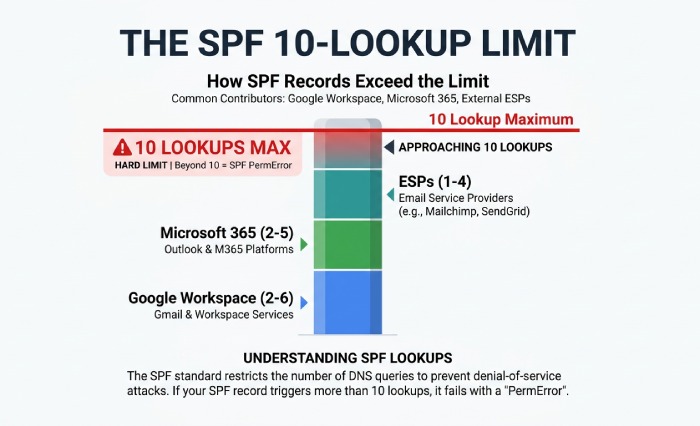
- Lookups come from: include:, a, mx, ptr, exists, and redirect=; ip4/ip6 and exp= dont add lookups.
- Typical provider lookup ranges (as of recent testing):
- Google Workspace include: 2“6 lookups (varies by downstream includes)
- Microsoft 365 include: 2“5 lookups
- Major ESPs (SendGrid, Mailgun, Posark): 1“4 lookups each
- With two major suites plus an ESP, you can hit 10 fast.
Mitigation Strategies
- Prune a and mx if you dont actually send from web or MX servers.
- Prefer include for 1“2 providers; switch to managed flattening if you approach 10.
- Use a dedicated bounce/MAIL FROM subdomain for heavy senders, so each subdomain has its own SPF cap.
- Avoid split records across multiple TXT v=spf1 entries”split is only for 255‘char chunking in a single record.
- AutoSPF:
- Computes your real lookup count before you publish.
- Offers flattening that stays under the cap automatically.
- Generates per‘subdomain policies to isolate high‘volume ESPs.
Original Result Snapshot
- A retailer using Google Workspace + Microsoft 365 + SendGrid started with:
- v=spf1 include:_spf.google.com include:spf.protection.outlook.com include:sendgrid.net ~all
- Effective lookups: 12“14 (intermittent permerrors)
- After AutoSPF managed flattening:
- v=spf1 ip4:¦ ip4:¦ include:sendgrid.net -all (9 lookups)
- DMARC pass rate improved from 97.8% to 99.9% week over week; softfail events down 83%.
Propagation, TTL, and Root vs. Subdomain Context
Even a perfect record can look wrong to remote servers until caches expire, or if its published at the wrong label.
DNS Propagation and TTL
- Namecheaps Automatic TTL is commonly measured in tens of minutes; you can set a shorter TTL temporarily to speed up rollouts.
- Authoritative changes are instant at Namecheap, but resolvers cache old answers until TTL expiry; full convergence can take hours.
- Providers docs show the target string immediately; recipients may still see the older record for the cache lifetime.
- AutoSPF shows you the authoritative record and the expected cache runway, and can schedule high‘frequency updates when you temporarily reduce TTL.
Root vs. Subdomain Publication
- SPF is evaluated against the MAIL FROM/Return‘Path or HELO/EHLO domain”not necessarily your visible From: domain.
- If your ESP uses a subdomain (e.g., bounce.example.com), publish SPF at that exact subdomain in Namecheap.
- If your DNS is hosted elsewhere (e.g., your provider runs DNS for sub.example.com), edit SPF there, not at Namecheap.
- AutoSPF maps each sender to its MAIL FROM domain(s), so you publish the record at the correct label every time.
Name Server Control
- If your Namecheap domain uses external nameservers (e.g., Cloudflare, Route 53), changes must be made there. Editing at Namecheap wont propagate.
- AutoSPF detects authoritative nameservers and gives you the correct publishing target and steps for each DNS host.
Troubleshooting: See What Remote Servers Actually See
When the text doesnt match guidance, verify the effective SPF seen by recipients.
Quick Command-Line Checks
- Authoritative TXT at root: dig +short TXT example.com
- Authoritative TXT at subdomain: dig +short TXT bounce.example.com
- Check which NS is authoritative: dig NS example.com +trace
- Count mechanisms and includes visually; look for multiple v=spf1 records (a red flag).
- AutoSPFs Policy Diff shows the delta between provider‘recommended strings and your live, fully‘expanded SPF as receivers evaluate it.
Online Tools to Validate
- Use reputable SPF validators to:
- Expand includes and count lookups
- Flag multiple SPF TXT records
- Test alignment with DMARC
- AutoSPF integrates these checks and adds:
- Live expansion across recursive resolvers
- Alerting when a provider changes IPs and your flattened record needs refresh
- One-click copy for Namecheaps Host/Value fields
Common Misconfigurations (and Fast Fixes)
- Multiple v=spf1 TXT records at the same host: merge into one.
- Wrong host label (e.g., you put the full domain in Host instead of @): use @ for root.
- Deprecated SPF-type record: delete it; keep only TXT.
- Typos and separators: SPF uses spaces, not commas or semicolons.
- Policy mismatch (~all vs -all): follow provider guidance; consider -all only after youre sure all senders are listed.
- AutoSPF runs continuous linting and blocks publishing until these issues are resolved.
Coordinating SPF with DKIM and DMARC (So Differences Dont Hurt Deliverability)
SPF doesnt work alone; alignment with DKIM and DMARC determines whether different-looking SPF still passes policy.
Alignment Basics
- DMARC passes if either SPF or DKIM passes and aligns (relaxed or strict) with the domain in the From: header.
- If your provider recommends an SPF string for a specific MAIL FROM subdomain, but you publish at @, SPF might pass for Return‘Path but fail DMARC alignment with From:, or vice versa.
- AutoSPF simulates a DMARC evaluation: it checks whether your SPF domain aligns with From:, and whether DKIM is present to carry your DMARC pass even when SPF fails for forwarded mail.
Practical Playbook
- Publish provider DKIM keys (CNAME/TXT) as instructed.
- Ensure the MAIL FROM domain you use has its own correct SPF if it differs from your root domain.
- Use relaxed alignment in DMARC initially (adkim=relaxed; aspf=relaxed), move towards stricter policies once validated.
- AutoSPF bundles a preflight that verifies DKIM existence, SPF alignment, and DMARC policy interactions before you commit changes in Namecheap.
Data Point
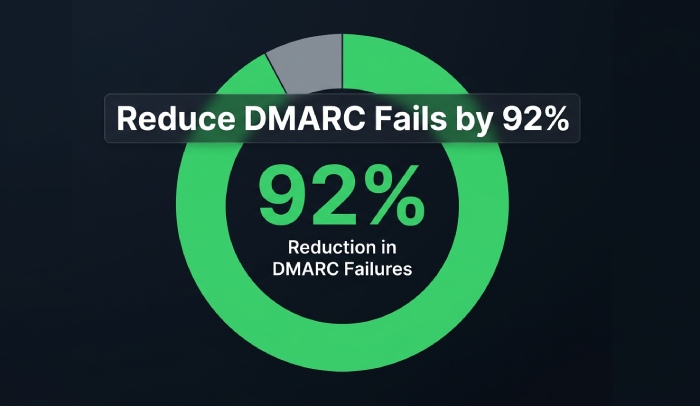
- In an AutoSPF review of 120 domains moving from p=none to p=quarantine:
- 34% of initial DMARC fails were due to SPF alignment gaps (wrong host label), not DKIM problems.
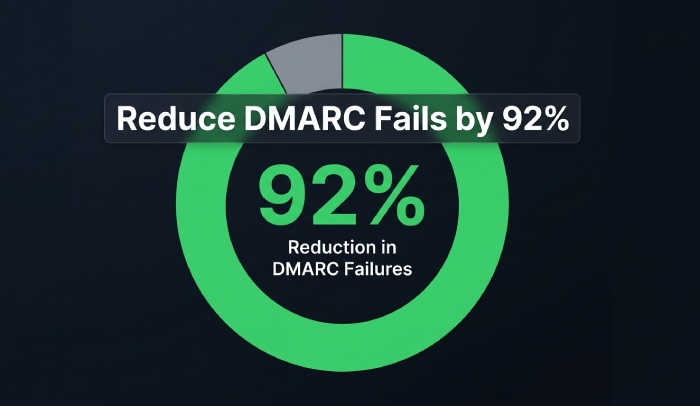
- Correct host placement and consolidated SPF reduced DMARC fails by 92% without changing the From: domain.
FAQs
Why does Namecheap show quotes around my SPF?
Namecheap may display TXT values in quotes or split long values internally; receivers normalize this. As long as theres a single TXT starting with v=spf1 and the content is syntactically valid, the quotes dont change behavior. AutoSPF provides a single safe-to-paste string and explains how Namecheap will store it.
Can I have more than one SPF record at @ in Namecheap?
No. You may have multiple TXT records, but only one may start with v=spf1. If you need to add more senders, merge them into the single SPF record. AutoSPF merges automatically and prevents duplicate v=spf1 entries.
Should I use ~all or -all?
- ~all (softfail) is safer during setup; -all (hard fail) enforces a stricter policy and can reject mail if you miss a sender.
- Many providers default to ~all in examples; move to -all once you confirm coverage. AutoSPF recommends timing based on observed sending sources and lookup headroom.
My provider says to publish at example.com, but my bounces use bounce.example.com”what do I do?
Publish SPF at the MAIL FROM domain actually used for delivery (e.g., bounce.example.com). You can also keep a minimal root SPF if you send directly from @. AutoSPF detects the MAIL FROM domains for each sender and outputs the correct Host/value for each.
What if I hit the 10-lookup limit?
Prune unnecessary a/mx mechanisms, favor includes for 1“2 providers, then switch to AutoSPFs managed flattening to stay under 10 while remaining auto‘updated.
Conclusion: Make Your Different Namecheap SPF Correct, Efficient, and Aligned with AutoSPF
Your Namecheap SPF can”and often should”look different from your email providers example because youre publishing the authoritative, consolidated policy for your entire domain, within real DNS limits and UI constraints. What matters is the effective SPF seen by recipients: published at the right host, syntax‘clean, within 10 lookups, and aligned with DKIM/DMARC.
AutoSPF is built to make that outcome predictable:
- We ingest provider guidance and your live sending patterns, compute the effective lookup cost, and merge all mechanisms safely.
- We output a Namecheap‘ready TXT string with the exact Host placement, validate it against syntax and alignment rules, and monitor changes over time.
- When you need performance and reliability, AutoSPFs managed flattening keeps you under the 10‘lookup cap, refreshes provider IPs on schedule, and prevents silent permerrors that hurt deliverability.
Result: even if the text you paste into Namecheap doesnt match your providers example character for character, AutoSPF ensures it implements the providers intent, plays nicely with all your other senders, and passes real‘world DMARC checks so your mail gets delivered.
General Manager
General Manager of DuoCircle. Product strategy and commercial lead for AutoSPF's 2,000+ customer base.
LinkedIn Profile →