Why Does a TXT Record Lookup Return Unexpected Values for an SPF Record?

Quick Answer
A TXT record lookup may return unexpected SPF values due to multiple SPF records, DNS caching, syntax errors, or incorrect DNS configurations. Learn how to identify these issues, verify your SPF record, and ensure proper email authentication and deliverability.
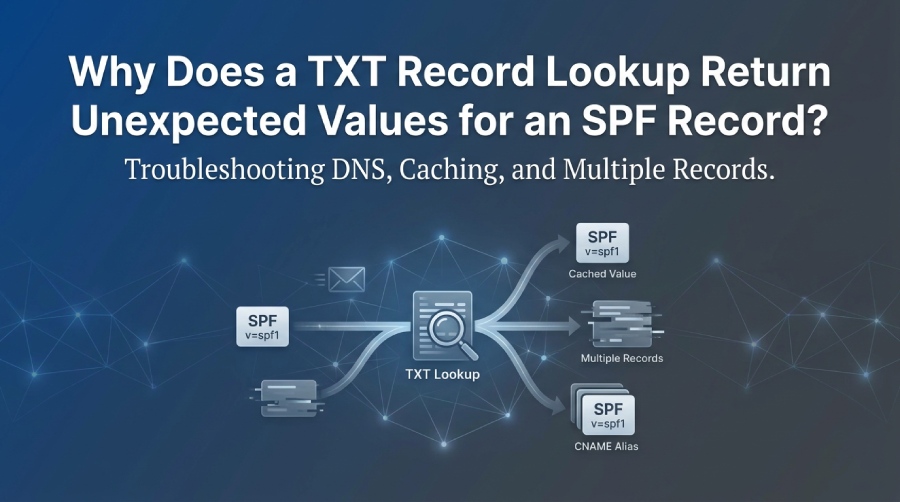
A TXT record lookup can return unexpected SPF values because DNS may contain multiple TXT records, cached responses, or records managed by different DNS providers. SPF also follows specific rules for selecting and evaluating records. To troubleshoot the issue, check the authoritative DNS response, confirm that only one TXT record begins with v=spf1 at the relevant domain, and validate the SPF policy for syntax and DNS lookup limits.
What Is an SPF TXT Record?
Sender Policy Framework (SPF) is an email authentication protocol that identifies which sending servers are authorized to send email using a domain. Domain administrators publish an SPF policy in DNS as a TXT resource record beginning with v=spf1.
For example:
example.com TXT “v=spf1 include:_spf.example.net -all”
This example authorizes sending sources specified by the referenced SPF policy and marks other sources as unauthorized. The actual mechanisms and ending qualifier should match the domain’s legitimate email-sending services.
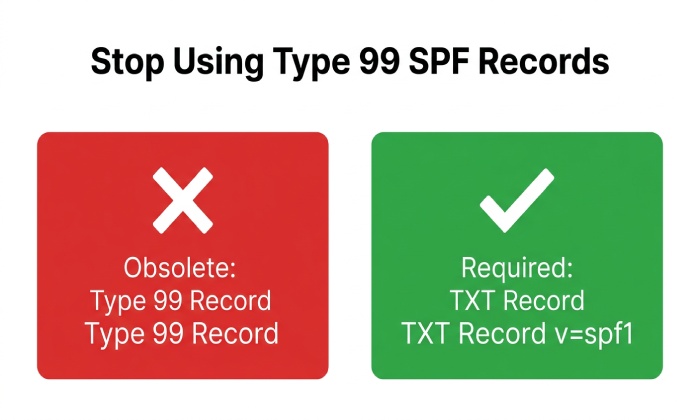
SPF records must be published as TXT records. The legacy SPF resource record type 99 is obsolete for SPF version 1 and should not be relied upon for email authentication. See RFC 7208 for the specification.
Why Does a TXT Record Lookup Return Unexpected SPF Values?
Several DNS and SPF behaviors can explain why a lookup tool displays information that differs from what an administrator expects.
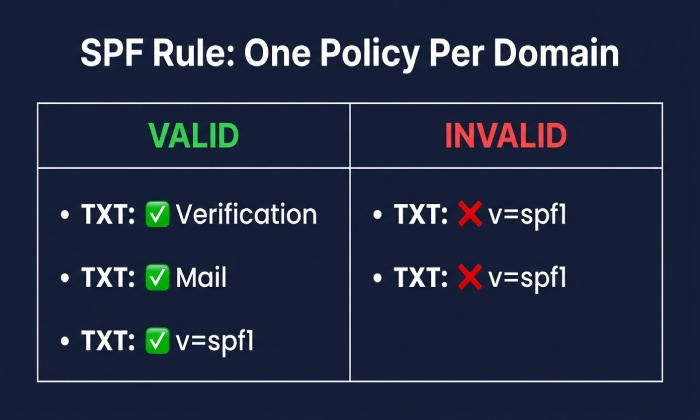
1. Multiple TXT Records Exist at the Same Domain
A domain can have several TXT records for different purposes, including website verification, email services, and domain ownership checks.
For example, a DNS response might include:
v=spf1 include:_spf.example.net -allgoogle-site-verification=verification-tokenMS=verification-token
These records do not automatically conflict. The important distinction is that an SPF evaluator looks for a TXT record that begins with the SPF version string v=spf1.
However, if multiple TXT records at the same name qualify as SPF records, SPF evaluation returns a PermError because the evaluator cannot select a single valid policy.
How to fix it: Inspect all TXT answers for the relevant name. Consolidate the authorized sending mechanisms into one SPF record rather than creating separate SPF TXT records for individual email providers.
2. The DNS Resolver Returns a Cached SPF Record
DNS resolvers cache responses according to their time to live (TTL). After an SPF record changes, a resolver may continue returning the previous value until its cached entry expires.
Negative caching can also affect results when a record or domain name was previously reported as nonexistent.
This can make a recently updated SPF policy appear inconsistent across DNS tools or locations. DNS changes do not propagate through a single global push; different resolvers refresh their cached answers at different times.
How to fix it:
- Check the record against the domain’s authoritative nameservers.
- Compare the response with one or more public DNS resolvers.
- Review the record’s TTL and allow existing caches to expire.
- Repeat the lookup to determine whether the responses converge.
Avoid repeatedly changing the SPF record simply because one resolver still displays an older value.
3. A CNAME or Delegated Subdomain Points to Another DNS Zone
A CNAME record identifies another DNS name as the canonical name for an alias. A delegated subdomain can also be managed by nameservers different from those serving its parent domain.
As a result, administrators may inspect one DNS zone while the relevant lookup is resolved through another.
For example, an organization may manage example.com with one DNS provider but delegate mail.example.com to another provider. The TXT records for names within that delegated zone must be checked against the appropriate authoritative nameservers.
CNAMEs also require care: a CNAME cannot coexist with ordinary TXT records at the same owner name. When a name is an alias, its target and the applicable DNS rules determine the response.
How to fix it: Identify the exact domain name used in the SPF evaluation, inspect its CNAME chain if applicable, and verify which nameservers are authoritative for that name. Do not assume that the apex domain’s SPF record automatically applies to every subdomain.
4. A Legacy SPF Type 99 Record Is Confused With a TXT Record
Older DNS configurations may contain an SPF resource record of type 99. SPF version 1 is specified to use TXT records, so a type 99 record should not be treated as a substitute for the required TXT policy.
For example, an administrator might find a legacy SPF record in one DNS tool and conclude that SPF is configured correctly, even though the required TXT record is missing.
How to fix it: Query TXT records directly and confirm that the correct SPF policy is published. Review and remove obsolete type 99 records when appropriate, following the DNS provider’s procedures.
5. A TXT Record Contains Multiple Character Strings
DNS permits one TXT resource record to contain multiple character strings. These strings are concatenated without adding spaces when the record is interpreted.
For example, a DNS interface might display one TXT record as two quoted strings:
“v=spf1 include:_spf.example.net" "-all”
Together, these strings form the logical value:
v=spf1 include:_spf.example.net-all
This illustrates why string boundaries must be handled carefully: splitting at an unsuitable position can change the intended SPF syntax.
A single TXT record may use multiple character strings to accommodate the DNS limit of 255 octets per character string. However, creating multiple separate TXT records and expecting receivers to merge them is incorrect.
How to fix it: Keep the entire SPF policy in one TXT resource record. If the record needs multiple character strings, ensure that their concatenated value preserves the intended syntax and spacing.
6. DNSSEC or DNS Resolution Errors Affect the Lookup
DNSSEC helps DNS resolvers validate the authenticity and integrity of DNS responses. Incorrect signatures, expired signatures, or a broken chain of trust can cause validating resolvers to return SERVFAIL.
Other resolution problems, including network timeouts or issues handling large DNS responses, can also make lookups appear inconsistent.
A SERVFAIL response does not necessarily mean that the SPF syntax is wrong. It may indicate a DNS resolution or validation problem that prevents the SPF record from being retrieved successfully.
How to fix it: Compare authoritative responses with responses from validating resolvers. If DNSSEC validation appears to be the problem, inspect the DNSSEC chain and signature status. If responses fail intermittently, investigate resolver logs, network connectivity, and whether TCP fallback succeeds.
7. The SPF Policy Exceeds DNS Lookup Limits
An SPF TXT record can look correct when viewed in a DNS tool but still produce a PermError during evaluation.
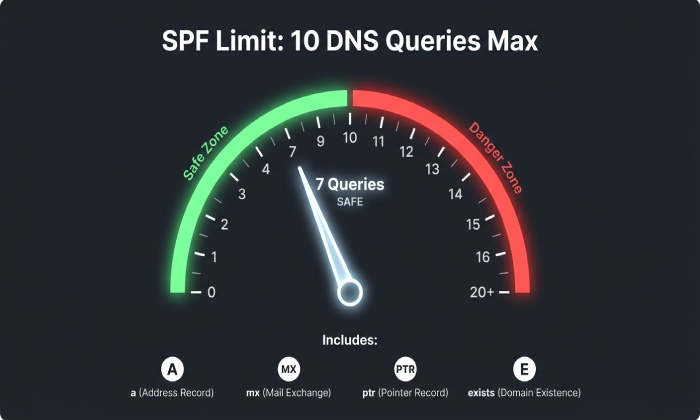
RFC 7208 limits SPF evaluation to 10 DNS-querying terms. These include the include, a, mx, ptr, and exists mechanisms and the redirect modifier. Nested includes and redirects count toward the overall limit.
For example, a domain might include several email providers, each of which references additional SPF records. The resulting evaluation can exceed the limit even when the main SPF record contains only a few mechanisms.
SPF implementations should also limit void lookups”queries that return no data or a nonexistent name. RFC 7208 recommends a limit of two.
How to fix it:
- Remove obsolete sending services from the SPF policy.
- Review nested include and redirect references.
- Avoid the ptr mechanism, which RFC 7208 discourages.
- Evaluate the complete SPF lookup chain rather than counting only the terms visible in the main record.
- Use a suitable SPF validation tool to identify lookup-limit problems before making changes.
Do not remove an email provider from the policy until you have confirmed that it no longer sends legitimate mail for the domain.
How to Troubleshoot Unexpected SPF TXT Results
Follow this practical workflow to identify the source of an unexpected response.
Step 1: Query the TXT Records
Run the following command, replacing example.com with your domain:
dig TXT example.com
Review every TXT answer. Identify the record beginning with v=spf1 and distinguish it from verification records and other TXT entries.
Step 2: Query an Authoritative Nameserver
Find the domain’s authoritative nameservers and query one directly:
dig +norecurse TXT example.com @ns1.example-dns.com
Replace ns1.example-dns.com with an actual authoritative nameserver for your domain.
Compare the response with the response from your normal resolver. If the answers differ, investigate caching, authoritative-zone consistency, and recent DNS changes.
Step 3: Compare Responses From Different Resolvers
Run a lookup against a public resolver, for example:
dig TXT example.com @8.8.8.8
You can compare this result with your authoritative response and another trusted public resolver. Differences may point to cached data, resolver-specific failures, or a recent configuration change.
Step 4: Trace the DNS Resolution Path
For a name that may involve aliases or delegation, run:
dig +trace TXT mail.example.com
This helps you follow DNS referrals toward the authoritative answer. Review the output carefully; a trace is a diagnostic aid and does not by itself prove that every receiver will obtain the same result.
Step 5: Validate the SPF Policy
Check the policy for:
- Multiple TXT records beginning with
v=spf1. - Invalid SPF syntax or mechanisms.
- Missing or incorrect provider references.
- Nested includes that exceed the DNS lookup limit.
- Unintended references to obsolete sending services.
If the DNS response is correct but email authentication still fails, inspect the SPF result reported by the receiving mail system and confirm which domain was evaluated.
How AutoSPF Can Help With SPF Troubleshooting
Unexpected TXT lookup results often require administrators to inspect DNS records, verify email providers, and understand how SPF mechanisms interact during evaluation.
AutoSPF is relevant to this workflow because it focuses on SPF management and validation. Use its confirmed capabilities to help review SPF configuration, identify policy issues, and maintain a policy that reflects the domain’s legitimate sending services.
Before changing an SPF record, verify every authorized sending source. A policy that removes a legitimate service can cause legitimate email to fail SPF, while a policy that retains unnecessary mechanisms can increase complexity and lookup consumption.
The goal is not simply to make a TXT lookup display the expected string. It is to ensure that the published SPF policy is valid, current, and appropriate for the domain’s actual email-sending infrastructure.
Best Practices for Preventing Unexpected SPF Results
Maintain One SPF Record Per Name
Publish one SPF TXT record beginning with v=spf1 at each domain name that requires an SPF policy. Combine authorized sending mechanisms into that record rather than publishing multiple SPF records for the same name.
Review DNS Changes Before and After Publishing
Record the existing SPF policy before making changes. Check the authoritative answer after publishing and compare it with public resolver responses while caches update.
Remove Obsolete Sending Services Carefully
Review old email providers and unused SPF includes periodically. Remove a source only after confirming that the organization no longer relies on it to send legitimate email.
Keep SPF Evaluation Within Its Limits
Review nested includes and redirects whenever a provider is added. Validate the complete policy to detect lookup-limit issues before they affect email authentication.
Verify the Exact Domain Being Evaluated
SPF evaluation uses the relevant identity domain, such as the domain in the SMTP MAIL FROM address or, in applicable circumstances, the HELO identity. Do not assume that checking the website’s apex domain will explain every SPF result.
Use Diagnostic Results Before Making Changes
A different TXT answer, a SERVFAIL, a PermError, and an SPF Fail are different conditions. Identify the actual result before editing DNS so that the correction addresses the underlying problem.
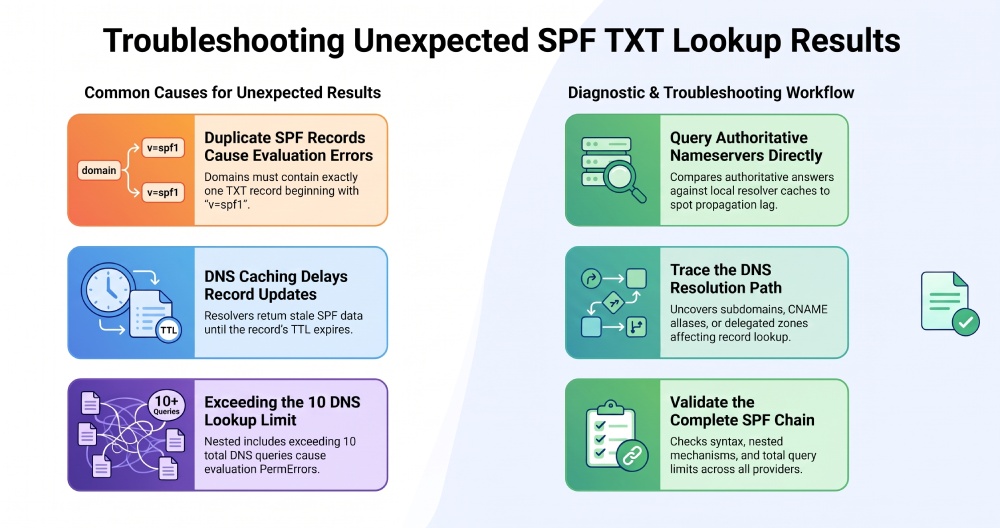
Quick Reference: Unexpected TXT Results and Their Causes
The quick reference for unexpected TXT results highlights common symptoms, their possible causes, and recommended actions. When multiple TXT answers appear, several services may be publishing TXT records, so identify the SPF record and inspect all relevant answers. If multiple records begin with v=spf1, duplicate SPF policies may exist, and they should be consolidated into a single SPF record. If an old SPF value appears, it may be caused by a cached DNS response; check the TTL values and authoritative answers. When a TXT lookup returns unexpected provider data, a CNAME, DNS delegation, or a different queried name may be involved, so trace the DNS path and identify the authoritative zone.
If SPF appears to be configured only as a type 99 record, a legacy record may have been mistaken for a TXT-based SPF record. Publish and validate the required TXT record to resolve this issue. If SPF returns a PermError, the cause may be invalid syntax, duplicate records, or exhaustion of the DNS lookup limit. Validate the complete SPF evaluation to identify the problem. When DNS lookup returns SERVFAIL, possible causes include DNSSEC validation problems or resolution failures, so check DNSSEC validation and resolver diagnostics. Finally, if legitimate email fails SPF authentication, the policy may be incorrect or may not authorize the sending source. Inspect the evaluated domain, sender IP address, and SPF result to determine the cause and correct the configuration.
Frequently Asked Questions
Why does a TXT lookup show more than one record?
A domain can have multiple TXT records for different purposes, such as SPF, domain verification, and other service configurations. Multiple TXT answers are not automatically an error. The problem occurs when more than one record qualifies as the SPF policy for the same name.
Can I split an SPF record across multiple TXT records?
No. SPF evaluation expects a single SPF policy in one TXT resource record for the relevant name. A single TXT record may contain multiple character strings that are concatenated, but separate SPF records must not be combined by the receiver.
Why does my DNS lookup show the correct SPF record while email still fails?
The record may be syntactically valid but authorize the wrong sending IP, reference an incorrect provider, or exceed SPF’s DNS lookup limit. Check the SPF result in the receiving mail system and inspect the complete evaluation chain.
Does changing an SPF record update every DNS resolver immediately?
No. Resolvers cache DNS answers according to TTLs, so different resolvers may temporarily return different versions. Check the authoritative nameservers and allow existing caches to expire before concluding that the update has failed.
What does SERVFAIL mean during an SPF lookup?
SERVFAIL indicates that the resolver could not complete the DNS query successfully. DNSSEC validation problems, timeouts, and other resolution failures are possible causes. It does not automatically mean that the SPF record contains a syntax error.
Do SPF include and redirect count toward the DNS lookup limit?
Yes. The include mechanism and redirect modifier count toward the SPF limit of 10 DNS-querying terms, along with a, mx, ptr, and exists. Nested evaluation must be included in the overall count.
Should I publish an SPF type 99 record alongside my TXT SPF record?
SPF version 1 should be published as a TXT record. A legacy SPF type 99 record is not a substitute for the required TXT policy and should not be relied upon for SPF evaluation.
Conclusion
Unexpected SPF TXT lookup results usually come from DNS caching, multiple records, legacy configurations, aliases or delegation, resolution errors, or problems in the SPF evaluation chain. Start by querying the relevant TXT record, checking the authoritative nameservers, comparing resolver responses, and validating the complete SPF policy.
For reliable email authentication, maintain one valid SPF TXT record per relevant name, review DNS changes carefully, and keep the policy within SPF’s evaluation limits. AutoSPF can be considered as part of an SPF management and validation workflow, using only the product capabilities confirmed for your setup.
General Manager
General Manager of DuoCircle. Product strategy and commercial lead for AutoSPF's 2,000+ customer base.
LinkedIn Profile →