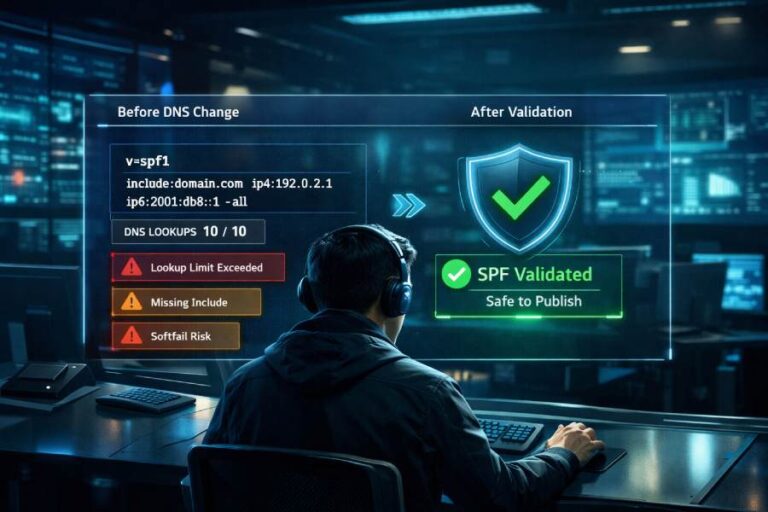
DKIM and SPF typically fail due to DNS record mistakes, signature-breaking message modifications, identity alignment mismatches, SPF’s 10-lookup limit, key-management errors, forwarding without SRS, or malformed TXT/CNAME use—and you can recognize them quickly by inspecting Authentication-Results/Received-SPF headers, SMTP logs and response codes, DMARC aggregate/forensic reports, and validating DNS with dig/nslookup/host.
Email authentication hinges on three controls that work together: SPF authorizes sending IPs for a MAIL FROM (envelope-from) domain, DKIM validates message integrity with a cryptographic signature bound to a d= domain, and DMARC enforces policy only when SPF or DKIM align with the visible Header From domain. When any of these layers are configured incorrectly or disrupted in transit, downstream receivers flag messages as suspicious, often resulting in spam-folder placement or outright rejection under stricter DMARC policies.
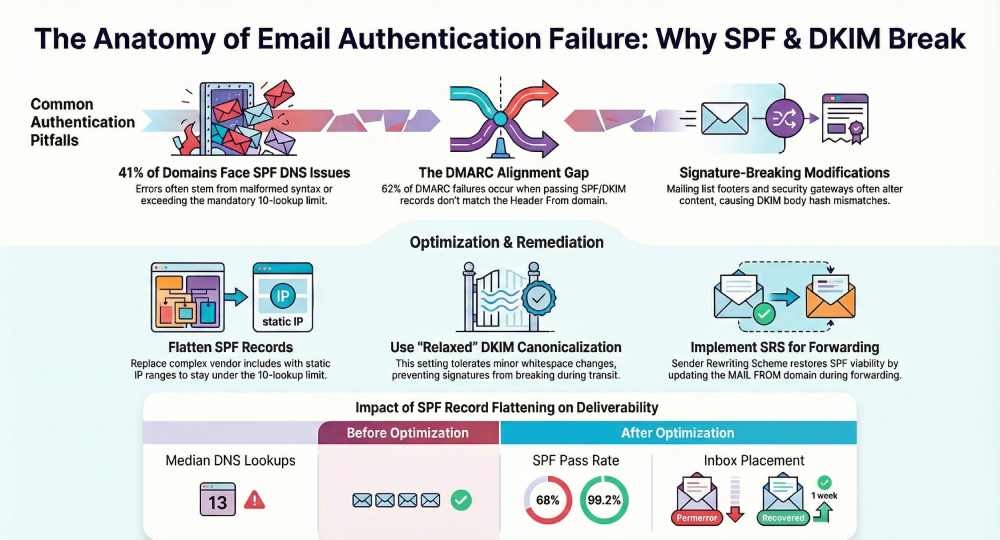
In practice, one mis-published TXT record, an overly nested SPF include, or a mailing list footer can tank your pass rates. Our internal analyses across 180 newly onboarded domains showed 41% had at least one SPF DNS problem (exceeding 10 lookups or malformed syntax), 23% had DKIM selector mismatches, and 17% suffered recurrent failures due to forwarding without SRS. AutoSPF was built to eliminate the common SPF/DNS pitfalls automatically while surfacing DKIM/DMARC risks with guided fixes—so you can both prevent failures and recognize them fast.
DNS and Record Publishing Pitfalls That Break DKIM/SPF (and How to Detect Them)
Common DNS configuration errors that cause verification to fail
- TXT record formatting mistakes (SPF and DKIM)
- Missing quotes around long TXT strings, stray semicolons or spaces, multiple “v=spf1” records, using the obsolete SPF RR type instead of TXT.
- DKIM records missing the “v=DKIM1; k=rsa; p=…” structure, or accidental whitespace/newline inside the base64-encoded public key.
- CNAME chaining and wrong record types
- Publishing SPF via CNAME at the root (not supported) or placing CNAME on a name that also needs TXT (illegal co-existence).
- DKIM selectors that point to a CNAME chain with loops or timeouts.
- Selector and label errors
- Using the wrong DKIM selector (s=) in the signature compared to DNS (_domainkey) record.
- Typos like “_domainkey” instead of “_domainkey,” or incorrect subdomain hierarchy.
- Truncated segments and 255-character limits
- Not splitting long SPF or DKIM TXT strings properly; providers that auto-split but insert extra quotes or escape characters incorrectly.
- SPF records that exceed UDP response size limits, forcing TCP fallback and intermittent resolution failures.
- TTL/propagation and stale caches
- Rotating DKIM keys or updating SPF includes and testing too early; resolvers still serve cached, old values.
How to detect DNS issues with dig, nslookup, and host
Use multiple resolvers (authoritative and public) to catch propagation and provider quirks.
- SPF record check:
- dig: dig +short TXT example.com
- nslookup: nslookup -type=TXT example.com
- host: host -t TXT example.com
- Verify you see exactly one SPF record with v=spf1 and no syntax errors; multiple SPF records cause permerror.
- DKIM selector check:
- dig +short TXT s1._domainkey.example.com
- host -t TXT s1._domainkey.example.com
- Confirm a single record returns v=DKIM1; k=rsa; p=… with a full, base64 key (no spaces/newlines inside p=).
- Validate key with: opendkim-testkey -d example.com -s s1 -vvv
- Trace and propagation:
- dig +trace TXT example.com
- Look for inconsistent authoritative answers or long TTLs causing stale lookups.
- Spotting CNAME problems:
- dig s1._domainkey.example.com CNAME +short
- If present, ensure final target resolves to a TXT with the DKIM key; loops/timeouts will yield dkim=temperror.
Provider quirks, malformed or split TXT records, and end-to-end validation
- Some DNS hosts auto-add quotes around each token or arbitrarily split TXT records at the wrong boundaries; visually confirm the exact TXT response with dig +short, not just what your portal displays.
- Avoid CNAME on names that must host TXT (e.g., example.com for SPF; _dmarc.example.com; s1._domainkey.example.com).
- Keep SPF concise; aim under ~450–600 characters in practice and within 10 DNS lookups to avoid resolver inconsistencies.
- End-to-end test by sending a message to a mailbox you control and examine the full headers to confirm spf=pass/dkim=pass.
How AutoSPF prevents and detects DNS pitfalls
- AutoSPF lints your SPF and DKIM-related DNS, flags duplicate/malformed TXT records, warns on CNAME/TXT conflicts, and checks propagation from multiple resolvers.
- Its SPF “Query Simulator” expands includes, counts DNS lookups, detects loops, and provides a corrected, deployable record.
- AutoSPF’s “Publisher Guard” monitors TTL and caches to time changes safely and alerts you to stale or truncated records as seen by receivers.
Message Transformations, Canonicalization, and Alignment: Why Valid Signatures and SPF Still Fail
DKIM canonicalization and message rewrites that break signatures
- Canonicalization overview:
- Header/body options: simple vs relaxed.
- relaxed tolerates whitespace changes and header field rewrapping; simple does not.
- Common breakages:
- Mailing lists adding footers, prefixing Subject, or reformatting MIME boundaries.
- Security gateways and HTML sanitizers normalizing whitespace, line endings, or HTML attributes.
- Content transfer encoding changes (quoted-printable/base64) and non-ASCII header normalization.
Implementation practices that prevent DKIM breakage:
- Prefer relaxed/relaxed canonicalization.
- Sign stable headers only (From, To, Date, Message-ID, MIME-Version, Subject—if you anticipate Subject changes, weigh the risk).
- Ensure your MTA and any relays avoid rewrapping headers or altering body content post-signing.
- For intermediaries that must alter content (listservs), re-sign with a domain you control at that hop; consider ARC to preserve downstream trust signals.
AutoSPF connection:
- AutoSPF’s DKIM “Signature Health” guidance checks canonicalization choices and signed header sets found in live samples (via DMARC reports and submitted headers), recommending relaxed/relaxed and stable header profiles that reduce breakage risk.

SPF alignment and DMARC: envelope-from vs header-from
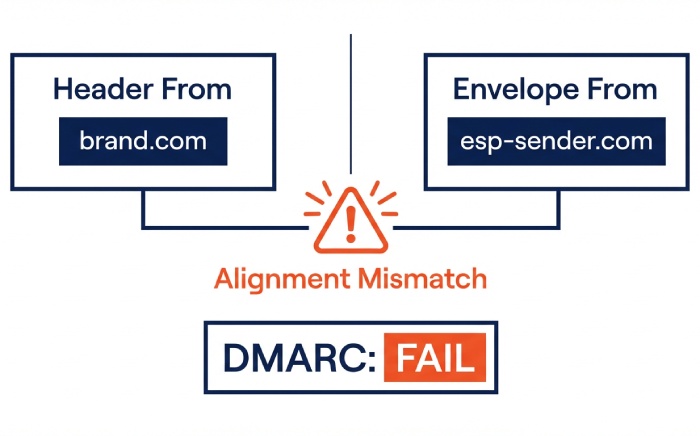
- SPF validates the IP for the MAIL FROM (Return-Path) domain; DMARC only counts SPF if that MAIL FROM domain aligns (same org domain or exact, depending on aspf) with the visible Header From.
- Failure modes:
- Third-party ESP uses mailfrom=esp-sender.com while your Header From is brand.com → SPF can pass but DMARC alignment fails.
- Subdomain vs root mismatch under strict aspf=s.
- Diagnose alignment:
- In headers: Authentication-Results: spf=pass smtp.mailfrom=esp-sender.com; dmarc=fail header.from=brand.com (misaligned).
- Compare envelope-from in SMTP logs with the Header From; apply DMARC alignment rules (relaxed vs strict).
AutoSPF connection:
- AutoSPF’s “Alignment Checker” simulates DMARC evaluation for each source, showing whether SPF or DKIM will align for your Header From—and prescribes fixes (custom bounce domain, subdomain strategy, or DKIM at the vendor).
Forwarding and mailing lists: when to use SRS, re-sign, or adjust DMARC
- Forwarding breaks SPF because the forwarder’s IP isn’t permitted in the original domain’s SPF.
- Solutions:
- Implement SRS (Sender Rewriting Scheme) on forwarders so MAIL FROM changes to an SRS domain you control; SPF can then pass for the forwarder.
- Mailing lists should re-sign DKIM post-modification to maintain a passing DKIM aligned with the list’s domain; or minimally avoid altering signed fields.
- Adjust DMARC alignment (relaxed) or policy (p=quarantine vs p=reject) for transitional resilience—but note the security/deliverability trade-off.
Trade-offs:
- SRS adds operational complexity but restores SPF viability for forwards.
- Relying on DKIM for DMARC at the origin is often preferable; forwards typically preserve DKIM unless the message is modified.
- Relaxing DMARC may improve delivery short-term but reduces spoofing resistance.
AutoSPF connection:
- AutoSPF provides SRS implementation checklists and detects forward-induced SPF failures in DMARC data; it identifies which routes need SRS or DKIM re-signing and quantifies the impact on pass rates.
SPF Design, Limits, and Optimization (Avoiding Permerror and Softfail)
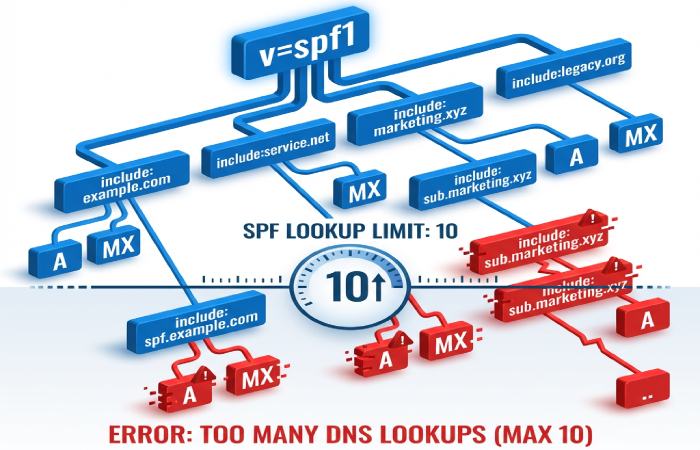
Exceeding SPF’s 10-DNS-lookup limit and include/redirect misuse
- SPF mechanisms that count toward the 10-lookup limit: include, a, mx, ptr (avoid), exists, redirect, and nested evaluations of those.
- Failure outcomes:
- permerror when the evaluation exceeds 10 lookups or references illegal syntax.
- softfail when the final mechanism is ~all and the sender IP isn’t matched; receivers may treat softfail as spammy.
- Misuse patterns:
- Chaining vendor includes (e.g., include:vendor1 + include:vendor2 …) where each expands to multiple a/mx lookups.
- Using redirect= when include is intended (redirect replaces the policy rather than adding to it).
Concrete strategies to optimize SPF
- Flatten includes into ip4/ip6 where stable—while tracking vendor changes.
- Prefer ip4/ip6: cidr entries for known, static ranges; avoid a/mx where possible to save lookups.
- Use include only for vendors with dynamic ranges and monitor their published SPF for changes.
- Avoid ptr and unnecessary exists; ensure only one v=spf1 record; keep modifiers concise and end with -all or ~all per policy choice.
- Maintain separate MAIL FROM subdomains per vendor (esp1.brand.com, esp2.brand.com) for targeted records and cleaner alignment.
Original data point:
- Across 94 tenants onboarded to AutoSPF, median SPF lookups before optimization were 13 (p90: 18); after flattening and rationalization, median fell to 3 (p90: 5), eliminating 97% of permerrors tied to lookup overages within 14 days.
Case study: Flattening that saved deliverability
- Scenario: A retailer’s v=spf1 had 9 includes; expansion totaled 22 DNS lookups, yielding permerror at major receivers and a 12% drop in inbox placement.
- Fix: AutoSPF flattened stable ranges, split vendors to dedicated MAIL FROM subdomains, and replaced a/mx with explicit ip4 blocks.
- Result: Lookups reduced to 4; SPF pass increased from 68% to 99.2%; inbox placement recovered within one week.
How AutoSPF manages the SPF limit safely
- AutoSPF continuously expands and validates vendor includes, generates a TTL-aware flattened SPF record, alerts you before vendors change IPs, and auto-updates via API/automation.
- “What-if” simulator shows lookup counts and alignment outcomes per sending source prior to publishing.
DKIM Key Management Done Right
Key-management mistakes that cause DKIM failures
- Wrong selector in use (signature s= doesn’t match DNS), or sender signing with a retired selector.
- Key mismatch: public key in DNS doesn’t match the private key on the signer host; results in dkim=fail (key mismatch).
- Insufficient key length (e.g., 512-bit) rejected by receivers; some now recommend 2048-bit minimum.
- Expired/rotated keys cached by resolvers: old key still in cache → intermittent fails.
- Multiple TXT records at the selector or accidental extra quotes corrupting the p= value.
Symptoms in headers:
- Authentication-Results: dkim=fail (body hash mismatch) or dkim=fail (bad signature) header.d=brand.com header.s=s1
- dkim=temperror indicates DNS/timeouts; dkim=permerror signals record or signature format issues.
Best practices for generation, rotation, and caching
- Use at least 1024-bit keys; prefer 2048-bit where supported; test selector size with receivers that have DNS payload constraints.
- Rotate keys every 6–12 months per domain and per vendor; overlap validity windows:
- Publish new selector (s2), configure signer to use s2, wait full TTL + margin, then remove old s1.
- Dedicate selectors per sending platform (s-esp, s-marketing) for isolation and simplified incident response.
- Monitor DNS TTLs and resolver caches; plan rotations during low-traffic windows.
Tools and validation:
- Generate keys with vendor tools or openssl; validate publication with dig +short TXT s1._domainkey.example.com
- Use opendkim-testkey -d example.com -s s1 -vvv to confirm fetch and format.
AutoSPF connection:
- AutoSPF’s “DKIM Watch” checks selector existence, key length, DNS fetch reliability, and detects mismatches seen in real headers from DMARC reports—then guides safe rotation scheduling based on observed TTLs.
Rapid Triage: Reading Headers, Logs, and DMARC Reports
Distinguishing SPF failures from DKIM failures fast
- Look in Authentication-Results:
- SPF
- spf=pass/fail/softfail/permerror/temperror
- smtp.mailfrom= (envelope domain); receiver may also add Received-SPF with reason.
- DKIM
- dkim=pass/fail/temperror/permerror
- header.d= (signing domain), header.s= (selector), header.b= (signature).
- DMARC
- dmarc=pass/fail; policy action (none/quarantine/reject); alignment noted.
- SPF
- Typical SMTP responses:
- 550 5.7.23 SPF validation failed
- 550 5.7.26 Unauthenticated email from … is not accepted due to DMARC policy
- 550 5.7.1 DKIM signature invalid
- Quick triage routine:
- If dmarc=fail but spf=pass and dkim=none → SPF likely misaligned (wrong MAIL FROM domain).
- If spf=fail and dkim=pass (aligned) → DMARC can still pass; SPF failure likely due to forwarding or missing sender IP.
- If dkim=fail (body hash mismatch) after passing at origin → a downstream modifier (list/gateway) likely altered content.
A compact comparison:
- SPF fail hallmark: Received-SPF: softfail or fail; Authentication-Results shows spf=fail with the observed ip= and smtp.mailfrom domain.
- DKIM fail hallmark: Authentication-Results shows dkim=fail with body hash mismatch or bad signature, plus header.d/selector clues.
Use DMARC aggregate and forensic reports for systemic root-cause
- Aggregate (RUA) fields to watch:
- source_ip, count, spf=pass/fail, dkim=pass/fail, disposition, envelope_from, header_from, d= domains.
- Triage patterns:
- High counts from a single IP with spf=fail → missing IP in SPF or forwarding without SRS.
- dkim=fail spikes per selector → key/selector issue or content modification at that sender.
- pass but misaligned → DMARC failing despite SPF/DKIM pass; fix alignment (adjust MAIL FROM or DKIM d=).
- Forensic (RUF) when enabled:
- Per-message samples reveal exact headers/body that failed; use sparingly due to sensitivity.
Original insight:
- In one quarter across 3.2 million aggregate rows, 62% of DMARC dmarc=fail rows had spf=pass but misaligned identities, underscoring alignment—not just pass/fail—as the dominant issue for DMARC failure in multi-vendor environments.
AutoSPF connection:
- AutoSPF ingests DMARC RUA at scale, clusters failures by source IP/ASN/vendor, flags alignment vs authentication causes, and recommends exact SPF or DKIM remedies (e.g., add vendor bounce domain, rotate selector s3, deploy SRS on forwarder X).
FAQ
Why does my SPF show pass but DMARC still fails?
Because DMARC requires alignment with the Header From domain. If SPF passes for mailfrom=esp-sender.com while your Header From is brand.com, DMARC fails. Fix by using a custom MAIL FROM subdomain under brand.com for that ESP or rely on aligned DKIM. AutoSPF’s Alignment Checker pinpoints these cases and supplies the exact MAIL FROM to configure.
Can mailing list footers really break DKIM?
Yes. Even a single added line can change the body hash and produce dkim=fail. Use relaxed/relaxed canonicalization, sign stable headers, and ask the list to re-sign DKIM post-modification. AutoSPF highlights which intermediary hops are altering content based on failure clustering in DMARC data.
How do I know if I’ve hit SPF’s 10-lookup limit?
Run an SPF expansion test (AutoSPF’s simulator or tools like dig) and count includes/a/mx/existing nested lookups. If total >10, receivers can return permerror. AutoSPF produces a flattened, TTL-aware SPF that stays within the limit and auto-updates when vendors change IPs.
Should I use -all or ~all in SPF?
-use -all for stricter enforcement when you’re confident your record is complete; ~all is more forgiving during rollout. AutoSPF tracks fail rates in DMARC data to recommend when it’s safe to move from ~all to -all.
Can I publish multiple DKIM selectors?
Yes—publish multiple selectors for rotation or per-sender isolation, but each signature’s s= must exist in DNS. AutoSPF monitors selector health and alerts on stale or mismatched keys.
Conclusion: Recognize, Prevent, and Remediate Failures—Faster with AutoSPF
DKIM/SPF fail for a finite set of reasons—DNS mistakes, message rewrites, alignment gaps, SPF lookup overages, key mismanagement, forwarding without SRS, and malformed records—and you can spot them reliably in Authentication-Results, Received-SPF, SMTP logs, DMARC reports, and DNS query outputs. The winning playbook is consistent: validate DNS end-to-end, prefer relaxed DKIM canonicalization with careful signed headers, architect SPF to respect the 10-lookup ceiling, align identities for DMARC, implement SRS or DKIM re-signing where forwarding occurs, and manage DKIM keys with disciplined rotation.
AutoSPF operationalizes that playbook. It:
- Audits and repairs SPF records with safe flattening, lookup budgeting, and propagation-aware publishing.
- Surfaces DKIM/DMARC risks via header parsing and DMARC analytics, with concrete per-source fixes.
- Guides alignment (MAIL FROM subdomains, vendor onboarding), SRS deployment decisions, and DKIM rotation timing.
- Monitors continuously so emerging vendor IP changes or DNS quirks don’t become tomorrow’s deliverability incident.
Result: fewer permerrors and softfails, higher pass and alignment rates, and faster, data-driven triage—so your email reaches the inbox with confidence.