How to Audit Your Domain for Google and Yahoo Sender Rules

Quick Answer
An email sender audit helps verify whether your domain meets Google and Yahoo’s sender requirements. Check SPF, DKIM, and DMARC records, validate email authentication, monitor spam complaints, and fix configuration issues to improve deliverability and protect your domain from spoofing.
To audit your domain against Google and Yahoo email sender requirements, verify your sending volume, authenticate mail with SPF, DKIM, and DMARC, confirm PTR record, reverse DNS, and forward DNS accuracy, review unsubscribe and complaint practices, and monitor performance through deliverability tools like Postmaster Tools.
TL;DR: Domain Audit Checklist for Gmail and Yahoo Compliance
A strong audit focuses on whether your sender domain proves its identity, sends wanted mail, and maintains a low spam rate with Gmail and Yahoo recipients. These email sender requirements are especially important for bulk senders, but many controls also apply to smaller senders using Google Workspace, an email service provider, or their own SMTP server.
Quick Compliance Snapshot
A quick compliance snapshot helps ensure that email practices meet Gmail and Yahoo requirements while maintaining strong deliverability. Sender classification involves checking daily sending volume and recipient type to determine whether bulk-sender rules apply. Email authentication requires reviewing SPF, DKIM, and DMARC to prove that messages are legitimate and properly authenticated. DNS accuracy includes verifying PTR records, reverse DNS, forward DNS, and A/AAAA records to connect the sending IP address with the domain.
Unsubscribe controls should include one-click unsubscribe functionality, a List-Unsubscribe header, and a visible unsubscribe link, as these are required for many promotional messages. Finally, monitoring through Postmaster Tools, DMARC reports, complaint tracking, and blocklists helps protect domain reputation and maintain reliable email deliverability.
Why This Audit Is Required Now
Google and Yahoo enforce stricter email sender requirements to reduce spoofing, phishing, and unwanted mail. If your email authentication fails, Gmail may reject messages with a 5.7.26 error, while Yahoo may route mail to spam or block it entirely.
Practical Baseline
At minimum, your domain should have a valid SPF record, a working DKIM key, and a DMARC policy published in DNS. Tools such as Google Admin Toolbox Dig can help verify forward DNS, reverse DNS, and whether a PTR record resolves correctly.
Example Domain
For a domain like solarmora.com, the audit should confirm that the visible From header, the sender domain, the DKIM signing domain, and the DMARC alignment all point to an authorized identity.
Confirm Your Sender Classification and Sending Volume
Before changing DNS or policy records, classify your sending pattern because Google and Yahoo email sender requirements vary depending on volume, message type, and recipient expectations. This step defines which compliance rules apply to your domain.
Identify Whether You Are a Bulk Sender
Bulk senders generally include organizations sending large volumes to Gmail or Yahoo recipients, particularly marketing campaigns, newsletters, and lifecycle automation. Even if you send through a shared IP address, your domain can still be judged by its own domain reputation.
Key Classification Questions
Ask these questions during the audit:
- How many messages are sent per day to Gmail and Yahoo recipients?
- Are messages promotional messages, account notifications, transactional receipts, or mixed traffic?
- Are recipients clearly opting in with documented recipient consent?
- Are you sending through Google Workspace, an email service provider, or a private SMTP server?
- Are any teams using personal Gmail accounts for business outreach?
Edge Case: Forwarded and Relayed Mail
Email forwarding and a third-party forwarding service can break SPF because the forwarding server may not be listed in your SPF record. This is why DKIM and DMARC alignment are critical for forwarded traffic to Gmail and Yahoo.
Map Your Sending Sources
Create an inventory of every system that sends from your domain. Google and Yahoo email sender requirements assume that the domain owner controls every legitimate source of mail, including CRM tools, billing platforms, support systems, and mailing lists.
Sending Source Inventory
Document:
- IP address or hostname used for outbound mail
- Whether the source uses a dedicated or shared IP address
- Envelope sender and visible From header
- DKIM selector and signing domain
- Return-path handling for bounced messages
- Compliance owner and vendor contact
Recommended Control
Use an SPF management tool such as AutoSPF when multiple platforms send mail for the same domain and you need to avoid SPF lookup-limit issues.
Audit SPF, DKIM, and DMARC Authentication Records
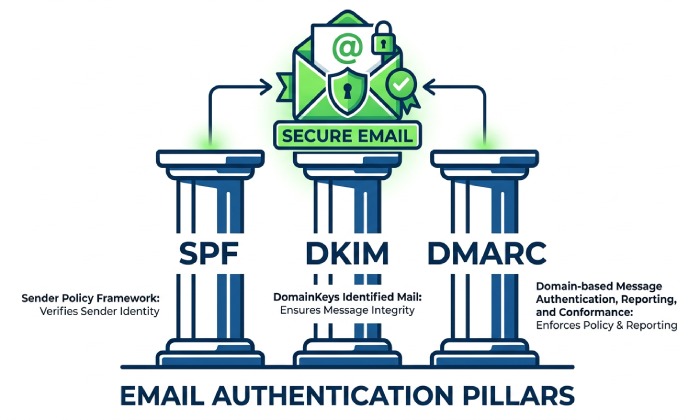
The core of email authentication is proving that your domain authorized the sender and that the message was not modified in transit. Google and Yahoo require at least SPF or DKIM authentication for all senders. Bulk senders must implement SPF, DKIM, and DMARC, with at least one aligned authentication method passing DMARC. Setting up all three authentication methods is also a recommended practice for smaller senders.
Verify SPF Authorization
SPF allows a domain to publish which servers may send mail on its behalf. Your SPF record lives in DNS as a TXT record and is checked during SMTP evaluation.
SPF Audit Points
Confirm that:
- Your SPF record includes all authorized sending services.
- The record has only one SPF TXT record for the domain.
- The DNS lookup count stays within SPF limits.
- Retired vendors are removed from SPF.
- Forwarding risk is mitigated with DKIM and DMARC.
SPF Failure Example
If your CRM sends from mail.solarmora.com but that source is missing from SPF, Gmail may treat the message as suspicious, and Yahoo may lower trust for the sender identity.
Validate DKIM Signing
DKIM uses a cryptographic signature to prove the message was authorized by the domain. A valid DKIM key helps Gmail and Yahoo confirm that message content and key message headers were not tampered with.
DKIM Audit Points
Check that:
- Every sending platform signs mail with DKIM.
- The DKIM domain aligns with the visible sender domain where possible.
- DKIM keys are rotated periodically.
- The selector exists in DNS and returns the correct public key.
- Important headers like From header, subject, and body hash validate.
DKIM and Message Formatting
Poor message formatting, broken HTML, invalid CSS, or malformed MIME structure can interfere with authentication and spam filtering. Mail should follow HTML standards and the Internet Format Standard described in RFC 5322.
Confirm DMARC Policy and Alignment
DMARC tells Gmail and Yahoo what to do when SPF or DKIM fails and provides reporting through aggregate DMARC report data. It also protects against spoofing and phishing using your domain.
DMARC Audit Points
Your DMARC record should:
- Exist at _
dmarc.yourdomain.com. - Start with monitoring if needed, then progress toward enforcement.
- Include a reporting address for DMARC report analysis.
- Align the domain in SPF or DKIM with the visible From domain.
- Support policy escalation from p=none to quarantine or reject.
Alignment Rule of Thumb
For Google and Yahoo email sender requirements, authentication is strongest when DMARC passes because either SPF or DKIM aligns with the domain shown to the recipient.
Check Domain Alignment, DNS Accuracy, and Infrastructure Setup
DNS infrastructure directly affects email delivery because Gmail and Yahoo use DNS evidence to connect your domain, sending host, and IP address. A complete audit must validate PTR record, reverse DNS, forward DNS, and hostname consistency.
Validate PTR Record and Reverse DNS
A PTR record maps an IP address back to a hostname through reverse DNS. Gmail and Yahoo expect sending IPs to have valid PTR record data, especially for dedicated mail infrastructure.
Reverse DNS Checklist
Confirm that:
- The sending IP has a valid PTR record.
- Reverse DNS returns a hostname you control or your provider manages.
- The hostname is not generic, suspicious, or missing.
- The hostname has matching forward DNS through an A record or AAAA record.
- The domain provider or hosting provider can update reverse DNS if needed.
Example
If 203.0.113.25 resolves by reverse DNS to mail.solarmora.com, then forward DNS should resolve mail.solarmora.com back to the same IP address or valid mail infrastructure.
Confirm Forward DNS and Mail Host Consistency
Forward DNS maps hostnames to IPs through A and AAAA records. Gmail and Yahoo use forward DNS consistency to assess whether mail is coming from a stable, legitimate system.
Infrastructure Audit Points
Review:
- A and AAAA records for sending hostnames
- MX records for receiving mail
- HELO/EHLO hostname used by the SMTP server
- Whether the hostname matches your PTR record
- Whether your domain provider delegates DNS correctly
Why This Matters
When PTR record, reverse DNS, and forward DNS do not match, Gmail and Yahoo may see the mail stream as poorly configured, which can damage email deliverability even if SPF, DKIM, and DMARC pass.
Review Header and Identity Standards
Message identity must be transparent. Google and Yahoo evaluate message headers, Message-ID, display names, and sender consistency to detect deception.
Standards to Check
Review compliance with:
- RFC 5322 and the Internet Format Standard
- RFC 2369 for List-Unsubscribe header formatting
- RFC 8058 for one-click unsubscribe behavior
- Unicode Technical Standard #39 for lookalike characters
- display name guidelines to prevent impersonation
Risk Example
A display name like Yahoo Billing from an unrelated domain may trigger spoofing or phishing suspicion, even if technical email authentication passes.
Review Unsubscribe, Complaint Rate, and List Hygiene Practices
Google and Yahoo increasingly evaluate whether recipients want your mail. Strong email sender requirements combine authentication with consent, complaint control, and visible unsubscribe mechanisms.
Confirm One-Click Unsubscribe
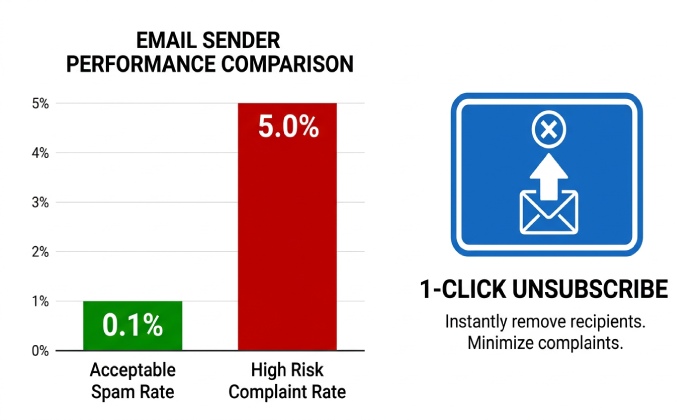
For many marketing and subscription programs, one-click unsubscribe is required. The message should contain both a clear body unsubscribe link and a standards-compliant List-Unsubscribe header.
Unsubscribe Requirements
Check that:
- The unsubscribe option is easy to find.
- Requests are honored quickly.
- No login is required for basic opt-out.
- The List-Unsubscribe header supports HTTPS or mailto.
- RFC 8058 one-click behavior works for eligible messages.
Subscription Requirements
For newsletters and mailing lists, keep proof of opting in, preference center choices, and subscription requirements so spam reports can be investigated with evidence.
Monitor Spam Rate and Complaint Sources
Your spam rate is a direct signal to Gmail and Yahoo. A rising spam rate often indicates weak targeting, unclear consent, misleading subject lines, or outdated lists.
List Hygiene Controls
Maintain:
- Suppression lists for unsubscribed users
- Bounce handling for invalid addresses
- Segmentation by engagement
- Removal of inactive recipients
- Review of spam reports by source and campaign
Practical Threshold
While acceptable spam-rate targets vary, keeping complaints extremely low is a best practices requirement. High complaint volume can push your domain toward a blocklist or cause Gmail and Yahoo spam filter systems to distrust future mail.
Monitor Compliance with Deliverability Tools and Ongoing Reporting
Compliance is not a one-time setup. Google and Yahoo email sender requirements require continuous monitoring because DNS, vendors, IPs, lists, and recipient behavior change over time.
Use Postmaster Tools and Provider Dashboards
Postmaster Tools helps monitor Gmail-facing reputation signals, authentication results, and complaint trends. Your email service provider may also provide Yahoo delivery metrics, bounce logs, and blocklist alerts.
What to Monitor Weekly
Track:
- SPF, DKIM, and DMARC pass rates
- Domain and IP reputation
- Gmail spam rate trends
- Yahoo deferrals and bounce patterns
- Blocklist appearances
- DMARC report anomalies
- 5.7.26 error patterns from Google Support references on
support.google.com
Reporting Insight
If DMARC reports show unauthorized sources, investigate quickly. Those sources may represent misconfigured tools, abandoned vendors, or active phishing attempts against your sender domain.
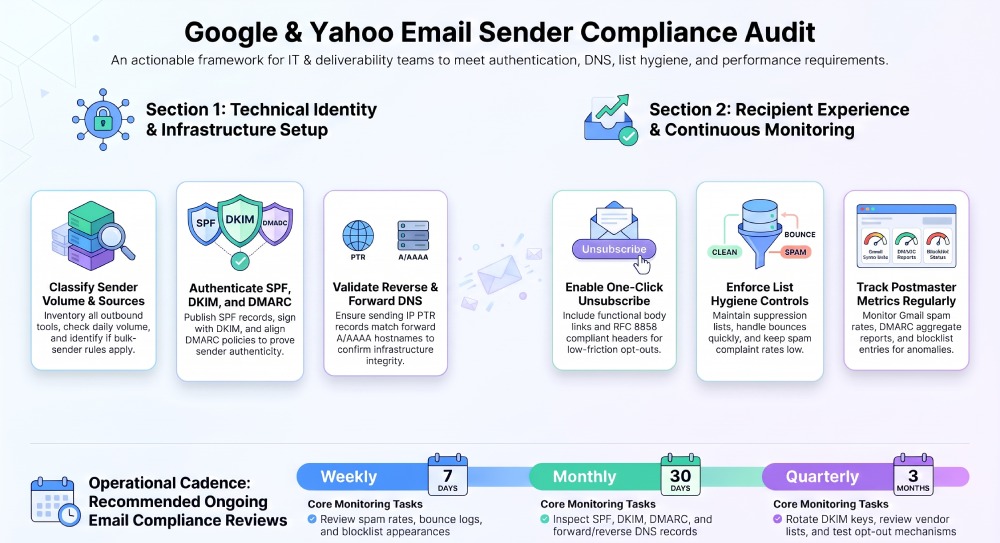
Build an Ongoing Audit Cadence
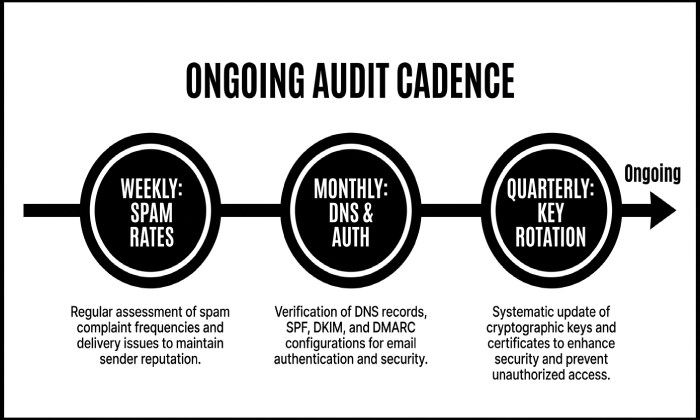
A practical audit schedule keeps your domain compliant with evolving email sender requirements and protects long-term email deliverability.
Suggested Cadence
- Weekly: review spam rate, bounces, and blocklist status.
- Monthly: inspect SPF, DKIM, DMARC, PTR record, reverse DNS, and forward DNS.
- Quarterly: rotate DKIM keys, review vendors, and test unsubscribe flows.
- After vendor changes: recheck DNS, authentication, and alignment immediately.
Operational Best Practice
Treat email compliance like security hygiene. Any new platform that sends from your domain should be approved before launch, authenticated with SPF/DKIM/DMARC, and tested against Gmail and Yahoo requirements.
FAQ: Google and Yahoo Email Sender Requirements
Do Gmail and Yahoo Require SPF, DKIM, and DMARC?
Yes. Gmail and Yahoo require strong email authentication, including SPF, DKIM, and DMARC, especially for bulk senders. At least one aligned authentication path must pass for DMARC to succeed.
What Is the Difference Between Reverse DNS and Forward DNS?
Reverse DNS maps an IP address to a hostname through a PTR record, while forward DNS maps that hostname back to an IP through an A record or AAAA record. Gmail and Yahoo use both to evaluate infrastructure legitimacy.
Why Are My Authenticated Messages Still Going to Spam?
Even authenticated messages can land in spam if your domain reputation, complaint rate, content quality, or list hygiene is poor. Authentication proves identity, but engagement and consent prove that recipients want the mail.
Can I Send Bulk Mail from Personal Gmail Accounts?
No, personal Gmail accounts are not appropriate for bulk campaigns. Use a verified domain, Google Workspace or a reputable email service provider, and configure SPF, DKIM, DMARC, PTR record, reverse DNS, and forward DNS before sending at scale.
General Manager
General Manager of DuoCircle. Product strategy and commercial lead for AutoSPF's 2,000+ customer base.
LinkedIn Profile →